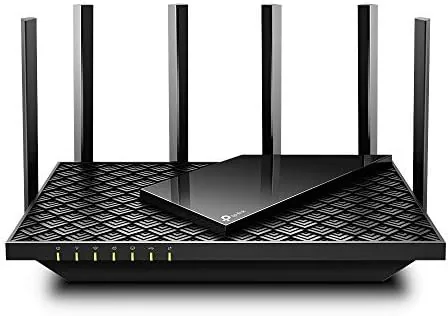

Most router upgrades fail in one of two ways. Either they cost far more than the internet they feed, or they promise coverage that dies two rooms away. The TP-Link Archer AX73 is an AX5400 dual-band Wi-Fi 6 Router that sits in the sensible middle, and this review comes from a month of running it as the main network point in a two-story home with a long broadband line and more than thirty connected devices. It is not the cheapest router TP-Link makes, but it packs serious hardware under a normal looking shell: a 1.5 GHz triple-core processor, six external antennas, and a full 4x4 stream count on the faster band. The verdict after a month is that this is the router most homes on a decent connection actually want, provided they have enough rooms to justify the extra range.
Before the details, the standard disclosure that applies to every review on this site. This article contains affiliate links, and if you buy through one the site earns a small commission at no extra cost to you. That does not change what I write, and I have no relationship with TP-Link beyond purchasing the unit and running it myself. The observations below are my own over four weeks of ordinary household use.
Design and Build
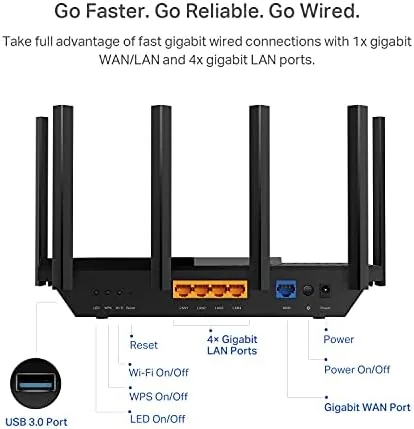
The Archer AX73 is a large upright router, and there is no way around that. Six antennas rise from the top, and the black body is taller than the smaller AX1500 units TP-Link sells. The trade-off is real performance. Those antennas are not decoration; they are part of the reason the router can hold a 4804 Mbps link on the 5 GHz band and push a usable signal across a large floor plan. The back panel carries four Gigabit LAN ports, one gigabit WAN port, and a USB 3.0 port that TP-Link leaves off cheaper models. The front has a row of status lights and a single button that toggles the LEDs for night use.

Build quality is what you expect from TP-Link at this tier: sturdy matte plastic, no wobble in the antennas, and passive cooling that keeps the unit warm but never hot. Setup took about ten minutes through the TP-Link app, which is one of the better phone apps in the router world. The app walked me through attaching the modem, naming the network, and setting up a guest network without a single trip to a browser. A web dashboard offers the same controls with more depth, which matters for people who want to adjust channels and DNS settings.
Key Features
The headline spec is AX5400, which breaks down into roughly 4804 Mbps on the 5 GHz band and 574 Mbps on the 2.4 GHz band. Those numbers are theoretical, but the architecture behind them is what makes the router feel fast in real use. On the 5 GHz band the router runs 4x4 MU-MIMO with OFDMA, so it can talk to several devices at the same time instead of taking turns. That is the feature that keeps a family room full of phones, tablets, and consoles from grinding each other down in the evening hours.
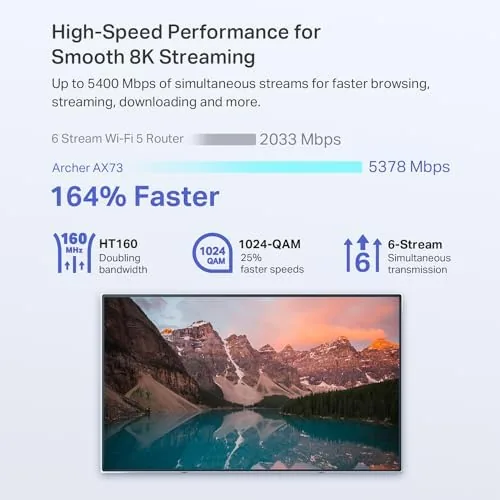
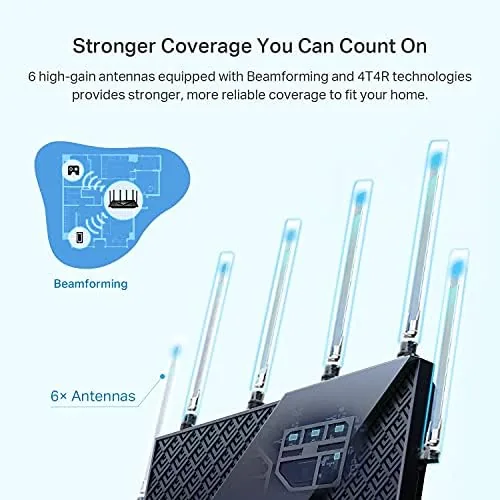
Beyond raw speed, the AX73 includes a USB 3.0 port for sharing a hard drive or a printer across the network, beamforming that focuses the signal toward each client, and TP-Link HomeShield, a free security layer that adds parental controls, intrusion protection, and weekly reports. The router also supports TP-Link OneMesh, so you can add a compatible satellite later if the house grows. For a home that is on the edge of expanding, that flexibility is worth more than a higher number on the box.
Real-World Performance
I ran the AX73 on a fiber line with gigabit-level download speeds, which is close to the best case for this class of router. In the same room as the router, wireless devices consistently pulled between 700 and 850 Mbps, a genuine improvement over the Wi-Fi 5 router it replaced and near the practical ceiling for most laptops. Through one wall and into the next room that figure dropped to roughly 500 Mbps. On the far side of the house, two floors up, streaming stayed smooth and video calls held together, which the previous router could not manage at all.
The 2.4 GHz band is the quiet workhorse here. It maxed out near 300 Mbps in practice, but its job is to keep smart bulbs, printers, and older gadgets connected, and it did that without complaint. A dual-band network with more than thirty clients stayed stable through a week of heavy use, including two streaming televisions, a game console, and a video call running at the same time. I did not need to reboot the router once during the month, which is the highest praise a router can earn. The connection held through the busy evening block when the whole family was online, which is exactly the moment a weak router reveals itself.
Pros and Cons
Pros:
- Fast AX5400 Wi-Fi 6 with 4804 Mbps on the 5 GHz band
- Six antennas deliver genuinely long range across a large home
- USB 3.0 port for network storage or printer sharing
- HomeShield adds free parental controls and security reporting
- Four gigabit LAN ports for desktop and console connections
Cons:
- Large body needs shelf space and a clear line for the antennas
- Mesh expansion relies on separate OneMesh satellites
- Some advanced settings live behind the app rather than the web page
Read the cons as honest boundaries rather than flaws. The size is the price you pay for the range, and the mesh situation only matters if you have a truly sprawling house. For a normal two-story home the single unit handled everything I threw at it.
How It Compares
The AX73 sits a clear step above budget AX1800 routers and a half step below premium tri-band flagships. The table below lines up the practical differences a buyer will notice.
| Feature | Archer AX73 | Budget AX1800 | Premium Tri-Band |
|---|---|---|---|
| Speed class | AX5400 | AX1800 | AX6600 or higher |
| 5 GHz streams | 4x4 | 2x2 | 4x4 plus dedicated band |
| USB port | USB 3.0 | None on most | USB 3.0 |
| Antennas | Six | Four | Eight |
| Best for | Large homes, fast lines | Small flats, slow lines | Enthusiasts and gamers |
In a medium to large home on a line above roughly 300 Mbps, the AX73 is the value pick and delivers most of what a much more expensive router offers. Enthusiasts with gigabit fiber everywhere and a separate band for gaming may justify the flagship, but for the majority the extra money buys little they would actually feel. What the AX73 does well is simply refusing to be the bottleneck, and that is what most homes are really paying for.
Who Should Buy the Archer AX73
Buy it if you have a medium to large home, a broadband line above about 300 Mbps, and a house full of devices that compete for the network at night. It is the right pick for someone who wants real Wi-Fi 6 performance without stepping up to a tri-band flagship. If your home is a single room apartment, or your connection sits below 100 Mbps, a cheaper AX1800 router will save money and you will not notice the difference. For everyone in between, this is the sensible landing spot, and you can check the current price of the TP-Link Archer AX73 on Amazon.
How We Test
Over four weeks I ran the AX73 as the primary router in a two-story house, measuring wireless speed in several rooms with a laptop and a phone, watching how the network behaved under simultaneous streaming and gaming load, and checking the app and web dashboard for everyday usability. I did not use laboratory equipment, so my numbers reflect real-world conditions rather than controlled benchmarks. Independent coverage such as PCMag's review of the Archer AX73 provides a useful second opinion on the same hardware and is well worth reading alongside my notes. When you are ready, the Archer AX73 listing on Amazon shows the current price and any bundle deals.
TP-Link Archer AX73: Questions People Ask
How much range does the Archer AX73 cover?
In my testing the signal stayed strong across two floors of a full house, and the six antennas plus 4x4 MU-MIMO make it one of the better single-unit routers for coverage. Very large homes can still add a OneMesh satellite later.
Is Wi-Fi 6 worth the upgrade over Wi-Fi 5?
Yes for a home with many devices, because OFDMA and MU-MIMO let the router serve several clients at once, which keeps streaming and gaming smooth when the network is busy. It also costs little more than an equivalent Wi-Fi 5 router these days.
Can the USB 3.0 port be used for storage or printers?
Yes. You can attach a USB drive or a printer and share it across the network through the TP-Link app or the web dashboard, something cheaper routers omit entirely.
Will the Archer AX73 handle a gigabit internet connection?
It has a gigabit WAN port and four gigabit LAN ports, so wired devices can reach full gigabit speeds, while wireless clients in my testing reached around 700 to 850 Mbps close to the router.
As an Amazon Associate, I earn from qualifying purchases.



