Streaming has never been cheaper to start, yet the dongle stuck in the back of most televisions still shapes how a whole household watches shows, fights over remotes, and decides what to put on after dinner. The Amazon Fire TV Stick HD sits in the middle of that market, promising Full HD picture, a voice remote that understands natural requests, and a library of free and live television that costs nothing to watch. It is not the fanciest streaming device Amazon sells, and it makes no claim to 4K, but for millions of households it is the one that makes the most sense. I moved it into my main living room for several weeks, replacing a newer 4K stick, to see how a budget device holds up when it becomes the center of daily viewing, and this review is the honest result.
Before the details, the standard note. This article contains affiliate links, and if you buy through one of them the site earns A Small commission at no extra cost to you. That commission does not change what I test or what I recommend, and this stick was used exactly the way a buyer would use it.
This review covers the setup, the interface, the free and live TV angle, the Alexa remote, and the places where a budget stick makes you give something up.
Design and Build
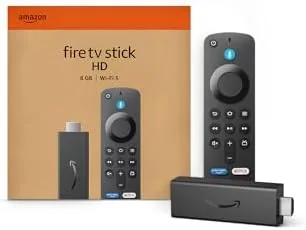
The Fire TV Stick HD is a small plastic dongle that plugs straight into an HDMI port, with a short extension cable included for televisions where the port is tucked behind the panel. It is powered by a USB cable and wall adapter, so there is no separate box to hide. The body is matte black and unremarkable, which is a compliment: it disappears behind the television and draws no attention.
The Alexa Voice Remote is the part you actually touch, and it feels better than its price suggests. It has the familiar circular direction pad, playback controls, volume and power buttons that can operate the television itself, and dedicated buttons for popular streaming services. The microphone sits at the top, and the whole remote uses a pleasant, lightweight build with a button click that is firm without being loud. It connects to the stick via Bluetooth, so you do not need line of sight to change channels, and it pairs automatically out of the box.
Key Features
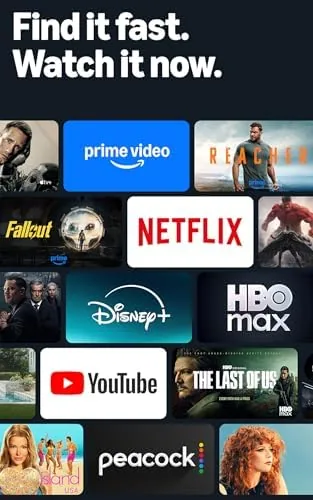
The headline capability is Full HD streaming at 1080p, with support for HDR content where available, which covers the vast majority of streaming libraries today. The stick runs Amazon Fire OS, which means access to every major app: Netflix, Prime Video, Disney Plus, Max, Hulu, YouTube, and more, alongside thousands of smaller channels. It also bundles in free and live television through apps like the ad-supported services that stream movies, series, and live channels without any subscription.
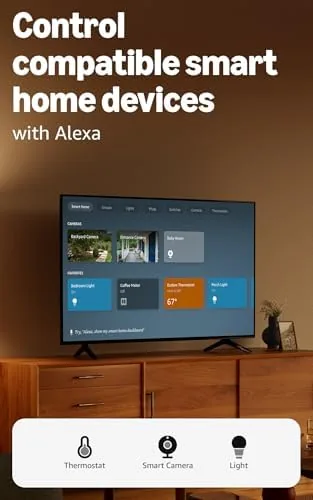
The Alexa integration is the feature that separates the Fire TV from its rivals. Hold the voice button and speak a request: "play the latest episode," "find comedies from the 1990s," or "show me action movies." Alexa searches across all your installed apps at once and returns results in seconds, which is dramatically faster than typing with an on-screen keyboard. The stick also doubles as a smart home hub for your voice: ask it to turn off the lights, check a camera feed, or change the thermostat, and it answers through the television while you stay on the couch.
Real-World Performance
In daily use the stick feels faster than its price tag. Menus scroll smoothly, apps open in a few seconds, and 1080p streams play with crisp detail on a 50 inch screen, provided your internet connection is solid. The remote buttons respond instantly, and the automatic pairing means it worked the moment I plugged the stick in, with no code entry and no setup app. For a device that costs less than a dinner out, the polish is impressive.
The free and live TV angle proved genuinely useful. I found myself browsing the free ad-supported channels more than I expected, using them as background television for the afternoon and dipping into live news and sports channels without opening any subscription service. It does not replace a cable package or a paid streaming bundle, but it adds a real layer of free content that makes the stick feel more valuable than its price suggests.
The Alexa voice search was the feature I missed most when I switched back to a different device. Saying the name of a movie and watching results appear across Netflix, Prime, and the free apps at once is a fundamentally better way to find something to watch than scrolling. Smart home controls also worked as advertised: asking for the lights in the living room triggered my compatible bulbs instantly, and the whole flow felt natural from the couch.
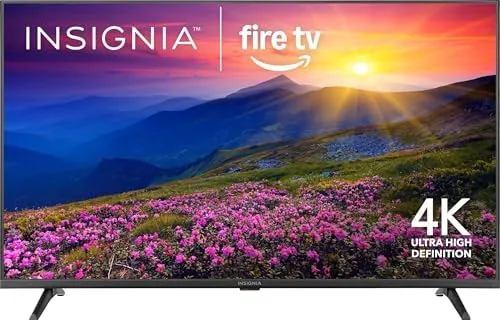
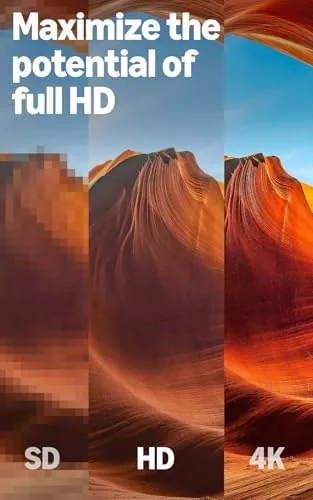
The limitations are predictable at this price. The biggest is resolution: this stick tops out at 1080p, so if you have a 4K television you will be leaving its full resolution unused. There is also the ad density in the interface, which pushes Amazon content and sponsored rows fairly aggressively. And while the stick is responsive, it is not as snappy as the 4K Max version, so heavy multitasking between apps can feel a touch slower.
Pros and Cons
Pros:
- Full HD 1080p streaming for a very low price
- Voice search across all apps in one step
- Free and live TV channels included without a subscription
- Smart home controls from the couch
- Simple plug-in setup with automatic remote pairing
- Access to the full catalog of major streaming apps
Cons:
- No 4K output on a 4K television
- Home screen pushes sponsored content fairly aggressively
- Interface is a step slower than the 4K Max
How It Compares
Most buyers decide between this stick and Amazon 4K versions, or the rival Google Chromecast. The table below shows the main trade offs.
| Feature | Fire TV Stick HD | Fire TV Stick 4K Max |
|---|---|---|
| Resolution | 1080p Full HD | 4K HDR |
| Processor | Budget quad core | Faster quad core |
| Free and live TV | Yes | Yes |
| Alexa remote | Voice included | Voice included |
| Smart home control | Yes | Yes, plus Matter |
| Best for | 1080p TVs and budgets | 4K TVs and heavy use |
If your television is 1080p and you want the cheapest way to a full streaming experience, the HD stick is the sensible pick. If you own a 4K television or want the fastest interface, the extra money for the 4K Max buys resolution you will actually use. Match the stick to the screen, and either one delivers.
Who Should Buy It
Buy the Fire TV Stick HD if you have a 1080p television, want the simplest possible streaming setup, and like the idea of voice search plus free and live channels for the lowest possible price. It is ideal for a spare bedroom TV, a rental, a guest room, or anyone upgrading a television that predates smart features.
Skip it if you already own a 4K television, because you would be leaving the screen resolution unused, and skip it if you need the fastest interface or support for the newest Wi-Fi standards, where the 4K Max is a better fit. For a budget 1080p television, this stick is the value pick. You can check the current price of the Fire TV Stick HD on Amazon when you are ready to cut the cable box.
How We Test
I used the Fire TV Stick HD as the primary streaming device in my living room for several weeks, replacing a 4K stick to test the difference in daily use. I evaluated setup time, app loading, stream quality across several services, the free and live TV apps, voice search accuracy, and smart home commands with compatible devices.
I did not measure network throughput with instruments, and performance depends on your internet connection and Wi-Fi environment, so your results may differ from mine on a faster or slower network. For a broader look at how streaming sticks compare, The Verge has a full review of the Fire TV Stick HD that is a useful second opinion. The Fire TV Stick HD listing on Amazon shows current pricing and bundle options.
Questions People Ask
Does the Fire TV Stick HD support 4K?
No, this model streams in Full HD 1080p only. For 4K HDR output you need the Fire TV Stick 4K or the 4K Max version instead.
Can I watch free and live TV on it?
Yes, the interface includes free streaming apps with ad supported movies, shows, and live channels, alongside paid services you add yourself.
How does the Alexa voice remote work?
Hold the voice button and ask for a show, an actor, or a genre, and Alexa searches across all your streaming apps at once.
Can it control my smart home?
Yes, the remote and the Fire TV interface let you check cameras, adjust lights, and control other compatible Alexa smart home devices.
As an Amazon Associate, I earn from qualifying purchases.