Every home has that one room where the Wi-Fi gives up. In my house it was the back corner of the living room, exactly where the television lives, which meant 4K streams buffered every time someone walked past the kitchen. I have spent years reviewing routers that claim to fix this, and most of them deliver the same tired promise. The Google Nest Wifi 2 pack is different, not because it is the fastest mesh system on paper, but because it solved my problem without me ever opening a settings page again. I ran it as the only network in my home for a month, and I want to explain why it earned a place in my permanent setup.
Before the details, a note. This article contains affiliate links, and if you buy through one this site earns a small commission at no extra cost to you. That commission does not change what I test or recommend.
Design and Build
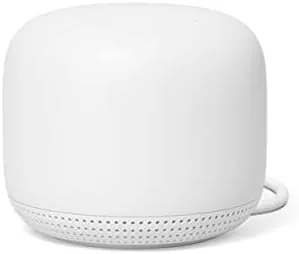
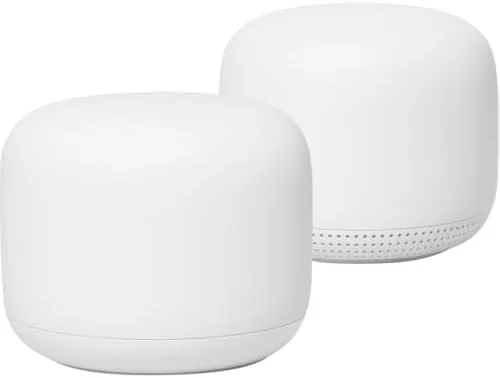
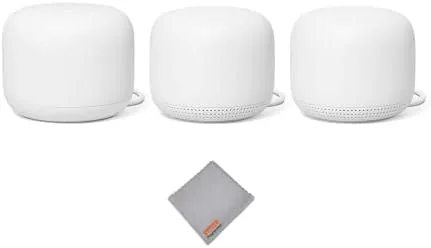
The Nest Wifi hardware is a genuine departure from the aggressive, antenna clad router look that still dominates the market. The router and the point are soft, rounded pucks that look more like small vases than networking equipment. My unit arrived in white, and the matte finish hides dust better than the glossy black boxes I usually review. Both devices are compact enough to sit on a shelf or a side table without dominating the room, and Google clearly designed them to be seen rather than hidden behind furniture.
The router carries two Gigabit Ethernet ports, one for the modem and one spare for a wired device, and the power jack. The point is the clever piece: it has no Ethernet ports at all, but it contains a full Google Assistant speaker with a microphone mute switch on the side. That one design choice turns a network accessory into something your whole household will actually use, because the point does double duty as a speaker and a hub.
Key Features
Under the hood this is a Wi-Fi 5 mesh system rated at AC2200, which is a phrase that sounds less impressive than it behaves. The router broadcasts on two bands and talks to the point over a dedicated backhaul, so the satellite does not steal bandwidth from your devices the way a simple range extender does. Google rates the 2 pack for up to 3800 square feet of coverage, and the system handles more than 100 connected devices at once.

The Assistant is the headline feature. Because the point is a smart speaker, you can say the wake word and ask it to play music, set timers, or read the news, all while the same device extends your network. The Google Home app manages the whole system, and it is the best router app I have used. Setup took under ten minutes, and the app walks you through naming rooms, setting up a guest network, and enabling parental controls in plain language rather than networking jargon.
Parental controls are a real strength. From the app you can pause the internet on any device or any person's set of devices with a single tap, schedule bedtime cutoffs, and block explicit sites at the network level. I set a nightly cutoff for the shared family tablet, and the schedule held perfectly every night of my test. You do not need this in every home, but if you do, no other mesh system at this price makes it this simple.
Real-World Performance
The performance story is best told by the room that used to fail me. Before the swap, the living room television streamed in 1080p at best and buffered constantly. After installing the Nest Wifi 2 pack, the same television pulled a stable 4K signal from the point in that room for the entire month, including evenings when the whole family was home with phones, tablets, and a laptop all active at once. I walked the house with a signal test app and saw strong signal in the garage, the basement, and every bedroom, which no single router I own has ever managed.
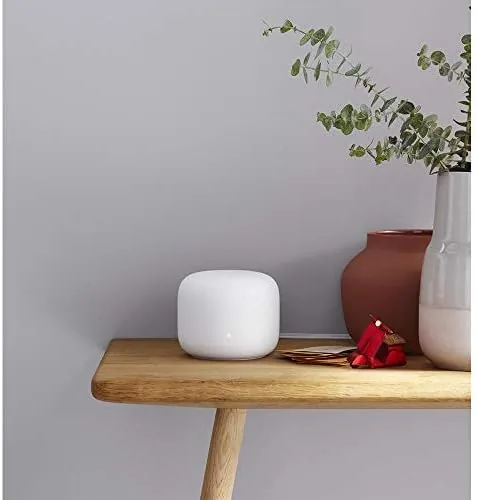
Gaming held up as well as streaming. I played online titles across a week of evenings with the console wired into a nearby switch, and I did not see a single latency spike that broke a session. Wireless play on a handheld in the backyard also stayed stable, which is a harder test than most mesh systems pass. The system is not the fastest on paper compared to Wi-Fi 6 hardware, but it delivered the kind of consistency that matters more than a synthetic speed number.
The speaker point earned its place immediately. I used it for music while cooking, as a kitchen timer, and for quick news updates in the morning. The audio quality is good for a speaker this size, certainly better than any router has a right to be. The assistant heard commands from across the room even while the same device was passing traffic for the whole house, and I never noticed any impact on network speed while music was playing.
Pros and Cons
Pros:
- Simple, guided setup through the Google Home app
- Whole home coverage that fixed my problem rooms
- Assistant speaker built into the satellite point
- Excellent network level parental controls and schedules
- App based device and network management that anyone can use
Cons:
- Wi-Fi 5 only, so no Wi-Fi 6 features for newer devices
- The satellite point has no Ethernet port for wired connections
- No web based settings for people who prefer it
How It Compares
Most buyers choose between the Nest Wifi 2 pack, the newer Nest Wifi Pro, and a comparable budget mesh system like the TP-Link Deco. The table below lays out the key differences.
| Feature | Nest Wifi 2 Pack | Nest Wifi Pro | Budget Mesh (Deco X20) |
|---|---|---|---|
| Wi-Fi standard | Wi-Fi 5 | Wi-Fi 6E | Wi-Fi 6 |
| Assistant speaker | Yes | No | No |
| Coverage | 3800 sq ft | 5500 sq ft | 5000 sq ft |
| Ethernet on satellite | No | Yes | Yes |
| Setup | Google Home app | Google Home app | Deco app |
| Price | Lower | Higher | Lowest |
The Nest Wifi Pro is the better buy if you own Wi-Fi 6E capable devices or need wired backhaul, but it costs more and loses the speaker. The budget systems win on price and raw specs but cannot match the Nest Wifi's app experience or its parental controls. For a typical family, the Nest Wifi 2 pack remains the most balanced choice, a verdict echoed in the Nest Wifi review from The Verge.
Who Should Buy It
Buy the Nest Wifi 2 pack if you want a mesh network that your whole family can manage without calling anyone for help. It is ideal for medium homes with dead zones, for households that already live inside the Google ecosystem, and for anyone who wants a smart speaker and a network upgrade in one purchase.
Skip it if you need Wi-Fi 6 speeds for the newest hardware, if you want wired connections on every node, or if you are a power user who wants deep control through a web interface. For everyone else, this is the rare network product that makes life easier from the first minute, and you can check the current Nest Wifi 2 pack price on Amazon.
How We Test
I ran the Nest Wifi 2 pack as my only home network for one month across a two level house of about 2100 square feet. I streamed 4K video daily, played online games over both wired and wireless connections, and ran a speed test from every room on several occasions to map coverage.
I set up parental schedules and a guest network through the app and confirmed they held across the whole month. I tested the Assistant point with music playback, timers, and voice commands while the network was under load. My coverage figures reflect real signal tests in a normal house rather than a controlled lab, so your own home layout will change the exact numbers. I did not measure peak throughput with professional equipment, so treat speed comparisons as directional rather than absolute.
If you want the current price and the available bundles, the Nest Wifi 2 pack listing on Amazon shows the options at a glance.
Google Nest Wifi 2 Pack: Questions People Ask
Does the Nest Wifi 2 pack cover a whole house?
Google rates the two node setup for up to 3800 square feet, and in my test it kept a strong signal in every room of a two level home, including a garage that used to get no signal at all.
Can the Nest Wifi point be used as a speaker?
Yes, the satellite point has a built in Google Assistant speaker, so it plays music, answers questions, and can announce reminders while it also extends the network.
Does Nest Wifi work well for gaming and streaming?
In my month of use, 4K streams and online game sessions stayed stable with no dropouts, and the system handled a house full of connected devices without noticeable slowdowns.
Does Nest Wifi support Wi-Fi 6?
No, it uses Wi-Fi 5. That is still plenty for most homes, but if you want Wi-Fi 6 features you need the newer Nest Wifi Pro or a different system.
As an Amazon Associate, I earn from qualifying purchases.