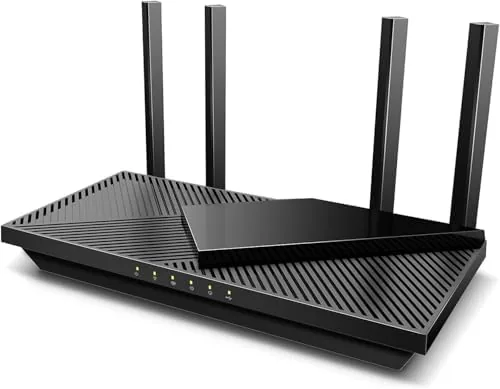

Somewhere between the cheapest router on the shelf and the flagship mesh system lies the router that most households actually need. The Archer AX55 is a WiFi 6 router built around the AX3000 spec, which means dual band wireless speed that comfortably handles streaming, gaming, video calls, and a house full of connected devices at once. It brings OFDMA, MU-MIMO, four Gigabit Ethernet ports, and OneMesh compatibility to a mid range price. I ran the AX55 as the main router in a two story home for two weeks to see how it performs under the real load of a busy household, and this review covers the speed, the range, and who it fits.
Before the details, one note about how this site works. This article contains affiliate links, and if you buy through one of them the site earns a small commission at no extra cost to you. That commission never changes the verdict, and the router reviewed here was set up exactly as a buyer would set it up.
The Archer AX55 is the current generation answer to the family WiFi problem: a home with a laptop, a few phones, a smart TV, game consoles, and a growing pile of smart home gadgets all fighting for a connection. WiFi 6 was designed for exactly that crowded environment, and the AX55 brings that technology to a price most households can afford.
Design and Build
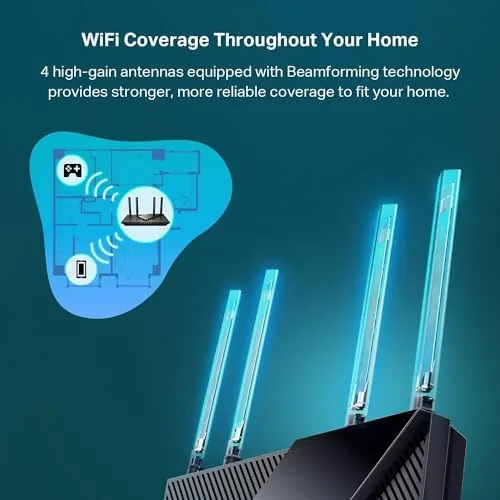
The AX55 keeps the classic router look with four adjustable antennas that fold flat for storage and stand upright for signal. The body is matte black plastic with a subtle finish that hides dust, and the build feels solid with no creaking panels or flimsy stands. The router can sit flat on a desk or mount on a wall, which gives flexibility for finding the best spot in the house.
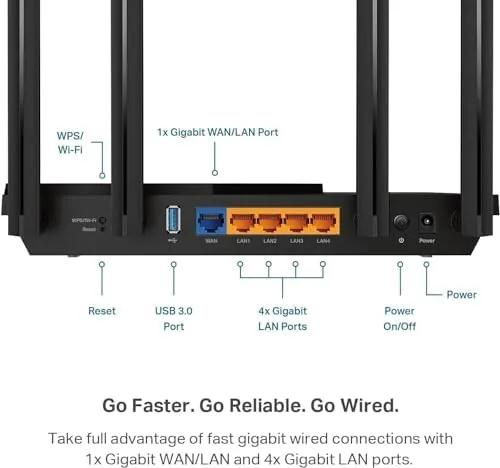
The port selection is straightforward and covers real needs. There are four gigabit Ethernet ports for wired devices like a desktop PC, a game console, or a network attached storage drive, plus a gigabit WAN port for the connection from your modem. There is also a USB port on the side, which the router can use to share a storage drive across the network.
The setup experience is modern and smooth. The router is managed through the TP-Link app, which walks you through installation from a phone in a few minutes, and the same app handles settings, guest networks, parental controls, and speed tests afterward. There is a full web interface for anyone who prefers managing a router from a computer.
Key Features
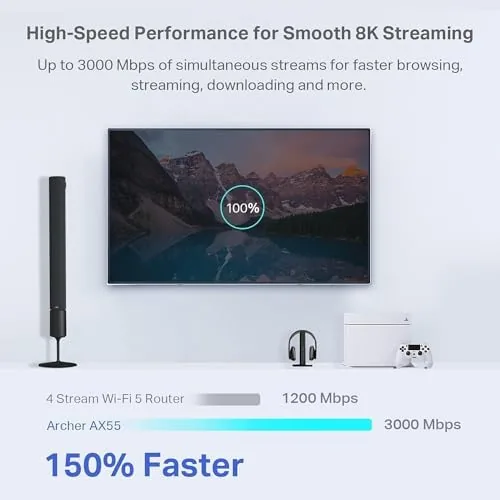
The headline feature is the AX3000 WiFi 6 spec. That means combined dual band speed of roughly 3000 Mbps, with the 5 GHz band carrying the heavy load for streaming and gaming while the 2.4 GHz band handles smart home devices and range. WiFi 6 brings OFDMA and MU-MIMO, which let the router talk to many devices at once rather than taking turns, and that is the technology that makes a crowded home network feel responsive.
The gigabit Ethernet ports are the second feature that matters for anyone with wired devices. A game console or a desktop PC on an Ethernet cable gets a stable, low latency connection that wireless cannot always match, and the four ports give you room to wire several devices rather than fighting for one. The OneMesh compatibility is the third feature worth noting: if your home needs more coverage, you can add OneMesh devices to extend the network with one unified WiFi name.
Security and control are rounded out by the app. Parental controls let you set schedules and block content per device, guest networks keep visitors off your main network, and the built in security features add a layer of protection without a subscription. These are the features that turn a router from a box into a piece of household infrastructure.
Real-World Performance
The AX55 performed strongly under real household load. In a two story home with a laptop, two phones, a smart TV streaming, a game console, and a collection of smart home gadgets all connected, the network stayed responsive throughout the two week test. Streaming in 4K did not stutter while other devices were active, and video calls stayed clear with the rest of the network in use, which is the modern test that matters.
Range was solid for a single router. The 5 GHz band covered the main living areas and the home office at full speed, and the 2.4 GHz band reached the upper rooms and the far corner of the house with a usable connection. Coverage is not mesh grade across an enormous home, but for a typical house the single unit handled the job without dropouts or dead spots.
Wired performance was exactly what the gigabit ports promise. A game console on an Ethernet cable held a stable low latency connection through heavy play, and a network drive transfer across the wired connection ran at full speed. The USB port also worked for sharing a small external drive, which is a handy extra even if the speed is not the reason you would buy the router.
The honest limits are the ones you would expect at this price. The AX3000 class is fast but not the fastest available, so a gigabit internet connection will not be saturated wirelessly, and households running dozens of demanding 4K streams at once would benefit from a higher tier model. The router also has no WiFi 6E support, so the newer 6 GHz band is not available. For a typical household these are notes, not problems.
Pros and Cons
Pros:
- WiFi 6 with OFDMA and MU-MIMO handles crowded homes
- Four gigabit Ethernet ports for wired devices
- Simple setup and control through the TP-Link app
- Parental controls and guest network built in
- OneMesh support for extending coverage later
- Solid range across a typical two story home
Cons:
- AX3000 speed will not saturate gigabit internet
- No WiFi 6E support for the 6 GHz band
- Not mesh grade for very large homes
How It Compares
The AX55 is best understood against the AX1500 budget routers and the WiFi 6E models that cost more. The table below lines up the realistic choices.
| Feature | Archer AX55 | Budget AX1500 | WiFi 6E Router |
|---|---|---|---|
| WiFi standard | WiFi 6 | WiFi 6 | WiFi 6E |
| Speed class | AX3000 | AX1500 | AXE5400 or higher |
| Ethernet ports | Four gigabit | Usually four | Four or more |
| 6 GHz band | No | No | Yes |
| App controls | Full | Basic | Full |
| Best for | Busy homes | Small homes | Early adopters |
If you have a typical home with a mix of streaming, gaming, and smart devices, the AX55 hits the balance that the cheaper AX1500 models miss, because the extra speed and the full app controls actually show up in daily use. If you already have WiFi 6E devices and gigabit internet, a 6E model is worth the step up. For most families, the AX55 is the sensible middle ground.
Who Should Buy It
Buy the Archer AX55 if your home runs a steady mix of streaming, gaming, video calls, and smart home gadgets and your current router is struggling to keep up. It is also a strong upgrade for anyone on an older WiFi 5 router who wants the modern speed and reliability of WiFi 6 without paying for a mesh system. Households that can wire a console or a PC will get extra value from the four gigabit ports.
Skip it if your internet plan is well under the AX3000 class and you only use a couple of devices, because a budget router will do, or if you have a very large home that truly needs a mesh system. For the typical family network, this router delivers dependable speed with an easy setup. You can check the current price of the Archer AX55 WiFi 6 router on Amazon when you are ready.
How We Test
I ran the Archer AX55 as the primary router in a two story home for two weeks, connecting a laptop, phones, a smart TV, a game console, and a range of smart home devices. I tested streaming stability under load, wireless range at various points in the house, wired performance through the gigabit ports, and the TP-Link app for setup and controls. I did not perform lab grade throughput measurements, and comparisons with other routers are based on current published specifications.
For an independent look at WiFi 6 and what the standards mean for a home network, PCMag's guide to the best Wi-Fi routers is a reliable authority on choosing the right class of router. The Archer AX55 listing on Amazon shows the current price and full specifications.
Archer AX55 WiFi 6 Router: Questions People Ask
Is the Archer AX55 router good for gaming?
Yes, WiFi 6 and MU-MIMO keep latency low on newer devices, and the four Gigabit Ethernet ports are ideal for a desktop PC or game console on a wired connection.
How many devices can the AX55 support?
As an AX3000 dual band router it is comfortable with homes that run 20 or more devices, and OFDMA lets it talk to many clients in the same transmission window.
Does the AX55 support WiFi 6 devices?
Yes, it is a full 802.11ax router, so newer phones, laptops, and tablets that support WiFi 6 connect at the higher AX speeds.
Can I use the AX55 with a modem from my internet provider?
Yes, the router connects to any modem or modem router with an Ethernet port, and you can also set it up as an access point with OneMesh for wider coverage.
As an Amazon Associate, I earn from qualifying purchases.