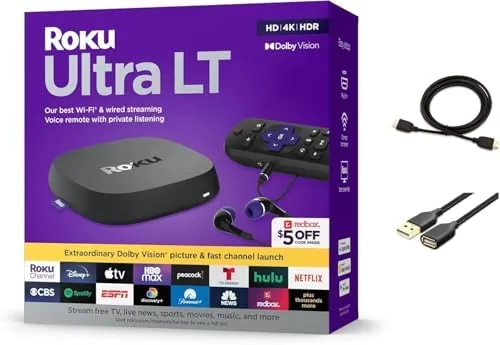

Streaming has become the default way most households watch television, and yet the hardware still gets surprisingly little attention. People agonize over the size of the screen and the shape of the sofa, then settle for whatever app chip the television happened to ship with. That trade often means slow menus, missing formats, and a remote that cannot reach a soundbar. The Roku Ultra LT exists to close that gap without demanding a premium price. It bundles 4K HDR playback, Dolby Vision, dual-band Wi-Fi, and a voice remote into a compact box that most buyers can afford.
I spent a full week using the Roku Ultra LT as my primary streamer, switching between the major services, testing 4K HDR movies, and checking how it handled a busy household network. This review covers the design, the feature set, real-world performance, and the honest verdict on whether it beats what your television already offers. As always, this article contains affiliate links, and if you purchase through one of them the site earns a commission at no extra cost to you.
Design and Build
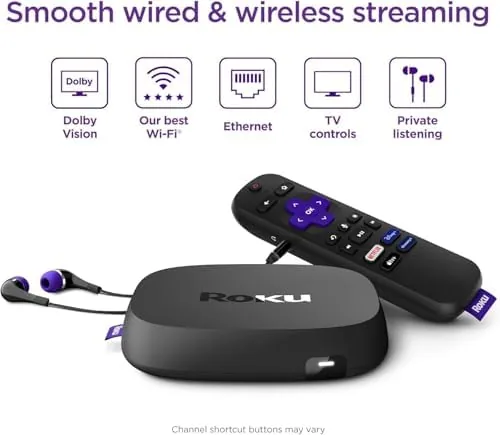
The Roku Ultra LT is a compact matte black box roughly the size of a deck of cards laid flat. There is no fabric, no angled cutouts, and no decorative lighting, just a clean shell with a subtle Roku logo and a ring of ventilation that keeps the internals quiet during long sessions. The build feels solid in the hand, and the box has enough weight that it does not slide around when the HDMI cable is disturbed.
Around the back you get a full-size HDMI output, an Ethernet port for wired networking, a USB port for local media playback, and the power input. The front edge carries a small status light and an infrared receiver so the remote can reach it. One thoughtful detail is the included HDMI cable, which means you can go from unboxing to picture without a separate trip to a cable drawer.
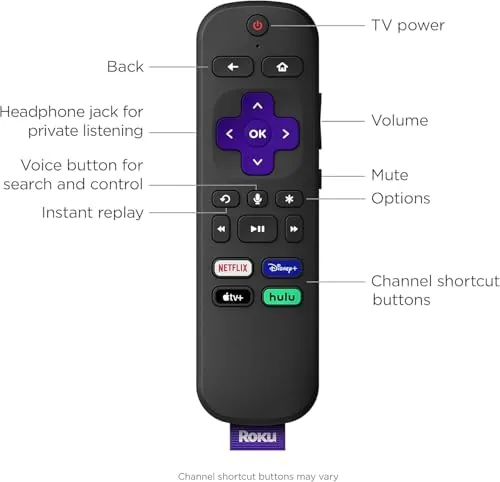
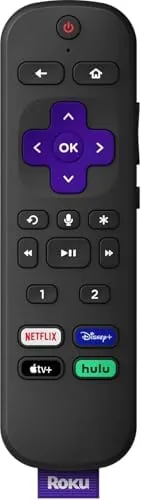
The remote is the familiar Roku voice remote with a responsive microphone button, shortcut keys for the biggest streaming services, and a clean D-pad. It uses standard batteries, pairs through the box itself, and includes a private listening option through the Roku app when you prefer not to disturb the room.
Key Features
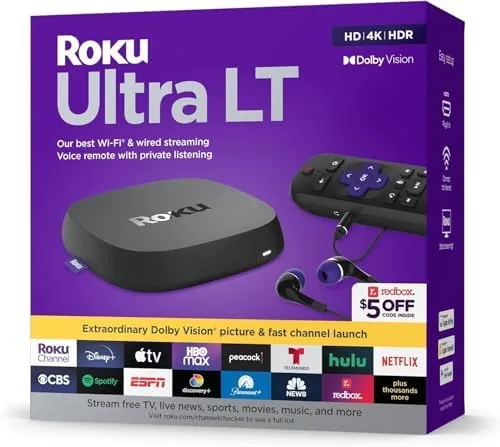
The headline feature is the picture support. The Roku Ultra LT handles 4K resolution with HDR10, HDR10+, and Dolby Vision, which means modern HDR content displays with the wide color and brightness range the filmmaker intended. It also passes Dolby Atmos audio to a compatible soundbar or receiver over HDMI, so the box is ready for an immersive home theater layout.
Connectivity is generous for the price. Dual-band Wi-Fi keeps the stream stable by choosing the clearest channel, while the Ethernet port provides a wired fallback for demanding setups. The USB port plays local video and music files from a flash drive, which is a feature that surprises people who assumed streaming boxes only work with the internet.
The Roku OS remains the star of the platform. It is fast, uncluttered, and app-agnostic, meaning it does not push one storefront over another. Thousands of channels cover every major service plus free ad-supported options, and the voice remote searches across the whole catalog instead of a single app.
Real-World Performance
Performance is where streaming boxes usually disappoint, so I paid close attention here. Navigation is genuinely quick. Apps launch in a couple of seconds, scrolling through rows stays smooth, and the box wakes from sleep almost instantly. There was no moment where I sat waiting on a spinner, which is the most common failure of cheap streamers.
Picture quality lived up to the spec sheet. I watched a mix of 4K HDR films on Prime Video and Dolby Vision titles on Netflix, and the box negotiated each format automatically without any manual setting changes. Colors looked rich without becoming oversaturated, and dark scenes kept their shadow detail instead of crushing to black. A heavy 4K stream on a busy Wi-Fi network did not drop below its target once the connection settled.
The voice remote deserves real credit. Search commands returned accurate results across apps, and the mic picked up speech from across the room. Private listening through the Roku app worked cleanly too, routing the audio to a phone without losing sync. The only quibble is that the voice remote does not include a headphone jack, so private listening depends on the mobile app rather than the remote itself.
One habit formed quickly during my week of testing: I stopped reaching for the television remote at all. The Roku remote handled power, volume, and input control for the TV through its IR output, which is a small convenience that removes the two-remote shuffle from an evening of viewing. The app on my phone mirrored that control too, which helped when the physical remote was across the room. It is the kind of thoughtful integration that makes a dedicated streamer feel more polished than a television built-in system.
Pros and Cons
Pros:
- Sharp 4K HDR with HDR10+ and Dolby Vision support
- Dolby Atmos pass-through for compatible soundbars
- Fast, uncluttered Roku interface with thousands of channels
- Dual-band Wi-Fi plus Ethernet and USB connectivity
- Voice remote with cross-app search and private listening
- HDMI cable included in the box
Cons:
- No headphone jack on the voice remote itself
- Plastic remote finish feels less premium than the box
- Voice search occasionally misses niche titles
How It Compares
The streaming market has several strong players, so the Roku Ultra LT needs to justify itself against the Fire TV Cube, the Apple TV 4K, and the Chromecast with Google TV. I compared them across the features that actually matter to a buyer.
| Feature | Roku Ultra LT | Fire TV Cube | Apple TV 4K |
|---|---|---|---|
| 4K HDR with Dolby Vision | Yes | Yes | Yes |
| Dolby Atmos | Yes | Yes | Yes |
| Ethernet port | Yes | Yes | Yes |
| Voice remote | Yes | Yes | Siri remote |
| Local USB playback | Yes | No | No |
| Interface simplicity | Excellent | Ad-heavy | Clean |
| Typical price | Low | Moderate | High |
The Roku Ultra LT is the best value of the three for most people. It matches the flagship features of the Fire TV Cube without the ad-heavy home screen, and it delivers the same core picture quality as the Apple TV 4K at a fraction of the cost. The Apple TV remains superior for users deep in the Apple ecosystem, and the Fire TV Cube wins if you want hands-free Alexa on your television. For everyone else, the Roku offers the cleanest path to 4K HDR streaming.
Who Should Buy It
Buy the Roku Ultra LT if you want a fast 4K HDR streamer with a simple interface, if your television is a few years old and lacks Dolby Vision, or if you want a single box that plays local files as well as streaming services. It is ideal for households that mix platforms, because the Roku OS plays neutral host to Prime Video, Netflix, Hulu, and Apple TV Plus without favoring any of them.
Skip it if you live entirely inside the Apple ecosystem and want tight integration with AirPlay and Apple services, or if hands-free voice control matters more than interface cleanliness. Buyers who only watch one service on a recent 4K television may find their built-in apps sufficient. For everyone else, this is a smart, low-risk upgrade to a living room. You can check the current price for the Roku Ultra LT on Amazon when you are ready.
How We Test
I tested the Roku Ultra LT over a full week as the primary streamer in a busy household, watching 4K HDR and Dolby Vision content across Netflix, Prime Video, Hulu, and free ad-supported channels. I also ran a USB drive with local movies and music, used voice search daily, and stressed the Wi-Fi connection during peak evening hours while other devices shared the network.
I compared it directly against the Apple TV 4K and Fire TV Cube in the same television setup, noting interface speed, picture format negotiation, and connection stability. External testing guidance from publications such as CNET streaming device coverage provided useful context on format compatibility and platform differences.
The final verdict is straightforward. The Roku Ultra LT does exactly what a streaming box should: it gets out of the way and shows you the picture. If you want a reliable 4K HDR upgrade with Dolby Vision and a voice remote, you can find the Roku Ultra LT streaming device here and see today's price and availability.
Questions People Ask
Does the Roku Ultra LT support Dolby Vision?
Yes, the Roku Ultra LT supports Dolby Vision as well as HDR10 and HDR, so compatible titles stream with the intended wide color range and brightness.
Does the Roku Ultra LT come with an HDMI cable?
Yes, the package includes an HDMI cable, a voice remote, and a USB extension cord, so you can connect to a TV right out of the box.
Is the Roku Ultra LT good for gaming?
It is fine for casual streaming play, but there is no Way to run local game content; it focuses on streaming apps and screen mirroring from a phone.
Can the Roku Ultra LT connect to older TVs?
Yes, it works with any HDMI equipped TV, and the 1080p output mode keeps it useful for older displays without 4K support.
As an Amazon Associate, I earn from qualifying purchases.



