

The remote that comes with a television is one of the most handled objects in a home, which is exactly why it is also one of the most likely to break, vanish under a couch cushion, or end up in the dog mouth. When the original Roku TV remote goes missing, the easy move is to grab any cheap Universal Remote, but that usually means fumbling through pairing menus and losing the streaming shortcuts that make a Roku TV fast to use. The official Roku TV remote control exists to fix that gap with a part that is made by the same company that built the television. I replaced a lost original with this official remote and ran it through several weeks of family use, and this review is the honest report of how the replacement performs.
Before the details, the standard note. This article contains affiliate links, and if you buy through one of them the site earns a small commission at no extra cost to you. That commission does not change what I test or what I recommend, and this remote was used exactly the way a buyer would use it.
The best replacement part is the one you forget is a replacement, and that is the standard this remote is judged against. This review covers the setup, the buttons, the voice features, and the compatibility details that matter before you buy.
Design and Build
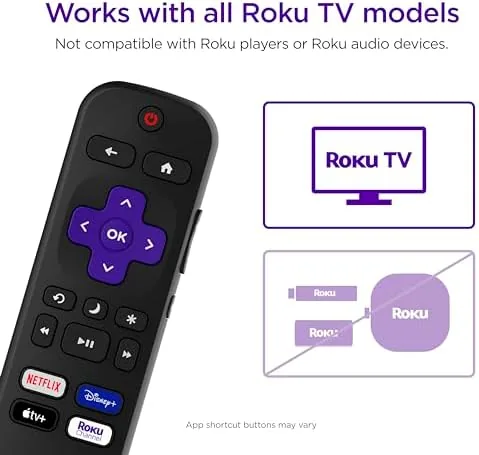
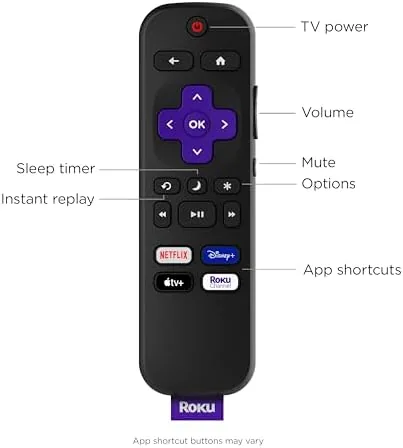
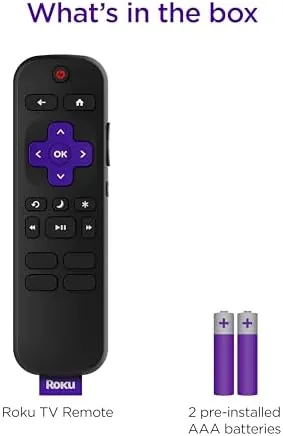
The remote follows the familiar Roku silhouette: a slim, gently curved plastic body with a rounded back that sits comfortably in the hand. The button layout is the same one Roku owners already know, with the directional pad at the top, playback controls below it, and the signature shortcut buttons running down the middle. The buttons have a satisfying click with a short travel, and the spacing is generous enough that you can operate the remote by feel during a dark movie scene.
The build quality is what you would expect from an official part. The plastic is dense, the seams are tight, and the whole unit feels more substantial than the flimsy generic remotes sold for half the price. It is powered by two AA batteries, which is convenient because the original remote for some Roku TVs uses a proprietary rechargeable battery that is a pain to replace. If you have an older Roku TV whose built-in remote battery has finally died, this replacement is a clean, off-the-shelf way out of that problem.
Key Features
Pairing is the headline feature, because it barely exists. You insert the batteries, point the remote at the television, and the Roku TV picks it up automatically within moments. There is no code entry, no setup screen, no app to fiddle with, and no technician call. In my test the remote was recognized before I finished closing the battery compartment door. For anyone who has wrestled with a universal remote, this instant pairing is the entire reason to buy the official part.
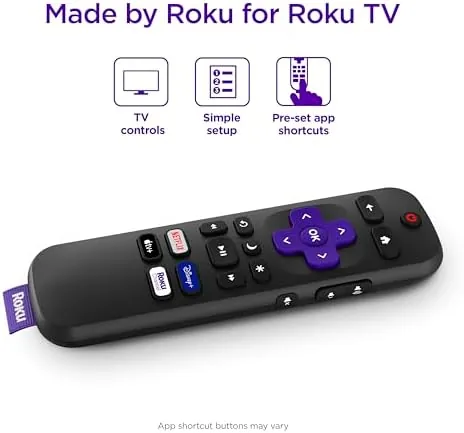
The shortcut buttons are the second selling point. Pre-set buttons jump directly to popular streaming services, so one press takes you to Netflix, Prime Video, and the other launch apps the row carries, instead of navigating a home menu every time. The voice control adds another layer: a dedicated voice button lets you search across apps by speaking a title, an actor, or a genre, which is faster than typing with the on-screen keyboard. There are also shortcut keys for the Roku Channel and other services, and the remote handles the basics like volume, mute, and power for the Roku TV itself.
Real-World Performance
In daily use the remote disappears into the routine, which is exactly what a replacement should do. The buttons respond instantly, the pairing has never dropped in several weeks, and the voice search works reliably from across the room. My family picked it up and used it without instructions, which is the strongest possible endorsement for a household device: nobody has to learn anything new.
The voice features deserve a closer word. Saying a title out loud brings up results across the streaming apps quickly, and the remote mic picks up speech clearly from a normal distance. It is not a replacement for the advanced Alexa or Google voice assistants, but for finding something to watch it is faster than the on-screen keyboard by a wide margin. The playback buttons handled pause, fast forward, and rewind during movies without any lag, and the remote talked to the television's power and volume controls without any extra setup.
The one caveat is compatibility, and it is important enough to state clearly. This remote is built for Roku TV models only. It will not pair with Roku streaming players or sticks, which use a different remote protocol. If you bought this expecting to control a Roku stick, it will not work, and that is the single most common cause of negative feedback on this kind of product. Check your device before you order, and you will be fine. One more detail earned quiet appreciation over the weeks. The remote wakes the television from sleep instantly, resumes whatever was playing with a single press, and keeps the streaming shortcuts in the same place as the original, so nobody in the household had to relearn where anything was. A couple of AA batteries have shown no meaningful drain after weeks of daily voice searches, and the remote shows no sign of the stickiness or dead spots that cheaper replacement parts develop quickly. For a part whose whole job is to be invisible, it has been exactly that.
Pros and Cons
Pros:
- Pairs automatically with a Roku TV in seconds
- Shortcut buttons jump straight to favorite streaming apps
- Reliable voice search for finding titles fast
- Official Roku build quality with comfortable feel
- Uses standard AA batteries for easy replacement
- Controls TV power, volume, and mute without setup
Cons:
- Does not work with Roku streaming players or sticks
- No backlight for dark room use
- Buyers must verify Roku TV compatibility first
How It Compares
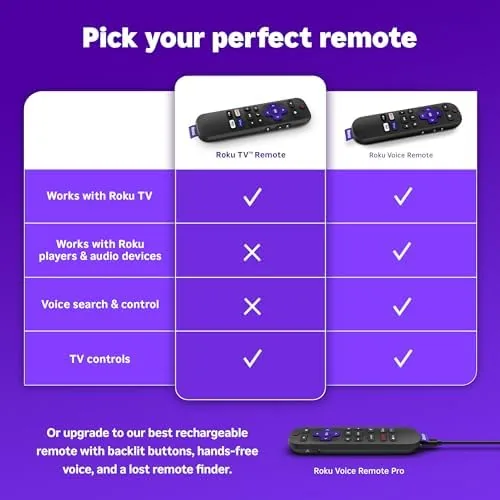
The realistic alternatives are a universal remote and a voice remote for Roku players. The table below shows how they line up.
| Feature | Official Roku TV Remote | Universal Remote |
|---|---|---|
| Setup | Automatic pairing | Manual code entry |
| Shortcut buttons | Pre-set streaming apps | Usually none |
| Voice search | Yes, across apps | Rarely |
| TV power control | Yes | Yes |
| Compatibility | Roku TV models only | Many devices, with setup |
| Best for | Roku TV owners | Multi-device setups |
If you own a Roku TV and want a zero-friction replacement, the official remote wins on every point that matters: instant pairing, streaming shortcuts, and voice search. A universal remote only makes sense if you want to consolidate several devices onto one control, and even then you give up the streaming shortcut row.
Who Should Buy It
Buy this remote if you own a Roku TV and your original remote is lost, broken, or has a dead battery you do not want to replace. It is also a smart backup to keep on hand, because it pairs instantly and costs little compared to the frustration of a missing remote on movie night. Households with kids or pets will appreciate having a cheap, easy replacement ready.
Skip it if you have a Roku streaming player or stick rather than a Roku TV, because it will not pair with those devices. If your television is a different brand with Roku built into a separate box, check twice before ordering. For Roku TV owners, this is the obvious choice. You can check the current price of the official Roku TV remote on Amazon when you are ready.
How We Test
I used this remote daily for several weeks in place of the original on a Roku TV, testing the automatic pairing from a cold start, the shortcut buttons, voice search in both quiet and noisy rooms, and the power, volume, and mute functions. I also confirmed the compatibility limit by checking that the remote does not pair with a separate Roku player.
I did not test the remote in extreme conditions such as drops onto hard floors or long term battery drain, and battery life will vary with how heavily voice search is used. For an authoritative guide to Roku remote pairing and troubleshooting, the Roku support pages have official instructions for pairing a remote to a Roku TV that are worth reading. The Roku TV remote control listing on Amazon shows current pricing and compatibility notes.
Questions People Ask
Will this remote work with my Roku TV?
It is designed for Roku TV models only, and it pairs automatically when you insert batteries, so a Roku TV set should connect within moments.
Does this remote work with Roku players?
No, this is a Roku TV remote only. Roku streaming players and sticks use a different remote, so check compatibility before you buy.
Does the remote have voice search?
Yes, a voice button on the remote lets you search channels, launch apps, and control playback by speaking into the microphone.
What are the shortcut buttons for?
The pre-set shortcut buttons jump straight to popular streaming services such as Netflix, Prime Video, and other apps in one press.
As an Amazon Associate, I earn from qualifying purchases.



