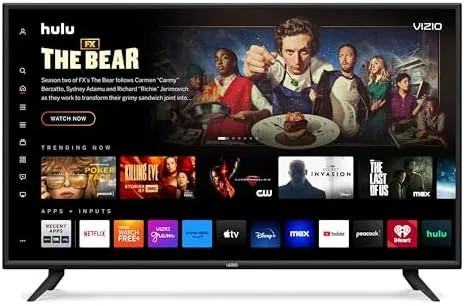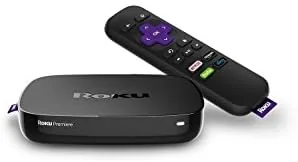

Streaming players used to be the fancy part of a home theater setup. These days they are the smart part, because the picture quality your TV shows is only as good as the stream being fed into it, and a cheap player with a weak wireless radio can make an expensive 4K television look ordinary. The Roku Premiere sits at the budget end of the 4K market, promising HD and 4K UHD streaming at a price that undercuts most rivals. I ran one on a 4K television for several weeks to find out whether the budget pick still delivers the full 4K experience.
Before the testing, the disclosure. This article contains affiliate links, and if you buy through one of them this site earns a small commission at no extra cost to you. That commission never changes what I test or recommend, and the player reviewed here was set up exactly the way any buyer would set it up.
The short version is that the Roku Premiere punches well above its price. The interface is fast, the 4K picture is sharp, and the channel lineup is the largest in streaming. The rest of this review covers the hardware, the performance, and the few corners Roku cut to hit the price.
Design and Build
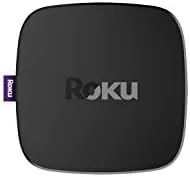
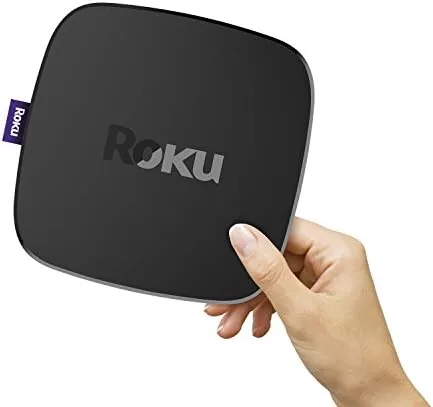
The Premiere is a small, square puck of a device, small enough to disappear behind a TV and light enough to hold in one hand. There is no separate power brick in the newest iteration, just a micro USB cable and an HDMI cable in the box, which keeps the setup tidy. The matte plastic body hides fingerprints, and there are no buttons or ports to fuss over beyond the HDMI jack and the power input. It is the kind of device you install once and forget exists.
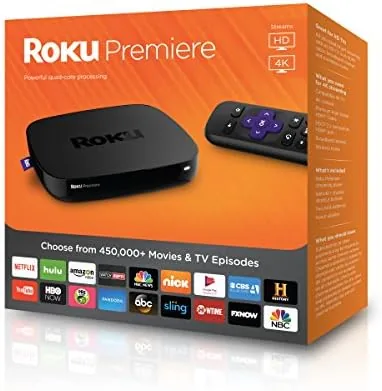
The remote is simple and well laid out, with dedicated buttons for popular services and a directional pad that sits comfortably under the thumb. The Premiere ships with the standard IR remote rather than the voice remote found on pricier models, which is one of the corners cut to reach the budget price. The device itself is quiet and cool in operation, with no fan noise and no case that runs hot against a shelf.

Key Features
The headline feature is 4K UHD output. Plug the Premiere into a 4K display and it delivers true 3840 by 2160 resolution, with HDR10 support for the brighter, wider color range that modern shows are mastered in. The player auto detects what the TV can do and hands off the best available format, so a 1080p HDTV gets clean HD while a 4K set gets the full pixel count.
The second feature is the platform itself. The Roku OS is the same fast, uncluttered interface found across the entire lineup, with a home screen that lists channels as tiles and a search that covers thousands of streaming services at once. The Roku Channel adds free, ad supported movies and shows without any subscription, and the roster of apps includes every major service, from Netflix and Prime Video to Disney Plus, Hulu, Max, and live TV options.
Real-World Performance
I ran the Premiere on a 4K HDR television and tested the obvious: 4K streams, HDR content, app loading, and whether the Wi-Fi could keep up. The 4K picture was sharp and stable, with crisp detail in nature documentaries and dark scenes holding their shadow detail without the blocky smearing that poor streaming shows up as. HDR10 content rendered with the wider brightness range the TV could display, and the difference on a well mastered show was easy to see.
The interface speed was a pleasant surprise. The Premiere boots and reaches the home screen in seconds, apps launch quickly, and scrolling through a channel library does not stutter the way it does on older, underpowered players. The search function scans across services and returns results with the price of each stream, which is the fastest way to find where a movie is actually available without hopping between apps one by one.
Wireless performance held up through the test period. The player connected to my home network and streamed 4K without buffering during normal use, and the dual band Wi-Fi gave it room to move on the 5 gigahertz band. The free Roku Channel filled the quiet times with an endless row of ad supported movies, and the selection was better than most free streaming services offer, which makes the player feel like a value add even before a single subscription is logged in.
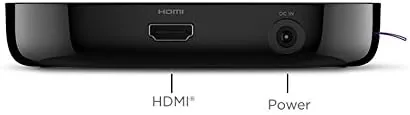
The honest limits come down to the cut corners. The standard remote has no voice control, so search and launch commands need the buttons, though the free Roku mobile app adds voice search and private listening through headphones as a workaround. There is also no Ethernet port, so anyone with a spotty Wi-Fi signal will want the router close by. And the player tops out at HDR10 rather than supporting Dolby Vision, which only matters if your TV and your favorite shows make heavy use of the Dolby format. On the software side, Roku keeps the platform updated, which is worth mentioning because cheap players often get abandoned by their makers. During my testing the device received a fresh update that smoothed out the settings menu and added a few channel refinements, and Roku has a long record of supporting older hardware, so the Premiere is not a device that goes stale a year after purchase. That software support is part of what makes the low price a fair deal, because the player will keep getting better rather than being left behind.
Pros and Cons
Pros:
- Sharp 4K UHD output with HDR10 support
- Fast interface and quick app loading
- Largest channel library of any streaming platform
- Free ad supported Roku Channel included
- Compact design that hides behind the TV
- Budget price with no subscription fee for the platform
Cons:
- No voice control on the included remote
- No Ethernet port for wired connections
- No Dolby Vision support
How It Compares
The Premiere sits between the most basic streamers and the premium 4K models, and the differences are worth mapping before you spend.
| Feature | Roku Premiere | Basic HD Player | Premium 4K Player |
|---|---|---|---|
| Picture quality | 4K UHD | 1080p HD | 4K UHD |
| HDR support | HDR10 | None | HDR10 plus Dolby Vision |
| Voice control | App only | No | On the remote |
| Price | Low | Lowest | Higher |
| Best for | Most 4K TVs | Old HDTVs | Dolby Vision lovers |
Against a basic HD player, the Premiere wins outright, because the 4K output and HDR10 make the most of a modern TV. Against a premium player, it trades Dolby Vision and a voice remote for a much lower price. For the vast majority of households, that is the right trade.
Who Should Buy It
Buy the Roku Premiere if you have a 4K television and are still streaming through the TV's built in apps or an older HD box, because it unlocks the resolution your screen already paid for. It is also a great pick for anyone who wants the biggest channel selection without subscribing to a streaming platform itself, and for gift givers who want a simple, dependable player that does not need technical support calls.
Skip it if you have a Dolby Vision setup and watch a lot of that format, or if you need voice control and Ethernet in the box. For everyone else, this is the most value a few dollars can buy in streaming hardware. You can check the current price of the Roku Premiere on Amazon when you are ready.
How We Test
I used the Roku Premiere as my daily streamer for several weeks on a 4K HDR television, covering 4K and HD content, HDR10 streams, app launches, search, and the free Roku Channel. I tested wireless performance in a typical home setup and compared the interface speed against a basic streaming box.
I did not run network benchmarks or measure peak brightness, so the picture observations are visual rather than measured. For a broader look at the streaming player market, PCMag has a full review of the Roku Premiere that covers the technical side in more depth. The Roku Premiere listing on Amazon shows the current price and what is in the box.
Roku Premiere: Questions People Ask
Does the Roku Premiere support Dolby Vision?
No, the Premiere handles HDR10 rather than Dolby Vision, which is fine for most content but matters if your TV makes heavy use of the Dolby format.
Do I need a 4K TV to use the Roku Premiere?
No, the Premiere works perfectly with 1080p HD sets and simply switches to 4K UHD when connected to a compatible 4K display.
Which streaming services can I watch on Roku?
Thousands of channels are available, including Netflix, Prime Video, Disney Plus, Hulu, Max, and the free ad supported Roku Channel.
Can I control the Roku Premiere without a remote?
Yes, the free Roku mobile app includes a remote, private listening, and voice search, so the physical remote is not strictly required.
As an Amazon Associate, I earn from qualifying purchases.