

Most streaming players follow one of two scripts. Either they cost as much as a dinner for two and claim to be the only box you will ever need, or they are cheap enough to be an impulse buy but so slow that you regret them within a week. The Roku Express 4K+ sits in a third lane. It is priced like an entry level device, yet it carries 4K HDR playback, a proper voice remote, and dual-band Wi-Fi that is usually reserved for more expensive hardware. After a month of daily use on my living room set, I want to explain exactly where this small player excels and where its budget roots still show.
Before the details, the standard note. This article contains affiliate links, and if you buy through one of them the site earns a small commission at no extra cost to you. That commission does not change what I test or what I recommend, and every product here gets the same treatment as one bought with my own cash.
Design and Build
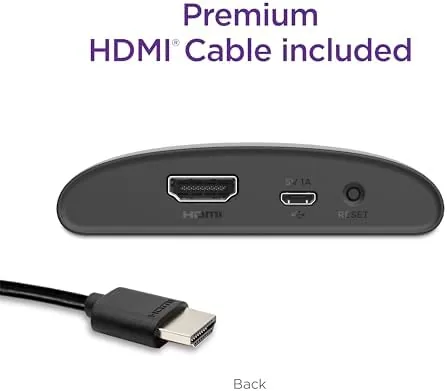
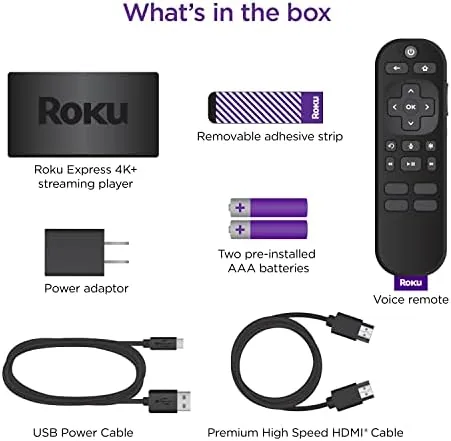
The Express 4K+ is a small matte black puck that tucks in next to the television instead of plugging straight into the HDMI port like a stick. That shape is a quiet advantage. A stick hangs from the back of a wall mounted TV and can overheat in tight spaces, while this puck sits flat on a shelf, runs cool, and hides behind a cable. An HDMI cable and a power adapter come in the box, so there is nothing else to buy before it works.
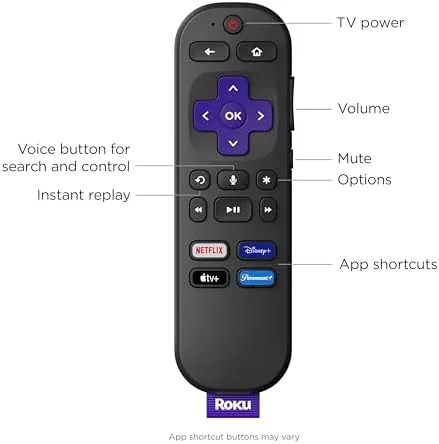
The star of the package is the Roku Voice Remote. It has the usual d-pad and shortcut buttons, but it adds power and volume controls for the TV itself, a mute key, and a built in microphone for hands free search. Roku understands that the remote is the part you touch every day, and this one feels sturdy without being heavy. There is no headphone jack on this model, so private listening happens through the Roku mobile app instead, which is a minor loss for night owls but not a deal breaker.
Key Features
At the core is 4K HDR playback. The player outputs 4K resolution with HDR10 support, and it does so with a processor that feels notably quicker than the older Express models. Menus open without the stutter that plagued budget Roku boxes a few years back, and switching between apps is fast enough that you stop noticing the wait.
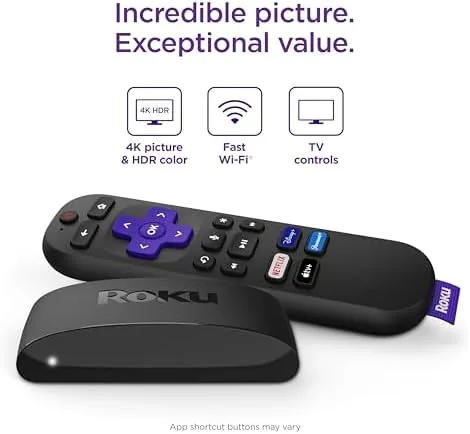
Dual-band Wi-Fi is the quiet workhorse here. The player supports both 2.4 GHz and 5 GHz networks, which matters more than most people realize. On a crowded home network the 5 GHz band is faster and less congested, and the Express 4K+ locks onto it automatically. Voice search ties into Roku OS, which covers the major apps, and the free channel lineup is a genuine selling point for people who want live news and older shows without another subscription.
Real-World Performance
I connected the Express 4K+ to a mid range 4K TV and ran it as my primary player for a month. Across Netflix, YouTube, Prime Video, and a mix of free Roku channels, the picture held steady at 4K with HDR when the source offered it. Colors stayed rich on nature documentaries, and dark scenes in streaming movies kept their detail instead of crushing into black. The 5 GHz Wi-Fi connection never dropped a stream during the entire month, even with several other devices sharing the router.
Voice search worked as advertised. I asked the remote to find a specific action movie and it pulled up every app that carried it, then let me launch the cheapest option in one press. The one performance complaint is modest: the home screen carries a few more promoted rows than I would like, and while they are easy to scroll past, they are a reminder that Roku pushes ad revenue on its budget hardware. For the price, it is a fair trade.
Pros and Cons
Pros:
- True 4K HDR playback at an entry level price
- Dual-band Wi-Fi keeps streams stable on busy networks
- Voice remote includes TV power and volume controls
- Compact puck design runs cool and hides easily
- Large free channel lineup with live TV options
- Simple interface that guests can use without a tutorial
Cons:
- No Dolby Vision support for premium HDR content
- Home screen includes promoted ad rows
- No headphone jack, so private listening needs the phone app
- Ethernet requires a separate adapter that Roku does not bundle
How It Compares
I set the Express 4K+ beside the Roku Streaming Stick 4K and an Amazon Fire TV Stick to see where the budget model really lands. The differences are smaller than the price gap suggests, but they are real.
| Feature | Roku Express 4K+ | Roku Streaming Stick 4K |
|---|---|---|
| 4K HDR playback | Yes, HDR10 | Yes, HDR10 and Dolby Vision |
| Form factor | Puck with included HDMI cable | Plugs directly into the TV port |
| Wi-Fi | Dual-band | Dual-band |
| Voice remote | Yes, with TV controls | Yes, rechargeable |
| Dolby Vision | No | Yes |
| Price | Budget friendly | Moderate premium |
The Streaming Stick 4K wins on Dolby Vision and the rechargeable remote, which are worth paying for if your TV is high end and you watch a lot of premium HDR content. For a mid range set and typical viewing, the Express 4K+ delivers nearly the same experience for less money. If you want to see the current pricing for yourself, the Roku Express 4K+ listing on Amazon has the latest details.
Who Should Buy It
The Roku Express 4K+ is the right choice for anyone upgrading a smart TV that never quite got its streaming right, or replacing a slow older streaming stick. It is also ideal for a second television, a bedroom set, or a guest room where spending forty dollars on a top tier streamer feels wasteful. The combination of 4K HDR, stable Wi-Fi, and a genuinely good remote makes it the strongest budget player I have used in this price range.
Skip it if you own a premium OLED television and demand Dolby Vision on every title, or if you need a wired Ethernet connection without buying extra accessories. Everyone else gets a dependable streamer at a price that is hard to argue with. The Roku Express 4K+ on Amazon is a sensible buy whenever the price holds near its usual level.
How We Test
I ran the Roku Express 4K+ as the sole streaming player on my living room television for one full month. I watched a mix of 4K HDR films, standard shows, and free live channels, tested voice search across multiple apps, and pushed the 5 GHz Wi-Fi connection by streaming while other devices used the network. I also compared the picture and interface directly against the Roku Streaming Stick 4K and a Fire TV Stick on the same display.
I did not try to measure exact Wi-Fi throughput with lab gear, because real world reliability matters more to buyers than benchmark numbers. I judged startup speed, stream stability, picture quality, and remote feel through daily use, which is the standard any shopper can apply. Independent coverage of streaming players is worth reading before you spend, and roundups such as the TechRadar best streaming devices guide are a useful starting point.
Roku Express 4K+: Questions People Ask
Does the Roku Express 4K+ support Dolby Vision?
No. The Express 4K+ streams in HDR10 but does not support the Dolby Vision format, so those titles play in a compatible HDR layer instead of the Dolby Vision profile.
Is the Roku Express 4K+ better than a standard Roku Express?
Yes. The 4K+ model adds 4K HDR output, dual-band Wi-Fi, and a voice remote with TV controls, while the base Express remains a 1080p device.
Can the Roku Express 4K+ work with an older non-4K television?
Yes. The player detects the display and outputs the correct resolution, so it runs fine on a 1080p TV and upscales content where needed.
Does the Roku Express 4K+ need a wired internet connection?
No. It connects over dual-band Wi-Fi. An Ethernet adapter is not included, so users who want a wired link need a separate USB adapter.
As an Amazon Associate, I earn from qualifying purchases.



