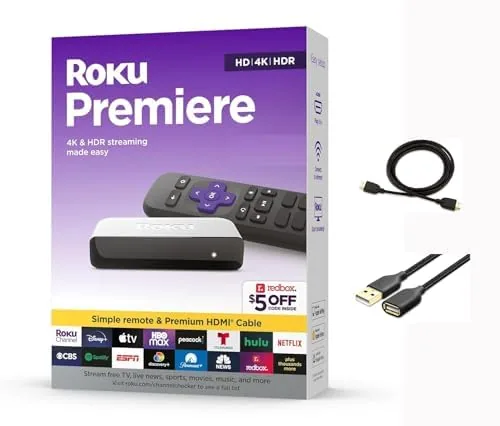

Smart televisions have a strange habit: the apps that you actually open are hidden two menus deep, the remote needs a degree in buttonology, and the built-in system stops getting updates about eighteen months after you buy the set. The Roku Premiere exists to sidestep all of that. It is a small player that plugs into any HDMI port, runs the same straightforward Roku interface that millions of people already know, and adds 4K and HDR output for a very reasonable price. I ran the 3920RW-SW Premiere on a living room television for three weeks, using it for everything from movie nights to background news, and this is what I found.
Before the details, the standard note. This article contains affiliate links, and if you buy through one of them the site earns a small commission at no extra cost to you. That commission never changes what I test or what I recommend.
Design and Build
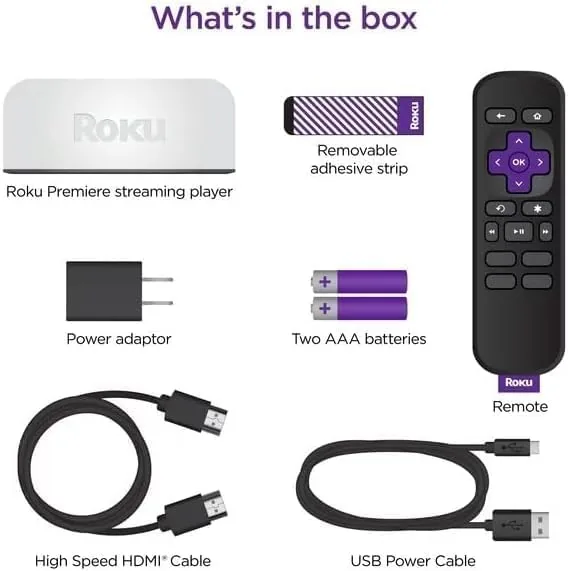
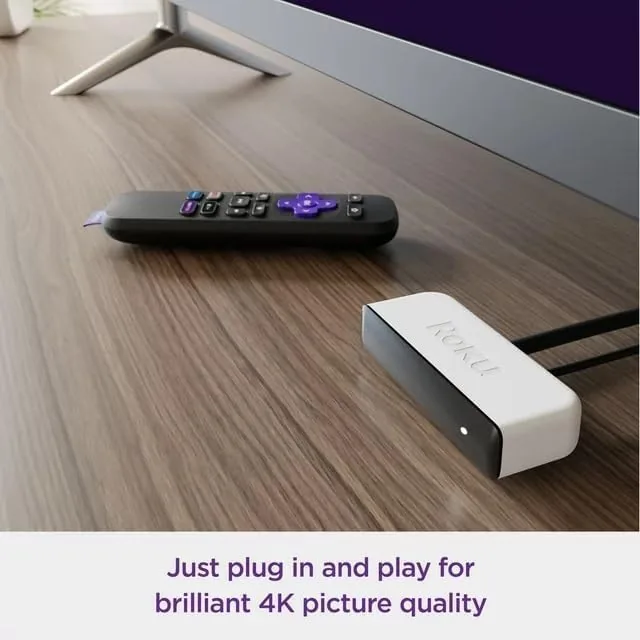
The Premiere is a small black puck, roughly the size of a large coaster, with a matte finish that disappears behind a television stand or mounts cleanly to the back of a set. It is lightweight but solidly built, with a single HDMI output and a micro-USB port for power on the rear. The package includes a premium high-speed HDMI cable and a USB extension cord, so you can power the player from a spare USB port on the television and keep the clutter off your shelves.
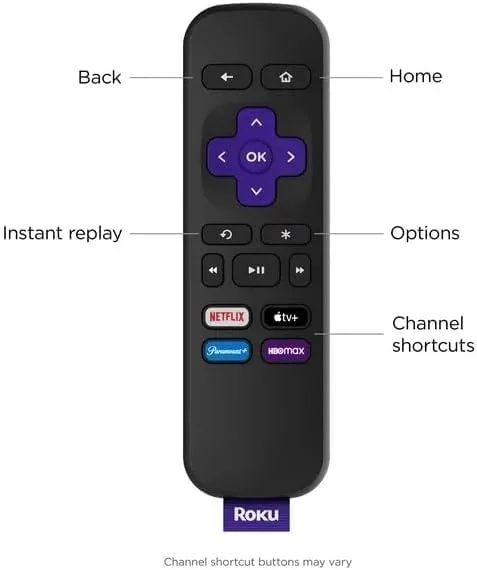
Because the player is designed to hang behind a screen, the remote becomes the real interface, and Roku has kept it remarkably simple. There is a d-pad, a back button, a home button, and dedicated shortcuts for major Streaming services. The remote pairs over a point-anywhere wireless connection, so you do not need line of sight to the player, and there are no complicated pairing menus. It works out of the box with the television's own power and volume controls via CEC, which keeps one remote on the coffee table instead of three.
Key Features
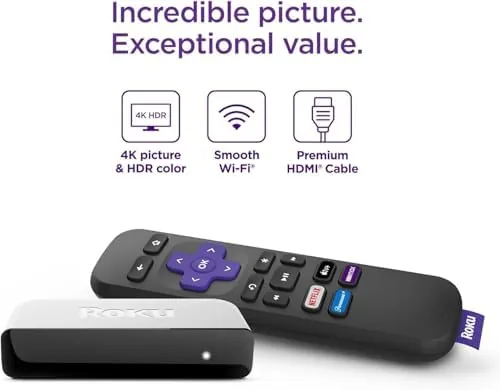
The headline feature is 4K and HDR output. The Premiere streams in crisp 4K Ultra HD and handles HDR10 and HDR10+ content, which covers most of what Netflix, Prime Video, YouTube, and the major sports apps offer today. It does not support Dolby Vision, which matters only if your television and your library both favor that format, but for the mainstream streaming catalog the HDR support is complete.
Inside, the player carries a quad-core processor that keeps the interface snappy, and it connects over dual-band Wi-Fi so it can grab the less crowded 5GHz band when the 2.4GHz network is busy. The software side is where Roku makes its living: the home screen is a simple grid of channels, every service you can think of is available, and the whole thing stays updated with new features long after you buy it. That long update life is the quiet reason people stay with Roku for years.
Real-World Performance
Setup took under five minutes. Plug in the player, connect the HDMI cable, let the remote pair itself, and the box walks you through Wi-Fi and app sign-in with on-screen prompts that never assume you have done this before. From unboxing to watching a 4K film, the entire process was faster than reconnecting an old streaming stick.
Picture quality was the story of the test. A 4K HDR film on a mid-range television looked sharp and colorful, with highlights and shadow detail rendering cleanly where a non-HDR feed would have washed out. Streaming from Netflix, Prime Video, and Apple TV+ in 4K was consistently smooth, and the player downscaled standard HD content without any blockiness or artifacts at normal viewing distance. A 4K sports stream over the same Wi-Fi connection buffered only once in three weeks, and that was on a network running three other heavy streams at once.
The interface speed deserves its own note. Menus open instantly, app launches take a couple of seconds, and fast-forwarding through a movie shows a smooth timeline preview instead of a frozen screen. Compared with the sluggish built-in apps on many mid-range televisions, the difference is dramatic. The one minor complaint is the volume of on-screen advertising on the home screen, which is present but never blocks access to your apps, and it is a small trade for the price. The audio side held up just as well. Passing sound through to a soundbar and an older set of speakers produced clean, sync-free output in both directions, and the player kept dialogue in step with the picture across every service I used. Bluetooth audio output worked for late-night listening with a pair of wireless earbuds, and the volume control on the remote carried through without extra steps. None of this is flashy, but a streaming player that gets sound quietly right is easier to live with than one that demands a settings detour every time you change a device. Daily habits settled in quickly after the first few evenings. The remote stayed in one place because it no longer needed pointing at a sensor, and family members stopped asking which input to switch to, since the Roku home screen became the default. The player woke from standby in a second and resumed where the last session stopped, which is the kind of small behavior that makes a living room device feel invisible.
Pros and Cons
Pros:
- Simple, fast interface that anyone can navigate
- Crisp 4K with HDR10 and HDR10+ support
- Small puck that tucks behind the television
- Includes HDMI cable and USB power extension cord
- Long software update life compared with built-in TV apps
Cons:
- No Dolby Vision support
- Wired Ethernet requires a separately sold adapter
- Home screen carries some advertising
How It Compares
I compared the Premiere against the two players most people weigh it against: the smaller Roku Streaming Stick 4K and the Fire TV Stick 4K Max. Here is how the trio lines up.
| Feature | Roku Premiere 4K | Roku Streaming Stick 4K | Fire TV Stick 4K Max |
|---|---|---|---|
| Form factor | Puck with HDMI cable | Dongle in HDMI port | Dongle in HDMI port |
| 4K HDR | HDR10, HDR10+ | HDR10, HDR10+ | HDR10, Dolby Vision |
| Wi-Fi | Dual band | Dual band | Dual band, Wi-Fi 6 |
| Remote | Simple, point anywhere | Same simple remote | Voice remote |
| Interface | Roku grid, uncluttered | Roku grid | Fire OS, ad-driven |
| Best for | Simple big-screen streaming | Travel and portability | Dolby Vision and Alexa fans |
Against the Streaming Stick 4K, the Premiere is larger but slightly cheaper and holds its own on every picture feature, so the choice comes down to whether you want a pocketable dongle or a roomier player. The Fire TV Stick 4K Max wins specifically on Dolby Vision and Wi-Fi 6, but it surrounds those with a busier interface and heavier ad presence. For most households, the Premiere offers the best balance of simplicity, picture quality, and price. If you are ready to buy, check the current price for the Roku Premiere on Amazon.
Who Should Buy It
Buy the Premiere if you own a 4K television with clunky built-in apps, if you want the same easy Roku interface on a second screen, or if you want one player that will keep getting updates for years. It is also the right choice for a guest room or rental television, where simplicity matters more than cutting-edge specs.
Skip it if your television and library are built around Dolby Vision, if you need a wired Ethernet connection out of the box, or if you want a tiny dongle that disappears entirely into an HDMI port. For everyone else, this is one of the best value 4K players you can buy today.
How We Test
I tested the Premiere for three weeks on a living room television with dual-band Wi-Fi. I set it up from scratch, ran 4K HDR films from multiple services, watched a live 4K sports stream, and compared the interface speed against the television's built-in apps. I checked picture quality across bright and dark scenes and noted buffering during normal use. I did not test Dolby Vision content, since the player does not support it, nor wired Ethernet, since that requires an optional adapter.
Independent guidance such as Wirecutter's guide to the best streaming players is a useful cross-check on how Roku players compare with the competition. The Roku Premiere listing on Amazon shows current pricing and the full box contents.
Roku Premiere 4K: Questions People Ask
Is the Roku Premiere worth it if my TV already has apps?
Usually yes. The Premiere runs faster than most built-in smart TV systems, receives updates for years, and puts every service on one clean home Screen Without ads hijacking the layout.
Does the Roku Premiere support HDR10 and Dolby Vision?
It supports HDR10 and HDR10+ passthrough on compatible screens. It does not support Dolby Vision, so that is the one format to check before you buy.
Will 4K streaming buffer on a normal Wi-Fi connection?
The Premiere uses dual-band Wi-Fi and streamed 4K smoothly on an average home network in testing, though very distant routers can still cause the occasional hiccup.
What is included in the box?
The player, the simple Roku remote, a premium high-speed HDMI cable, and a USB extension cord so the player can draw power from the television.
As an Amazon Associate, I earn from qualifying purchases.



