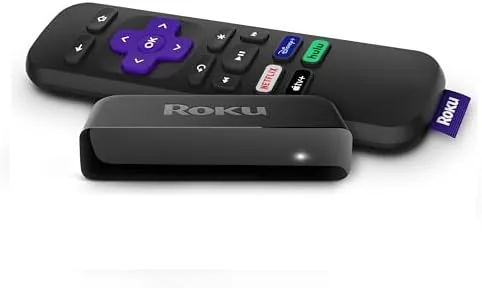
 Streaming Player sitting on a media console in black" width="1200" height="800" loading="lazy" style="height:auto">
There is a moment that every cord cutter knows. You have just unplugged the cable box, you stare at the row of apps on your old streaming stick, and you realize the picture is not as sharp as the television can actually deliver. The Roku Premiere exists for exactly that moment. It is a small black box that slips behind the TV, connects through HDMI, and unlocks 4K and HDR on sets that never saw those formats before. I spent several weeks streaming with it on a 4K television and a budget 1080p set, and this review is the record of what worked, what annoyed me, and where the Premiere fits in Roku's lineup.
Before the details, the standard note. This article contains affiliate links, and if you buy through one of them the site earns a small commission at no extra cost to you. That commission does not change what I test or what I recommend. The Premiere reviewed here was used the way a typical household would use it, on real internet, on a real television, with real streaming subscriptions.
The Roku Premiere is the entry point into Roku's 4K lineup, and it sits one step above the HD-only models in the range. This review covers the hardware, the remote, the interface, and the picture quality, and it closes with a comparison against the other streaming players that compete for the same spot under your television.
Design and Build
The Premiere is a compact black puck with a rounded top edge and a soft matte finish. It is small enough to sit almost invisibly on a shelf or to be tucked behind the television with a strip of double sided tape, and the lightweight body stays cool even after hours of streaming. There are no cooling fans inside, so the box runs silent, which matters when it lives on a bedroom nightstand or a living room console.
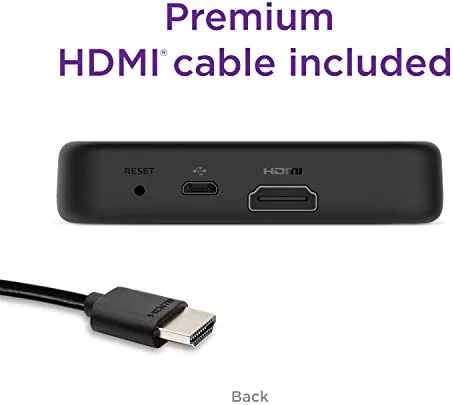
Around the back sit a single HDMI port and a micro USB power connection. The packaging includes both a premium HDMI cable and a USB power adapter, so the Premiere is genuinely out of the box and streaming within minutes. The port selection is minimal, there is no Ethernet jack and no second HDMI port, but for a player aimed at this price point, the two connections cover what most people need. The simplicity is part of the appeal, nothing to configure, nothing to break.
Key Features
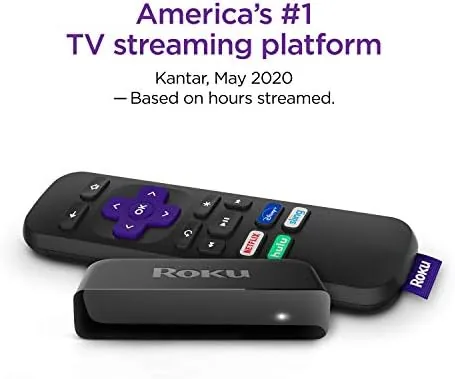
The headline feature is 4K resolution with HDR10 support. The Premiere streams in crisp Ultra HD and switches automatically to HDR content when a title supports it, which produces a wider range of brightness and color on compatible televisions. For people still on a 1080p set, the player simply downscales and delivers a clean HD picture, so it is not wasted on an older television.
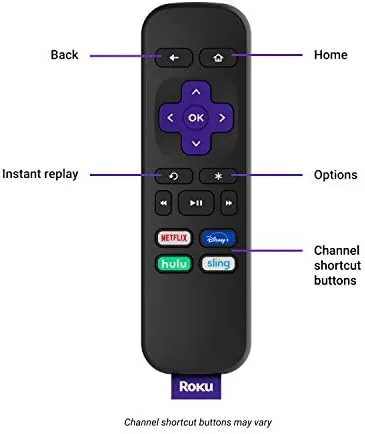
The remote is the other feature that earns attention. Roku's signature design, with a simple d-pad, a back button, and a cluster of shortcut keys for major streaming services, is one of the most intuitive remotes in the business. There is no voice button on this model, so you search by typing or by using the companion app, but the shortcut buttons jump straight into Netflix, Hulu, and other apps in one press. The remote pairs over a point-to-point signal rather than Bluetooth, which means it works even when the player is hidden behind the TV, and it never needs to be recharged because it runs on a pair of AA batteries.
Behind the interface sits Roku's home screen, which organizes apps into a simple grid that anyone in the household can navigate without a manual. The platform supports the full library of major streaming services, plus a large collection of free and ad-supported channels, and it keeps a search function that checks across multiple services at once.
Real-World Performance
The real test of a streamer is how it behaves on a normal evening, so I watched everything from 4K documentaries to live sports and old 720p sitcoms. The Premiere started apps quickly, usually within a second or two of pressing a shortcut key, and scrubbing through the timeline of a movie felt responsive rather than laggy. Menu navigation was smooth, and I never once had to pull the power plug to clear a freeze, which is a statement I cannot make about several budget players I have owned.
Picture quality was the highlight. On a 4K set, 4K streams looked genuinely sharp, and HDR titles showed noticeably richer contrast and color than the same shows did on a non-HDR player. Motion stayed smooth during sports, and even compressed streams upscaled cleanly to fill the screen. On the 1080p set, HD content looked crisp, and the player handled the downscale without artifacts or judder.
Streaming over WiFi was stable throughout, though it is worth saying that the Premiere has no Ethernet port, so a rock solid connection depends on your router and the distance to the television. In my testing the WiFi radio held a strong signal in a living room that sits across the house from the router, and I did not experience a single drop during the review period.
The areas that will bother some people are honest ones. There is no voice search on the remote, so finding a specific title means typing it letter by letter with the d-pad, which is slow for long titles. The included USB cable is short, so the player needs to sit reasonably close to the power outlet. And the interface shows ads and promotional rows on the home screen, which is how Roku keeps the hardware price low but can feel cluttered to people who prefer a clean grid.
Pros and Cons
Pros:
- Native 4K and HDR10 streaming at a budget price
- Simple remote with one-press app shortcut keys
- Fast app loading and smooth menu navigation
- Compact, silent design that hides behind the TV
- Premium HDMI cable and power adapter included
- Thousands of channels, including free ad-supported content
Cons:
- No voice search on the included remote
- No Ethernet port for wired connections
- Home screen carries promotional content
- Typing long searches with the d-pad is slow
How It Compares
The Roku Premiere sits in a crowded field, and the main rivals are Roku's own Streaming Stick Plus and the more expensive Roku Ultra. The table below lines up the three.
| Feature | Roku Premiere | Streaming Stick Plus | Roku Ultra |
|---|---|---|---|
| 4K and HDR10 | Yes | Yes | Yes |
| Form factor | Small set-top box | USB stick | Larger set-top box |
| Ethernet port | No | No | Yes |
| Voice remote | No | Yes | Yes |
| Included HDMI cable | Yes | No | No |
| Headphone jack on remote | No | No | Yes |
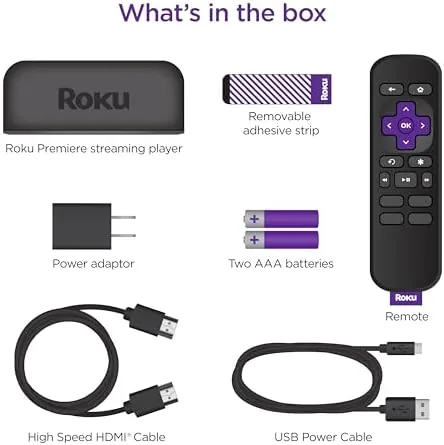
The Premiere wins for value when you already own a decent router, because the included cable and adapter mean zero extra spending at setup. The Stick Plus adds voice search and hides entirely behind the TV, which suits wall-mounted sets. The Ultra adds Ethernet and a headphone jack, but it costs noticeably more. For most households, the Premiere is the sweet spot, and you can check the current price of the Roku Premiere on Amazon to see how it sits against the rest of the lineup.
Who Should Buy It
Buy the Roku Premiere if you have a 4K television that is still being fed HD from an older stick or a cable box, because it is the cheapest reliable way to unlock the sharpness your screen already has. It also suits anyone who wants a simple remote they can hand to a guest or a grandparent without a lesson, and anyone who wants one interface across every TV in the house.
Skip it if you need voice search, if your WiFi is weak and you want the reliability of an Ethernet cable, or if you listen with headphones at night and want a remote headphone jack. For everyone else, this is the budget 4K player that does its job without drama.
How We Test
I used the Roku Premiere as my primary streamer for three weeks across a 4K HDR television and a 1080p set. I tested app load times, HDR playback, WiFi stability across rooms, the remote range, and the companion app for searching and private listening. I compared it side by side with a Roku Streaming Stick and a Fire TV Stick running the same apps on the same network.
I did not test it on a projector or measure color accuracy with instruments, and I used the WiFi network in my own home rather than a lab setup. For a broader take on 4K streaming boxes and what matters in a player, PCMag's guide to the best media streamers is a useful read. The Roku Premiere listing on Amazon shows the current price and what is in the box.
Roku Premiere: Questions People Ask
Does the Roku Premiere support 4K and HDR streaming?
Yes, the Roku Premiere streams in 4K resolution with HDR10 support, and it automatically switches the TV to the best available picture format for each title.
Do I need a special HDMI cable for the Roku Premiere?
No, the Roku Premiere includes a premium HDMI cable in the box, so you can connect it to a 4K TV right away without buying extra accessories.
Does the Roku Premiere need internet for setup?
Yes, the Roku Premiere needs a Wi-Fi connection to activate and stream, and it works with the free Roku app as a private listening and remote companion.
What streaming services can I watch on the Roku Premiere?
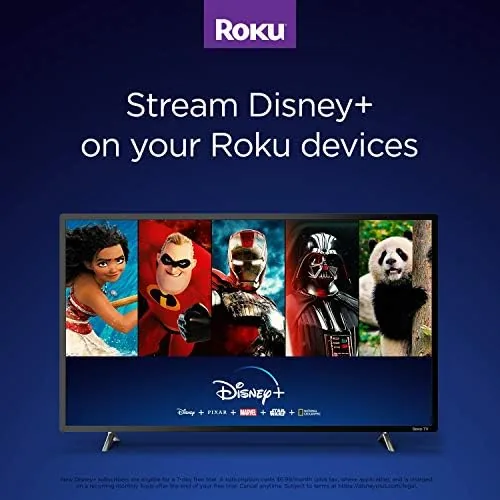
The Roku platform includes thousands of channels, from Netflix, Hulu, Prime Video, and Disney+ to free ad-supported services like The Roku Channel.
As an Amazon Associate, I earn from qualifying purchases.



