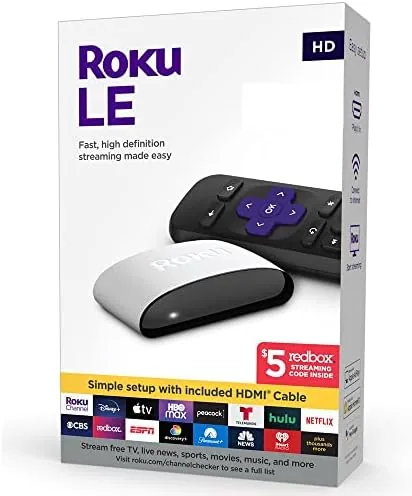

There is still a television somewhere in most homes that is not smart. A spare set in the bedroom, an older panel in the garage, or a living room screen that predates built-in apps. That television can gain thousands of streaming channels for less than the cost of a pizza, and the Roku LE HD is one of the most affordable ways to do it. Roku has spent years perfecting a simple interface that anyone can navigate, and the LE HD brings that experience to older HD televisions at the lowest end of the price scale. I connected one to a spare bedroom TV for two weeks, and this review records how it performed.
Before the details, the standard note. This article contains affiliate links, and if you buy through one of them the site earns a small commission at no extra cost to you. That commission does not change what I test or what I recommend, and the player here was set up the way a first time buyer would set it up.
The Roku LE HD is a small streaming player that plugs into an HDMI port and runs on Wi-Fi. It streams in up to 1080p HD, which makes it a perfect match for the HD televisions it is designed for, and it runs the same Roku operating system used across the company's lineup. The rest of this review covers the hardware, the setup, the app selection, and the honest limits of a budget HD Streamer.
Design and Build
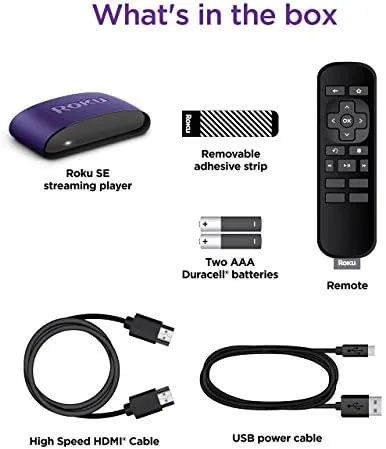
The LE HD is a compact black unit about the size of a deck of cards, with a fixed HDMI connector and a micro USB power port on the side. The design is deliberately minimal, there are no Buttons on the device itself because the remote handles everything. The build is light plastic, but the case is sturdy enough and the passive cooling is silent, with no fan to hum while you watch.
The included remote is the Roku classic, a rounded clicker with a directional pad, a home button, back and options buttons, and dedicated shortcut keys for popular streaming services. The remote pairs with the player over Wi-Fi Direct rather than infrared, which means it does not need line of sight to work, and it comes with a micro USB cable and power adapter in the box.
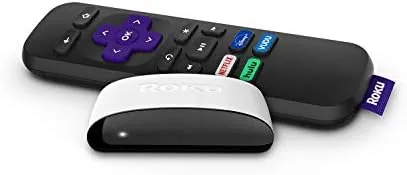
The hardware is simple because the software does the heavy lifting. There is no storage to manage, no antenna, and no complex ports to configure. The unit draws power from its adapter and delivers the Roku experience through a single HDMI connection, which keeps setup time to a few minutes for anyone who can plug in a cable.
Key Features
The headline feature is the Roku operating system. It is the most approachable streaming interface on the market, with a simple home screen of square channel tiles that you scroll through and select. The system learns which apps you use most and surfaces them at the front, and the universal search lets you find a title across all your services at once instead of checking each app separately.
The app selection is the second feature that matters. The Roku Channel Store offers thousands of channels, including Netflix, Hulu, Prime Video, Disney Plus, Peacock, Max, and a long list of free ad supported services. For a budget HD player, the catalog is essentially the same one you get on Roku's most expensive models, which is the core value of the platform.
The LE HD also supports free live television through the Roku Channel, which bundles a lineup of free ad supported channels and recent movies alongside the paid services. The voice search button on the remote, available through the free Roku mobile app, lets you search by speaking a title rather than typing it with the on screen keyboard, and the player auto-sleeps when idle to save power.
Real-World Performance
Setup took under ten minutes from opening the box to watching the first show. I plugged the player into the HDMI port of a spare HD television, connected the power adapter, and followed the on screen prompts to join the Wi-Fi network. The player downloaded its updates and showed the home screen without any account trouble, and I was streaming a movie before the kettle boiled.
The interface is fast for the price. Channel tiles load in a beat, menus scroll smoothly, and the remote responds instantly through Wi-Fi Direct, even when the player sits behind the TV out of line of sight. On the spare bedroom television, which has no smart features of its own, the Roku made the whole experience feel modern and responsive, a genuine upgrade for a dated panel.
Streaming quality held up across the two week test. HD content on Netflix and Prime Video played cleanly with no buffering on a solid home Wi-Fi connection, and the 1080p output matched the television's native resolution perfectly. The free Roku Channel lineup worked the same way, loading live news and on demand movies without complaint, which adds real value on top of the paid subscriptions.The honest limits are worth stating. The LE HD outputs 1080p only, so it cannot drive a 4K television at its full resolution, and pairing it with a 4K set would waste the panel's capability. The 2.4GHz Wi-Fi support is adequate for HD streaming but is not the fastest option available. And the player has no Ethernet port, so a wired connection is not possible if your Wi-Fi is weak. For the televisions this player is meant for, none of those limits matter.
Pros and Cons
Pros:
- Simple, approachable Roku interface anyone can learn
- Thousands of channels including free ad supported options
- Fast setup with a Wi-Fi Direct remote, no line of sight needed
- HD streaming matches older televisions perfectly
- Universal search across all subscribed services
- Very affordable entry price
Cons:
- 1080p output only, no 4K support
- No Ethernet port for wired connections
- 2.4GHz Wi-Fi only, not the fastest available
How It Compares
The LE HD competes with other budget streamers and with Roku's own higher tier players, and the table below lines up the main options.
| Feature | Roku LE HD | Roku 4K Player | Generic HD Dongle |
|---|---|---|---|
| Resolution | 1080p HD | 4K and HDR | 1080p HD |
| Interface | Roku OS | Roku OS | Varies by brand |
| Ethernet port | No | Optional models | Rare |
| Channel library | Thousands | Thousands | Hundreds |
| Price point | Budget | Mid | Budget |
The 4K Roku player costs more and adds 4K and HDR, but those features are wasted on an HD television. A generic HD dongle is similarly priced but runs a less polished interface and a smaller channel library. For anyone pairing a player with a standard HD panel, the LE HD delivers the best interface and the biggest app selection at the lowest price.
Who Should Buy It
Buy the Roku LE HD if you have an HD television without smart features and want to bring it into the streaming era cheaply. It suits spare bedroom TVs, older living room panels, and any household that values a simple interface over cutting edge specs. It is also a great first streamer for someone who is not technical, because the Roku interface is famously easy to navigate.
Skip it if your television is 4K, because you would be leaving resolution on the table and should step up to a 4K player. For HD televisions, this is the best value in the streaming market. You can check the current price of the Roku LE HD on Amazon when you are ready.
How We Test
I connected the Roku LE HD to a spare HD television and used it as the primary streamer for two weeks. I timed the setup from unboxing to first stream, tested the interface speed across navigation and channel launching, and streamed a range of content from Netflix, Prime Video, and the free Roku Channel. I also verified remote behavior through Wi-Fi Direct with the player hidden behind the television, and I checked the power draw and heat of the unit during extended sessions.
I did not test the player on a 4K television, because it is not designed for that output, and I did not stress test it on an unreliable Wi-Fi network, so performance in that scenario is based on the player's 2.4GHz support rather than a direct test. For a broader look at how Roku players compare across the lineup, TechRadar has a guide to the best Roku devices that is worth reading. The Roku LE HD listing on Amazon shows the current price and what is included in the box.
Roku LE HD Streaming Player: Questions People Ask
What video quality does the Roku LE HD support?
The player tops out at 1080p HD, so it pairs perfectly with older flat screens, while a 4K television would not use the extra resolution.
Which streaming apps work on the Roku LE HD?
The Roku Channel Store offers thousands of channels including Netflix, Hulu, Prime Video, Disney Plus, Peacock, and free ad supported services.
Is the Roku LE HD easy to set up for someone who is not technical?
Plug the player into an HDMI port, connect it to Wi-Fi, and follow the on screen prompts, and most people reach the home screen in under ten minutes.
How does the Roku LE HD compare to a 4K Roku player?
The LE HD costs less and loads quickly, but it cannot output 4K or HDR, so the 4K model only matters if your television and TV plan both support it.
As an Amazon Associate, I earn from qualifying purchases.



