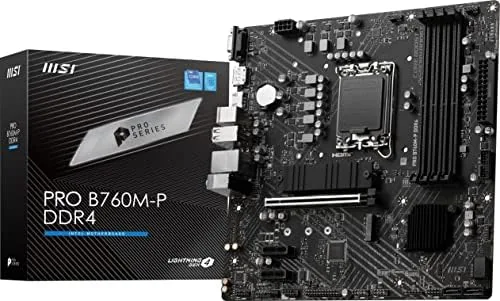

Building a new PC in 2026 comes with a quiet dilemma. The newest memory is fast and impressive, but DDR5 kits and the motherboards that support them still carry a premium. For a budget build, that premium is often the difference between a capable machine and one that busts the budget. The MSI PRO B760M-P takes the other path: it is a modern LGA 1700 motherboard that runs on DDR4, letting you pair a current Intel processor with affordable memory you might already own. I built a complete system around this mATX board to see exactly what you gain and what you give up.
Before the details, the standard note. This article contains affiliate links, and if you buy through one of them the site earns a small commission at no extra cost to you. That commission does not change what I test or what I recommend, and the board here was installed and used the way a builder would use it.
The rest of this review covers the layout, the features, the build experience, and the performance of this board in a real system.
Design and Build
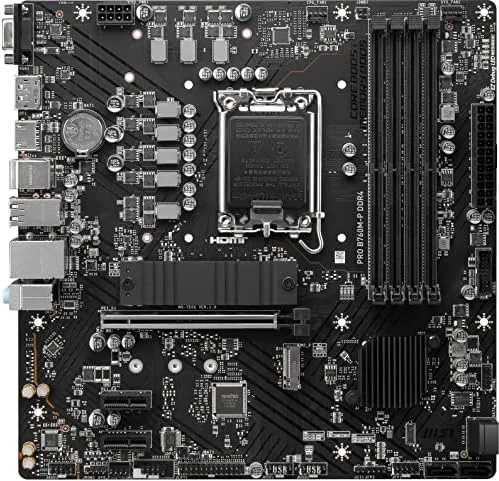
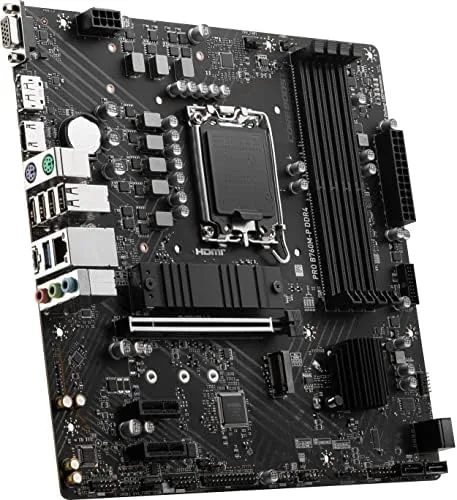
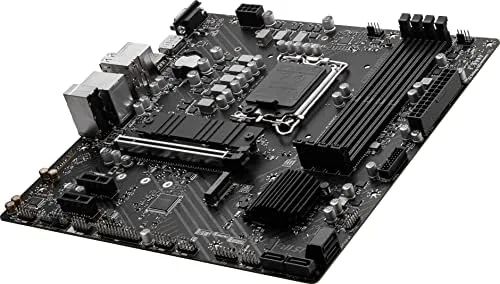
The PRO B760M-P is an mATX board, which means a 244 by 244 millimeter footprint that fits most compact cases. The layout is clean and practical, with the CPU socket, DIMM slots, and M.2 slot arranged for easy access, and the board uses a modest but adequate power delivery design for the processors it targets. The heatsinks are compact but cover the key VRM components, and nothing on the board feels like wasted space.
Build quality is in line with the price. The board is not a flashy gaming product, and that is the point: the PRO series targets reliable budget and office builds. The PCB is solid, the ports are well placed, and the components are soldered cleanly. There is no RGB lighting and no oversized armor, which keeps the price down and the board easy to work with.
Key Features
The headline feature is the platform itself. The B760 chipset brings current Intel features to a budget price, and the LGA 1700 socket supports 12th, 13th, and 14th Gen Intel processors, which gives builders a wide range of CPU choices from cheap quad cores up to capable mid-range chips. The board supports DDR4 memory, which is the deciding feature for many budget builders because it keeps the total cost of a system down.
Storage and expansion cover the essentials. The board has two M.2 slots, with the primary slot running at PCIe 4.0 speed for fast NVMe drives, and the secondary slot available for extra capacity. The main PCIe x16 slot is PCIe 4.0 for a graphics card, and there is a second shorter slot for expansion cards. USB 3.2 Gen2 ports on the rear provide fast connectivity for external drives and peripherals.
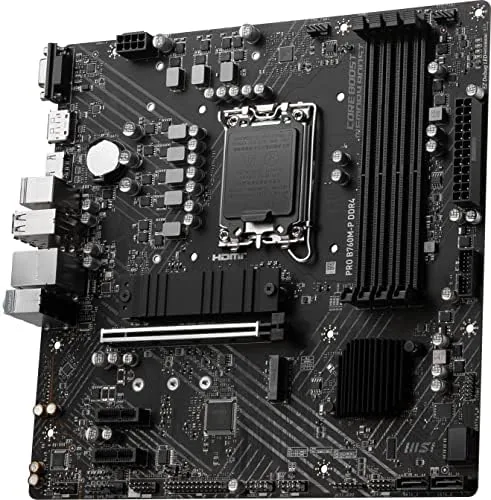
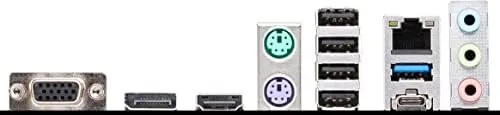
For display output, the board includes both HDMI and DisplayPort on the rear I/O, which matters for builds that rely on integrated graphics. Networking is handled by a wired Ethernet port, and the audio is the standard integrated codec, which is fine for most desktop use.
Real-World Performance
I built a full system on the B760M-P with a 13th Gen Intel processor, DDR4 memory, an M.2 SSD, and a mid-range graphics card, and the board performed exactly as a budget platform should. The processor posted on the first attempt, the DDR4 memory ran at its rated speed without adjustment, and the M.2 drive delivered its expected PCIe 4.0 read speeds in day to day use.
In everyday tasks the board was indistinguishable from a more expensive one. Boot times were quick, file transfers were fast, and the system felt responsive under normal desktop work and light gaming. The power delivery handled the processor without issue, and the VRM heatsinks stayed cool during sustained load, which is a good sign for a budget board running a mid-range CPU.
Gaming performance was limited by the graphics card rather than the board, which is exactly the relationship you want in a budget build. Frame rates in the titles I tested were in line with the GPU and CPU, and the PCIe 4.0 slot fed the card without bottleneck. For a system built on a budget, the board did not hold anything back.
The honest limitations are the ones you would expect at this price. The board has no Wi-Fi, so a wireless build needs an adapter. The audio is functional but not premium. The second M.2 slot runs at a slower speed than the primary, which matters for anyone planning two fast drives. And while the power delivery is fine for mid-range chips, this is not the board for a top-tier flagship processor under heavy overclocking. The details of the build experience deserve a mention, because they are where a motherboard earns its keep. The BIOS is the familiar MSI interface, which is well organized and easy to navigate for a first build, and it found the processor, memory, and drives without any fiddling. The four memory slots left room to add more RAM later, and the front panel headers were clearly labeled, which matters when you are working in a tight mATX case. The board also posted quietly and quickly on every cold start over the test period, with no unexplained hangs or resets. None of that is flashy, but it is precisely the reliability a budget builder is counting on when they put the system together and hand it over for daily use.
Pros and Cons
Pros:
- Supports a wide range of Intel 12th, 13th, and 14th Gen processors
- DDR4 memory keeps budget builds and upgrades affordable
- PCIe 4.0 M.2 slot for fast NVMe storage
- HDMI and DisplayPort for integrated graphics builds
- Compact mATX size fits most cases
- Reliable, no-nonsense design for daily use
Cons:
- No built-in Wi-Fi
- Secondary M.2 slot runs at a slower speed
- Audio is functional but not premium
- Power delivery is not suited to flagship overclocking
How It Compares
The B760M-P competes with other LGA 1700 boards, and the key choice for budget builders is DDR4 versus DDR5. The table below shows where the board lands.
| Feature | PRO B760M-P DDR4 | B760 Board DDR5 | Entry H610 Board |
|---|---|---|---|
| Memory support | DDR4 | DDR5 | DDR4 |
| M.2 slots | Two, one PCIe 4.0 | Two, PCIe 4.0 | Often one |
| PCIe x16 | PCIe 4.0 | PCIe 4.0 | PCIe 4.0 |
| Wi-Fi | No | Some models | No |
| Form factor | mATX | mATX or ATX | mATX |
| Best for | Budget DDR4 builds | Modern DDR5 builds | Lowest cost builds |
If you already own DDR4 memory or want to keep the memory cost down, the B760M-P is the smart choice. If you want the fastest memory on the platform, a DDR5 board is worth the premium. Against an entry H610 board, the B760M-P adds the second M.2 slot and better overall flexibility for a small price increase.
Who Should Buy It
Buy the MSI PRO B760M-P if you are building a budget or office PC on an Intel LGA 1700 processor and want to keep the memory cost low with DDR4. It is also a strong fit for anyone upgrading an existing system who wants to reuse DDR4 modules while moving to a modern platform, and for Compact Builds that need an mATX board.
Skip it if you need Wi-Fi built in, if you want the performance of DDR5 memory, or if you plan to push a flagship processor. For a dependable, No-Frills motherboard that keeps an Intel build affordable, this board is one of the most sensible options around. You can check the current price of the MSI PRO B760M-P on Amazon when you are ready.
How We Test
I built a complete system on the B760M-P with a 13th Gen Intel processor, DDR4 memory, an M.2 SSD, and a mid-range graphics card, then used it for a week of desktop work, file transfers, and gaming. I verified memory ran at its rated speed, checked M.2 throughput against expectations, and monitored temperatures during sustained load.
I also checked the VRM behavior under a mid-range processor to confirm the power delivery held up, and I compared the board's feature set against DDR5 and entry level alternatives. For a deeper look at motherboard selection and the B760 platform, the buying guide at Tom's Hardware covers the landscape in useful detail. The MSI PRO B760M-P listing on Amazon shows the current price and compatibility notes.
MSI PRO B760M-P: Questions People Ask
Which Intel processors does the B760M-P support?
The board supports Intel 12th, 13th, and 14th Gen processors on the LGA 1700 socket, which covers a wide range of budget and mid-range CPUs.
Does this board support DDR4 or DDR5 memory?
This version of the B760M-P uses DDR4 memory, which keeps the cost of a build down and lets you reuse existing DDR4 modules.
Does the B760M-P have Wi-Fi built in?
No, the board relies on the rear Ethernet port for wired networking, so you would need a Wi-Fi adapter or a different board for wireless.
Can I use two M.2 drives on this motherboard?
The board has two M.2 slots, so you can run two drives, with the primary slot running at PCIe 4.0 speed for fast storage.
As an Amazon Associate, I earn from qualifying purchases.



