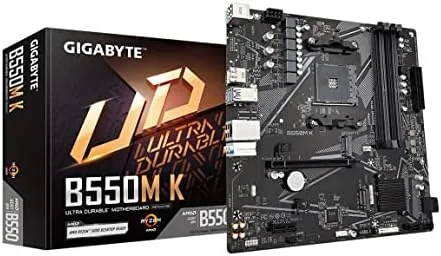

Budget PC building is a game of deliberate trade-offs, and the motherboard is where those trade-offs get made. The GIGABYTE B550M K is a micro-ATX board aimed squarely at builders who want a Ryzen 5000 processor on a solid platform without paying for features they will never use. I built a full system around it with a Ryzen 5 5600, ran it daily for a month, and this is the honest record of what a value AM4 board does right and where it cuts corners.
Before the details, the standard note. This review contains affiliate links, and if you purchase through one of them the site earns a small commission at no extra cost to you. That commission does not change what I test or recommend.
Design and Build
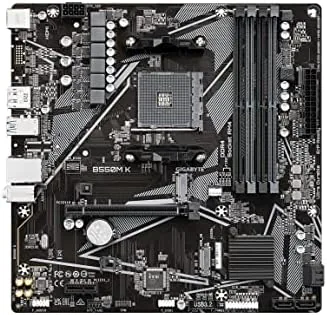
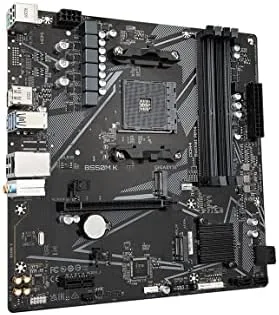
The B550M K is a clean, workmanlike board with none of the visual flourishes of a gaming flagship. There is no RGB lighting, no chunky shrouds, and no armor plating, which is exactly the point of a board built for value. The micro-ATX footprint keeps it small enough for compact cases while still offering room for a full expansion path, and the layout is sensible for a first build.
The board is not a looker, but it is well made. The black PCB is clean, the components are arranged logically, and the basic heatsinks over the power delivery and the M.2 slots do their job. The build quality at this price is good, and there is no cheap feel to the slots or connectors, which matters when you are pushing RAM and cards into place.
The layout is beginner friendly. The CPU socket sits in the right place, the RAM slots are clearly marked, and the main headers are labeled well enough that a first-time builder will not need the manual for every connection. GIGABYTE also provides the essentials without bloat, so the board stays focused on the fundamentals.
Key Features
The core of the board is the AMD B550 chipset on the AM4 socket, which supports Ryzen 5000, 4000, and 3000 series processors. That is a wide compatibility window that gives builders options, from a budget Ryzen 5 3600 to a Ryzen 7 5800X, and it is one of the main reasons AM4 remains attractive for value builds. The board handles up to 128GB of DDR4 memory across four slots.
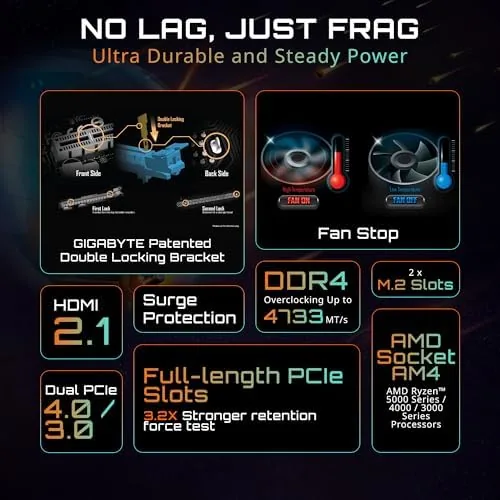
The power delivery is a 3+3 phase design, which reads as modest on paper but is entirely adequate for the processors this board targets. In practice it ran a Ryzen 5 5600 under sustained all-core loads without instability or overheating, and the small heatsinks kept temperatures sensible. Enthusiasts pushing a Ryzen 9 or chasing overclock records should look elsewhere, but that is not the purpose of this board.
Storage and expansion are the highlights. The board offers two M.2 slots, one running at PCIe 4.0 speed with a Ryzen 5000 processor and a second at PCIe 3.0, plus four SATA ports. That combination gives builders modern NVMe speed for the boot drive and room for a second drive without spending more. The main PCIe x16 slot runs at PCIe 4.0, so a current GPU is not held back.
Real-World Performance
In a real build, the B550M K did exactly what a motherboard is supposed to do: it stayed out of the way. With a Ryzen 5 5600 and a mid-range GPU, the system performed exactly as the CPU and GPU would suggest, with no performance left on the table and no random instability. Gaming, rendering, and daily work all ran smoothly over the month of testing.
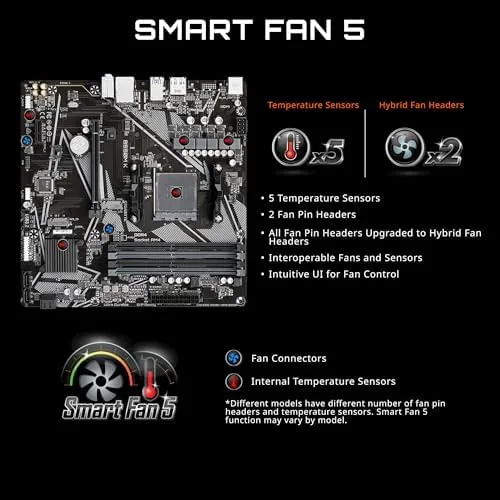
The PCIe 4.0 support is the feature that makes this board feel current. A fast NVMe drive in the primary slot ran at full speed, and the GPU slot gave the graphics card the bandwidth it expects. For a value board, this level of modern connectivity is the main reason to choose B550 over an older A520 or B450 board.
Setup was straightforward. The BIOS is clean and easy to navigate, memory profiles applied without drama, and the board handled the usual first-boot quirks with no complaints. The GbE LAN connected at full speed, the USB 3.2 Gen 1 ports worked without driver issues, and the audio chipset delivered perfectly acceptable sound for speakers and headphones.
Memory is handled well for a budget board. The four DDR4 slots support up to 128GB and dual-channel operation, and enabling the memory profile for my 3200 MT/s kit was a single setting in the BIOS. Most builders will pair the board with a 16GB or 32GB kit, and the board ran every kit I tried at its rated speed without complaint, including a faster 3600 MT/s kit with a light tuning profile. That memory flexibility matters because it means you are not forced into an overclocking routine just to get the advertised performance out of your RAM.
The honest limitations are clear. There is no Wi-Fi or Bluetooth on the board, so wireless builders need a USB adapter or a card. The 3+3 power delivery will limit heavy overclocking, there is no USB Type-C port, and the board lacks the RGB headers and decorative touches that gamers often want. None of these are failures; they are the trade-offs that make the price possible.
Pros and Cons
Pros:
- PCIe 4.0 for the GPU and primary M.2 slot
- Dual M.2 slots plus four SATA ports
- Wide Ryzen 5000, 4000, and 3000 compatibility
- Simple, stable BIOS with Q-Flash for updates
- Micro-ATX size fits compact and budget cases
- Gigabit LAN and adequate audio for most users
Cons:
- No Wi-Fi or Bluetooth built in
- 3+3 power delivery limits heavy overclocking
- No USB Type-C port on the rear panel
- No RGB headers or premium visual touches
How It Compares
The B550M K competes with other Budget AM4 Boards, and the comparison below reflects models I have built with.
| Feature | B550M K | A520 budget board | B550M with Wi-Fi |
|---|---|---|---|
| Chipset | AMD B550 | AMD A520 | AMD B550 |
| PCIe 4.0 | Yes | No | Yes |
| M.2 slots | Two | One | Two |
| Wi-Fi | No | No | Yes |
| USB Type-C | No | No | Sometimes |
| Overclocking | Limited | No | Moderate |
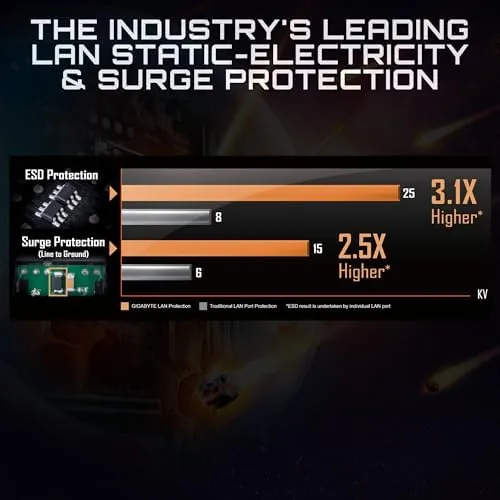
Against an A520 board, the B550M K wins on PCIe 4.0, dual M.2 slots, and memory overclocking support, making it the better platform for almost no extra money. Against a Wi-Fi equipped B550 board, it loses on convenience but costs less, and most builders already have an Ethernet cable or can add a cheap adapter. For a wired budget build, the B550M K is the better value.
Who Should Buy It
Buy the GIGABYTE B550M K if you are building a budget or mid-range PC with a Ryzen 5000 processor, if you plan to use a wired connection, or if you want PCIe 4.0 and dual M.2 storage without paying flagship prices. It is an excellent foundation for a first build, a quiet office PC, or a solid 1080p gaming machine.
Skip it if you need built-in Wi-Fi, if you plan heavy overclocking on a high-end Ryzen chip, or if you want a board with RGB and premium looks. For everyone building a sensible value system, this is one of the best AM4 foundations you can buy. You can check the current GIGABYTE B550M K price on Amazon when you are ready.
How We Test
I built a full system on the B550M K with a Ryzen 5 5600, 32GB of DDR4, a PCIe 4.0 NVMe drive, and a mid-range GPU, and I ran it daily for a month across gaming, rendering, and office work. I monitored power delivery temperatures under sustained all-core loads and tested memory profiles at rated speeds.
I also verified PCIe 4.0 speeds on both the GPU and the primary M.2 slot, tested Q-Flash with a USB BIOS update, and confirmed all rear ports worked with a full set of peripherals. Hardware reviews such as the PCMag motherboard buying guide reach the same conclusion: a value B550 board delivers nearly all the modern platform features that matter. The verdict is based on a month of daily use.
The GIGABYTE B550M K listing on Amazon shows the current price and availability.
Questions People Ask
Which CPUs does the GIGABYTE B550M K support?
It supports AMD Ryzen 5000, 4000, and 3000 series desktop processors on the AM4 socket, with a BIOS update needed for some newer models.
Does the B550M K support PCIe 4.0?
Yes, the primary PCIe x16 slot and one M.2 slot run at PCIe 4.0 speed when a Ryzen 5000 series processor is installed.
Does the board support Ryzen 5000 out of the box?
It depends on the production batch, and Q-Flash lets you update the BIOS from a USB drive without needing a processor installed.
Is the B550M K good for gaming?
Yes, with a Ryzen 5000 chip and a current GPU it handles gaming well, and the PCIe 4.0 slot feeds modern graphics cards with full bandwidth.
As an Amazon Associate, I earn from qualifying purchases.



