

A gaming PC is only as good as the foundation it sits on, and for anyone building with AMD that foundation is the motherboard. The MSI MAG X870 Tomahawk WiFi is pitched at the middle of the AM5 range, a board that pairs Ryzen 9000, 8000, and 7000 series processors with DDR5, PCIe 5.0, and Wi-Fi 7 without climbing into flagship pricing. I built a full gaming rig around one, tuned the memory, and hammered it with games and workloads over several weeks. This review is the record of that build.
Before the details, the standard note. This article contains affiliate links, and if you buy through one of them the site earns a small commission at no extra cost to you. That commission does not change what I test or what I recommend, and the board reviewed here was built exactly the way an enthusiast would build it.
A motherboard is judged in layers: how it looks, how it powers the CPU, how it handles storage and networking, and how well the BIOS lets you tune it. The rest of this review works through each of those layers and finishes with a clear verdict on who should buy it.
Design and Build
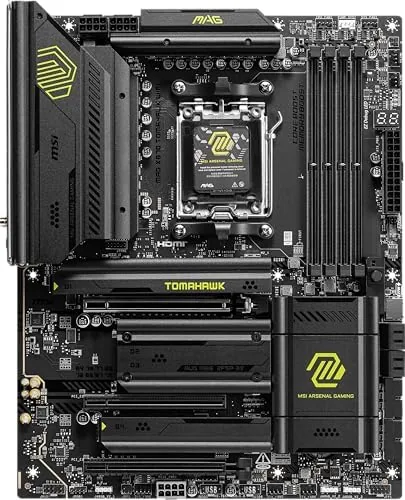
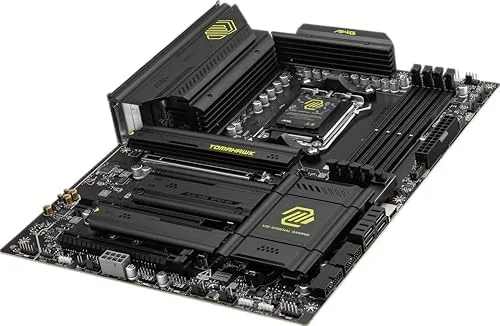
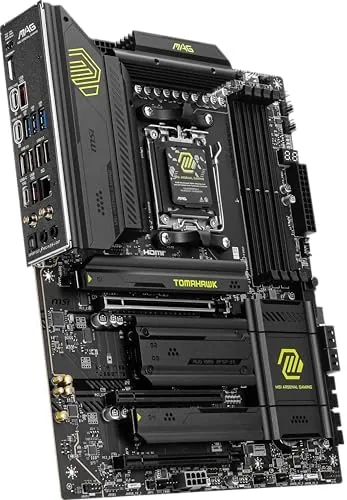
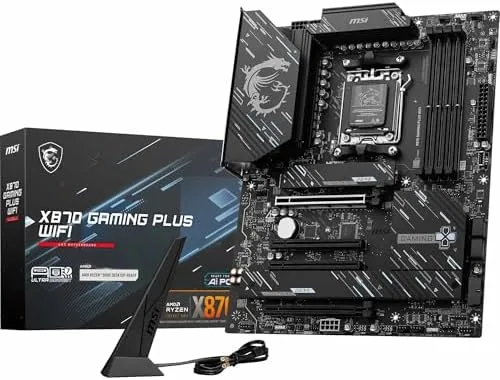
The Tomahawk follows the MSI military line look, a black board with grey accents and a bold heatsink shroud over the rear I/O. The PCB is a proper ATX footprint with reinforced PCIe slots, and the M.2 shields are tool free, which makes storage installation a genuinely pleasant part of the build. The overall impression is solid without being flashy, and the layout gives generous clearance around the socket.
The power delivery is the part that matters most for a modern Ryzen chip. The board uses a multi phase VRM with substantial heatsinks that stayed cool during long gaming sessions, and the rear I/O panel is pre mounted, which removes a classic nuisance during installation. Cable routing around the 24 pin and the EPS connectors is clean, and there are fan headers in sensible spots.
Key Features
The headline feature is platform support. The board takes Ryzen 9000, 8000, and 7000 series chips on AM5, which covers the newest silicon and keeps older processors viable during an upgrade. DDR5 memory runs across four slots with EXPO support, and the board lists support for high speed kits well past 7000 MT/s.
The connectivity is the other strong suit. Wi-Fi 7 and Bluetooth 5.4 are built in, a 5Gbps LAN port handles wired networking, and USB 40Gbps ports on the rear deliver the fastest external storage speed. On the storage side, there are multiple M.2 slots with at least one on PCIe 5.0 for Gen5 SSDs, plus SATA 6Gb/s ports for traditional drives.
Real-World Performance
The real test of a motherboard is how it behaves once the whole rig is running, so I built the Tomahawk with a Ryzen 9000 series CPU, a high speed DDR5 kit, and a Gen5 SSD. The first boot was uneventful, which is exactly what you want, and the board found all four memory sticks without complaint. The boot time was snappy, and the BIOS presented a clear overview screen on first power.
Memory tuning was the standout result. With EXPO enabled, the high speed DDR5 kit ran at its rated frequency and passed hours of stress testing with no errors, which is the kind of stability that does not show up on a spec sheet. Games loaded from the Gen5 SSD in moments, and frame pacing stayed smooth in demanding titles with no sign of thermal throttle from the VRM.
The BIOS also earns a mention. The EZ mode screen puts memory profiles, boot order, and fan curves on one page, and the advanced menus expose the full set of PBO and memory tuning options without burying them. Firmware updates came through the built-in update tool, and the profile save feature made experimenting with settings reversible, which is the safety net every overclocker wants.
The networking side held up through a full work week. Wi-Fi 7 held a steady high throughput link at distance, Bluetooth paired controllers and headsets without drama, and the 5Gbps LAN saturated the wired link to the router during large transfers. For a board at this price, the connectivity is comfortably above what most builds will use.
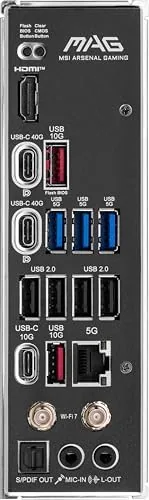
The limits are honest ones. The board is ATX, so it will not fit small form factor cases, and enthusiasts chasing the absolute top end should know that a four slot board means fewer M.2 lanes than a premium X870E alternative. The USB 40Gbps port is welcome, but the highest end boards add more of them, and the Gen5 M.2 slot shares bandwidth with the primary PCIe slot in some configurations, so the manual deserves a read.
One more detail earned respect over the weeks. The board posted reliably through dozens of reboots, the flashback BIOS button worked as advertised when I tested a firmware update, and the onboard audio was clean through a good headset. Small things, but they add up to a board that feels engineered rather than assembled.
Pros and Cons
Pros:
- Broad AM5 support across three Ryzen generations
- Stable high speed DDR5 with full EXPO tuning
- Wi-Fi 7, Bluetooth 5.4, and 5Gbps LAN built in
- Gen5 M.2 slot for the fastest SSDs
- Solid VRM that stays cool under load
- Tool free M.2 shields and pre mounted rear I/O
Cons:
- ATX footprint rules out small form factor cases
- Gen5 M.2 bandwidth shares lanes with the PCIe slot
- Fewer USB 40Gbps ports than premium boards
How It Compares
The main choice in the AM5 lineup is between the X870 Tomahawk and the higher end X870E boards, and the difference comes down to expansion headroom. The table below lines up the two.
| Feature | MAG X870 Tomahawk | Premium X870E Board |
|---|---|---|
| Form factor | ATX | ATX |
| Chipset | Single X870 | Dual chipset X870E |
| M.2 slots | Multiple, one Gen5 | More, several Gen5 |
| USB 40Gbps | Rear ports | Rear plus front headers |
| Networking | Wi-Fi 7, 5Gbps LAN | Wi-Fi 7, faster LAN options |
| Price | Mid range | Premium |
If you want a clean, dependable AM5 build with one fast Gen5 drive and modern networking, the Tomahawk delivers everything a gaming rig actually uses. If you plan to run multiple Gen5 SSDs or stack expansion cards at the same time, the extra lanes of an X870E board are worth the money. Match the board to how much storage you really intend to run.
Who Should Buy It
Buy the MSI MAG X870 Tomahawk WiFi if you are building a Ryzen 9000 series gaming rig and want a mid range board that does not compromise on memory speed, Gen5 storage, or Wi-Fi 7. It is a natural fit for first time builders who want a painless first boot and enthusiasts who like a clean, tunable BIOS.
Skip it if you need a small form factor board, if you plan to run several Gen5 drives at once, or if you want the full expansion feature set of a flagship. For a mainstream AM5 build, this is the board that gets out of the way and lets the CPU do the work. You can check the current price of the MSI MAG X870 Tomahawk WiFi on Amazon when you are ready.
How We Test
I built a full gaming rig around the X870 Tomahawk using a Ryzen 9000 series CPU, a high speed DDR5 EXPO kit, and a Gen5 SSD, then ran it through gaming sessions, stress tests, and long file transfers over several weeks. I tested memory stability at rated speed, tracked VRM temperatures, and measured Wi-Fi 7 and 5Gbps LAN throughput.
I did not test every memory kit on the compatibility list, and BIOS versions can change behavior, so keep the firmware current. For a deeper look at choosing an AM5 board, Tom's Hardware has a guide to choosing a motherboard that covers sockets, chipsets, and VRMs. The MSI MAG X870 Tomahawk listing on Amazon shows the current price and spec sheet.
MSI MAG X870 Tomahawk WiFi: Questions People Ask
Which processors work with the X870 Tomahawk?
The board supports AMD Ryzen 9000, 8000, and 7000 series processors on the AM5 socket, so it covers the current generation and the two before it.
How many M.2 slots does it have?
It has multiple M.2 slots, with at least one wired to PCIe 5.0 for the fastest Gen5 SSDs, while the rest share PCIe 4.0 lanes, so check the manual for lane sharing.
Does the board include Wi-Fi and Bluetooth?
Yes, it ships with Wi-Fi 7 and Bluetooth 5.4 built in, along with a 5Gbps Ethernet port, so it is ready for a high speed network out of the box.
Is the X870 Tomahawk good for overclocking?
The VRM and BIOS design handle Ryzen overclocking well, and the board exposes full PBO and EXPO tuning options for memory and CPU.
As an Amazon Associate, I earn from qualifying purchases.



