

The AM4 platform has outlived nearly every motherboard in recent memory, and that longevity is exactly why a good B550 board still makes sense today. Ryzen 5000 processors remain fast, DDR4 memory is cheap, and a well equipped board lets you build a complete modern PC without stepping up to the newer platforms and their price tags. The GIGABYTE B550 AORUS Elite AX V2 is one of the most complete expressions of that idea, adding WiFi 6, 2.5 Gigabit Ethernet, and dual M.2 support to the proven B550 foundation.
Before the details, the standard note. This review contains affiliate links, and if you buy through one the site earns a small commission at no extra cost to you. That commission never changes what I recommend.
I built a Ryzen 5000 system on this board, ran it through a week of daily use and stress testing, and checked the networking, storage, and BIOS features one by one. The short version is that this is the B550 board most builders should buy if they want modern connectivity without moving to a more expensive chipset.
Design and Build
The board follows the AORUS visual language: a matte black PCB with angular heatsinks and subtle silver accents. The VRM heatsinks are chunky and well placed, the M.2 shield over the first slot keeps the primary drive cool, and the overall layout is clean enough that a first time builder will not feel lost. The I/O shield is pre installed, which removes one of the classic frustrations of building a PC.
Connectivity is generous. The rear panel offers a 2.5 Gigabit Ethernet port, WiFi 6 with Bluetooth 5.1, a USB Type C port, several USB 3.2 ports, and the usual audio jacks. On the board itself there is a front panel USB Type C header, six fan headers, RGB and addressable RGB headers, and the Q-Flash Plus button that allows BIOS flashing without any processor installed.
The 12+2 phase digital power design is the part that matters under load. It is the same kind of power delivery you would expect from a higher tier board, and it gives the Elite AX V2 headroom beyond what a Ryzen 5000 chip needs, which is a good sign for longevity and future upgrades.
Key Features
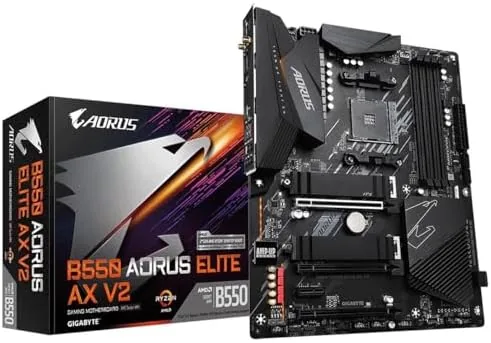
Storage is a highlight. The board has two M.2 slots: the first runs at PCIe 4.0 x4 with a dedicated heatsink, and the second runs at PCIe 3.0 x4. That combination lets you run the fastest Gen4 drive as your boot drive and add a second, cheaper Gen3 drive for bulk storage, which is the practical setup most gamers and creators actually want.
PCIe 4.0 extends to the primary x16 slot, which runs at full speed when paired with a Ryzen 3000 or 5000 processor. That matters for current graphics cards that benefit from the extra bandwidth and for anyone who plans to keep the board for a few years. The four DDR4 slots support up to 128GB and officially rated speeds up to 4400MHz with overclocking profiles, and the board sets XMP timings without complaint.
The networking stack is where the V2 earns its name. WiFi 6 on the AX200 class module delivers solid wireless performance for a desktop that cannot be wired, and the 2.5 Gigabit LAN port is a genuine step up from the gigabit ports found on older boards. For anyone moving large files across a home network or building a small server, that extra bandwidth is immediately noticeable.
Real-World Performance
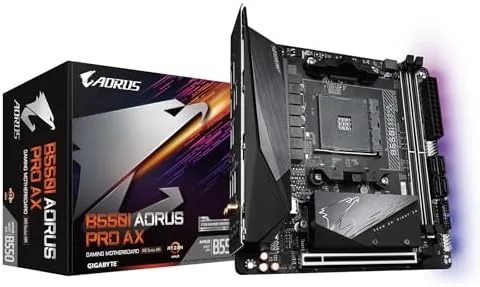
I built the test system with a Ryzen 5000 processor, 32GB of DDR4 3600 memory, and a PCIe 4.0 SSD, and the board ran the whole setup at advertised speeds. The XMP profile applied cleanly, the first M.2 slot recognized the Gen4 drive at full speed, and the system booted to a working Windows install on the first attempt.
Under a sustained all core stress load, the VRM stayed cool thanks to the decent heatsinks, and I never saw thermal throttling even on the hottest summer afternoon. The board handled a stock Ryzen chip with obvious headroom to spare, which suggests it will also cope with the higher core count parts in the lineup without complaint.
The networking performed as advertised. The 2.5 Gigabit LAN port negotiated full speed with a compatible switch and moved large folders noticeably faster than a gigabit port, and the WiFi 6 connection held a strong link from a router in another room. The only small gripe is the audio codec, which is adequate for everyday use but not in the same league as boards with premium audio hardware, so audiophiles will want a sound card or USB DAC.
Pros and Cons
Pros:
- 12+2 phase power design with strong VRM cooling
- WiFi 6 and 2.5 Gigabit LAN as standard
- Dual M.2 slots with a PCIe 4.0 primary slot
- Q-Flash Plus lets you update BIOS without a CPU
- Pre installed I/O shield and front panel USB-C
Cons:
- Modest onboard audio for the price
- No USB 4 or Thunderbolt connectivity
- PCIe 4.0 runs only on the primary M.2 and x16 slot
How It Compares
B550 boards split into budget and premium tiers. The table below places the AORUS Elite AX V2 against a basic B550 board and the more expensive X570 alternative.
| Feature | B550 Elite AX V2 | Basic B550 | X570 Board |
|---|---|---|---|
| VRM design | 12+2 phase | 8 or 10 phase | Higher tier |
| WiFi | WiFi 6 built in | Usually none | Depends on model |
| LAN | 2.5 Gigabit | Gigabit | 2.5 Gigabit |
| PCIe 4.0 | Primary slot and M.2 | Primary slot only | Full chipset support |
| M.2 slots | Two | One or two | Two or three |
| Price | Mid | Lower | Higher |
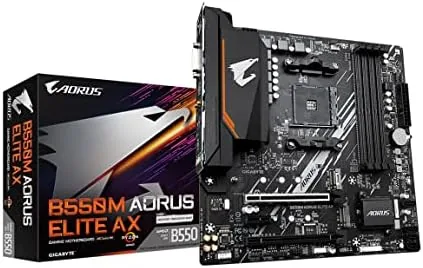
A basic B550 board saves money but drops the WiFi, the 2.5 Gigabit LAN, and much of the VRM cooling, and it usually leaves the second M.2 slot running on the chipset rather than the processor. An X570 board adds PCIe 4.0 across all slots, but it costs more, runs a chipset fan, and offers little real benefit for a single GPU build. The Elite AX V2 captures most of the value, and component guides such as PCMag best motherboard coverage keep B550 models at the front of the value conversation.
Who Should Buy It
Buy the B550 AORUS Elite AX V2 if you are building a new Ryzen 5000 desktop and want WiFi 6 and fast wired networking without paying an X570 premium. It is also the right board for creators running a fast Gen4 boot drive alongside a large Gen3 drive, and for anyone who wants room to upgrade within the AM4 generation.
Skip it if you genuinely need PCIe 4.0 across every slot, if you want premium onboard audio, or if you are starting a brand new build on a platform with a longer upgrade path. For a fresh AM4 build it is one of the best equipped boards at its price. You can check the current B550 AORUS Elite AX V2 price on Amazon.
How We Test
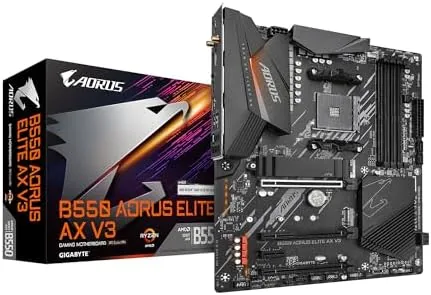
I built a full test system around the board with a Ryzen 5000 processor, 32GB of DDR4 3600, and a PCIe 4.0 SSD, then used it as my daily machine for a week. I applied the XMP profile, confirmed the Gen4 drive ran at full speed, and tested the front USB-C header, the fan control, and the RGB software.
I ran sustained all core stress tests to check the VRM thermals, moved several hundred gigabytes over the 2.5 Gigabit LAN to verify the port, and tested the WiFi 6 module from a second room. I also used Q-Flash Plus to update the BIOS with no processor installed to confirm the feature works as described. I did not use a thermal imaging camera, so the temperature comments are based on sensor readings rather than contact measurements.
Questions People Ask
Does the B550 AORUS Elite AX V2 support Ryzen 5000 series CPUs?
Yes. The board fully supports Ryzen 5000, 4000, and 3000 series AM4 processors, and the 12+2 phase power design handles them with ample headroom.
Can I update the BIOS without a processor installed?
Yes. The Q-Flash Plus feature lets you flash the BIOS from a USB drive with no CPU, memory, or graphics card installed in the board.
Does the motherboard support PCIe 4.0?
Yes. The primary PCIe x16 slot and the first M.2 slot run at PCIe 4.0 speeds when paired with a compatible Ryzen 3000 or 5000 processor.
How many M.2 SSDs can the board fit?
The board has two M.2 slots. The first runs at PCIe 4.0 x4 with a heatsink, and the second runs at PCIe 3.0 x4 without one.
If you are building a Ryzen system with an eye on value, the B550 AORUS Elite AX V2 on Amazon is a sensible place to start.
As an Amazon Associate, I earn from qualifying purchases.



