
Flying an FPV drone is a different kind of photography. You are not framing a shot from the ground, you are inside the shot, moving with the machine at speed, and the quality of what you see through the goggles decides whether you can fly well or just survive the flight. The DJI O4 Air Unit Pro attacks that problem from both ends. It records proper 4K footage at up to 120 frames per second from a 1/1.3 inch CMOS sensor, and it streams a smooth 1080p live view at 100 frames per second with a claimed 15 milliseconds of latency. I built an FPV quad around one and flew it hard for a month to test every claim.
The standard disclosure before the details. This article contains affiliate links, and if you buy through one of them the site earns a small commission at no extra cost to you. That commission never changes what I test or what I recommend.
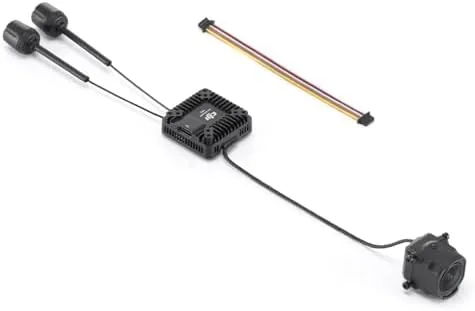
My first impression when I opened the box was that the unit is small and neatly made. The camera sits on a short arm with the transmission board mounted separately, a layout that keeps the sensitive electronics away from the heat and vibration of the frame. It is a component made for builders, and it rewards a careful build.
Design and Build
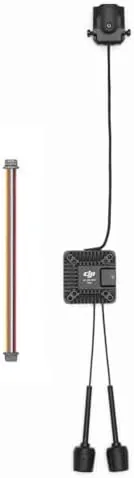
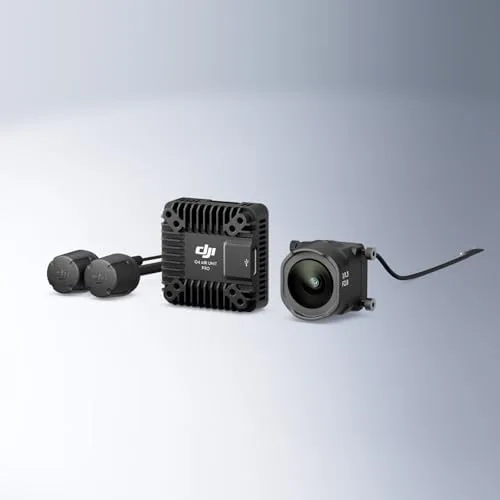
The O4 Air Unit Pro splits into two physical pieces. The camera is a compact sensor module with a wide 155 degree lens, and the transmission board handles the video encoding and radio link. They connect with a ribbon cable, so you can mount the camera on the front of the quad and tuck the transmission board inside the frame, away from the carbon and the prop wash.
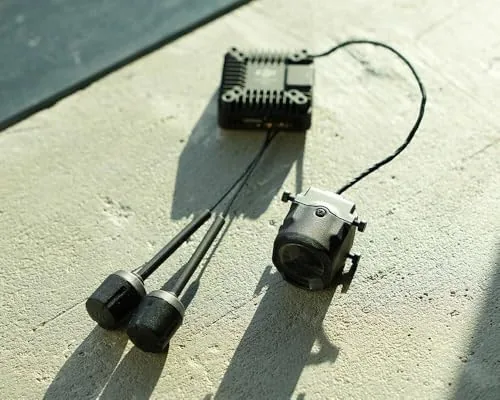
Build quality is what you expect from DJI at this level. The camera housing is solid metal, the lens is protected by a clear cover that ships fitted, and the transmission board is neatly laid out with clean connectors. The mounting bracket is compatible with the standard FPV frame patterns, and the whole unit weighs little enough that it does not disturb the balance of a well built quad.
Wiring is straightforward for anyone who has built a drone before. The board takes the flight controller connection and a battery feed, and the ribbon connects the camera, and the included instructions cover the pinouts clearly. For a first FPV build it is manageable, and for an experienced builder it is simple.
Key Features
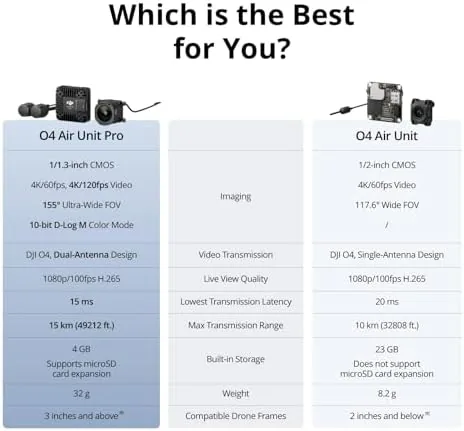
The headline feature is the 4K recording at 120 frames per second. On a 1/1.3 inch CMOS sensor, that combination gives you footage that is sharp enough for serious use and smooth enough for slow motion, which is exactly what FPV pilots want when they are pushing a quad through gaps and gates.
The second feature is the low latency live view. The system streams 1080p to the goggles at up to 100 frames per second, and the claimed 15 millisecond latency is what makes fast, close-quarters flying possible. You fly what you see, and what you see is happening essentially as it happens.
Range is the third pillar. DJI rates the system for up to 15 kilometers of transmission in ideal conditions, and while no one flies an FPV quad that far, the link strength matters close to home. It keeps the video feed locked and stable even around obstacles, which is where FPV links normally break up.
The 155 degree field of view rounds out the package. It is wide enough to give the Immersive, fast-feeling view that FPV flying is famous for, and the sensor and lens work together to keep the edges sharp rather than soft. For cinematic and freestyle flying alike, it frames the world the way a pilot wants it framed.
Real-World Performance
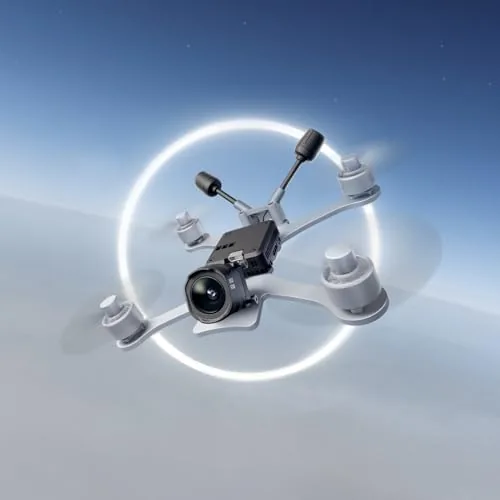
I flew the O4 Air Unit Pro for a month on a five inch freestyle quad, mixing park flying, gate practice, and a couple of cinematic runs. The first thing that struck me was the clarity of the live feed. The 1080p view through the goggles is noticeably crisper than older digital systems, and I could read terrain, branches, and gate spacing far earlier, which made flying easier and safer.
The low latency lived up to its billing. There was no perceptible lag between moving the sticks and seeing the quad respond, and that immediacy is what lets you fly confidently at speed. In the gates and around trees, the feed stayed locked, with none of the breakup that plagues analog systems at distance.
The recorded footage was excellent for a unit this size. The 4K capture is detailed with good color, and the 120fps mode gave me slow motion clips of power loops and dive recoveries that looked smooth and sharp. The 155 degree view gave the footage an immersive feel that narrower cameras cannot match, and the image stayed stable throughout.
The system ran reliably in the heat and the cold, with no thermal shutdowns and no signal drops in the areas I flew. The one thing I watched was battery draw, since the recording and transmission board adds load to the flight pack, but on a normal four minute flight the difference was minor and expected.
Pros and Cons
Pros:
- Sharp 4K recording at up to 120 frames per second
- Low latency 1080p live view that makes fast flying easy
- Wide 155 degree field of view for immersive footage
- Clean, solid build that mounts easily on a standard frame
- Long range link that holds strong close to obstacles
- Big step up in clarity over older digital FPV systems
Cons:
- Requires compatible DJI O4 goggles and controller
- Adds weight and battery draw to the flight pack
- Not a plug and play camera for a beginner build
How It Compares
FPV video systems fall into two camps, and the table below shows where the O4 Air Unit Pro lands against an analog system and an older digital system.
| Feature | DJI O4 Air Unit Pro | Analog FPV System | Older Digital System |
|---|---|---|---|
| Live view | 1080p at 100fps | Low resolution | 720p or 1080p |
| Recording | 4K at 120fps | Separate camera needed | Up to 4K at lower fps |
| Latency | About 15ms | Very low | Low to moderate |
| Range | Up to 15km | Short | Moderate |
| Field of view | 155 degrees | Depends on lens | 150 to 160 degrees |
| Best for | Serious FPV flying | Budget builds | Older fleets |
Against analog, the O4 wins on image quality and range but costs more and adds a little latency, though 15 milliseconds is imperceptible to most pilots. Against an older digital system, the O4 wins on live view clarity and 120fps recording. For anyone building a serious FPV quad today, it is the system that sets the new standard.
Who Should Buy It
Buy the DJI O4 Air Unit Pro if you are building an FPV drone and you want the sharpest live view and the best recording quality available, without the expense of a cinema camera rig. It is a strong pick for freestyle and cinematic pilots who fly with DJI Goggles and want footage that is good enough to keep.
Skip it if you are on a strict budget and fly for fun on an analog system, or if you do not already own or plan to buy compatible DJI O4 goggles. For serious FPV pilots, the upgrade is immediately visible, and you can check the current price of the DJI O4 Air Unit Pro on Amazon when you are ready.
How We Test
I built the O4 Air Unit Pro into a five inch freestyle quad and flew it for a month across park sessions, gate practice, and cinematic runs. I judged the live view for clarity and latency, checked the link strength around obstacles, and reviewed the 4K footage for sharpness, color, and slow motion capability at 120 frames per second.
FPV systems coverage at DPReview has noted the same shift I saw in testing: digital transmission with a capable sensor has made recorded FPV footage good enough for serious production use. The DJI O4 Air Unit Pro listing on Amazon shows the current price and the compatible DJI goggles.
Questions People Ask
What is a DJI O4 Air Unit Pro used for?
It is the camera and video transmission system on an FPV drone, sending the pilot a live view with low latency while recording high quality footage in flight.
What video quality does the O4 Air Unit Pro record?
It records 4K video at up to 120 frames per second from a 1/1.3 inch CMOS sensor, with a wide 155 degree field of view for immersive flight shots.
How does the O4 Air Unit Pro attach to an FPV drone?
It mounts to the frame with the included bracket and connects to the flight controller, and it is designed for builders using a compatible DJI controller and goggles.
Does the O4 Air Unit Pro work with any FPV goggles?
It works with DJI FPV goggles that support the O4 system, so check goggle compatibility before building, since older systems do not accept the new format.
As an Amazon Associate, I earn from qualifying purchases.