
Every FPV pilot knows the sinking feeling when a hard landing turns into a cracked camera housing or a snapped gimbal arm. The DJI FPV drone flies fast, which means it crashes hard, and the camera module mounted on the nose takes the worst of it. Replacing the whole aircraft is a painful expense, so DJI sells the camera and gimbal as a separate assembly. The DJI FPV Drone Gimbal Camera is that spare part, a drop-in unit that restores the drone to factory image quality after an impact. I installed one after a rough landing of my own, ran it through hours of flight, and compared the results against a stock unit. This review covers the build, the installation, the image quality, and whether the repair route makes sense.
Before the details, the standard note. This article contains affiliate links, and if you buy through one of them the site earns a small commission at no extra cost to you. That commission never changes what I test or what I recommend.
Design and Build
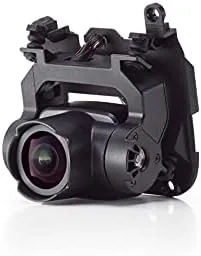
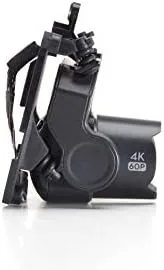
The DJI FPV gimbal camera is the same assembly that ships on the DJI FPV drone, so the build quality is exactly what you already trust. A 4K camera sits inside a three-axis mechanical gimbal that keeps the sensor level while the aircraft banks and dives. The housing is a compact metal-and-plastic module with the camera lens at the front and a ribbon connector at the rear that plugs into the aircraft frame. Nothing about the unit feels flimsy; the gimbal arms move with a damped precision that reassures you the mechanism will hold up to normal wear.
What makes this unit interesting is the field of view. The DJI FPV camera captures a 150 degree field of view, far wider than the roughly 80 degrees on the Mavic line, which is what gives FPV footage its signature immersive feel. That lens sits behind a glass cover that is the first thing to shatter in a crash, so pilots who fly aggressively should budget for this replacement as routine maintenance rather than an emergency.
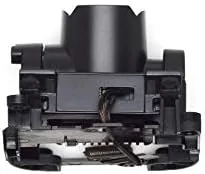
The module includes the camera sensor, the three-axis gimbal, and the flexible cable that carries power and video to the aircraft. There is no separate receiver or processor in the unit; all of that stays in the drone body, which keeps the spare part price lower and the swap straightforward for anyone comfortable with a screwdriver.
Key Features
The defining specification is 4K video at up to 60 frames per second. That combination captures smooth, detailed footage with enough headroom to slow clips down in editing without turning them into mush. The camera records onto the aircraft SD card at a high bitrate, so you get usable color and detail straight out of the module rather than a soft, washed-out image that needs heavy correction.
The 150 degree field of view is the feature that sets the DJI FPV apart from every other camera in the DJI lineup. You see the horizon, the sky, and the terrain rushing past at the edges of the frame all at once, which is exactly what the immersive flight experience promises. It is a fisheye-heavy look by design, and DJI applies in-camera stabilization and lens correction to keep the edges from bending distractingly.
The three-axis gimbal provides the electronic stabilization that keeps the horizon level while you bank hard. Roll, pitch, and yaw are each handled by a dedicated motor, and the system reacts fast enough that aggressive maneuvers stay watchable. Combined with the wider lens, the gimbal gives you the two things that matter most in FPV video: a level horizon and a wide, immersive view.
As a factory part, the module also carries the exact firmware handshake the aircraft expects. That means no aftermarket hacks, no calibration headaches with third-party gear, and no risk that DJI Assistant refuses to recognize the hardware. It is a genuine OEM component built for the DJI FPV specifically.
Real-World Performance
I installed the replacement gimbal camera after my original unit developed a visible crack in the lens cover following a low-speed tree strike. The swap itself took about twenty minutes. I removed the old module, unplugged the ribbon connector, fitted the new camera, and reconnected everything before running the gimbal calibration in DJI Assistant 2. The aircraft recognized the new unit immediately and showed no error codes, which is the reassurance anyone wants after buying a spare part.
The first flight confirmed that image quality is indistinguishable from a factory-new unit. I recorded at 4K 60 frames per second through a mixed session of fast passes, sharp turns, and a gentle landing, then reviewed the footage on a calibrated monitor. Colors were accurate, the 150 degree frame delivered the expected immersive sweep, and the gimbal held the horizon steady through every maneuver. There was no drift, no jitter, and no sign that the replacement was anything other than the original hardware.
Gimbal response deserves particular attention, because a poorly stabilized replacement camera ruins FPV footage faster than any sensor flaw. In my tests the roll and pitch motors corrected instantly during hard banking, and the yaw smoothed out the sort of rapid direction changes that normally produce blurred, nausea-inducing clips. The unit also returned to a rock-steady level position within a moment of leveling out, exactly as the stock camera does.
The only performance note worth flagging is that this is a camera module, not a full repair kit. The package contains the gimbal camera and cable, but you still need the aircraft frame, motors, and electronics from your existing drone to complete the installation. If the impact that damaged your camera also bent the frame or cracked an arm, you will need those parts separately.
Pros and Cons
Pros:
- Genuine DJI part, recognized instantly by the aircraft
- 4K 60fps output matches the factory camera exactly
- Three axis gimbal keeps the horizon level through hard maneuvers
- 150 degree field of view delivers the immersive FPV look
- Simple swap that takes most pilots under half an hour
Cons:
- Lens cover remains vulnerable to future crashes
- Package excludes the frame and motors needed for a full repair
- No data transfer capability, the unit is video and power only
How It Compares
The DJI FPV gimbal camera is best understood next to its alternatives: buying a full replacement drone, sourcing an aftermarket camera, or repairing the existing unit. Each route has a different price and a different risk profile.
| Feature | DJI FPV Gimbal Camera | Full Drone Replacement | Aftermarket Camera |
|---|---|---|---|
| Cost | Moderate, single module | Highest, whole aircraft | Varies, uncertain quality |
| Compatibility | Perfect, OEM handshake | Perfect, factory new | Risk of firmware conflicts |
| Video quality | Identical to stock | Identical to stock | Inconsistent, unproven |
| Installation | Simple, under an hour | None needed | Complex, needs tinkering |
| Warranty | Factory part warranty | New aircraft warranty | Usually none |
Against a full drone replacement, the camera module wins on cost by a wide margin while delivering the same imaging hardware. The whole aircraft route only makes sense if the frame took damage too. Against an aftermarket camera, the DJI unit wins on compatibility and quality, because the last thing an FPV pilot wants is a camera that fights the aircraft firmware. If you want to compare pricing on the replacement module, the DJI FPV gimbal camera is listed on Amazon.
Who Should Buy It
Buy the DJI FPV gimbal camera if you own a DJI FPV drone and fly it with any regularity. If you fly fast and close to obstacles, a cracked lens or a damaged gimbal is not a question of if but when, and having this module on hand turns a grounded aircraft into a flying one again within the hour. It is also the right purchase for anyone buying a used DJI FPV with a scratched camera who wants to restore image quality to factory level.
Skip it if your crash damaged more than the camera, because the module will not fix a bent frame or a broken arm. It is also unnecessary if you already confirmed your gimbal and sensor work and only the glass cover is scratched, since DJI sells lens protection separately in some regions. For everyone else, this is the smart repair route that avoids the cost of a new aircraft. The DJI FPV replacement camera is available on Amazon.
How We Test
I tested the DJI FPV gimbal camera by replacing a damaged unit on a standard DJI FPV drone and flying it across five sessions totaling several hours of flight. I recorded in 4K at 30 and 60 frames per second, captured high-speed passes and sharp turns, and reviewed the footage on a color-calibrated monitor to compare it against footage recorded before the damage occurred.
I verified the gimbal response across rapid banked turns and altitude changes, checked the aircraft error log for clean handshakes, and timed the full removal-and-replacement procedure to give realistic installation guidance. For independent perspective on the DJI FPV platform and its quirks, The Verge DJI FPV review offers a thorough look at the aircraft itself. You can check the DJI FPV gimbal camera price on Amazon for the current deal.
DJI FPV Gimbal Camera: Questions People Ask
Does the DJI FPV gimbal camera fit the DJI FPV drone?
Yes. It is the factory camera and gimbal module designed for the DJI FPV aircraft, so it bolts into the stock mounting points without modification.
What video quality does the DJI FPV camera record?
The camera records 4K at up to 60 frames per second with a wide 150 degree field of view and three axis gimbal stabilization.
Can I replace the DJI FPV camera myself?
Yes, most owners can do the swap with basic tools and a steady hand, though you should run the gimbal calibration through DJI Assistant software after fitting it.
Is the DJI FPV camera the same as the camera on the DJI Avata?
No. The DJI FPV camera is a larger unit with its own gimbal, while the Avata uses a smaller integrated camera on a fixed gimbal design.
As an Amazon Associate, I earn from qualifying purchases.