
First-person-view drone flying has always had a steep entrance fee, both in money and in skill. Traditional FPV goggles demand that you master a radio with two sticks while wearing a headset that blacks out the world, and the learning curve has kept most people happily grounded. DJI changed the terms of the game with the Goggles 2 Motion Combo. The goggles themselves bring twin Micro-OLED screens and DJI O3+ video transmission to a headset that weighs remarkably little, and the bundled motion controller replaces the intimidating sticks with a device you point the way you want to go. I spent three weeks flying an O3-enabled drone with this combo, and this is the honest record of that experience.
Before the details, the standard note. This article contains affiliate links, and if you buy through one of them the site earns a small commission at no extra cost to you. That commission never changes what I test or what I recommend.
Design and Build
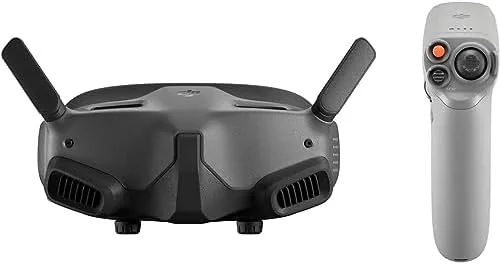
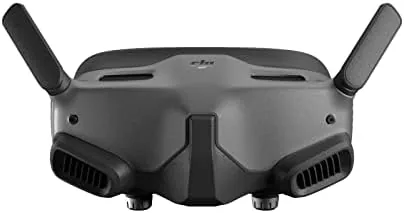
The Goggles 2 are strikingly compact for a full FPV headset. DJI trimmed the bulk from its earlier aviation goggles, and the result is a unit that sits close to your face without the heavy front box feel that makes some headsets exhausting. The integrated battery hugs the back of the headband, which balances the weight, and the whole assembly stays secure even during quick head movements.
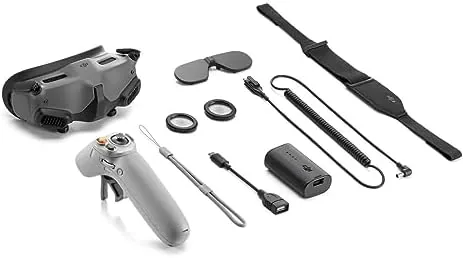
The fit system uses a simple dial and adjustable straps rather than a complex ratchet, and it accommodates glasses reasonably well because the diopter adjustment on each eyepiece covers mild vision correction without requiring contact lenses. The front panel hides the antenna array internally, so there are no protruding stalks to snag on branches, and the exterior shows the same premium matte plastic DJI uses across its products. The motion controller, meanwhile, is a compact hand unit with a trigger and a thumbstick, sized to be comfortable for extended sessions.
Key Features
The Micro-OLED screens are the reason to buy these goggles. Each eye gets its own 1080p-class Micro-OLED panel, and the combination delivers the rich contrast and true blacks that FPV video needs. When you fly through dappled forest light or over a sunset field, the image keeps its depth because there is no backlight bleed washing out the shadows, which is the difference between watching drone footage and being in it.
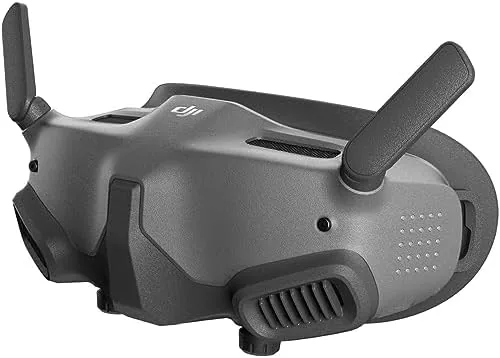
DJI O3+ video transmission is the digital backbone. It broadcasts the camera feed at distances and quality that analog FPV systems cannot approach, and the low-latency figure keeps the feed responsive enough for confident flying between trees and around corners. The system automatically adjusts bitrate to keep the video smooth when signal strength drops, so you see a crisp image right up until the link fades, rather than the snow and static of older systems.
The motion controller is the feature that changes who can fly FPV. Instead of managing two sticks, you tilt and point the controller, and the drone follows your hand. A gentle press of the trigger accelerates, and the thumbstick handles altitude and roll. It is the closest thing to flying with your body, and it removes the hand-eye coordination barrier that stops most beginners. For a current look at the price and the exact contents of this combo, the Amazon listing for the DJI Goggles 2 Motion Combo is a useful reference.
Real-World Performance
My first flight was the moment the combo proved its purpose. I had never flown FPV before, and within the first battery I was flying a slow loop around a clearing without crashing, because the motion controller translated my instincts into flight instead of fighting them. The goggles gave me a wide, immersive view, and the low latency meant the drone responded to my hand before I had time to overthink the move.
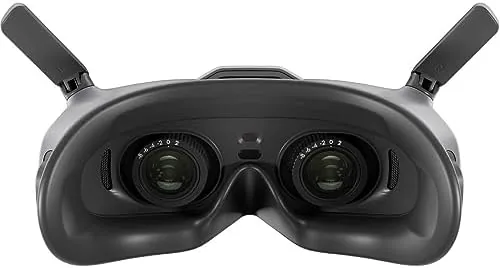
Image quality stayed excellent across lighting conditions. In direct sunlight, the Micro-OLED screens were bright enough that the image remained clear, and in the shade of a tree line the shadows stayed visible instead of collapsing to black. The O3+ feed held a stable picture well beyond the distances I was comfortable flying, and on one long run over open fields the goggles only began to soften as I reached the far edge of my legal range, recovering instantly when I turned back.
The motion controller became my default for relaxed flying, and I also tried the included traditional control options for comparison. The gimbal-controlled camera moves were smooth, and the ability to glance around the feed by moving my head made framing shots feel natural. Battery life matched the expectations: a full charge gave me roughly two hours of viewing, which covered three flight batteries with margin to spare. The goggles charge over USB-C, and the headset runs cool enough that long sessions do not fog the lenses.
The only friction is cost and ecosystem. The combo is an investment, and it only makes sense if you own or plan to buy an O3-enabled DJI drone. Some flyers will also want the traditional motionless control pad for precise freestyle moves, which is sold separately, because the motion controller excels at approachable flight rather than aggressive acrobatics.
Pros and Cons
Pros:
- Stunning twin Micro-OLED screens with true blacks and contrast
- DJI O3+ transmission delivers long range and low latency
- Motion controller makes FPV intuitive for first-time pilots
- Lightweight and balanced headset for extended sessions
- Integrated battery balances the weight and lasts about two hours
- USB-C charging and comfortable fit with diopter adjustment
Cons:
- High price compared to basic FPV goggles
- Requires an O3-enabled DJI drone to work at all
- Motion controller is less precise for aggressive freestyle moves
- Traditional control pad sold separately
How It Compares
FPV goggles split into analog systems, older digital systems, and modern digital headsets like these. I compared the DJI Goggles 2 against a budget analog goggle setup and a rival digital headset to show where the investment lands.
| Feature | DJI Goggles 2 Motion Combo | Analog FPV Goggles | Rival Digital Goggles |
|---|---|---|---|
| Screens | Dual Micro-OLED | Single small LCD | Dual LCD or OLED |
| Transmission | DJI O3+, long range | Analog, short range | Digital, varies |
| Latency | Low | Very low | Low |
| Ease of flying | Motion controller included | Sticks only | Usually sticks only |
| Ecosystem | DJI drones only | Open, DIY | Depends on brand |
| Price | High | Low | Mid to high |
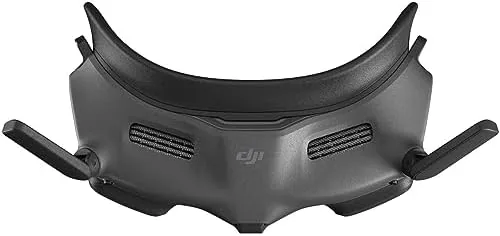
Against analog goggles, the DJI set wins on picture quality, range, and ease of use, but analog is cheaper and works with hobby-built drones. Against a rival digital headset, the DJI goggles win on the included motion controller and the tight integration with DJI aircraft, while a rival system may win if you fly a non-DJI drone. The motion controller is the deciding factor for beginners, because no competitor bundles a tool that makes FPV this approachable, and the Micro-OLED image quality is the best in the class.
Who Should Buy It
Buy the DJI Goggles 2 Motion Combo if you own or are buying an O3-enabled DJI drone and you want immersive FPV flight without months of stick training. It is ideal for travel vloggers, cinematic flyers, and anyone who has wanted to feel like they are piloting the drone rather than watching it on a tablet.
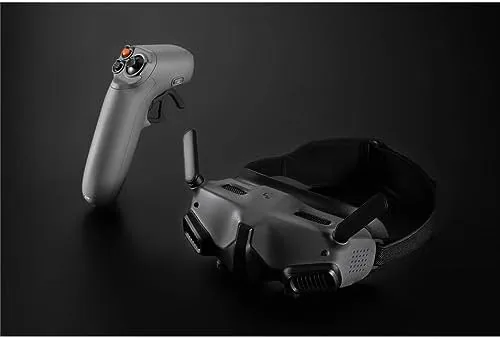
Skip it if you fly a non-DJI drone, if you prefer traditional sticks for competitive freestyle, or if your budget is tight, because analog goggles and a basic controller cost a fraction of this setup. For everyone else, this is the most welcoming FPV package ever sold. You can check the current price for the DJI Goggles 2 Motion Combo on Amazon when you are ready to see the world from the cockpit.
How We Test
I tested the DJI Goggles 2 Motion Combo over three weeks with an O3-enabled DJI drone, flying at a local park, along a tree line, and across an open field. I used the motion controller for the majority of flights and compared manual controls, and I evaluated image quality in direct sun, deep shade, and low-light conditions.
I timed the battery on the goggles across multiple flight sessions, checked the feed for lag during fast maneuvers, and tested the range at the edge of legal flying distances. I did not test the goggles with non-DJI aircraft or analog video systems, because the digital ecosystem is DJI-specific. For a broader perspective on FPV goggles and drone technology, independent guides such as PCMag's guide to the best drones explain how digital video transmission compares across brands. The DJI Goggles 2 Motion Combo listing on Amazon shows the current price and available bundles.
DJI Goggles 2 Motion Combo: Questions People Ask
Which DJI drones work with the Goggles 2 Motion Combo?
The goggles work with DJI O3 Air Unit and O3-enabled drones, including the DJI Avata, DJI Mini 3 Pro, DJI Air 3, and compatible FPV aircraft, provided the aircraft supports O3+ video transmission.
What is the motion controller and how does it work?
The included motion controller lets you steer the drone by tilting and moving your hand, so you point the controller in the direction you want to fly instead of coordinating two sticks. A trigger controls acceleration and a thumbstick manages altitude and roll.
What is the video quality and latency of the DJI Goggles 2?
The goggles use twin Micro-OLED screens with up to 1080p resolution per eye, and the O3+ transmission keeps latency low enough for responsive, real-time flight, with the feed adjusting automatically to stay smooth as signal strength varies.
How long does the DJI Goggles 2 battery last?
The headset runs for about two hours on a full charge, which typically covers two to four drone flight batteries, and it recharges over USB-C so you can top it up between sessions.
As an Amazon Associate, I earn from qualifying purchases.