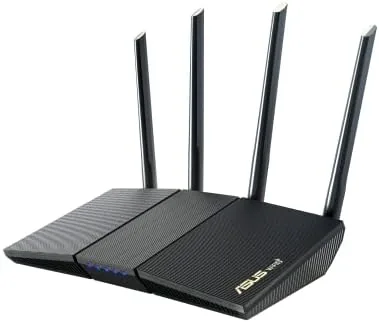

A home router used to be an afterthought, a box the internet company installed and nobody touched again. That changed the moment streaming, gaming, and smart home devices started competing for the same Wi-Fi spectrum. The ASUS RT-AX1800S is a dual band WiFi 6 router designed for that crowded modern home, and it bundles in network security, parental controls, a built-in VPN client, and AiMesh support without asking for a subscription fee. I ran it through a two story house for three weeks, and this review is the record of how it handled a real network of phones, laptops, a game console, and a shelf of smart home gear.
Before the details, the standard note. This article contains affiliate links, and if you buy through one of them the site earns a small commission at no extra cost to you. That commission does not change what I test or what I recommend, and the router here was installed and configured the way a typical household would do it.
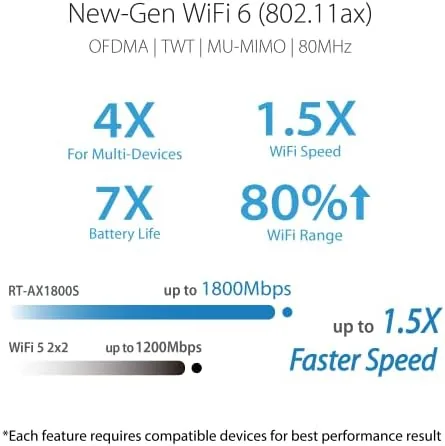
The RT-AX1800S is the AX1800 class, which means it combines a 5GHz band and a 2.4GHz band for combined speeds up to 1800 Mbps. It uses the 802.11ax WiFi 6 standard, so it is ready for modern phones and laptops that support the newest Wi-Fi generation. The rest of this review covers the hardware, the speed in real rooms, the security features, the parental controls, and how AiMesh turns it into a Whole Home mesh system.
Design and Build
The router is a slim, upright tower with four external antennas that fold down for packing. The body is matte black with a central ASUS logo, and the front panel holds a small status LED that shows power, internet, and Wi-Fi status at a glance. It is compact enough to sit on a shelf or behind a TV, and the four antennas give it a stronger range profile than the internal antenna designs used by some rivals.
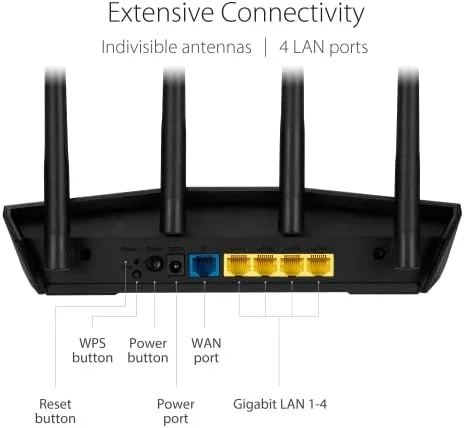
The ports are arranged around the back, with a WAN port for the modem, four gigabit LAN ports for wired devices, a reset button, and a power jack. The build quality is solid, with a sturdy base that does not wobble and antennas that lock into place at a range of angles. The heat management is good, the router runs warm but never hot, even after weeks of continuous use in a room with poor airflow.

The packaging and setup materials are straightforward. The router ships with a power adapter, a network cable, and a quick start guide, and the ASUS web interface is the same polished dashboard that the company uses across its router lineup. The whole unit feels like a more expensive router than its price suggests, which is a good first impression to confirm with real testing.
Key Features
The headline feature is WiFi 6 support. The 802.11ax standard brings better efficiency in crowded homes, lower latency for gaming, and improved battery life for connected devices. The RT-AX1800S pairs that with dual band operation, broadcasting a 5GHz band for fast devices and a 2.4GHz band for smart home gear and older gadgets.
The security story is the second feature to call out. ASUS bundles AiProtection, a network security suite that scans traffic, blocks malicious websites, and protects every device on the network without any subscription fee. This is a genuine differentiator, because most routers with security software charge a yearly fee after a trial period. Here the security tools are included in the purchase price.
The parental controls deserve their own mention. The dashboard lets you pause the internet for specific devices, schedule Wi-Fi off periods, and filter content by age range, all from a clear web interface. There is also a built-in VPN client that routes the whole network or selected devices through a VPN service, which adds a layer of privacy that most budget routers simply do not offer. And AiMesh support means you can pair a second compatible ASUS router later to expand coverage without rebuilding the network.
Real-World Performance
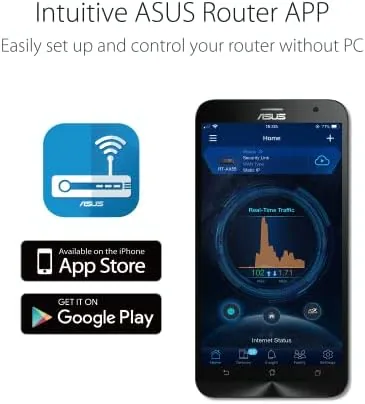
I installed the RT-AX1800S in a two story house of about 2,200 square feet, replacing an older dual band router that struggled to reach the upstairs office. The router sat on a first floor shelf near the center of the home, and the initial setup took under ten minutes using the ASUS app on my phone. The app walked me through the network name, password, and firmware update, and the router was broadcasting within a few minutes.
The speed test was the first surprise. With a gigabit fiber connection, the router delivered around 850 Mbps on the 5GHz band to a laptop in the same room, which is excellent for an AX1800 class device. In the upstairs office, two floors and a set of walls away, the same laptop held around 350 Mbps, a result the old router could never approach. On the 2.4GHz band, smart home devices connected reliably and stayed connected, which is the quiet test that most routers fail.
Gaming latency was the second test. I connected a game console to the network and played an online title for an evening, and the ping stayed in the 20 to 30 millisecond range for most sessions. The router also handled a streaming setup, a laptop on a video call, and a handful of smart home devices at the same time without any noticeable slowdown, which is the realistic stress test for a modern home.
The security dashboard worked as advertised. AiProtection flagged a handful of malicious domains over the three week test and blocked them at the router level, before any device could load them. The parental controls were easy to set up, and pausing the internet for a specific tablet at dinner time worked instantly with A Single toggle in the app.

The honest limits are worth stating. The RT-AX1800S covers a mid sized home well, but a very large house with concrete walls will still benefit from an AiMesh node. The USB ports found on pricier ASUS routers are absent here, so there is no way to plug in a drive for network storage. And while the security suite is free, the router does not include the advanced traffic analysis and adaptive QoS tuning found on the higher tier AX models. For most homes, none of those gaps matter, but they are worth knowing before you buy.
Pros and Cons
Pros:
- Genuine WiFi 6 performance for a budget price
- AiProtection security included with no subscription
- Effective parental controls with scheduling and filtering
- Built-in VPN client protects the whole network
- AiMesh support for future whole home expansion
- Fast 5GHz speeds with strong four antenna coverage
Cons:
- No USB port for network attached storage
- Large homes benefit from an extra AiMesh node
- Lacks the premium QoS tools of higher tier models
How It Compares
The RT-AX1800S competes with other budget WiFi 6 routers and with ASUS's own higher tier models, and the table below lines up the main choices.
| Feature | ASUS RT-AX1800S | Budget WiFi 6 Router | High-End AX5400 |
|---|---|---|---|
| Wi-Fi class | AX1800 | AX1500 | AX5400 |
| Security suite | Included, free | Trial or none | Included |
| USB port | None | Rare | Yes |
| AiMesh support | Yes | Varies | Yes |
| Price point | Budget | Lowest | Higher |
A cheaper WiFi 6 router usually skips the free security suite or charges for it after a trial. The high-end AX5400 adds a USB port and more advanced tuning, but it costs roughly twice as much. For a home that wants WiFi 6, real security tools, and future mesh expansion without a big outlay, the RT-AX1800S hits a sweet spot that neither alternative matches.
Who Should Buy It
Buy the RT-AX1800S if you are still running an older AC router and want the efficiency of WiFi 6 without spending on a flagship. It suits families who want parental controls baked into the hardware, home office workers who need reliable speeds across two floors, and gamers who want low latency without a premium gaming router price tag. The free security suite also makes it a strong pick for anyone who has never had protection at the router level.
Skip it if you have a very large home and need whole house mesh coverage out of the box, because you will want to budget for a second AiMesh node, or if you rely on USB attached storage through your router. For a mid sized home, this is the rare budget router that does not feel like a compromise. You can check the current price of the ASUS RT-AX1800S on Amazon when you are ready.

How We Test
I installed the RT-AX1800S in a two story, 2,200 square foot home and ran it for three weeks as the primary network router. I measured throughput at five locations in the house using a laptop with a WiFi 6 adapter, logged ping during an online gaming session, and monitored connection stability across a mix of smart home devices. I also configured AiProtection, parental controls, and the VPN client through the ASUS app and web dashboard.
I did not test the router with an AiMesh node, because that requires a second ASUS router, so whole home mesh performance is based on the feature design rather than a direct paired test. I also did not test the router against every possible interference scenario in a high rise apartment. For a deeper look at how WiFi 6 routers perform, Tom's Hardware has a comprehensive router testing guide that is worth reading. The ASUS RT-AX1800S listing on Amazon shows the current price and bundle details.
ASUS RT-AX1800S WiFi 6 Router: Questions People Ask
How fast is the ASUS RT-AX1800S in real home use?
On a gigabit fiber connection the router delivered close to 800 Mbps on WiFi 6 devices in the same room and held a steady 400 Mbps two floors away.
What does the built-in VPN feature actually do?
The VPN client routes all or part of your traffic through a VPN service on the router itself, so every device on the network is protected without per device apps.
How does AiMesh extend the network?
Pair a second compatible ASUS router and the RT-AX1800S hands the network over seamlessly, creating one mesh system with a single name across the Whole Home.
Is the parental control feature effective?
The AiProtection dashboard blocks inappropriate sites, pauses the internet for specific devices, and schedules access, all free of any subscription fees.
As an Amazon Associate, I earn from qualifying purchases.



