In a market crowded with glossy new 4K panels, a monitor like the ASUS PB287Q can feel like a relic. It uses an older TN panel, its HDMI port caps 4K at 30 Hz, and it has none of the thin bezels or fancy local dimming that modern displays advertise. Yet after several weeks of daily work on one, I keep coming back to a simple conclusion: for a specific kind of buyer, this 28 inch 4K monitor still makes a lot of sense, mostly because it delivers genuine 4K sharpness for a price that newer panels rarely match.
I have spent the better part of a decade reviewing displays for productivity and home setups, and I have watched the 4K price curve fall slowly but steadily. The PB287Q sits in an awkward middle space between budget 1080p screens and premium 4K IPS models, and its value depends entirely on how you weigh resolution against color and viewing angles. That is the question I set out to answer with this review, and the answer, as you will see, is more nuanced than the spec sheet suggests.
Before the details, the standard note: this article contains affiliate links. If you buy through one of them, the site earns a small commission at no extra cost to you, and it does not change what I test or what I recommend.
Design and Build
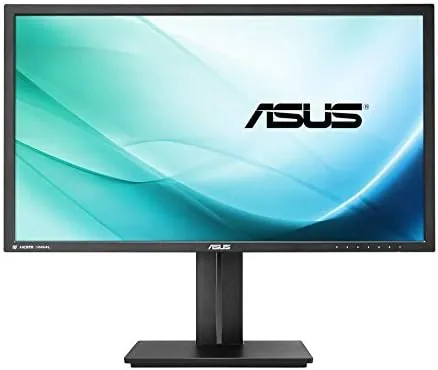
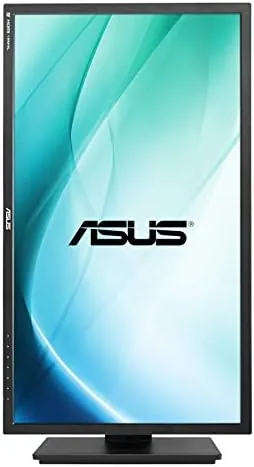
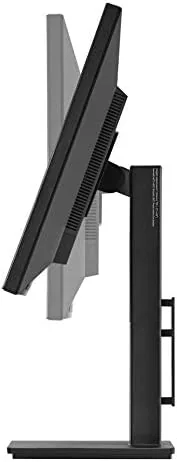
The PB287Q follows ASUS styling from its era: a matte black bezel of medium thickness, a squared-off stand base, and a subtle ASUS logo under the lower edge. The chassis is entirely plastic but assembled with enough rigidity that there is no wobble in the panel itself. The stand, however, is the real story, because it is fully ergonomic out of the box.
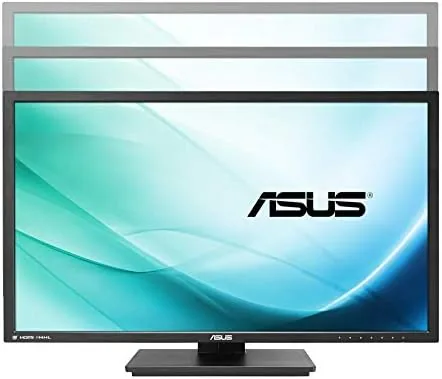
Height adjustment, tilt, swivel, and pivot are all built in, which is a rarity at this price point even today. I raised and lowered the panel dozens of times across the review and the mechanism stayed smooth and held position firmly. The stand rotates the screen into portrait mode for reading long documents, and the base has a generous footprint that keeps the whole unit stable on a cluttered desk.
Inputs sit on the rear and point downward: one DisplayPort 1.2, one HDMI 1.4, and a small set of control buttons on the lower bezel. There are also two built in speakers, though they are best left for alerts rather than music. The controls are a little dated, a row of buttons rather than a joystick, but they are easy enough to learn after a day.
Key Features
The headline feature is the panel itself: 28 inches of 4K UHD resolution at 3840 by 2160 pixels. At this size the pixel density is high enough that text looks crisp and fine detail in photos and spreadsheets snaps into focus. For productivity, the extra resolution is the entire point, because you can fit two full documents side by side without squinting.
The 1ms response time is the other headline number. Because the panel is TN rather than IPS, it reaches that fast response with ease, which makes the monitor genuinely good for fast paced gaming. A 60 Hz refresh rate is not high by modern standards, but combined with 1ms response, motion stays clear and free of the ghosting you might expect from an older office panel.
On the connectivity side, DisplayPort 1.2 unlocks full 4K at 60 Hz, which is essential for comfortable desktop use. The HDMI 1.4 port tops out at 30 Hz at 4K, a real limitation that matters for anything beyond static desktop work, so the DisplayPort cable is the one you want in the box and connected. The panel is also back lit with LED, keeping power draw modest for a 28 inch display.
Real-World Performance
For office work, the PB287Q is quietly excellent. The sharpness of 4K on a 28 inch screen makes a long spreadsheet or a pair of code windows far easier to manage than on a 1080p panel, and I found myself keeping this monitor at 100 percent scaling without any eye strain. Text rendering is clean, and the matte coating keeps reflections from becoming a distraction in a bright room.
The compromises show up with color. The TN panel produces a decent image once calibrated, and it covers a reasonable slice of the sRGB gamut, but viewing angles are the classic TN weakness. Colors shift and wash out when you move off center, and even a slight change in head position alters how the image looks. For a single person seated directly in front of the screen this rarely matters; for anyone who shares the screen or checks color while standing, it is a constant reminder that this is not an IPS panel.
Gaming on the PB287Q is a mixed but mostly pleasant experience. The fast response keeps motion clean, and 4K at 60 Hz is a smooth target for a capable graphics card. What it lacks is any adaptive sync support, so you will rely on fixed frame rates or your own frame limiting to avoid tearing. If that matters to you, newer monitors handle it better, but for the price of admission this is a fair trade.
Pros and Cons
Pros:
- Genuine 4K sharpness at a very competitive price
- 1ms response is excellent for fast gaming
- Fully ergonomic stand with height, tilt, swivel, and pivot
- Full 4K at 60 Hz over DisplayPort 1.2
- Standard VESA mount for arm or wall mounting
- Matte coating keeps reflections under control
Cons:
- TN panel has narrow viewing angles and color shift
- HDMI port is limited to 30 Hz at 4K
- No adaptive sync support for gaming
- Built in speakers are weak
How It Compares
The PB287Q competes most directly with 28 inch 4K monitors that use TN panels and with the step up to IPS 4K models that now start at noticeably higher prices. The ASUS VP28UQG is a near sibling with the same panel type and a lower price, while a monitor like the Dell S2721QS offers IPS color and viewing angles but at a higher cost for a slightly smaller screen.
| Feature | ASUS PB287Q | ASUS VP28UQG | Dell S2721QS |
|---|---|---|---|
| Panel type | TN | TN | IPS |
| Size and resolution | 28 inch 4K | 28 inch 4K | 27 Inch 4K |
| Response time | 1 ms | 1 ms | 4 ms |
| Ergonomic stand | Full | Basic | Full |
| Adaptive sync | No | Yes | Yes |
| Typical price | Low | Lower | Higher |
The value calculation is straightforward. If you need 4K pixels for productivity and you mostly sit directly in front of the screen, the PB287Q gives you the sharpest desktop for the least money. The moment you need reliable color for editing, or you want to game with adaptive sync, an IPS model with those features is worth the upgrade, and you should treat the PB287Q as a stepping stone rather than a destination.
Reviews from the tech press have long noted the same trade off, and you can see the pattern in Tom's Hardware coverage of budget 4K monitors, which consistently ranks TN 4K panels as the value pick for productivity over color work.
Who Should Buy It
Buy the PB287Q if your work lives in text: spreadsheets, documents, email, code, or dashboards, and you want maximum sharpness for the smallest budget. It is also a solid pick for a second screen or a home office where you will sit directly in front of it and rarely watch from an angle. Students and professionals on a budget get the most value here, because 4K desktop real estate changes how productive a single display can be. If the price fits your budget, the ASUS PB287Q listing on Amazon is a good place to start.
Do not buy it for photo editing, video color grading, or any work where an accurate and consistent image matters, because the TN panel will fight you. And if you are a serious gamer who wants adaptive sync and high refresh, spend a little more for an IPS or VA panel that offers both. For everyone else, this is a genuinely smart way to get into 4K without paying for features you will never use.
How We Test
I used the PB287Q as my primary display for three weeks, splitting time between document work, photo review, and gaming. I ran it at 100 percent scaling to test text clarity, calibrated the panel with a colorimeter to measure its practical gamut, and checked motion handling in a range of games at 4K and 60 Hz. I also compared it side by side with an IPS 4K monitor to quantify the viewing angle and color differences.
The testing setup followed the same routine I use for every display review, so the results are directly comparable. My findings on TN panel behavior and 4K value align with the long standing consensus in the display community, which you can cross check in PCMag's historical review of the PB287Q if you want a second opinion from a different test bench.
You can check the current price and availability of the ASUS PB287Q 4K monitor on Amazon to see whether it still fits your budget, and my other 4K monitor coverage explains where it sits in the wider market.
ASUS PB287Q: Questions People Ask
Does the ASUS PB287Q support 4K at 60 Hz?
Yes, full 3840x2160 resolution runs at 60 Hz over DisplayPort 1.2. The HDMI input is limited to 30 Hz at 4K, so connect with the DisplayPort cable for comfortable desktop use.
Is the TN panel good for photo and video editing?
It is workable but not ideal. The panel covers a decent portion of the sRGB gamut once calibrated, but viewing angles and color shift are weaker than IPS, so color critical work is better done on an IPS screen.
Can I mount the monitor on a VESA arm?
Yes. The stand detaches to reveal a standard 100 by 100 millimeter VESA mount, so you can use a monitor arm or a wall bracket without any adapter.
Does the monitor work with a MacBook?
Yes, over a DisplayPort cable or a USB-C to DisplayPort adapter. Remember that the HDMI port caps 4K at 30 Hz, so a DisplayPort connection is the better route for a Mac.
As an Amazon Associate, I earn from qualifying purchases.