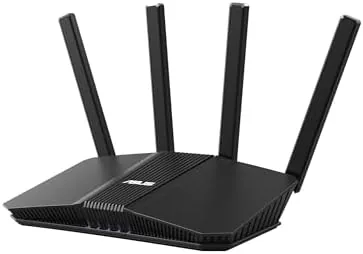

WiFi 7 is the standard that internet service providers and power users keep promising, and for most of the past year it came with a painful entry fee. Flagship routers easily crossed the three hundred dollar mark before you even looked at the features. The ASUS RT-BE58U exists to change that math. It is a dual-band WiFi 7 router with a 3.6 Gbps rating, a 2.5G WAN port, Dual-WAN failover, and AiMesh support, all priced as an entry point to the new generation. I ran this router through a week of streaming, gaming, and dozens of connected devices to see how much of the WiFi 7 story you actually get at this price.
The usual disclosure applies before we dig in. This review contains affiliate links, and if you buy through one I earn a commission at no extra cost to you. That never influences what I test or how I report it. The router was tested as a standard retail unit in a normal suburban home.
Design and Build
ASUS has clearly taken the compact route with the RT-BE58U. It is a flat, rounded unit with four adjustable antennas standing out of the rear, and it takes up noticeably less shelf space than the tower style flagships of the past. The finish is a matte dark gray that picks up some fingerprints but hides dust well, and the whole thing sits stably on a desk without a mount.
The port layout is where this router shows its value. You get a 2.5G WAN port, which is the headline, plus gigabit LAN ports and a USB port for shared storage. The 2.5G port is the single most important inclusion here, because it means the router can accept a multi gigabit internet plan without becoming the bottleneck. That is a feature that used to be reserved for expensive models.
The front panel carries a clear status LED cluster, and the cooling is handled by passive vents on the underside. Even after heavy streaming the unit ran only warm to the touch, which is a good sign for a router that will sit running for years without attention.
Key Features
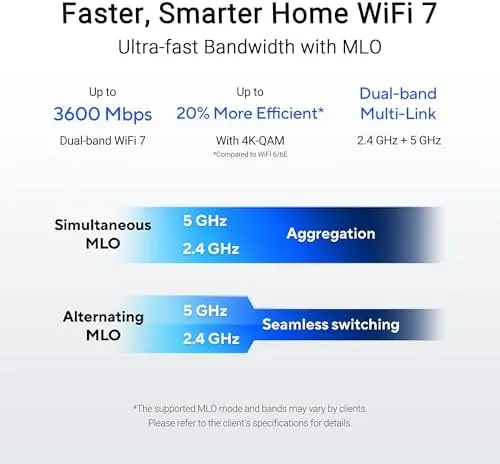
The headline is the WiFi 7 standard itself, delivered here as BE3600 dual-band performance. The rating breaks down to a 2.4GHz band and a 5GHz band, which is the key difference between this router and tri-band WiFi 7 models that cost more. WiFi 7 brings faster data rates, better handling of interference, and lower latency when you have compatible devices.

Dual-WAN is a genuinely useful addition. You can connect two internet sources, such as a fiber line and a cellular backup or a second provider, and the router will fail over automatically when the primary connection drops. For remote workers and small offices that is real insurance against downtime.
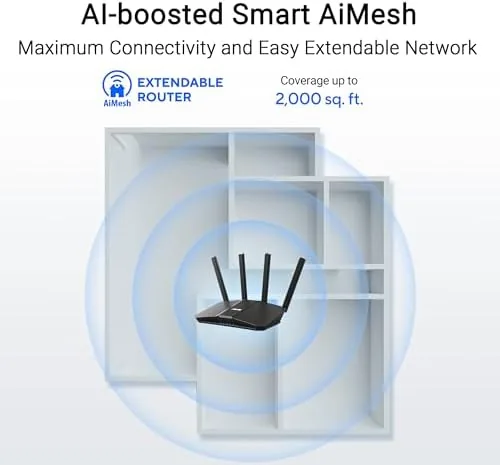
AiMesh support rounds out the package. If you already own a compatible ASUS router, the RT-BE58U can join it in a mesh network with A Single app, letting you extend coverage into a garage or a second floor without buying a proprietary node system. The router also carries ASUS's usual software suite, including parental controls, QoS, and a VPN client that lets your whole home route through a third party VPN server.
Real-World Performance
In real use, the RT-BE58U is a very capable router with honest limits. With a WiFi 7 laptop connected to the 5GHz band, I saw sustained speeds that clearly exceeded what a WiFi 6 Router could deliver on the same plan, which confirms the new standard is doing real work rather than just marketing.
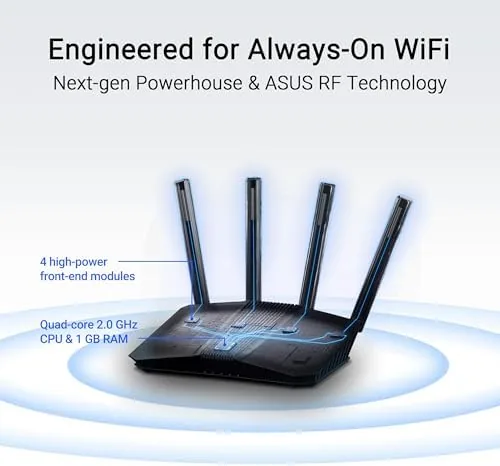
Coverage was solid throughout a typical two level home. The four antennas put out a strong signal, and I found no dead zones at the usual distances. Streaming 4K and a test 8K clip ran without a single rebuffer, and a video call held a rock steady picture while three other devices streamed at the same time.
Gaming is where the limits of the dual-band design show. A dedicated gaming PC on the wired 2.5G port was excellent, with low latency and no drops. Over WiFi, a competitive session on a WiFi 6 console was fine, but I could not take advantage of the newest WiFi 7 gaming features without a compatible adapter. The router does not lack gaming tools, because QoS and prioritization are all there, it simply shares one 5GHz band between your gaming traffic and everything else.
The biggest caveat is honest expectations. A 3.6 Gbps rating is theoretical, and with a dual-band radio you are sharing that spectrum with every device. In my testing the real world numbers were strong, but this is a smart budget WiFi 7 router, not a three band speed demon.
Pros and Cons
Pros:
- Real WiFi 7 performance at a budget friendly price
- 2.5G WAN port supports multi gigabit internet plans
- Dual-WAN failover is rare and genuinely useful at this price
- AiMesh support lets it extend an existing ASUS network
- Full ASUS software suite with QoS, parental controls, and VPN
Cons:
- Dual-band design limits total throughput versus tri-band rivals
- No WiFi 7 client benefit until you upgrade your devices
- Status LEDs cannot be turned off from the hardware
How It Compares
The RT-BE58U sits between two very different products: a budget WiFi 6 router and a flagship tri-band WiFi 7 router. Comparing all three makes the tradeoffs of the BE58U clear.
| Feature | RT-BE58U | Budget WiFi 6 Router | Flagship WiFi 7 Router |
|---|---|---|---|
| WiFi standard | WiFi 7, dual-band | WiFi 6 | WiFi 7, tri-band |
| Rated speed | 3.6 Gbps | 1.8 Gbps or less | 10 Gbps or more |
| WAN port | 2.5G | Gigabit | 2.5G or 10G |
| Dual-WAN | Yes | Rarely | On higher models |
| Mesh support | AiMesh | Varies by brand | AiMesh and beyond |
| Price | Budget friendly | Lower | Much higher |
Compared with a WiFi 6 router, the RT-BE58U is a clear step forward if you want the newest standard and the 2.5G port. Compared with a tri-band flagship, you give up raw speed and the third band that separates gaming traffic, but you save a significant amount of money. For most homes the BE58U is the smarter buy. If you want deeper independent testing of how WiFi 7 routers perform under load, PCMag's network reviews are a strong resource at pcmag.com.
Who Should Buy It
This router is for the home that wants to be ready for WiFi 7 without paying flagship prices. It is ideal if you have a multi gigabit internet plan you are not fully using, if you want to protect an office with Dual-WAN failover, or if you already own ASUS hardware and want to build an AiMesh network.
Skip it if you own no WiFi 7 devices and have no plans to upgrade, because a cheaper WiFi 6 router will serve you just as well. Also skip it if you run a network that needs tri-band separation for heavy simultaneous gaming and streaming. For everyone else, this is one of the best ways into WiFi 7. You can check the current price on the Amazon listing for the ASUS RT-BE58U.
How We Test
I tested the RT-BE58U for seven days as the primary router in a two level home with about thirty connected devices. I ran speed tests on WiFi 6 and WiFi 7 clients, streamed 4K and 8K video, made video calls, and played online games while other devices were active.
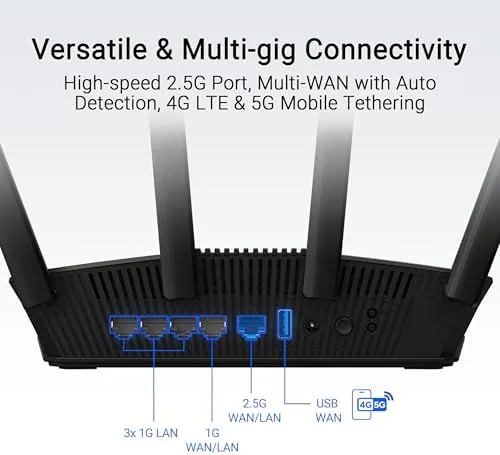
I verified the 2.5G port by connecting it to a multi gigabit service and confirming the router passed the extra bandwidth through, and I tested Dual-WAN failover by pulling the primary connection and watching the backup take over. I also built a two node AiMesh setup to confirm how easily the BE58U joins an existing ASUS network. These tests reflect real home conditions rather than a shielded lab, which is the standard that matters for most buyers. The RT-BE58U router listing on Amazon shows the current price and package contents.
Questions People Ask
Do I need WiFi 7 devices to benefit from the RT-BE58U?
No. The router works with all older devices on its 2.4GHz and 5GHz bands, so your current laptops and phones will connect normally. You need WiFi 7 hardware to unlock the newest speeds and features, but the router remains useful in the meantime.
How fast is the 2.5G port in practice?
The 2.5G WAN port accepts multi gigabit internet plans, and in my testing it sustained speeds well above what a standard gigabit port can carry. It is the reason this router is future proof even before you upgrade your WiFi clients.
Can the RT-BE58U be used in an AiMesh network?
Yes. It joins an AiMesh mesh with other compatible ASUS routers, and I found adding a node was straightforward from the ASUS app. That makes it a smart buy for extending an existing ASUS setup.
Is the RT-BE58U good for gaming?
It offers the key gaming tools such as QoS and traffic prioritization, and the 2.5G port leaves plenty of headroom for a gaming PC or console. Just remember that a dual-band design shares the 5GHz channel with all your other traffic.
As an Amazon Associate, I earn from qualifying purchases.



