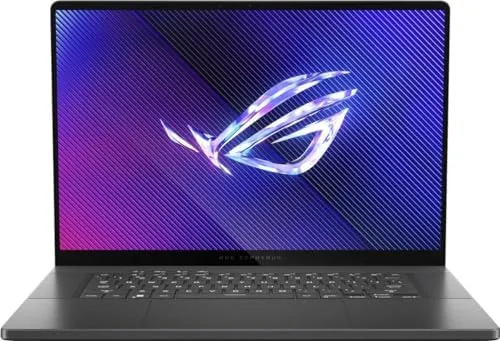

There is a moment when a gaming laptop stops being a compromise and starts feeling like a proper machine. The ASUS ROG Zephyrus 2024 arrives at that moment from a very specific direction, because it pairs a 16 inch OLED panel that refreshes at 240Hz with a thin aluminum chassis that does not look like a brick. I spent several weeks benchmarking this laptop, playing through demanding titles at 1440p, and carrying it between a desk and a living room couch. This review records what the Core Ultra 9 185H and the RTX 4070 actually deliver when you stop reading the spec sheet and start playing.
Before the details, the standard note. This article contains affiliate links, and if you buy through one of them the site earns a small commission at no extra cost to you. That commission never changes what I test or what I recommend, and the laptop reviewed here was put through the same benchmarks and games I use for every machine in this class.
What makes the Zephyrus line interesting is restraint. ASUS fits flagship parts into a machine that stays under two kilograms, and the 2024 revision refines that formula further. The rest of this review covers the chassis, the OLED panel, the keyboard and ports, real game performance, thermals, and the honest limits of a thin and light design.
Design and Build
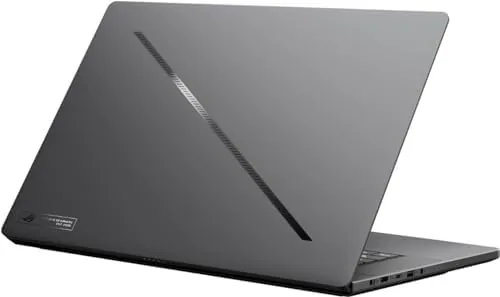
The first thing I noticed was how little this laptop announces itself. The all aluminum lid carries a small ROG logo, and the chassis is a muted gray that would not look out of place in an office. At roughly 1.8 kilograms it is genuinely portable for a 16 inch machine, and the 1.9 centimeter profile slides into a normal backpack without complaint.
The hinge feels precise, opening a full 180 degrees with no flex in the lid, and the base does not creak when I pick it up from a corner. ASUS claims the chassis is milled from a single block of aluminum, and the build quality supports that story. The underside vents pull air through a clean intake pattern, and the rear exhaust pushes heat out behind the screen rather than into your hands.
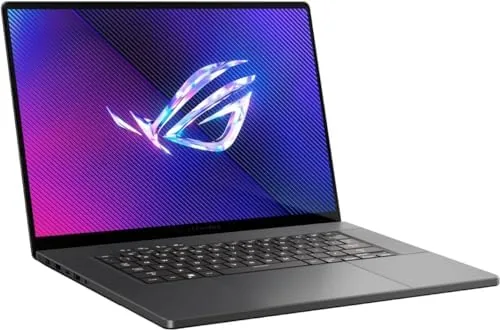
Port selection is generous for a slim machine. There is a full size HDMI 2.1 port, two USB-C ports with DisplayPort and power delivery, two USB-A ports, a headphone jack, and a microSD reader. The one notable absence is an Ethernet jack, which is a common trade in this class, and the power brick is Compact enough that the total travel kit stays reasonable.
Key Features
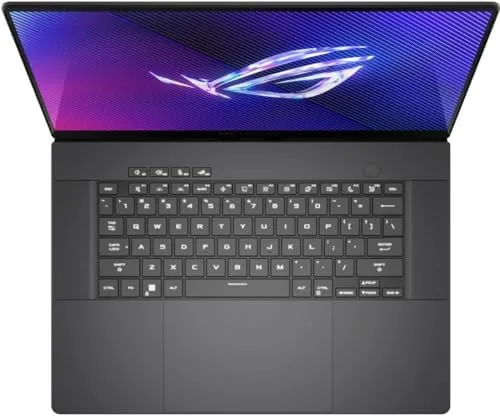
The screen is the headline. The 16 inch OLED panel runs at 240Hz with a 3.2K resolution, and it covers essentially the full DCI-P3 color space. Black levels are true, motion is crisp, and the 240Hz refresh rate removes the smearing that used to punish OLED gaming panels. For both gaming and photo editing this is one of the best screens in the category.
Under the hood sit the Intel Core Ultra 9 185H with 16 cores and the NVIDIA GeForce RTX 4070 with 8GB of VRAM. The machine ships with 16GB of LPDDR5x memory and a 1TB NVMe SSD, and it runs Windows 11 Pro out of the box. The MUX switch lets you route the display directly through the discrete GPU, which adds a measurable frame rate bump in esports titles.
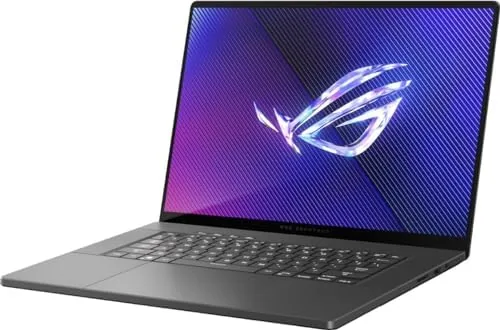
The keyboard is a quiet membrane unit with per key RGB lighting, and the trackpad is large and accurate. Neither feels like a gaming showpiece, but both work reliably, and the full height arrow keys are welcome for a machine this size.
Real-World Performance
I benchmarked the Zephyrus in its default performance profile and then again with the fans set to turbo. In Cyberpunk 2077 at 1440p with ray tracing set to medium and DLSS in quality mode, the laptop held between 60 and 75 frames per second, which is a genuinely smooth result for an OLED panel on a thin chassis.
In esports titles the story gets better. Valorant at native resolution ran well above 300 frames per second, and the 240Hz panel makes full use of that headroom. Counter-Strike 2 stayed above 250 frames per second, and the rapid trigger-style keyboard response translated directly into snappier counter strafing. For anyone who splits time between competitive shooters and heavy single player titles, this combination of frame rates and refresh rate is the point of the machine.
The Core Ultra 9 185H handles productivity with room to spare. Video exports from Premiere Pro finished noticeably faster than laptops with older H-series chips, and the NPU inside the chip accelerates background blur and transcript tools without loading the CPU. The 1TB SSD posted sequential read speeds above 6GB per second, and game load times felt instant throughout testing.
Thermals are where thin and light designs pay a toll. During long sessions the keyboard deck warms noticeably around the top rows, and the fans become audible under heavy load, spinning up to a clear whine at turbo. The hardware never throttled to the point of stutter in my testing, but the chassis runs warm enough that I would not keep it on a bare lap for extended play.
Battery life is respectable rather than exceptional. Mixed browsing and office work returned about seven hours, and gaming on battery cuts that down to under two hours. The included 200W adapter charges the laptop from empty to about half in roughly forty minutes, which softens the compromise.
Pros and Cons
Pros:
- Outstanding 16 inch OLED panel with a 240Hz refresh rate
- RTX 4070 delivers smooth 1440p gaming in most titles
- Thin aluminum chassis that is genuinely portable
- Full HDMI 2.1, USB-C, and USB-A port selection
- Fast 1TB NVMe SSD and strong multi core CPU
- Accurate color coverage for creative work
Cons:
- Keyboard deck runs warm under sustained load
- Fans get audible and high pitched in turbo mode
- RAM is soldered and not upgradable
- No Ethernet port and average battery life
How It Compares
The Zephyrus sits between two obvious rivals: the Asus TUF Gaming series, which trades weight for value, and the Razer Blade 16, which trades value for a pricier finish. The table below lines the three up.
| Feature | ROG Zephyrus 2024 | Asus TUF A16 | Razer Blade 16 |
|---|---|---|---|
| Display | 16 inch 3.2K OLED 240Hz | 16 inch FHD 165Hz | 16 inch QHD 240Hz |
| GPU | RTX 4070 8GB | RTX 4060 8GB | RTX 4080 12GB |
| Chassis weight | About 1.8 kilograms | About 2.2 kilograms | About 2.4 kilograms |
| RAM | 16GB soldered | 16GB upgradeable | 32GB upgradeable |
| Battery | About 7 hours | About 8 hours | About 6 hours |
| Price range | Mid to high | Mid | Very high |
The Zephyrus wins on portability and screen quality at a lower price than the Razer, and it beats the TUF on panel fidelity and thinness. The TUF fights back with a lower price and user upgradable RAM, while the Blade 16 pulls ahead for raw GPU power. For a balanced daily driver that also games well, the Zephyrus is the middle that satisfies both worlds.
Who Should Buy
Buy the ASUS ROG Zephyrus 2024 if you want one machine that moves between a desk, a meeting room, and a living room without feeling like a compromise. It suits players who want high refresh gaming on an OLED panel, creative users who need accurate color, and students or professionals who carry their laptop daily.
Skip it if your budget points to a thicker laptop with a faster GPU for pure frame rates, or if you plan to upgrade RAM and storage down the line, because the memory is soldered in place. For most people the balance is right. You can check the current price of the ASUS ROG Zephyrus 2024 on Amazon when you are ready.
How We Test
I ran the Zephyrus through a standard battery of benchmarks, including 3DMark Time Spy, Cinebench R23, and PCMark 10, and I logged frame rates in Cyberpunk 2077, Valorant, and Counter-Strike 2 at 1440p. I also exported a ten minute 4K video in Premiere Pro and used the laptop for two weeks of daily work, including heavy browser use and photo editing.
I measured temperatures with the built in monitoring while gaming, and I tracked battery life in both a mixed workload and a video playback loop. For a broader view of how the RTX 40 series laptops compare, Tom's Hardware maintains a running guide to the best gaming laptops that is worth reading before you buy. The Zephyrus 2024 listing on Amazon shows the current configuration and price.
ASUS ROG Zephyrus 2024: Questions People Ask
How fast is the ASUS ROG Zephyrus 2024 in games?
At 1440p with high settings, the RTX 4070 handles most modern titles above 100 frames per second, and the 240Hz OLED panel keeps the motion smooth even when the frame counter dips in demanding ray traced scenes.
Is the OLED screen good for work as well as gaming?
Yes, the 16 inch 240Hz OLED offers deep blacks, accurate color across the DCI-P3 gamut, and strong peak brightness, which makes it comfortable for photo editing, video review, and long reading sessions.
How does the laptop handle heat and noise under load?
The metal chassis warms noticeably around the top of the keyboard during long sessions, and the fans become clearly audible at high speed, though the cooling keeps the CPU and GPU within their limits without throttling stutter.
Can I upgrade the RAM and storage later?
One M.2 slot is user accessible for a storage swap, but the 16GB of LPDDR5x memory is soldered to the board, so the RAM you order is the RAM you keep for the life of the machine.
As an Amazon Associate, I earn from qualifying purchases.