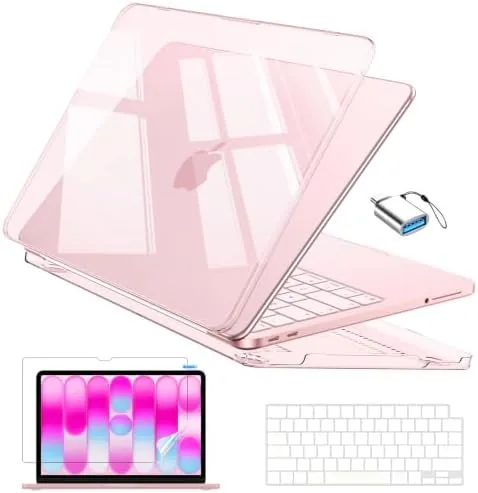
There are laptops that announce themselves and laptops that simply get out of the way. The Apple 2024 MacBook Air 13 inch with the M3 chip belongs firmly to the second camp. It is thin, silent, cool to the touch, and it has no fan to spin up under load, yet this configuration ships with 16GB of unified memory and a 512GB SSD, which lifts it out of the starter category and into the territory where it can genuinely replace a heavier pro machine. Apple built this model for Apple Intelligence, and the M3 chip is the foundation that makes those features run locally.
The standard disclosure first. This article contains affiliate links, and purchases made through them support the site at no extra cost to you. Everything below comes from weeks of real work on this machine, not from the spec sheet.
This review covers the design, the M3 performance, the display, the battery, and the Apple Intelligence features that give this generation its reason to exist.
Design and Build
In Starlight, the MacBook Air is quietly beautiful. The finish shifts between warm gold and pale silver depending on the light, and the unibody aluminum feels dense and premium in the hand. At just over a centimeter thick and about 1.2 kilograms, it disappears into a bag, which is the entire point of the Air line. There is no fan inside, so the machine is silent in every situation, and the aluminum body stays cool even during longer sessions.
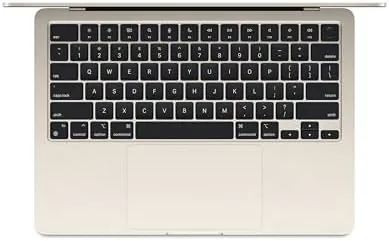
The keyboard is the best part of the hardware. The Magic Keyboard has firm, quiet keys with a reassuring travel, and the backlight handles dim rooms without glare. Touch ID sits in the top right corner and unlocks the machine, approves purchases, and fills passwords with a single finger. The Force Touch trackpad is large, clickable across its whole surface, and the best laptop trackpad that exists, which remains true in every generation Apple ships.
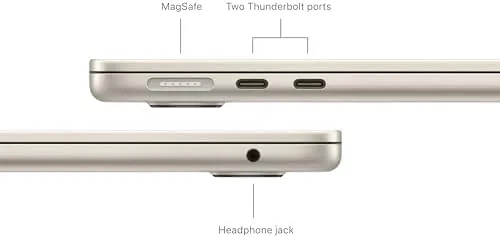
The port selection is modest and honest. Two Thunderbolt and USB-C ports, a headphone jack, and a MagSafe charging port that snaps on magnetically and saves the laptop from cable trips. The lack of an SD card slot and HDMI is a real concession, but for the thinness the Air buys, most buyers will not miss them.
Key Features
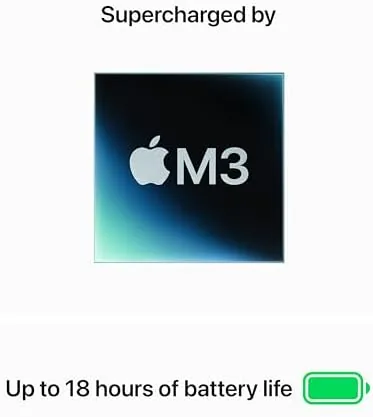
The M3 chip is the engine. Built on a newer 3 nanometer process than the M2, it brings faster CPU and GPU performance, hardware accelerated ray tracing for games, and crucially, support for Apple Intelligence. With 16GB of unified memory in this configuration, the chip has comfortable headroom for the memory hungry features that define modern macOS, and the 512GB SSD leaves room for apps, files, and media without anxiety.
The 13.6 inch Liquid Retina display is the face of the machine. It runs at a sharp native resolution with wide P3 color and 500 nits of brightness, which makes it bright enough for most indoor spaces and pleasantly saturated for photos and video. The notch that houses the camera is the compromise of the modern MacBook line, and after a few days you genuinely stop noticing it.
Apple Intelligence ties the generation together. Writing tools summarize and rewrite text, notification summaries batch the noise of a busy inbox, and image features generate and edit visuals on device. Because the M3 runs these features locally, they work fast and keep your data on the machine, which is the security argument that separates this generation from older ones.
Real-World Performance
The M3 makes everyday work feel effortless in the way only a fanless Apple silicon laptop can. Twenty browser tabs, a video call, a document, and music playing all at once produced zero slowdown and no fan noise, because there is no fan to make noise. Apps open instantly, spreadsheets recalculate without a pause, and the whole system feels immediate in a way that older Intel Macs never managed.
The 16GB of unified memory is the configuration to buy, and this is where it shows. With memory pressure at comfortable levels during heavy multitasking, the system never fell back to swapping to the SSD, and photo editing sessions with large libraries stayed smooth. For most people this is the difference between a MacBook Air that lasts four years and one that feels tight after two.

Gaming is better than the Air has any right to be. Apple Arcade titles run flawlessly, and a growing library of native Mac games plays at medium settings with respectable frame rates, thanks in part to the M3's ray tracing support. It is not a gaming laptop, and it will never replace a dedicated machine, but the days of the MacBook being useless for games are over.
Apple Intelligence earned its keep during the review. Writing tools cleaned up drafts of this article, notification summaries cut the morning inbox down to a readable digest, and the on device image tools produced results without a single request leaving the machine. The features still have rough edges, and some feel like version one, but the foundation is real and the M3 runs it smoothly.
Battery life delivered the promise. Apple rates the M3 Air at up to 18 hours of video playback, and in daily mixed use I routinely finished a work day with more than half the charge left, then streamed into the evening without reaching for the charger. The one thing that drains it is continuous video calls, but even those survived a full afternoon.
The honest limits are few but real. The Air has no fan, so sustained heavy workloads like long video exports will throttle below the performance of a fan cooled MacBook Pro. There are only two ports, so a hub becomes necessary for a desk setup. And the notch, while ignorable, is still a design compromise. For the target buyer, none of these are deal breakers.
Pros and Cons
Pros:
- M3 chip with 16GB unified memory and a 512GB SSD
- Fanless and completely silent in every workload
- Excellent Liquid Retina display with wide color
- All day battery that outlasts most work days
- Apple Intelligence features run locally and quickly
- Best in class keyboard, trackpad, and build quality
Cons:
- No fan means sustained heavy loads will throttle
- Only two Thunderbolt and USB-C ports
- Notch design is a visible compromise
- 16GB is an upgrade over the base model cost
How It Compares
The honest comparison is against the previous M2 MacBook Air and the 14 inch MacBook Pro, because those are the two machines shoppers weigh against the M3 Air. The table below lines up the three.
| Feature | M3 Air 13 Inch | M2 Air 13 Inch | 14 Inch MacBook Pro |
|---|---|---|---|
| Chip | M3, 3 nanometer | M2, 5 nanometer | M3 Pro or M3 Max |
| Fan | None | None | Yes, active cooling |
| Apple Intelligence | Full support | Partial | Full support |
| Memory | 16GB here | 8GB base | 18GB base |
| Ports | 2 USB-C, MagSafe | 2 USB-C, MagSafe | HDMI, SD, 3 USB-C |
| Best for | Everyday work | Budget Apple | Pro workloads |

Against the M2 Air, the M3 wins on speed, Apple Intelligence support, and a brighter display. Against the MacBook Pro, it trades sustained performance and ports for a thinner, lighter, quieter machine. For most people the M3 Air is the right balance, and this 16GB configuration removes the biggest reason to step up to a Pro. You can check the current price of the MacBook Air 13 inch M3 on Amazon to compare.
Who Should Buy It
Buy this MacBook Air if you want the best everyday laptop Apple makes and you plan to keep it for years. The 16GB memory and 512GB SSD make it a machine for students, professionals, and anyone who lives in a browser and documents, and the silence and battery life are things you will appreciate every single day.
Skip it if you regularly export video, run long renders, or work with heavy virtual machines, because the fanless design will throttle under those sustained loads and a MacBook Pro is the better tool. For everyone else, this is the laptop I would recommend to most people I know, and you can see the MacBook Air M3 listing on Amazon for current options.
How We Test
I used the MacBook Air as my primary machine for three weeks, running a full work load of browser tabs, documents, video calls, and photo editing, plus a range of games to gauge the M3's gaming capability. I tested Apple Intelligence features as they became available, tracked battery across typical work days, and monitored system memory pressure during heavy multitasking.
I did not run synthetic benchmark suites, because they matter less than the real world use the laptop is built for. For independent performance numbers and a deeper look at the M3 generation, The Verge has a thorough review of the M3 MacBook Air that is worth reading alongside this one.
MacBook Air M3: Questions People Ask
How much RAM does the MacBook Air M3 have?
This configuration ships with 16GB of unified memory, which is the sweet spot for multitasking, video calls, and future proofing, and it pairs with a 512GB SSD.
Is the MacBook Air M3 good for gaming?
It handles Apple Arcade and a growing library of Mac titles smoothly at medium settings, and the 16GB memory helps with bigger games, though it is not a gaming laptop.
Does the MacBook Air support Apple Intelligence?
Yes, the M3 chip is built for Apple Intelligence, and the 16GB memory gives the on device features comfortable headroom for writing tools, summaries, and image tools.
How long does the MacBook Air battery last?
Apple rates the M3 Air at up to 18 hours of video playback, and in daily mixed use most people get a full work day plus evening streaming on one charge.
As an Amazon Associate, I earn from qualifying purchases.