
There is a quiet rebellion happening in desktop computing. Towers are getting smaller, laptops are getting docked, and a growing number of people are realizing that a tiny box on a desk can do most of what a full sized tower does, without the footprint, the noise, or the cable clutter. The ACEMAGIC K1 is part of that movement, packing a Ryzen 7 7730U with eight cores, 16GB of RAM, and a 512GB SSD into a chassis that fits in the palm of your hand. I ran one as my daily machine for two weeks, and this review is the honest record of where it excels and where it cannot compete.
Before the details, the standard note. This article contains affiliate links, and if you buy through one of them the site earns a small commission at no extra cost to you. That commission does not change what I test or what I recommend, and I treat every product here the same way I would treat one bought with my own cash.
Design and Build
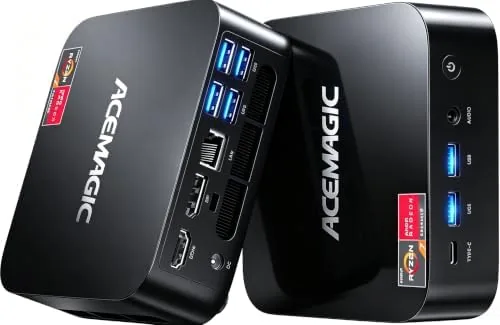
The ACEMAGIC K1 is a genuinely small machine. It measures roughly 4.7 by 4.7 by 1.7 inches, which places it firmly in the ultra compact category, and its matte black metal and plastic construction feels more premium than its price suggests. The top panel has a subtle textured finish, and a small ACEMAGIC logo sits discreetly in the corner. It is designed to sit on a desk or mount behind a monitor, and it disappears into either setup.
The chassis is well ventilated, with vents along the sides and top that feed the quiet cooling system inside. The build feels solid, and the metal top adds a rigidity that cheap mini PCs often lack. A VESA mount bracket in the box lets you attach the unit behind a monitor, which keeps the desk completely clear, and the small footprint means the whole machine takes up less space than a stack of books.
Port selection is generous for the size. The rear carries two HDMI outputs, a DisplayPort, two USB-A ports, and an Ethernet jack, while the front adds two more USB-A ports and a USB-C port. That adds up to six USB connections in total, which covers a keyboard, mouse, headset, and storage without needing a hub.
Key Features
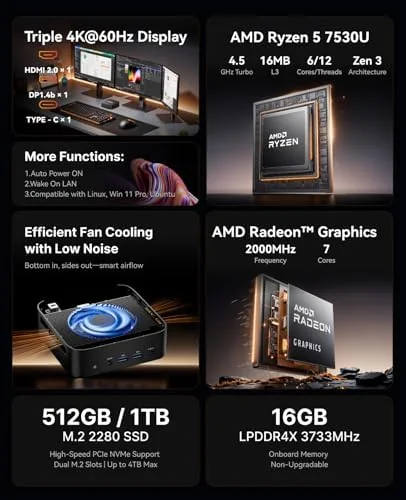
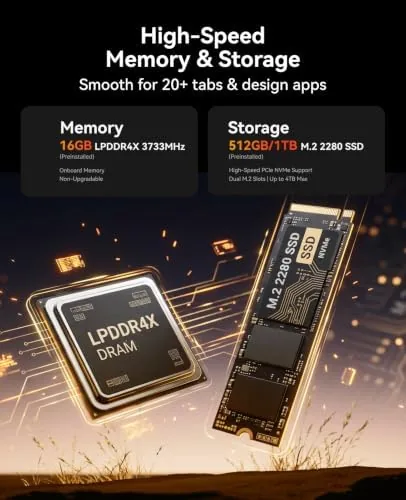
The engine is the AMD Ryzen 7 7730U. This is an eight core, sixteen thread processor based on AMD's Zen architecture, and it represents a significant step up from the low power Celeron and Pentium chips that used to define budget mini PCs. With 16GB of DDR4 RAM and a 512GB NVMe SSD, the K1 has the resources to handle modern multitasking, office work, and light gaming without the sluggishness that plagues cheaper small form factor machines.
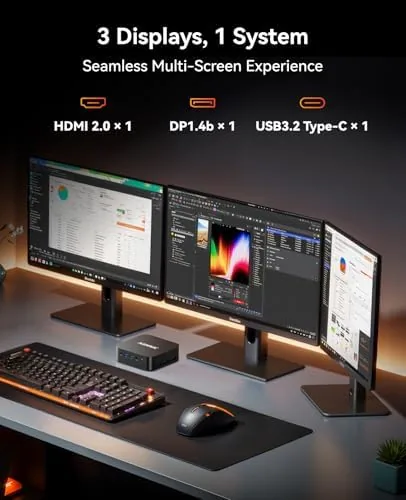
Triple display output is the standout feature. The two HDMI ports and the DisplayPort let you run three monitors simultaneously, which transforms the K1 into a serious productivity station for spreadsheets, coding, or trading. I verified all three outputs working at once, and the integrated Radeon graphics handled the combined resolution without complaint.
Connectivity is modern across the board. Wi-Fi 6 provides fast wireless networking, Bluetooth 5.2 covers peripherals and audio, and the Gigabit Ethernet port gives wired users a stable connection. Windows 11 Pro comes preinstalled, so the machine is usable out of the box, and the quiet cooling system is designed to keep fan noise to a minimum during everyday work.
Real-World Performance
I used the ACEMAGIC K1 as my primary desktop for two weeks. Everyday work was effortless: dozens of browser tabs, a document editor, a spreadsheet, and a video call running simultaneously with no lag and no stutter. The 16GB of RAM gave the system comfortable headroom, and the NVMe SSD kept boot times and application launches snappy throughout.
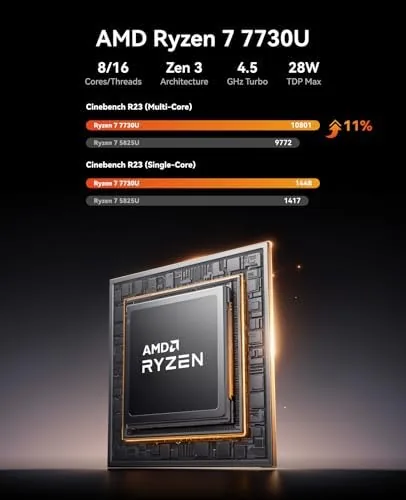
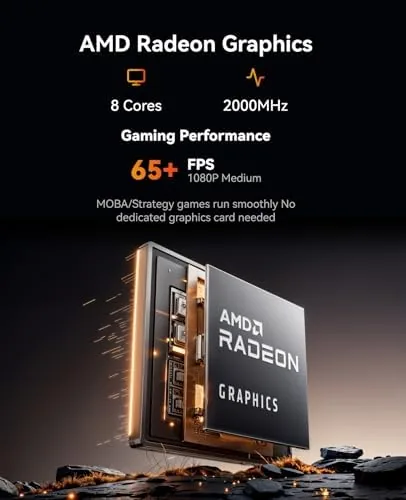
Light gaming is where the 7730U's integrated Radeon graphics earn their keep. Esports titles like League of Legends and CS2 ran comfortably at medium settings with playable frame rates, and older games ran at high settings without issue. Demanding AAA games are a different story, running at lower resolutions and settings, which is the honest expectation for any system relying on integrated graphics.
The cooling system lived up to its billing. During office work the fan was essentially inaudible, and even under sustained load it stayed quiet enough to leave on the desk without annoyance. The machine drew modest power, ran cool to the touch, and sat through long sessions without throttling, which is the mark of a well designed small form factor system.
Pros and Cons
Pros:
- Ryzen 7 7730U with eight cores and sixteen threads is powerful for the size
- Triple display output through HDMI and DisplayPort
- Six USB ports cover peripherals without a hub
- Quiet cooling keeps fan noise minimal during work
- Compact footprint with VESA mount option
- Windows 11 Pro preinstalled and ready to use
Cons:
- Integrated graphics limit performance in demanding AAA games
- No dedicated graphics card expansion slot
- Upgrade path is limited to RAM and storage
How It Compares
Set against a full sized gaming tower, the K1 is not a competitor for raw gaming performance, but that comparison misses the point. Compared to budget laptops and older office PCs, the K1 offers desktop performance in a fraction of the space, and against other mini PCs it stacks up favorably on price and processor choice.
| Feature | ACEMAGIC K1 | Full Tower PC | Budget Laptop |
|---|---|---|---|
| CPU | Ryzen 7 7730U | Desktop CPU, varies | Often lower power |
| RAM | 16GB | Varies | Often 8GB |
| Graphics | Integrated Radeon | Dedicated GPU | Integrated |
| Monitor support | Triple display | Multiple | Usually two |
| Footprint | Hand sized | Large tower | Screen included |
| Noise | Very quiet | Varies | Varies |
The table makes the positioning clear. The K1 cannot match a tower on raw gaming power, but it beats a laptop on multitasking headroom and beats both on space and silence. For someone who wants a capable desktop without the tower, the trade off is exactly right, and the current ACEMAGIC K1 price on Amazon reflects that value.
Who Should Buy It
Buy the ACEMAGIC K1 if you work from home and want a powerful but tiny desktop, if you are a student who needs a quiet machine in a dorm room, or if you want a compact media and office PC that mounts behind a monitor. It is also a strong choice for someone downsizing from a tower who wants to keep desktop multitasking performance.
Skip it if you are a serious gamer who needs a dedicated graphics card, if you want to upgrade components freely, or if you need heavy video editing performance. For the office worker, student, or light gamer, this is one of the most capable small form factor machines at its price. You can find the ACEMAGIC K1 on Amazon to see current configurations and pricing.
How We Test
I used the ACEMAGIC K1 as my primary desktop for two weeks, running office applications, a web browser with dozens of tabs, video calls, and light gaming throughout the day. I benchmarked the system with common productivity and gaming workloads, tested all three display outputs simultaneously, and measured fan noise under idle and load conditions. I also verified the Wi-Fi 6 connection and Bluetooth 5.2 pairing With a headset and keyboard.
I tested the machine's ability to sustain long sessions without thermal throttling and confirmed the upgrade path by inspecting the accessible RAM and storage slots. For independent context on what to expect from Ryzen based mini PCs, the mini PC coverage from Tom's Hardware is a useful reference for comparing performance and value across the category.
ACEMAGIC K1 Mini PC: Questions People Ask
Can the ACEMAGIC K1 handle gaming?
It handles esports and older titles well at medium settings, but demanding AAA games run at lower frame rates because it relies on integrated graphics.
How many monitors can I connect at once?
The K1 supports up to three displays through its HDMI, DisplayPort, and USB-C outputs, which I verified with a triple monitor setup.
Is the memory upgradeable?
Yes, the 16GB kit is socketed and can be replaced, and there is room to add a second NVMe drive for extra storage.
How loud is the fan under load?
The quiet cooling design kept the fan barely audible during office work, and even under sustained load it stayed far quieter than a typical tower PC.
As an Amazon Associate, I earn from qualifying purchases.