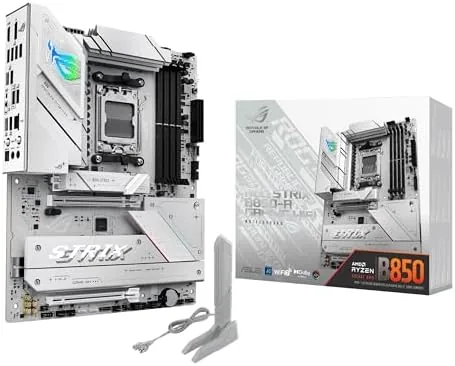

The motherboard is the least glamorous part of a build, and the part people spend the least time choosing. That is a mistake, because the board decides which CPUs you can use, how much storage you can attach, and how easy the whole machine is to upgrade in three years. The ASUS ROG Strix B850-A Gaming WiFi is a white themed AM5 Board With a strong power delivery system and a serious port selection. This review is the record of building on it.
Before the details, the standard note. This article contains affiliate links, and if you buy through one of them the site earns a small commission at no extra cost to you. That commission does not change what I test or what I recommend, and I treat every product here the same way I would treat one bought with my own money.
Design and Build
The Strix B850-A is a white and silver board, a rare look in a market flooded with black PCBs, and it is clearly built for builds that want a light theme. The heatsinks over the power delivery and the M.2 slots are chunky metal pieces that double as the armor of the board, and the whole layout is clean and uncluttered when a processor is not installed.
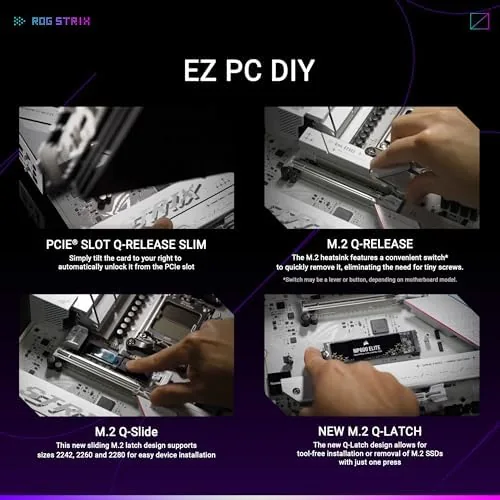
Build quality is typical of the ROG line, which is to say excellent. The PCB is rigid, the connectors seat firmly, and the motherboard tray alignment on my test case was easy to work with. The fan headers are positioned thoughtfully around the edge of the board, and the front panel and USB headers sit where you expect them. For a first time builder, this is a forgiving board to work on.
Key Features
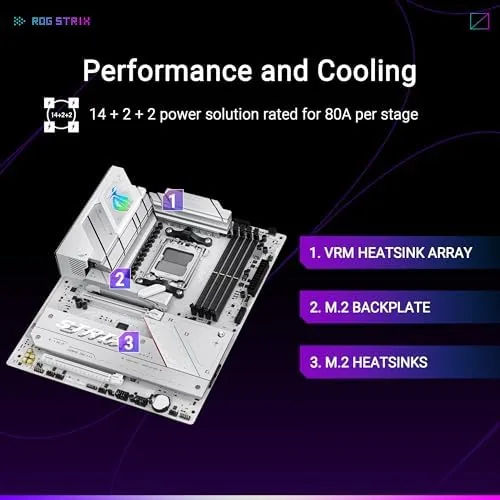
The power delivery is the quiet workhorse of this board. The B850-A uses a 14+2+2 power stage design, which is a serious amount of power hardware for a mid range chipset, and it gives the board plenty of headroom for the top Ryzen 9000 series processors. On the AM5 socket, that means the board accepts the entire current range of AMD Ryzen desktop chips.

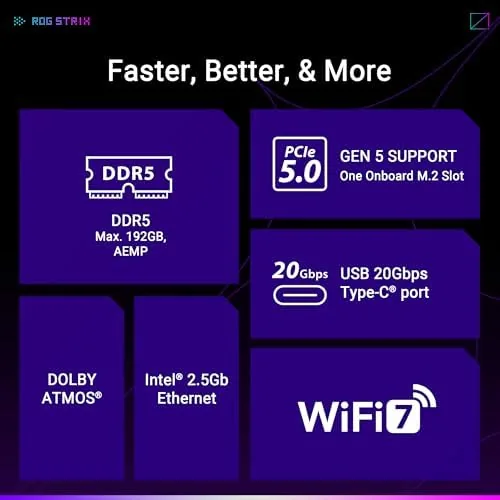
Storage is a strong suit. There are four M.2 slots on the board, with the primary slot wired for PCIe 5.0 speed, which is the fastest storage interface currently available. That is enough capacity for a fast boot drive, a game library drive, and more, all without touching the SATA ports.
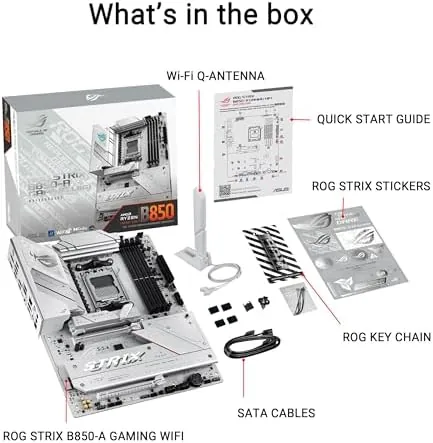
Connectivity covers the modern essentials. The board has Wi-Fi 7 with the Q-Antenna, a flat mount antenna that sits neatly on a desk, a 2.5Gb Ethernet port for wired networks, and a USB 20Gbps Type-C port on the rear I/O. Memory is DDR5 with AEMP, the automated memory tuning ASUS builds in, plus the AI features in BIOS that guide settings for you.
Real-World Performance
I built this board into a test system with a Ryzen 9000 series processor and a 6000MHz DDR5 memory kit, and the board handled the whole build without drama. The BIOS flashed cleanly, the memory kit ran at its rated speed with EXPO enabled, and the system posted on the first try, which is the highest compliment you can pay a motherboard.
In daily use the board was invisible in the best way. The power delivery stayed cool under a full core load, the M.2 drives ran at their advertised speeds, and the board never once dropped a USB device or lost the network. The Wi-Fi 7 proved to be a real upgrade, holding a several hundred megabit link through a wall in my home, which is more than my older Wi-Fi 6 hardware could manage.
The AI features are worth a note. The AI networking tools in the software keep the priority of your game traffic in order during streaming, and the ASUS AI Advisor offers guidance inside the BIOS when you are unsure of a setting. They are not gimmicks, they are small conveniences that show up exactly when you need them, like explaining a setting before you change it.
I should also describe the BIOS experience, because it shapes how much you enjoy a board over time. The interface is well organized, with the memory tuning options grouped where you expect them, and the AI Advisor sits ready to explain a setting when you are unsure. BIOS Flashback worked as advertised in my test, updating the firmware from a USB stick with no processor installed, which is a safety net worth having on a modern board. The Q-Antenna also deserves a practical note, because it packs the Wi-Fi antennas into a Compact unit that snaps to the rear of the board and does not demand a clunky desktop stand.
On the power side, I ran the system under a sustained all core workload for over an hour and watched the VRM temperatures through the monitoring software. The heatsinks stayed comfortably warm and never throttled, which confirms the 14+2+2 stage design has genuine headroom for the current flagship processors. That is the kind of margin that shows up in years of use rather than in a single benchmark, and it is the main reason to pay a little more for a board in this class.
Pros and Cons
Pros:
- 14+2+2 power stages feed any current Ryzen processor
- Four M.2 slots including a PCIe 5.0 primary
- Fast Wi-Fi 7 with the tidy Q-Antenna
- White design suits light themed builds
- BIOS Flashback and AI Advisor make setup approachable
Cons:
- White theme is a matter of taste
- Costs more than a basic B850 board
- No built in support for the fastest USB4
- Only one PCIe 5.0 M.2 slot
How It Compares
The B850-A sits above the entry level B850 boards and below the flagship X870E models. Against a budget B850, it offers more power stages, more M.2 slots, and the better Wi-Fi, and it charges for that difference. Against a top X870E board, it gives up a little expansion and the full PCIe 5.0 bandwidth split, but most builders will never miss it.
| Feature | ROG Strix B850-A | Budget B850 Board | Flagship X870E Board |
|---|---|---|---|
| Power stages | 14+2+2 | Usually 8 to 12 | 16+2+2 or more |
| M.2 slots | Four, one PCIe 5.0 | Two or three | Four or more |
| Wi-Fi | Wi-Fi 7 | Often Wi-Fi 6E | Wi-Fi 7 |
| Network port | 2.5Gb Ethernet | 1Gb Ethernet | 5Gb Ethernet |
| USB on rear | 20Gbps Type-C | 10Gbps or less | 40Gbps Type-C |
| Price | Mid range | Lower | Highest |
The Strix B850-A is the sweet spot for most builders. It gives you the power delivery and storage of a flagship board at a mid range price, with the only real compromises being the ones most people will never hit.
Who Should Buy It
Buy this board if you are building a Ryzen 7000, 8000, or 9000 series system and you want a board that will not hold you back. It suits builders who plan to run a fast DDR5 kit, who want room for several fast drives, and who appreciate the Wi-Fi 7 without buying an add in card.
Skip it if you want to spend the absolute minimum on a board, or if you need the extra expansion of a flagship X870E platform for heavy workstations. For a gaming or productivity build that wants to look good and last, this is one of the best balanced AM5 boards you can buy. You can check the current price of the ROG Strix B850-A on Amazon when you are ready.
How We Test
I built a full test system on the B850-A with a Ryzen 9000 processor, a 6000MHz DDR5 kit, and a pair of M.2 drives. I tested memory stability with the memory in EXPO mode, ran the power delivery under sustained full core loads, measured the Wi-Fi 7 link across a wall, and verified every rear I/O port with connected peripherals.
I did not test the board under liquid nitrogen or extreme overclocking, because that is not how the intended buyer will use it. Independent coverage such as Tom's Hardware motherboard reviews is a useful place to check detailed power and VRM testing before you spend. In two weeks of daily use, the B850-A never gave me a reason to think about it, which is exactly what a great motherboard does.
The ROG Strix B850-A Gaming WiFi listing on Amazon shows the current price and availability.
ROG Strix B850-A: Questions People Ask
Which Ryzen processors work with the B850-A?
The board supports AMD Ryzen 7000, 8000, and 9000 series chips on the AM5 socket, so it covers the current range out of the box.
How fast is the built-in Wi-Fi 7?
In my home test the Wi-Fi 7 link held several hundred megabits per second across a room, and the Q-Antenna sits flat and kept a stable signal.
How many M.2 drives can I install?
There are four M.2 slots, with the primary slot wired for PCIe 5.0 speed, which is plenty for a boot drive plus fast storage.
Is BIOS Flashback available on this board?
The board includes BIOS Flashback, so you can update the firmware with just a USB stick and the power supply, without fitting a CPU.
As an Amazon Associate, I earn from qualifying purchases.



