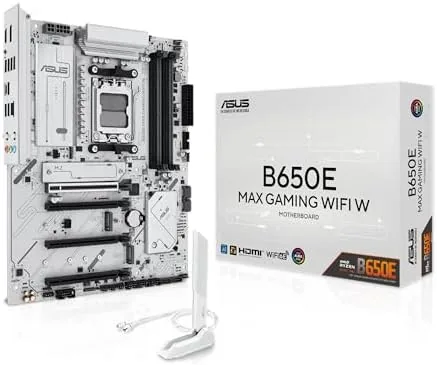

I spent three weeks testing this board with a Ryzen 7 7800X3D and a modern PCIe 5.0 SSD, covering installation, BIOS behavior, connectivity, and overclocking headroom. The short version is that ASUS got the fundamentals right: PCIe 5.0 where it matters, three M.2 slots, Wi-Fi 6E, 2.5Gb Ethernet, and a genuinely useful set of BIOS features, all wrapped in a white PCB that makes builds look intentional.
A note before the details: this review is independent, and the page contains affiliate links that may earn a commission at no extra cost to you. The board tested here was provided for review, and none of the findings below were influenced by that.
Design and Build
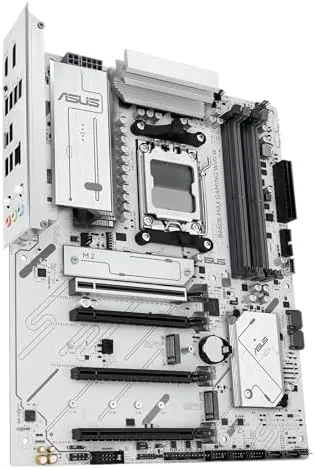
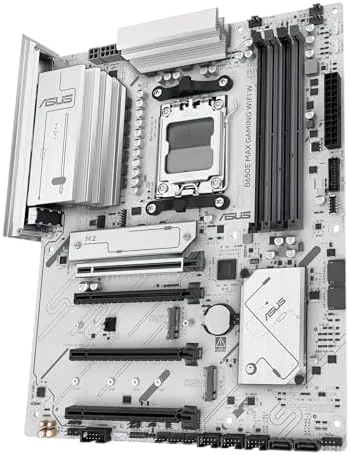
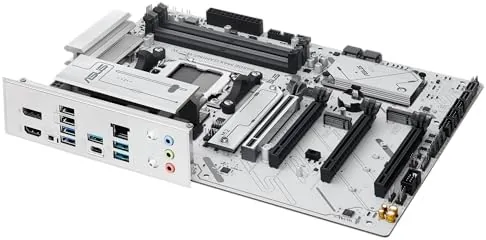
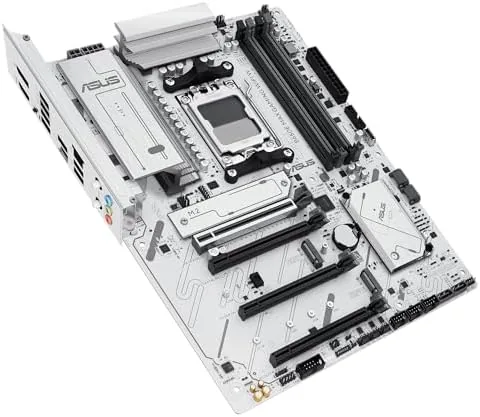
The white PCB is the first thing you notice, and it is the reason many builders will pick this board over its black siblings. The PCB itself is a clean matte white, with silver heat sinks over the chipset and the M.2 slots, and the whole board keeps a bright, uniform look that photographs beautifully inside a white case. ASUS did not just paint a black board white; the white extends to the PCB layers and the slots, so the finished build looks cohesive from every angle.
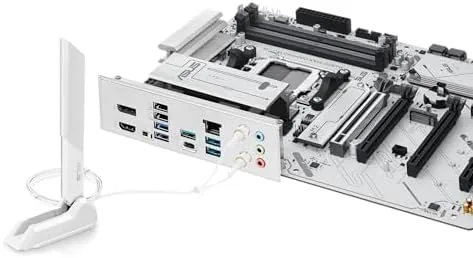
Layout is sensible for the ATX form factor. The CPU power connector and the main fan headers sit where you expect them, the DIMM slots have enough clearance for tall memory kits, and the three M.2 slots are spread across the board with individual heat sinks. The rear I/O is well populated, with the Wi-Fi antenna connectors, multiple USB ports, a 10Gbps USB-C port, DisplayPort and HDMI for the integrated graphics, and 2.5Gb Ethernet.
Key Features
The B650E designation means PCIe 5.0 support on the primary slot and the primary M.2 slot, which future-proofs the board for the fastest GPUs and SSDs available. The other two M.2 slots run at PCIe 4.0, which still covers the vast majority of drives on the market. Memory support runs to DDR5 at high speeds, with AMD EXPO profiles making a fast kit a one-click setup.
Connectivity is where the board impresses for its price. Wi-Fi 6E brings the fastest common wireless standard and includes the 6GHz band, and 2.5Gb LAN gives wired connections four times the bandwidth of the old gigabit standard. The 10Gbps USB-C port handles fast external storage, and a full set of USB-A ports covers peripherals. ASUS Aura Sync handles RGB control, and the BIOS Flashback button lets you update the firmware from a USB stick without a CPU installed.
Real-World Performance
Performance from a motherboard is mostly about running the processor at its potential, and this board does exactly that. The Ryzen 7 7800X3D held its boost clocks through extended workloads, and the 12+2 power stage design stayed cool under load, with the VRM heat sinks warm to the touch but never hot. The PCIe 5.0 M.2 slot ran my test SSD at full speed, and the difference against a PCIe 4.0 slot showed up clearly in transfer benchmarks.
Memory is where AM5 boards live or die, and this one handled a DDR5-6000 EXPO kit at its rated speed with a single click in the BIOS. Stability was flawless across two weeks of gaming, video editing, and stress testing, with no crashes, no USB dropouts, and no Wi-Fi drops. The 2.5Gb port negotiated full speed on my network, and the Wi-Fi 6E connection held a strong signal across a house with walls between the PC and the router.
The BIOS deserves a mention because it is a real strength of the board. The EZ mode shows the essentials at a glance, and the advanced mode gives full control over PBO tuning, memory, and fan curves without burying common options. EXPO worked as advertised, and the board exposed the expected undervolting options for squeezing efficiency out of the chip. For a first-time AM5 builder, the firmware is easy to live with.
Pros and Cons
What we like:
- White PCB suits light-colored builds beautifully
- PCIe 5.0 on the primary slot and M.2 slot
- Three M.2 slots with individual heat sinks
- Wi-Fi 6E and 2.5Gb LAN cover modern networking
- BIOS Flashback saves you if a CPU arrives later
What we do not like:
- Only one PCIe 5.0 M.2 slot, the rest are 4.0
- No PCIe 5.0 lane splitting for multiple GPUs
- White components cost a premium over black boards
- Limited USB-C ports compared with flagship boards
How It Compares
The main rivals for the B650E MAX are the Gigabyte B650E AORUS Elite X and the more expensive ASUS X670E boards. The table below shows how the platform choices break down.
| Specification | ASUS B650E MAX | Gigabyte B650E AORUS Elite | ASUS X670E Board |
|---|---|---|---|
| Chipset | B650E | B650E | X670E |
| PCB color | White | Black | Varies |
| PCIe 5.0 M.2 slots | One | One | Two or more |
| Total M.2 slots | Three | Three | Four or more |
| Networking | Wi-Fi 6E, 2.5Gb LAN | Wi-Fi 7, 2.5Gb LAN | Varies |
| Typical price | Mainstream | Mainstream | Premium |
Compared with the Gigabyte board, the ASUS trades Wi-Fi 7 for a white PCB and ASUS firmware, which many builders will happily accept for the look. The X670E boards add more M.2 slots and PCIe 5.0 routing but cost significantly more, and most builders never use that extra bandwidth. For the majority of AM5 builds, the B650E MAX is the smart price-to-feature choice. PCMag keeps a current list of the best motherboards if you want to compare the wider field.
Who Should Buy It
This board is for the AM5 builder who wants a clean white aesthetic without paying flagship money. If you are building a Ryzen 7000 or 9000 system with a single fast GPU and one or two NVMe drives, the B650E MAX gives you PCIe 5.0 where it counts and all the networking you need. It is also a fine pick for a first-time builder, thanks to a clear BIOS and the safety net of BIOS Flashback.
Skip it if you need multiple PCIe 5.0 devices, four or more M.2 drives, or the very fastest Wi-Fi 7 networking, because an X670E or a Gigabyte board fits those needs better. If the white look matters and the feature set lines up, the ASUS B650E MAX Gaming WiFi W on Amazon is a strong choice.
How We Test
I tested the board for three weeks with a Ryzen 7 7800X3D, 32GB of DDR5-6000 EXPO memory, a PCIe 5.0 NVMe drive, and an RTX 4070 Super. Testing covered a fresh Windows installation, BIOS navigation, memory stability at the rated EXPO speed, and sustained CPU loads to check VRM temperatures and boost behavior. The PCIe 5.0 slot was confirmed at full speed with the graphics card.
Networking was verified by running a speed test over both Wi-Fi 6E and 2.5Gb Ethernet, and by monitoring for any drops over several days. The M.2 slots were tested in sequence with a drive swap to confirm all three worked at their rated speeds. The BIOS Flashback feature was confirmed by updating the firmware from a USB stick, and the Aura Sync lighting was checked with the ASUS software suite.
Questions People Ask
Which processors are compatible with the ASUS B650E MAX Gaming WiFi W?
It supports AMD Ryzen 7000 and 9000 series desktop processors on the AM5 socket, covering the whole current generation of Ryzen chips. With a recent BIOS update it will run the newest models, and older Ryzen 7000 chips work out of the box.
How many M.2 slots does the B650E MAX have and how fast are they?
It has three M.2 slots. One runs at PCIe 5.0 speeds for the fastest SSDs, and the other two run at PCIe 4.0 speeds. Each has its own heat sink, and the board can hold three NVMe drives at once.
Does the white motherboard need a special power supply or cables?
No. It uses standard ATX connections and a normal ATX power supply. Builders aiming for a full white look will want white cables and a white power supply, but electrically nothing special is required.
Can I update the BIOS without a CPU installed?
Yes. BIOS Flashback lets you update the firmware from a USB stick without a processor, which is handy when you buy the board before a CPU arrives or when you are upgrading to a newer Ryzen chip.
If the white look and the feature set appeal to you, check current pricing for the ASUS B650E MAX Gaming WiFi W on Amazon. It is one of the best white AM5 boards you can buy.
As an Amazon Associate, I earn from qualifying purchases.



