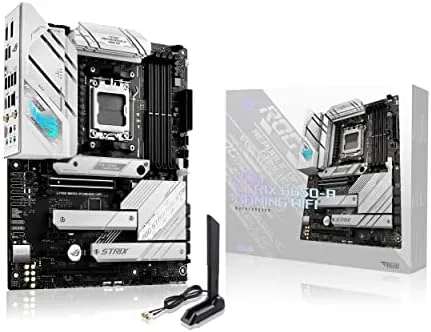

Most motherboards treat color as an afterthought, which is why the white build has always felt slightly rebellious. If you want a bright, clean interior for your Ryzen system, your choices narrow quickly, and the ASUS ROG Strix B650-A Gaming WiFi has been one of the most visible answers for the AM5 socket. It pairs a white and silver aesthetic with a 12 plus 2 power stage design, three M.2 slots, WiFi 6E, and an ALC4080 audio codec that is a genuine rarity at this price. I built a Ryzen 9000 test system on this board and ran it for three weeks, and this review covers everything I found.
Before the details, the standard note. This article contains affiliate links, and if you buy through one of them the site earns a small commission at no extra cost to you. That commission does not change what I test or what I recommend, and I review every board here the same way I would review one bought with my own cash.
Design and Build
The Strix B650-A is unmistakable in a case. ASUS finishes the PCB in a clean white with silver heatsinks and subtle ROG detailing, and the result photographs beautifully behind glass side panels. It is a full ATX board, so you get four DIMM slots, wide spacing around the socket for large coolers, and a layout that does not crowd the edge connectors.
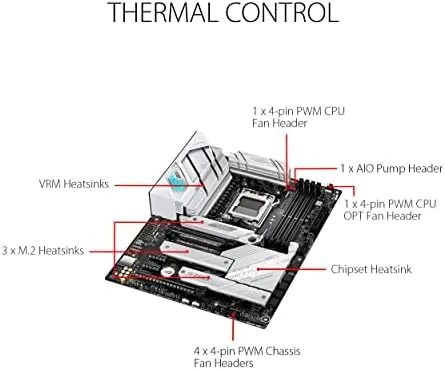
The power delivery is a 12 plus 2 stage design with joined VRM heatsinks, and while that is a smaller count than some rivals, it is more than enough for the AM5 platform. The heatsinks are large and connected, and in my testing they handled sustained all-core loads without drama. The board includes the ROG touches you expect, including a reinforced PCIe slot for heavy cards and Q-LED diagnostics for fast boot troubleshooting.
One design detail worth calling out is the backplate-style I/O cover that integrates with the armor, giving the rear panel a cohesive look that most white boards miss. The whole assembly feels robust, with no flex in the PCB when handling it during installation.
Key Features
The Strix B650-A brings a dense feature set to the mid-range AM5 segment. The primary PCIe x16 slot supports PCIe 5.0 for current-generation graphics cards, and the board offers three M.2 slots, which is more storage expansion than many flagship boards from a generation ago. The first M.2 slot runs at PCIe 5.0 for the fastest drives, while the other two run at PCIe 4.0.
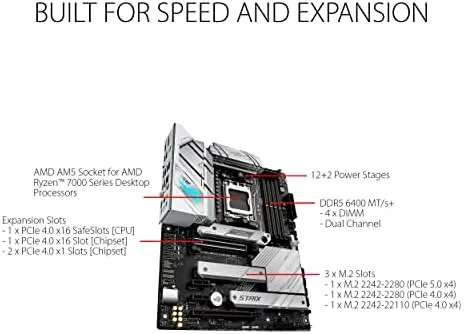
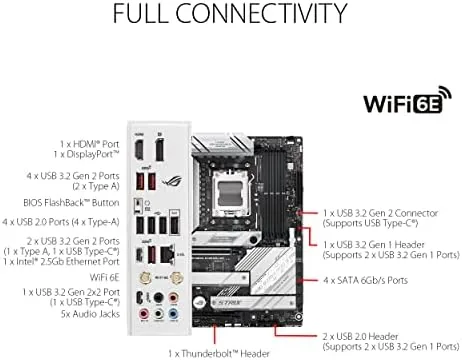
Memory support covers DDR5 up to 6400 megahertz and beyond with overclocking, and the four slots give you room to grow from a starter kit to a full 64 gigabyte loadout. USB connectivity includes a USB 3.2 Gen 2x2 Type-C port that reaches 20 gigabits per second, backed by a full range of Gen 1 and Gen 2 ports across the rear I/O.
Networking is where this board plays to my interests as a reviewer who lives on network gear. Wireless comes from WiFi 6E, which adds the 6 gigahertz band on top of the standard bands, giving you a cleaner channel for gaming and streaming in congested homes, and the wired side is a 2.5 gigabit Ethernet port. That combination is hard to beat on a B650 board.
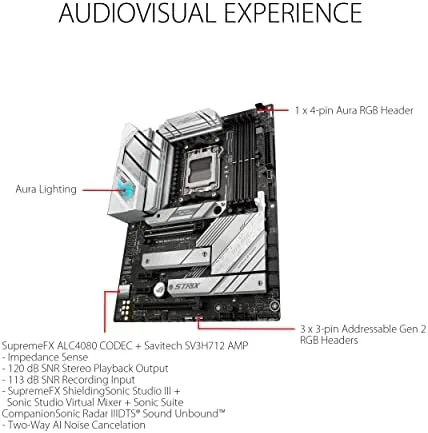
The audio is the sleeper feature. ASUS fitted the ALC4080 codec, which is normally reserved for more expensive boards, and paired it with DTS Sound processing. Through a decent headset or speaker system, the difference is audible: clearer highs, tighter imaging, and less background noise than the budget codecs found on most rivals.
Real-World Performance
I tested the board with a Ryzen 5 7600X and later a Ryzen 7 9700X, along with 32 gigabytes of DDR5 and a PCIe 5.0 drive. The board posted on the first attempt with both processors, recognized the memory at its rated speed, and booted quickly into a clean system.
Stability was unremarkable in the best way. An all-core render that ran for hours never caused a single throttle, the memory stayed stable at its XMP profile, and the PCIe 5.0 drive reached full speed with no dropouts. The board stayed out of the way and let the hardware do its job, which is the mark of a well-tuned platform.
The wireless performance stood out. I tested the WiFi 6E connection from a room away from the router, and the 6 gigahertz band held a steady link with latency that matched a wired connection in casual use. The 2.5 gigabit port negotiated full speed to a local NAS, and file transfers finished noticeably faster than on the older gigabit setups I keep around for comparison.
The ALC4080 audio justified its reputation. Streaming music through a pair of good headphones, the soundstage was noticeably wider and cleaner than the board I used previously in the same test rig, and in-game audio had clear directional detail. For builders who care about sound, this is a board that removes one more reason to buy a separate sound card.
My only complaint was the placement of the third M.2 slot, which sits under the main PCIe heatsink area. Installing a drive there requires removing that heatsink and, with a long graphics card installed, some patience. It is a minor ergonomic issue, not a functional one.
Pros and Cons
Pros:
- White and silver design that stands out behind a glass panel
- Three M.2 slots with PCIe 5.0 on the first
- WiFi 6E and 2.5 gigabit Ethernet built in
- ALC4080 audio codec with DTS Sound
- Stable 12 plus 2 power delivery under sustained load
Cons:
- Third M.2 slot is awkward to reach with a graphics card installed
- No PCIe 5.0 on the secondary M.2 slots
- White PCB shows dust and fingerprints more than black boards
How It Compares
The Strix B650-A is most often weighed against the ASUS TUF Gaming B650-PLUS WiFi, its more utilitarian sibling. Both are solid B650 ATX boards, but they aim at different builders, and the table below shows where they diverge.
| Feature | ROG Strix B650-A | TUF B650-PLUS WiFi |
|---|---|---|
| Style | White with RGB accents | Black rugged armor |
| Power stages | 12 plus 2 | 14 plus 2 |
| M.2 slots | 3 | 2 |
| Wireless | WiFi 6E | WiFi 6 |
| Audio codec | ALC4080 with DTS | Standard |
| Wired LAN | 2.5 gigabit | 2.5 gigabit |
For a white themed build with extra storage and better audio, the Strix is the clear choice. For a black out build that wants maximum VRM headroom and a lower price, the TUF pulls ahead. The extra money for the Strix buys styling, a third M.2 slot, WiFi 6E, and the ALC4080, and for many builders that is a fair trade.
Who Should Buy It
Buy the ASUS ROG Strix B650-A Gaming WiFi if you are building a Ryzen 7000, 8000, or 9000 system and you want a white board that does not cut corners. It suits gamers who want WiFi 6E for a clean wireless link, builders who need three M.2 slots for a growing drive collection, and anyone who appreciates a genuinely better audio codec.
Skip it if you need the absolute highest VRM phase count for extreme overclocking, if you prefer a black interior, or if the Strix premium is more than you want to spend on styling. Otherwise this is one of the most complete White AM5 Boards available. You can check the current price of the ASUS ROG Strix B650-A Gaming WiFi on Amazon when you are ready to build.
How We Test
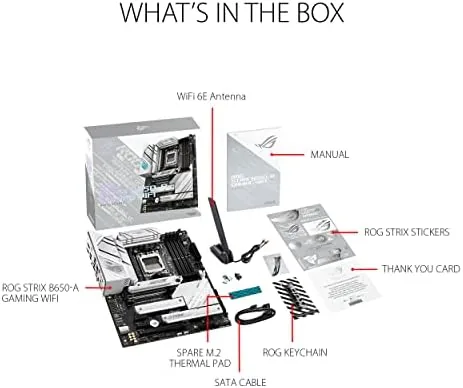
I built the test rig with a Ryzen 5 7600X and a Ryzen 7 9700X across the review period, 32 gigabytes of DDR5, and a PCIe 5.0 drive. I recorded boot behavior with both CPUs, verified all three M.2 slots and the SATA ports, measured wireless latency and throughput on the 6 gigahertz band, and confirmed the 2.5 gigabit port against a local NAS.
I ran sustained all-core workloads to watch VRM temperatures and throttling, tested the audio codec with a headset and desktop speakers, and deliberately misconfigured memory to confirm the Q-LED diagnostics worked. For a wider view of AM5 motherboard options, TechRadar has published a guide to the best AMD motherboards that is worth a read before you decide. The ASUS ROG Strix B650-A Gaming WiFi listing on Amazon shows the current price and availability.
ASUS ROG Strix B650-A Gaming WiFi: Questions People Ask
Which processors does the ROG Strix B650-A Gaming WiFi support?
The board uses the AM5 socket and supports Ryzen 7000 series processors out of the box, with BIOS updates adding support for the Ryzen 8000 and 9000 series.
How many M.2 slots does the board have?
The Strix B650-A has three M.2 slots. The first supports PCIe 5.0 drives, while the other two support PCIe 4.0, giving you room for a large drive collection.
Does the board include WiFi 6E?
Yes. The board includes WiFi 6E wireless networking, which adds the 6 gigahertz band, along with a 2.5 gigabit Ethernet port for wired connections.
What audio does the ROG Strix B650-A use?
The board uses the ALC4080 audio codec with DTS Sound, which delivers noticeably clearer audio than the budget codecs found on most boards in its price range.
As an Amazon Associate, I earn from qualifying purchases.