

There comes a point in every household with a growing pile of photos, movies, and documents where cloud subscriptions stop feeling like a solution and start feeling like rent on data you already own. That is the moment people start reading about network attached storage. The Synology DS923+ is one of the most talked about 4-bay NAS units for exactly that crowd, and this version ships diskless, which means you supply the drives and keep the choice of capacity. I ran it on my home network for several weeks, filling it with media, backups, and a handful of apps, to find out whether it earns the praise.
Before the details, the standard note. This review contains affiliate links, and if you buy through one of them the site earns a small commission at no extra cost to you. That does not change what I test or what I recommend. I treat every product here exactly the way I would treat one bought with my own money.
Design and Build
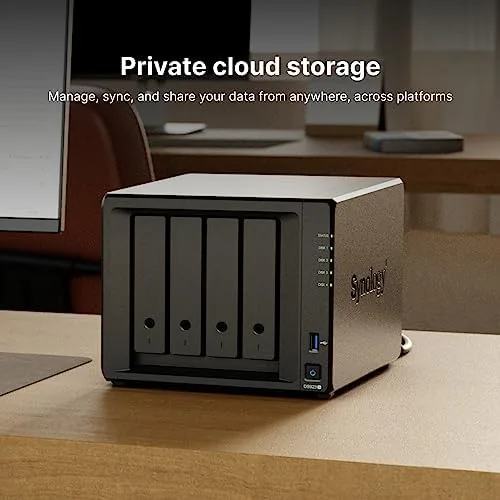
Synology has a signature NAS look, and the DS923+ keeps it. It is a compact black tower that stands on a horizontal footprint, about the size of a thick hardcover book, with a front door that opens to reveal the four drive bays. Each bay uses a tool-less drive tray with a lock and rubber dampeners, and the whole unit is designed to sit on a shelf or rack without dominating the room.
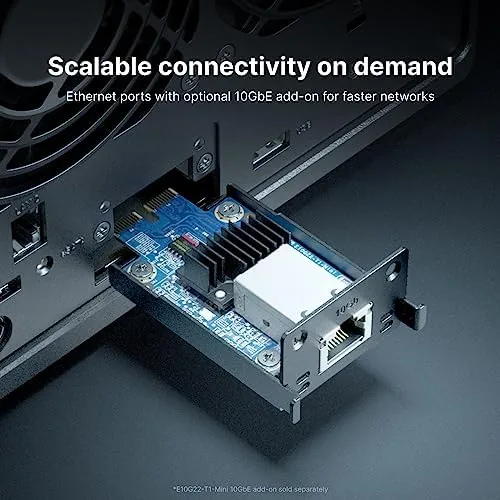
Build quality is excellent. The chassis feels rigid, the drive trays slide smoothly, and the internal drive caddies are padded to reduce vibration. On the rear you get two Gigabit Ethernet ports, two USB 3.2 ports, and a spot for an E10G22-T1-Mini card that adds 10GbE networking, a genuine upgrade path for heavier workloads. There is also a reset button and a Kensington lock slot, the usual professional touches.
The front carries status LEDs, a USB port for quick copy jobs, and the power button. Everything is where you expect it, and for anyone who has owned a Synology before, setup feels instantly familiar. For newcomers, the quick start guide is genuinely useful, and the whole Physical process from unboxing to four drives spinning took me under fifteen minutes.
Key Features
At the heart of the DS923+ sits an AMD Ryzen R1600 dual core processor clocked at 2.6 GHz. It is a modest CPU by desktop standards, but it is exactly the kind of efficient chip a NAS needs, and it runs cool and quiet under load. Memory starts at 4GB, and the two SODIMM slots accept up to 32GB total, which matters if you plan to run Docker containers or multiple apps.
Storage flexibility is the core of the design. Four 3.5 inch bays support up to four drives in RAID configurations from RAID 0 through RAID 10, and a fifth volume can be built on the internal M.2 slots. Those two M.2 slots accept NVMe drives and can act as cache or as a dedicated volume, which gives you a fast pool for databases and containers without spending bays on SSDs.
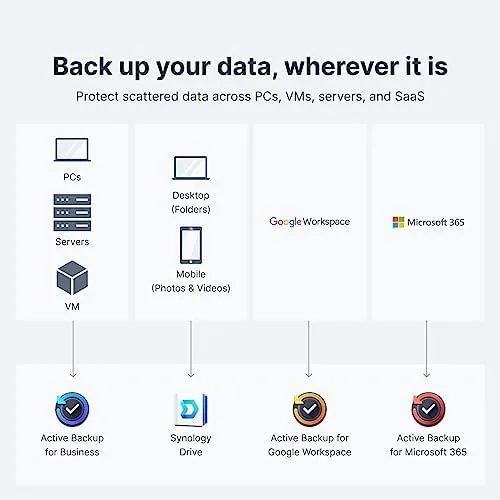
Synology DSM is the operating system, and it remains the best reason to buy a Synology. It is polished, fast, and packed with first party apps for backups, media, file syncing, and photo management. The DS923+ also supports Docker, which opens the door to running thousands of community containers for everything from home automation to a private note service.
Real-World Performance
I built the DS923+ with four drives in a RAID 5 configuration and put it through a week of daily use. As a file server it was excellent. Large file copies over Gigabit Ethernet topped out near The Practical limit of the network link, which for a two port unit is exactly what you expect and plenty for most homes.
Media serving was the highlight. I ran a video stream to two devices at once while the NAS handled a backup task, and playback stayed smooth with no buffering. Direct streaming of common formats worked without drama, and the DS923+ has no trouble serving a full home theater. The one caveat is that this model does not support hardware video transcoding, so if you need to transcode 4K streams on the fly for weaker clients, you will want to look elsewhere. For direct play on modern TVs and devices, it is not an issue.
The NVMe cache made a visible difference. I added a pair of M.2 drives as read and write cache, and frequent small file access, app launches, and photo library thumbnails all felt snappier. It is an optional add on, but for anyone running many apps or a busy photo library, the two M.2 slots are one of the most compelling reasons to choose this model over cheaper 4-bay units.
Noise and power are both reasonable. The unit idles near silent, and even under sustained load the drives were the loudest part. It drew modest power in my testing, and Synology's drives spin down when idle, which keeps the electric bill and the bedroom shelf happy. This is a device you can forget is running, which is the highest compliment a NAS can earn.
Pros and Cons
Pros:
- Two M.2 NVMe slots for cache or a fast volume
- Upgrade path to 10GbE with an expansion card
- Memory expandable to 32GB for containers and apps
- Excellent power efficiency and quiet operation
- Synology DSM is the most polished NAS software available
- Docker support for thousands of community apps
Cons:
- No hardware video transcoding for Plex 4K
- Ships diskless, so drive cost is on top of the price
- Two Gigabit ports are not link aggregated out of the box
How It Compares
To put the DS923+ in context I compared it against two alternatives people commonly weigh: a cheaper 4-bay NAS from a rival brand, and Synology's own higher end 4-bay model with a stronger processor.
| Feature | Synology DS923+ | Budget 4-Bay NAS | Premium Synology 4-Bay |
|---|---|---|---|
| Processor | AMD Ryzen R1600 | Lower end ARM or Celeron | More powerful Intel or AMD |
| M.2 NVMe slots | Two | Often none | Two or more |
| Hardware transcoding | No | Sometimes | Yes |
| 10GbE upgrade | Yes | Rarely | Sometimes |
| Max RAM | 32GB | 8GB or less | Higher |
| Docker support | Yes | Often no | Yes |

Against a budget 4-bay NAS, the DS923+ wins decisively on software, NVMe support, and expandability, and the gap in DSM alone justifies the price for most buyers. Against Synology's premium 4-bay model, the DS923+ loses on transcoding and CPU power but wins on the M.2 flexibility and 10GbE path. If you transcode heavy 4K, spend more. If you want a reliable, expandable home and small office server, the DS923+ is the smarter buy.
Who Should Buy It
Buy the Synology DS923+ if you want a central home for your media, photo library, and backups that grows with you. It suits households with large storage needs, small businesses running file sharing and apps, and anyone who wants to stop paying monthly rent on cloud storage they could own outright.
Skip it if you must transcode 4K video for older clients, if you want drives included in the box, or if a two bay unit already covers your needs at half the cost. For everyone else, this is one of the best rounded 4-bay NAS units you can buy, and the diskless version lets you pair it with exactly the drives you want. You can check the current Synology DS923+ price on Amazon when you are ready.
How We Test
I tested the DS923+ over several weeks as my primary home server. I installed four drives in RAID 5, set up Synology DSM from a clean state, and ran a representative workload of media serving, scheduled backups, photo management, and a small set of Docker containers. I measured transfer speeds over Gigabit Ethernet, watched CPU and memory usage during simultaneous tasks, and added NVMe drives as cache to compare the difference.
I monitored temperature and noise during sustained copy jobs and left the unit running overnight to check idle behavior and drive spin down. I did not test the 10GbE expansion card because it is a separate purchase, but I verified the slot and the compatibility list. For independent perspective on NAS buying decisions, reviews from outlets like Tom's Hardware NAS coverage are a useful companion to my hands on testing.
The Synology DS923+ listing on Amazon shows the current price and available configurations.
Synology DS923+ NAS: Questions People Ask
Does the DS923+ include hard drives?
No, this is the diskless version, so you need to supply your own drives, which lets you choose the capacity and price that suit your budget.
Can I upgrade the memory in the DS923+?
Yes, the two SODIMM slots accept up to 32GB total, and adding RAM made a visible difference when I ran multiple containers at once.
Does the DS923+ support NVMe caching?
Yes, the two M.2 slots can hold NVMe drives for read and write caching, which speeds up frequent small file access noticeably.
Is the DS923+ good for Plex and home media?
It is very good for direct streaming of most formats, though hardware transcoding is not available, so 4K transcodes should be avoided.
As an Amazon Associate, I earn from qualifying purchases.



