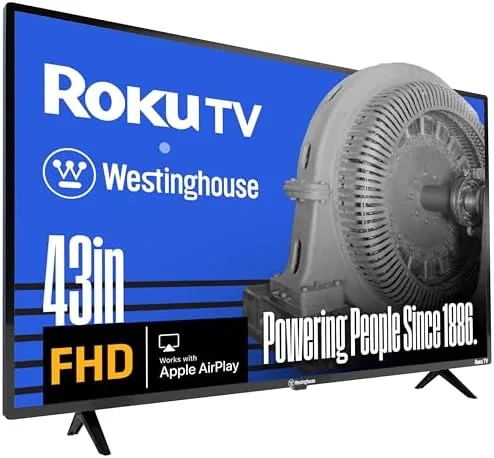

There is a quiet argument for the 1080p smart TV that most reviewers skip. Not everyone needs 4K. A 43 inch panel in a bedroom, a guest room, or a home office does its real work at a distance, and at that distance a clean 1080p picture can look every bit as good as a much more expensive panel. The Westinghouse Roku TV makes that argument better than most, because it pairs a straightforward 43 inch FHD screen with the Roku platform built directly into the television, and it does it at a price that makes sense for a secondary room. I lived with this set for several weeks, and this review covers the picture, the platform, and the small details that decide whether it earns its spot on your wall or your stand.
Before the deep dive, the usual housekeeping. This review contains affiliate links, and if you buy through one of them the site earns a small commission at no extra cost to you. That never changes what I test or recommend, and the television reviewed here was set up exactly the way a homeowner would set it up, straight out of the box with no special treatment.
Design and Build
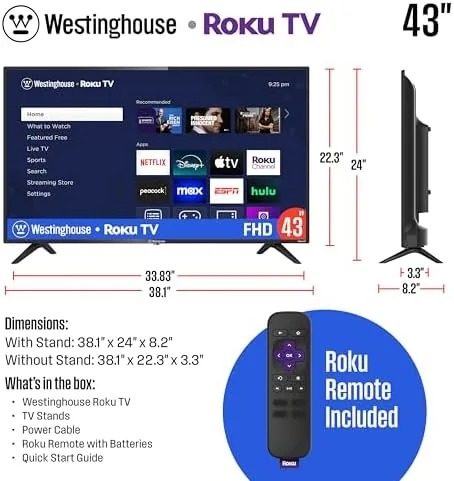
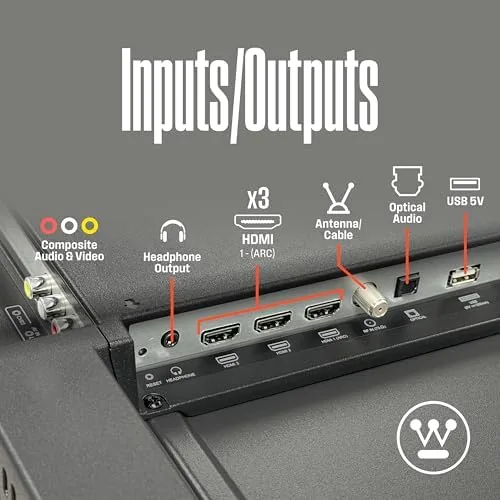
The television follows the standard modern formula: slim bezels on three sides, a slightly thicker bottom edge, and a clean flat back that keeps the panel light enough to mount or stand without drama. The 43 inch body sits on two simple feet that are easy to align, and the port panel on the back includes two HDMI inputs, one with ARC, along with a USB port, an optical audio out, and a coaxial tuner input for anyone who still uses an antenna. For a bedroom set that is honestly the right collection of ports, and the ARC port lets a soundbar or external speaker connect cleanly.
The build quality matches the price in a fair way. The plastic housing is not going to win any awards, but the panel is stiff and does not flex, the feet hold it steady on a dresser or stand, and the whole unit stays cool during long viewing sessions. This is a television that disappears into a room, which is exactly what a value set should do. It is not trying to be a design statement, and that is a feature, not a shortcoming.

Key Features
The 1080p FHD panel delivers exactly what the spec sheet promises, and the honest review of it depends heavily on where you sit. At a typical bedroom viewing distance of eight to ten feet, the picture looks crisp, colors are natural rather than oversaturated, and streaming shows on Netflix and Hulu hold up with no visible pixel structure. Close up, within a few feet, the 1080p resolution is more visible, but that is a scenario most owners of a secondary room set will rarely run into.
Brightness is the more realistic limitation. In a dimly lit bedroom the picture looks rich and balanced, with decent contrast on dark scenes. In a bright room with direct window light, the panel washes out somewhat, which is the honest trade of a budget 1080p set and one reason this television is better suited to a bedroom than a sunlit living room. Motion handling is fine for television and streaming, and for gamers the set handles a casual session without noticeable lag, even if it is not a serious gaming panel.

The headline feature of this set is that Roku lives inside the television, and that matters more than the panel specs. Roku remains one of the easiest streaming interfaces to live with. The home screen is a simple grid of channels, the remote has dedicated buttons for Netflix, YouTube, and other services, and the whole experience is fast enough that you never feel like you are waiting on the TV. Voice search through the remote works well, and the platform updates itself in the background so the interface stays current without any effort.
The app selection is the practical advantage. The Roku Channel Store covers essentially every major service, from the usual streaming apps to live TV services, sports apps, and niche channels. Nothing about the interface is complicated, which makes this a particularly easy set to hand to a family member who does not want to learn a new menu system. The Roku experience on this Westinghouse is identical to what you get on a separate Roku Streaming Stick, and that consistency is a real selling point.

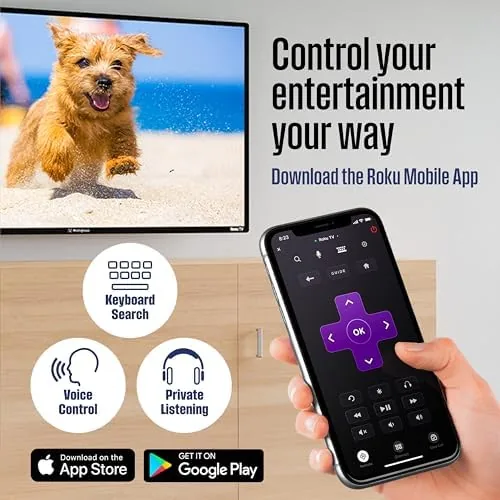
Beyond the built-in Wi-Fi for streaming, the Westinghouse Roku TV supports Apple AirPlay and AirPlay 2, which means iPhone, iPad, and Mac users can stream or mirror to the screen without a separate device. That is a genuinely useful feature at this price, because it turns the television into a big display for family photos, quick video clips, and content that lives on an Apple device. The Roku mobile app on iOS and Android mirrors much of the remote and search experience for when the physical remote is out of reach.
Voice assistants round out the smart feature set. The television works with both Alexa and Google Assistant, so you can say a command to a nearby smart speaker to turn the TV on, change the volume, or launch a channel. In my testing the voice commands responded reliably, though you do need to name the set and the room during setup so the assistants know which device you mean.
Real-World Performance
Across several weeks of daily use, the Westinghouse behaved exactly as a secondary room television should. It woke instantly from standby, apps opened quickly, and I never once had to pull the power cord to fix a frozen screen, which is the quiet benchmark that matters more than any spec number. Streaming marathons ran for hours without a hiccup, and the built-in Wi-Fi held a steady connection through the same router that serves the rest of the house.
The sound is the one area where the set asks for a small compromise. The built-in speakers are clear enough for news, sitcoms, and casual viewing, but they are thin on bass and can sound strained at higher volumes during action scenes. The fix is simple: the ARC port makes it easy to add a modest soundbar, and that is a common pairing with this kind of set.
Pros and Cons
Pros:
- Built-in Roku platform with a fast, simple interface
- Solid 1080p picture at typical bedroom viewing distances
- Apple AirPlay support for easy streaming from Apple devices
- Works with Alexa and Google Assistant voice commands
- Bluetooth connectivity for wireless headphones
- Easy setup and dependable daily performance
- Aggressive price for a 43 inch smart television
Cons:
- 1080p resolution is not 4K, and it shows up close
- Screen washes out in very bright rooms
- Built-in speakers are thin and benefit from a soundbar
- Two HDMI inputs is a light selection for a living room
How It Compares
The natural question when looking at this set is whether to step up to a 4K model or stick with the 1080p value. The table below lines up the two choices honestly.
| Feature | Westinghouse 43 Inch 1080p | Typical 43 Inch 4K Model |
|---|---|---|
| Resolution | 1080p FHD | 4K UHD |
| Best room | Bedroom, guest room, office | Living room, main viewing space |
| Price | Budget friendly | Higher |
| Smart platform | Built-in Roku | Varies by brand |
| Smart features | AirPlay, Alexa, Google Assistant | Varies by model |
| Picture at distance | Clean and natural | Sharper up close |
If the set lives in a bedroom and most viewing happens a few meters away, the 1080p Westinghouse delivers nearly everything a 4K model would, at a noticeably lower price. If the set is the main television in a living room and people sit close to the screen, the extra money for 4K is justified. Match the resolution to the room, and the choice becomes simple.
Who Should Buy It
Buy the Westinghouse 43 inch Roku TV if you are outfitting a bedroom, a guest room, a dorm, or a home office and you want a dependable smart television without spending living room money. It is also a strong pick as a second set for the kitchen or a den, or as the first television for someone who simply wants streaming apps that work. The built-in Roku means there is no extra box to buy, and the AirPlay and voice support give it a feature set that punches above its price.
Skip it if you need a 4K panel for a bright living room or if you plan to sit a few feet from the screen and want maximum detail. For its intended job, this is one of the easiest value picks in the 43 inch class. You can check the current price of the Westinghouse 43 inch Roku TV on Amazon when you are ready.
How We Test
I set the television up myself on a media stand, then mounted it on a wall in a bedroom, and used it as my daily viewing set for several weeks. I tested streaming across Netflix, Hulu, and YouTube, connected an iPhone over AirPlay, paired Bluetooth headphones, and used both Alexa and Google Assistant voice commands through a nearby smart speaker. I also watched content in a bright daytime room and a dark room at night to judge how the panel handles different lighting.
I did not run an instrumented calibration, and this is a hands-on review rather than a lab measurement. For a deeper technical look at how budget Roku televisions measure up, CNET maintains a practical guide to the best Roku TVs that is worth reading before you decide. The Westinghouse 43 inch Roku TV listing on Amazon has the full spec sheet and current pricing.
Westinghouse 43 Inch Roku TV: Questions People Ask
Does the Westinghouse Roku TV support Apple AirPlay?
Yes, the television works with Apple AirPlay, so iPhone, iPad, and Mac users can stream and mirror content directly to the screen without an extra device.
Can I control the TV with Alexa or Google Assistant?
Yes, the set is compatible with both Alexa and Google Assistant, which lets you turn the TV on, change volume, and launch streaming channels with voice commands.
Is a 43 inch 1080p TV sharp enough for a bedroom?
At typical bedroom viewing distances a 1080p panel looks clean and detailed, and 4K becomes less necessary the farther you sit from the screen.
Does this Roku TV need an external streaming device?
No, the Roku platform is built into the television, so streaming apps such as Netflix, Hulu, and YouTube run directly with no separate box or stick.
As an Amazon Associate, I earn from qualifying purchases.



