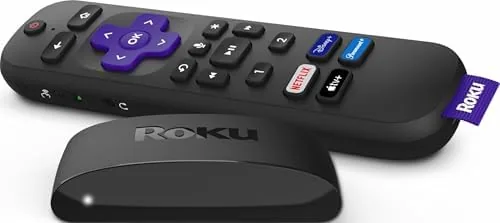

Streaming devices have a way of making the simplest job complicated. Smart TV menus are slow, phone casting drops connections, and some boxes force you through a maze of subscriptions before you can watch anything. The Roku Express takes the opposite approach: a tiny black puck that plugs into any HDMI port and turns the television into a streaming player with the famously simple Roku interface. At a price that sits well under a single outing, it is the streaming device most people actually need.
Before the details, the standard note. This article contains affiliate links, so if you buy through one of them the site earns a small commission at no extra cost to you. That does not change what I test or what I write.
Design and Build
The Roku Express is small enough to disappear behind the television. It is a flat black rectangle roughly the size of a large coaster, with a sticky pad on the underside so you can mount it to the back of the set and forget it exists. The front edge holds the IR receiver, and the cable tucks neatly out of sight.
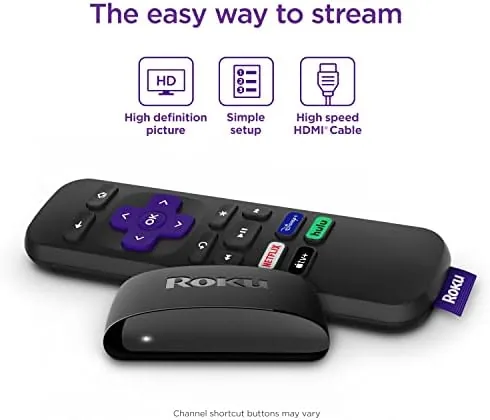
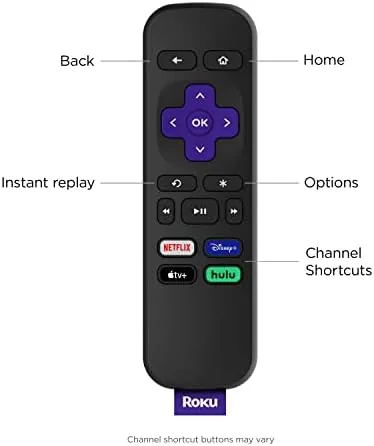
The included remote is the definition of simple. It has the familiar directional pad, a home button, back and instant replay buttons, and dedicated shortcuts for the main streaming services. There are no TV power or volume controls, which keeps the remote tiny and uncluttered, but it does mean you will still reach for the television remote to adjust the volume.
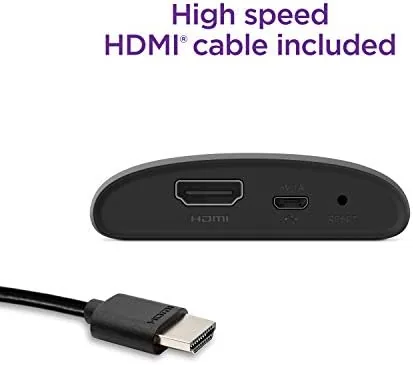
Setup is genuinely painless. Plug in the power, plug the included HDMI cable into the television, choose the right input, and the device walks you through connecting to Wi-Fi and linking your Roku account. From unboxing to the home screen took under five minutes in my test, with no app downloads and no phone pairing required.
Key Features
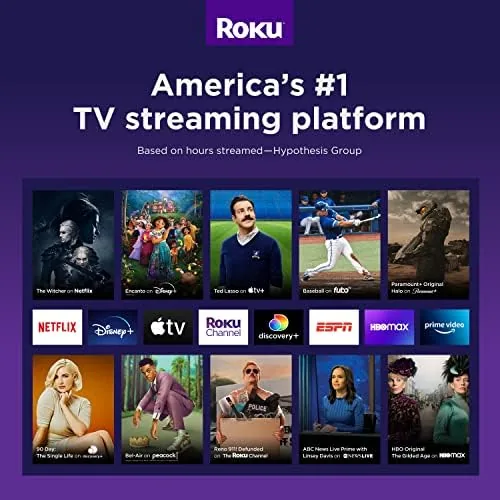
The Roku Express streams in up to 1080p HD, which matches the resolution of a huge number of televisions in real homes. It runs the full Roku OS, which means access to thousands of channels and apps, including the major streaming services, free ad supported channels, and the Roku Channel with its library of free movies and live TV.
Free and live TV is a genuine highlight. The Roku Channel bundles hundreds of movies and shows at no cost, and the live TV section streams round the clock news, sports highlights, and entertainment channels without a subscription. For a cord cutter on a budget, that content alone can justify the price of the device.
The Roku mobile app adds useful extras: private listening through your phone or headphones, voice search, and the ability to control the box from a phone. The app also lets you cast photos and video, and it keeps the device useful even if the physical remote goes missing. The Express does not support 4K, which is expected at this price, but for an HD television it is the correct match.
Real-World Performance
The Roku interface is the reason this device exists. It is fast, responsive, and free of the clutter that slows down smart TV operating systems. Moving between channels is instant, menus load without lag, and the home screen shows your favorite apps in a simple grid. After weeks of use, the Express never once slowed down or needed a restart.
Streaming quality was excellent in testing. 1080p content from the major services played smoothly with no buffering on a solid Wi-Fi connection, and the device handled the Roku Channel live streams without hiccups. Switching between apps is quick, and resuming where you left off works reliably across services.
One thing I appreciated is how the Express stays out of the way during everyday use. The home screen puts your most used apps in one row, and the search function checks a dozen services at once to show where a title is available and at what price. That cross platform search alone saves time, because it stops you from assuming a movie must be on the service you happen to have open.
The biggest practical limitation is the remote. Because it has no TV controls, the volume, power, and input switching all live on the television remote, which means juggling two remotes during a session. It is a deliberate cost saving, and the Roku app fills the gap, but it is the one thing I would change if the budget allowed.
There is also a welcome sense of calm to the whole experience. Roku does not push its own content into every corner of the interface the way some rivals do, so you see the apps you chose rather than a feed of sponsored recommendations. For anyone who has fought a smart TV home screen full of noise, that restraint is a genuine advantage, and it is a big part of why the platform feels so effortless day after day.
For most households the trade off is easy to accept. The Express is small, quiet, and fast, and it turns a dumb television into a smart one for the price of a couple of coffees. If you are looking to cut the cable cord or upgrade a tired smart TV, the Roku Express on Amazon is the obvious starting point.
The mobile app deserves its own mention because it quietly extends the device. Private listening routes the audio through your phone or a pair of wired earbuds, which is a lifesaver when someone else is asleep in the same room. Voice search lets you type nothing at all and simply speak a title, and the app even finds the player if you leave the remote in another room. For a budget device, that level of software support is genuinely generous.
Pros and Cons
Pros:
- Simple, fast, uncluttered interface
- Free and live TV through the Roku Channel
- Painless five minute setup
- Compact size disappears behind the television
- Excellent value for an HD television
Cons:
- Remote lacks TV power and volume controls
- 1080p only, with no 4K support
- Requires a separate Wi-Fi network setup step
How It Compares
At its price the Roku Express competes with budget Fire TV Sticks and Chromecast devices. The Fire TV Stick offers 4K on its pricier models and integrates tightly with Alexa, but its interface pushes content recommendations harder. The Chromecast relies on your phone for most control, which some users love and others find fiddly. The Roku Express wins on simplicity and on having a physical remote that anyone in the household can use.
| Feature | Roku Express | Fire TV Stick Lite | Chromecast with Google TV |
|---|---|---|---|
| Resolution | 1080p HD | 1080p HD | 4K HDR |
| Remote included | Yes, simple | Yes, with TV controls | Yes, with TV controls |
| Free and live TV | Roku Channel | Amazon Freevee | Google TV free content |
| Voice assistant | App based search | Alexa | Google Assistant |
| Interface | Clean grid | Recommendation heavy | Content focused |
For a comprehensive comparison of streaming hardware, PCMag best streaming players is a solid independent reference.
Who Should Buy It
The Roku Express is for anyone with an HD television and a desire for a simple, reliable streaming experience. It is perfect for a bedroom set, a guest room, or a secondary television where a premium 4K box would be wasted. It is also ideal for older users who want a remote they can understand and an interface that does not hide anything.
If you have a 4K television or need a single remote to control everything, spend a little more on a Roku Streaming Stick or an Express 4K+. But if you want the lowest possible price to make any television smarter, the Express is the right call.
How We Test
I used the Roku Express daily for three weeks as the primary streaming device on an HD television. I tested setup time, app switching speed, streaming stability across the major services and the Roku Channel, and the phone app features including private listening and voice search. I also compared the experience against a 4K Roku Stick and a Fire TV device side by side.
For background on how Roku has grown into the streaming market, the The Verge review of the Roku Express offers a useful independent perspective.
Roku Express: Questions People Ask
Does the Roku Express support 4K video?
No, the Roku Express is an HD streaming player that tops out at 1080p; the Roku Express 4K+ or a streaming stick is the upgrade path for 4K televisions.
What comes in the box with the Roku Express?
You get the streaming player, a simple remote without TV controls, a USB power cable and adapter, an HDMI cable, and two adhesive strips for mounting.
Do I need a cable subscription to use the Roku Express?
No, the Roku Channel offers free and live TV, and thousands of channels are free, with paid services added only when you want them.
How do I control the Roku Express?
The included remote handles navigation and power for the player, and the free Roku mobile app adds private listening and voice search.
When you are ready to make any television smarter, you can order the Roku Express on Amazon.
As an Amazon Associate, I earn from qualifying purchases.



