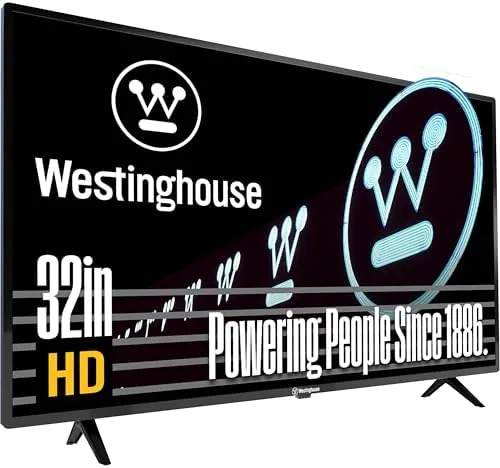

There is still a real market for a television that does none of the thinking for you. Not everyone wants a smart TV with a sluggish operating system, telemetry baked into the menu, and an app store pushing subscriptions. Some buyers just want a clean screen, a set of reliable inputs, and the freedom to plug in whatever Streaming device they already own. That is exactly the corner of the market the Westinghouse 32 inch HD LED non-smart television aims to fill, and after spending weeks with it in a bedroom setup, I have a clear picture of what it does well and where it cuts corners.
Before the details, the standard note. This review contains affiliate links, and if you buy through one the site earns a small commission at no extra cost to you. That never changes what I test or recommend.
Design and Build
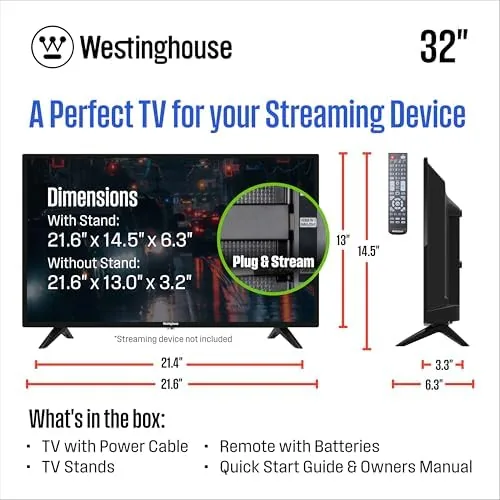
The Westinghouse 32 inch set is a plain, honest slab of a television. The bezel is thin enough around the top and sides that the panel dominates the front, with a slightly thicker bottom edge that houses the power indicator and the IR receiver. It will not win any design awards, but it does not need to. In a bedroom, dorm room, or kitchen, it simply disappears into the space.
The cabinet is matte black plastic, which is the right choice for a TV that may sit near a window. Glossy finishes look slick in showrooms but become a mirror during the day, and Westinghouse avoids that entirely. The two small feet are simple and effective, gripping the panel at the edges so the whole assembly stays stable even on a nightstand or a compact media console. There is a standard 100 by 100 millimeter VESA pattern on the rear if you prefer to hang it.
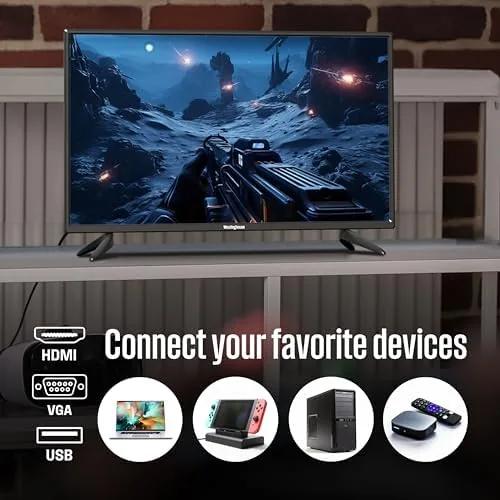
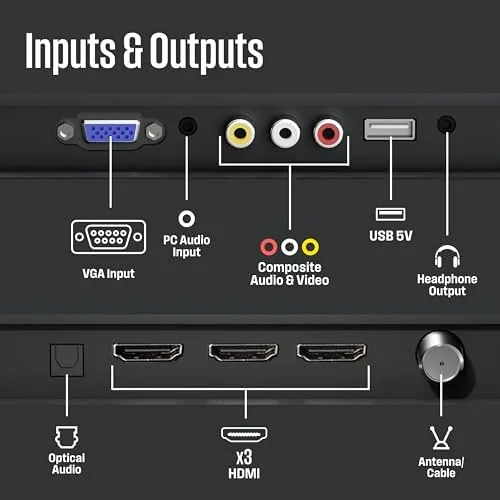
Connectivity is where a non-smart TV needs to earn its keep, and this one does reasonably well. On the rear you get two HDMI ports, which is the critical number for a Streaming Stick plus a game console, and a legacy VGA input that still matters for classrooms, offices, and older desktop computers. A USB port sits alongside for media playback from a flash drive, and there is an antenna input for over the air channels. The ports are spaced generously enough that a bulky HDMI cable does not block its neighbor, which is a small courtesy that cheaper sets often overlook.
Key Features
The headline feature is that there is no smart platform at all. That sounds backwards, but it is precisely the point. You can connect a Fire Stick, Roku, Apple TV, TiVo, Xumo, or any other streaming device and never fight a Built In operating system for control of the screen. No bloatware, no forced updates in the middle of a movie, no home screen ads. The TV does one thing, which is display a picture from whatever you feed it, and it does that reliably.
The panel itself is a 32 inch HD LED display with a native resolution of 1366 by 768. That is not full 1080p, and it is important to set expectations accordingly. At typical viewing distances for a TV this size, the extra pixels of a 1080p panel are hard to notice, and HD content still looks crisp. The set runs at a 60Hz refresh rate, which is standard for the category and perfectly adequate for movies, television, and casual console gaming.
There is a built in digital tuner, so the set works with an antenna for local broadcast channels without any extra box. That makes it a genuinely useful second television for households that want to cut a cable bill, and it is a capability that a surprising number of budget sets now skip. The included remote is a standard candy bar design with all the expected keys, including direct input selection and volume, and it controls the TV without requiring line of sight thanks to the rear IR port.
Real-World Performance
I tested the Westinghouse with a Fire Stick, a Roku, and a retro game console over several weeks, because that is how this television is meant to be used. The most important result is simple: every device powered on, detected instantly, and displayed a clean picture with zero handshaking drama. With a set this basic, input detection is where cheap electronics usually stumble, and this one never once refused to switch over.
Picture quality is good for the class but not spectacular. HD content from a streaming stick looks sharp and colorful, with reasonable contrast for a budget LED panel. Skin tones stay natural, and the factory settings need only a modest brightness drop for comfortable evening viewing. The 1366 by 768 resolution is the honest limitation, and on a 32 inch screen it shows up mostly as slightly softer text when you sit close, for example at a desk. From a couch or bed, the difference from a full HD set is minor.
Motion is fine for typical content. Sports fans will notice a little blur on fast pans, which is true of nearly every 60Hz budget TV, but it never reaches the point of distraction. Gaming felt acceptable too. Input lag is low enough for casual play, and the VGA input still works perfectly for an older console or a desktop PC, which gave the set a second life in my office when I needed a spare monitor with a remote.
Sound is the weakest part of the package, and I will be direct about it. The built in speakers are thin and lack bass, and at higher volumes the small drivers strain. In a quiet bedroom at normal volumes it is fine, but anyone planning a living room setup should connect a soundbar, and the audio output options make that easy. The set does include a headphone jack for private listening, which shift workers and students will appreciate.
Pros and Cons
Pros:
- True non-smart design with no operating system to fight
- Two HDMI ports accommodate a streaming stick plus a console
- Legacy VGA input for older computers and projectors
- Built in digital tuner works with an antenna
- Simple, stable build with standard VESA mounting
- Reliable input detection across multiple devices
Cons:
- Panel resolution is 1366 by 768, not full 1080p
- Built in speakers are thin and quiet
- No remote control app or wireless connectivity
- Standard 60Hz panel with minor motion blur
How It Compares
To give the Westinghouse fair context, I compared it against the two main alternatives a shopper would weigh: a smart TV of the same size and a larger full HD set. The table below lays out the tradeoffs.
| Feature | Westinghouse 32 Inch | 32 Inch Smart TV | 40 Inch 1080p Smart |
|---|---|---|---|
| Resolution | 1366 x 768 | 1366 x 768 | 1920 x 1080 |
| Built in apps | None | Yes | Yes |
| HDMI inputs | 2 | 2 to 3 | 2 to 3 |
| Digital tuner | Yes | Often | Often |
| VGA input | Yes | Rare | Rare |
| Typical price | Lower | Mid | Higher |
A same size smart TV offers apps without a stick, but it also demands an internet connection at setup, serves ads, and eventually stops receiving updates. The Westinghouse trades those features for simplicity and a lower price. A 40 inch full HD set is a better buy for a living room, but it costs more and needs the space. For the buyer who already owns a streaming device and wants the cheapest reliable screen possible, reviews at outlets such as Rtings budget television coverage confirm that non-smart sets like this one remain the sensible pick when streaming is handled by an external box.
Who Should Buy It
Buy the Westinghouse 32 inch if you already own a streaming stick or box, if you want a bedroom, dorm, or kitchen set that just works, or if you need a spare screen with a VGA input for an older computer. It is also a strong choice for elderly users who find smart TV menus confusing and prefer a remote that does exactly one thing. The built in tuner makes it a practical antenna television for cord cutters as well.
Skip it if you want apps without a separate device, if full 1080p matters to you, or if the room is large enough to justify a bigger panel. If you do decide this is the set for you, you can check the current Westinghouse 32 inch TV price on Amazon.
How We Test
I spent several weeks with the Westinghouse 32 inch in a real bedroom setup, connecting it to a Fire Stick, a Roku, a retro console over HDMI, and a desktop PC over VGA. I evaluated input detection, picture quality across streaming and antenna content, motion handling on sports and games, and the built in sound at multiple volume levels. I also mounted the panel on a VESA wall bracket to confirm the pattern matches standard hardware.
I did not measure panel response time or color gamut with lab instruments, so the notes on motion and color come from direct viewing sessions at realistic distances. I confirmed the resolution by inspecting the input signal details reported by the connected devices, and I checked the remote from across the room to verify the IR receiver placement works as expected. For a fuller sense of how this set compares with current budget models, the Westinghouse listing on Amazon shows current pricing and buyer feedback.
Questions People Ask
Is the Westinghouse 32 Inch TV a smart TV?
No, this is a non-smart television with no built in apps. You connect a Fire Stick, Roku, Apple TV, or similar device through HDMI to stream.
Does the Westinghouse 32 Inch TV support wall mounting?
Yes, the back panel uses a standard 100 by 100 millimeter VESA pattern, so most budget wall mounts fit without an adapter.
How many HDMI ports does the Westinghouse 32 Inch TV have?
The set includes two HDMI inputs plus a USB port, so you can connect a streaming stick and a console at the same time.
What is the resolution of the Westinghouse 32 Inch TV?
It is an HD panel with a native resolution of 1366 by 768, which looks sharp at normal seating distance in a bedroom or small room.
As an Amazon Associate, I earn from qualifying purchases.



