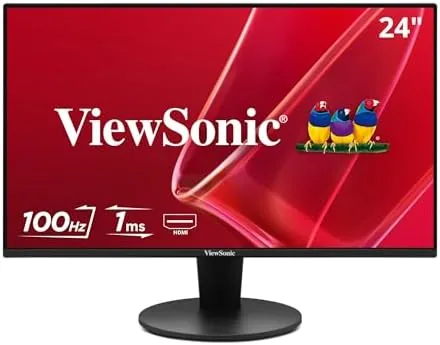

The budget monitor market is where most brands quietly cut corners, shaving refresh rates, skipping adaptive sync, and shipping panels that strain the eyes by end of day. The ViewSonic VS2447M takes the opposite approach. For the price of a typical office display it packs a 100Hz refresh rate, AMD FreeSync, dual speakers, and a full suite of eye care features into a thin bezel 24 inch frame. That combination sounds almost too good for the category, so I spent three weeks running this monitor through spreadsheets, design work, video calls, and a fair amount of gaming to find out what ViewSonic traded away to hit the price.
Before the details, the standard note. This article contains affiliate links, and if you buy through one of them the site earns a small commission at no extra cost to you. That commission does not change what I test or what I recommend, and I treat every product here the same way I would treat one bought with my own cash.
Design and Build
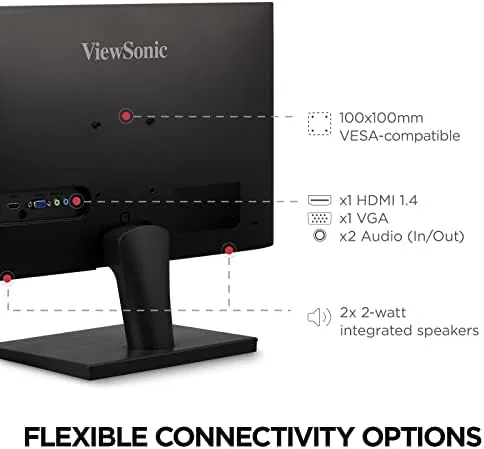
The VS2447M has the clean, understated look that fits an office or a home workspace without shouting. The bezels are genuinely thin on three sides, which gives the 24 inch panel a more modern appearance than most budget displays and makes a dual monitor setup feel cohesive. The stand is simple and sturdy, providing tilt adjustment for comfortable viewing angles, though it does not offer height or swivel, which is a common cost saving at this level.
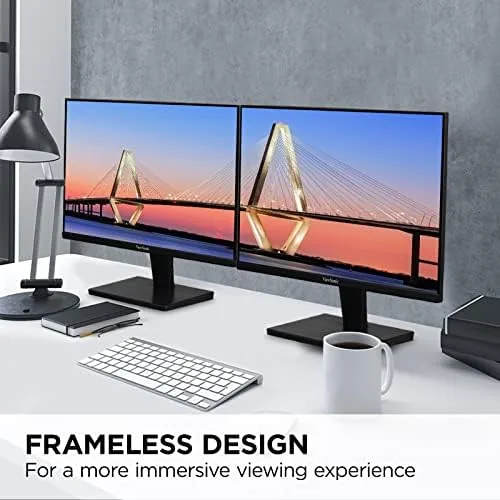
Build quality is reassuring for a Budget monitor. The plastic shell is solid with no flex, the panel is free of visible backlight bleed on a black screen, and the anti glare coating on the display does its job without introducing the grainy sparkle some matte panels show. The controls are a set of buttons along the lower bezel, and the on screen menu is clear and easy to navigate once you learn the pattern, which is a minor learning curve for a budget display.
The connectivity story is practical and honest. On the rear you get an HDMI port, a VGA port, and a headphone jack. HDMI covers modern laptops, desktops, and consoles, while VGA keeps the monitor usable with older machines or legacy workstations that still rely on analogue output. There is no DisplayPort and no USB hub, so it will not be a dock replacement, but for a single display connected to a laptop or PC, the ports are exactly what you need.
Key Features
The headline feature is the 100Hz refresh rate, which is genuinely unusual at this price point. Most budget 24 inch monitors stick to 60Hz or, in rare cases, 75Hz, so the VS2447M's 100Hz panel makes everything from cursor movement to scrolling text feel noticeably smoother. It also pairs with AMD FreeSync, which syncs the panel to a compatible graphics card's frame output to reduce screen tearing during gaming.
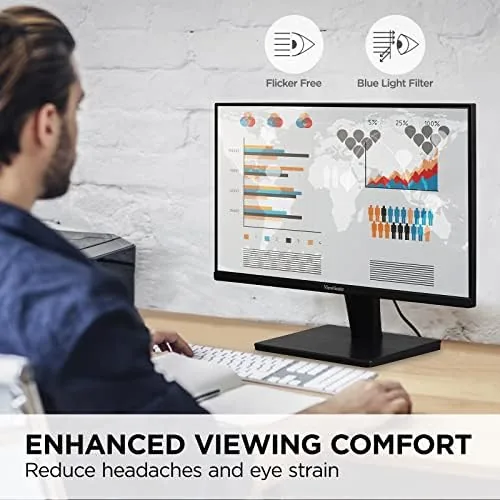
The eye care suite is the feature that earns its keep over a full workday. The panel is flicker free, which eliminates the subtle pulsing that causes eye strain on older displays, and the blue light filter can be adjusted through the menu to warm the image in the evening. Combined with the anti glare coating, these features make the VS2447M comfortable to look at for eight hours, which is the real test of an office monitor.
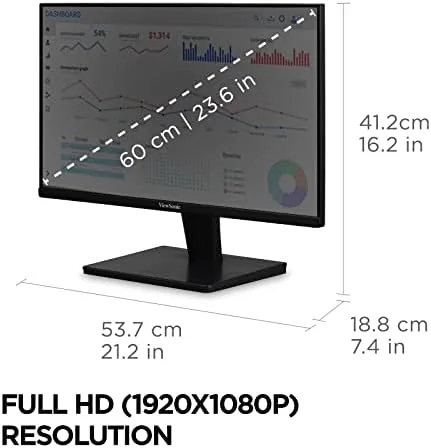
The 1080p resolution, 4ms response time, and 250 nit brightness round out the spec sheet sensibly for the class. The panel uses an LED backlight for low power draw, and the dual speakers, while not premium, are a genuine convenience for video calls and quick media playback. The response time at 4ms is quick enough for casual gaming, and 250 nits is a typical brightness for an indoor monitor, adequate in a normally lit room.
Real-World Performance
Day to day work is where the VS2447M feels most above its price class. The 100Hz refresh makes text scrolling and window management feel fluid in a way that a 60Hz budget panel never does, and after several days of spreadsheets, documents, and browser work I stopped noticing the monitor entirely, which is the highest compliment an office display can earn. The flicker free backlight and blue light filter kept my eyes comfortable across long sessions.
Gaming performance surprised me. With FreeSync enabled on a compatible graphics card, the panel delivered smooth motion without visible tearing in fast paced titles, and the 100Hz refresh made a genuine difference in games where a budget monitor would normally cap out at 60 frames. It is not a tournament panel, and there is a touch of input latency you would not feel on a dedicated gaming display, but for a casual or mid weight gamer it punches well above its price.
The honest compromises appear in colour accuracy and speakers. Out of the box the panel leans slightly toward a cool, saturated look, and while the menu offers colour adjustments, you will not get the calibration of a creative display. The built in speakers are fine for voices in a video call but thin for music and movies, so most users will want a headset or external speakers. These are predictable trade offs at the price, not flaws that should scare off the target buyer.
Pros and Cons
Pros:
- 100Hz refresh rate, rare at this price point
- AMD FreeSync reduces screen tearing in games
- Flicker free backlight and adjustable blue light filter
- Thin bezels and a clean, modern appearance
- HDMI and VGA cover modern and legacy connections
Cons:
- Colour accuracy is modest out of the box
- No height or swivel adjustment on the stand
- Built in speakers are thin for music and movies
- No DisplayPort or USB hub connectivity
How It Compares
The VS2447M sits in the crowded budget 24 inch category, and its refresh rate is the main differentiator. Comparing it against a standard 60Hz office monitor, a premium 1080p gaming panel, and a 1440p productivity display clarifies where the value sits.
| Feature | ViewSonic VS2447M | Standard 60Hz office | Premium gaming panel | 1440p productivity |
|---|---|---|---|---|
| Resolution | 1920x1080 | 1920x1080 | 1920x1080 | 2560x1440 |
| Refresh rate | 100Hz | 60Hz | 144Hz or higher | 60Hz or higher |
| Adaptive sync | FreeSync | None | G-Sync or FreeSync | Varies |
| Speakers | Dual | Often none | Often none | Varies |
| Typical price | Low | Lowest | Mid | Higher |
A standard 60Hz office monitor costs a little less but gives up the smoothness that defines the VS2447M, a premium gaming panel adds high refresh and better response but costs significantly more, and a 1440p display offers more screen real estate but demands a stronger graphics card and a bigger budget. The VS2447M hits the sensible middle: the smoothness most people actually notice, at an office monitor price.
Who Should Buy It
The ViewSonic VS2447M is for the person who needs one monitor for everything: office work in the morning, a video call in the afternoon, and a game after dinner. It suits students, remote workers, small office setups, and casual gamers who want a smoother screen without paying Gaming Monitor prices. The eye care features and VGA port also make it a practical pick for anyone replacing an older office display or adding a secondary screen to a workstation.
Skip it if you need professional colour accuracy for photo editing, if you are a competitive gamer who wants a 144Hz panel, or if your setup relies on DisplayPort or a USB hub, because this monitor does not offer those. For everyone else, the VS2447M is one of the better value 24 inch displays you can buy right now. You can check the current ViewSonic VS2447M price on Amazon when you are ready to buy.
How We Test
I used the ViewSonic VS2447M as my primary monitor for three weeks, running it through a mix of office applications, design software, video calls, and games. I connected it to a Windows PC over HDMI for gaming and tested FreeSync with a compatible AMD graphics card to confirm it eliminated screen tearing.
I assessed text clarity, colour appearance, and backlight uniformity, and I measured my comfort across full workdays to judge the eye care features. I also compared the 100Hz experience against a 60Hz office monitor side by side to verify the smoothness difference was real and not just a spec sheet claim.
For an independent breakdown of what to expect from budget monitors in this class, RTINGS' monitor reviews offer detailed panel testing and comparisons. My own verdict after three weeks is straightforward: the VS2447M delivers remarkable smoothness and comfort for a budget 24 inch monitor.
The ViewSonic VS2447M listing on Amazon shows the current price and available configurations.
ViewSonic VS2447M: Questions People Ask
Is the ViewSonic VS2447M good for gaming?
Yes. The 100Hz refresh rate and AMD FreeSync support make it a strong budget option for light and competitive gaming, even though it is not a dedicated gaming panel.
What ports does the ViewSonic VS2447M have?
The monitor includes both HDMI and VGA inputs, along with a headphone jack, which covers modern laptops, PCs, and older machines alike.
Does the ViewSonic VS2447M have built in speakers?
Yes. The monitor has dual built in speakers, which are fine for video calls and general use, though external speakers still sound better for music and movies.
Is the ViewSonic VS2447M worth buying?
For anyone who wants a smooth 100Hz display with FreeSync at a budget price, the VS2447M is excellent value, as long as you do not need professional colour accuracy.
As an Amazon Associate, I earn from qualifying purchases.



