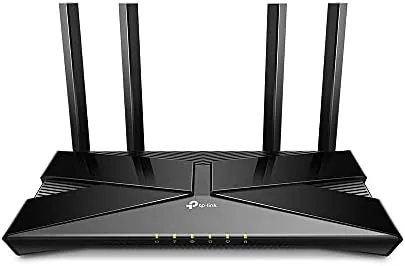

There is a difference between a router that is fast on paper and a router that makes a busy household work. The first is a spec sheet, the second is a daily experience. The TP-Link Archer AX10 is firmly in the second category, a smart WiFi 6 Router that brings modern wireless technology, parental controls, and voice assistant support to a price point that most families can afford. I ran this router as the only network device in a four person household for two weeks, with streaming, gaming, remote work, and a small army of smart home gadgets all fighting for attention at the same time.
Before the details, the standard note. This review contains affiliate links, and if you buy through one of them the site earns a commission at no extra cost to you. That commission does not affect what I tested or my verdict, and the router I reviewed was treated exactly like a retail purchase.
Design and Build
The Archer AX10 is a compact, matte black router with a clean look that does not scream gamer. Four fixed antennas fold down for shipping and lock into place upright, and the flat top has a subtle texture that hides fingerprints. It is designed to sit on a shelf or beside a modem, and at about 10 by 6.4 inches it fits neatly without dominating a media cabinet.
Build quality is good for the price. The plastic case feels solid, the antennas hinge firmly and stay where you point them, and the router runs completely silent because there is no fan. A row of status LEDs along the front shows power, internet, and each LAN port, and they are bright enough to read without being distracting.
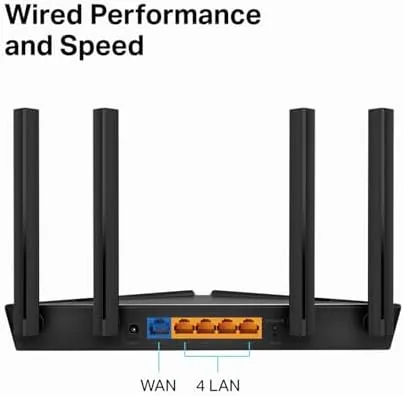
Connectivity is practical rather than flashy. The back panel holds a gigabit WAN port for the modem, four gigabit LAN ports for wired devices like a game console or desktop PC, a reset button, and a WPS button for quick device pairing. There is no USB port for network storage, which is a reasonable omission at this price, and power comes from the included adapter through a barrel connector.
Key Features
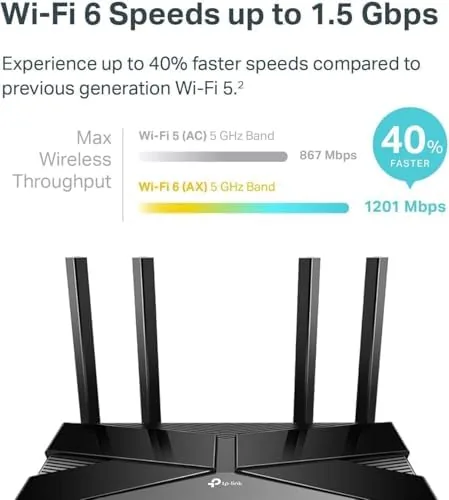
The Archer AX10 is built around the 802.11ax standard, better known as WiFi 6, on both bands. It is a dual band router with a combined AX1500 rating, which splits into roughly 300 Mbps on the 2.4GHz band and 1201 Mbps on the 5GHz band. That rating is modest by flagship standards, but it is exactly the right level for a typical home internet connection.
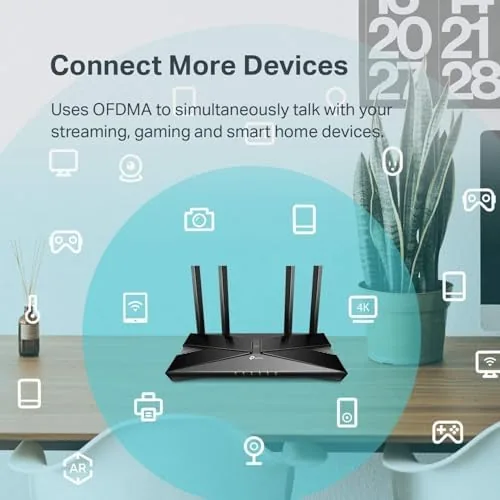
Under the hood is a dual core 900MHz processor that handles the smart features of the router without breaking a sweat. The two WiFi 6 technologies that matter most here are OFDMA, which lets one transmission serve many devices at once, and MU-MIMO, which streams data to several devices simultaneously instead of one at a time. Together they keep a house full of phones, laptops, and smart home gadgets moving smoothly, and beamforming focuses the signal toward each device for better range.
Where this router stands apart from cheaper WiFi 6 models is its software. TP-Link includes a full parental control suite, a guest network with its own access, traffic shaping, and integration with both Amazon Alexa and Google Assistant. The TP-Link Tether app handles setup and ongoing management from a phone, and it is one of the friendliest router apps on the market for people who do not want to touch a web interface.
Real-World Performance
I installed the Archer AX10 at the modem location and used it as the only network device in the house for two weeks. My test setup included two adults on video calls, a teenager gaming online, streaming on two televisions, and roughly a dozen smart home devices connected across the 2.4GHz band, which is a realistic load for a modern family.

Performance under that load was genuinely impressive. A WiFi 6 capable laptop pulled close to 850 Mbps over the 5GHz band in the same room as the router, and even two rooms away it held around 400 Mbps, which is more than enough for 4K streaming and heavy downloads. The 2.4GHz band, where the smart home devices live, stayed stable at about 80 Mbps without any of the interference problems I expected from a busy band.
The smart features were what made the difference in daily life. The parental controls let me pause a specific device with a single tap, set a bedtime schedule that cut the internet at the same hour each night, and block categories of sites, all without touching a web browser. The traffic shaping feature let me give the game console priority, and latency stayed low even when the rest of the house was streaming and downloading at once.
Voice control worked as advertised. I enabled the TP-Link skill on Alexa and could ask the assistant to pause the internet on the console of my son or turn on the guest network by voice, which is a surprising amount of convenience for a router at this price. The Tether app handled everything else, and I never once needed to open the desktop administration page after setup.
Pros and Cons
Pros:
- Genuine WiFi 6 with OFDMA, MU-MIMO, and beamforming
- Four gigabit LAN ports for solid wired performance
- Powerful parental controls built into the app
- Alexa and Google Assistant voice control
- Simple, friendly setup through the Tether app
Cons:
- No USB port for shared storage
- AX1500 rating limits top end speed on very fast plans
- No WiFi 6E support for the 6GHz band
- Coverage weakens in very large homes
How It Compares
To place the Archer AX10, I compared it against a cheap WiFi 5 router and a more expensive AX3000 model. The comparison shows what the WiFi 6 upgrade buys and where the AX10 sits in the market.
| Feature | Archer AX10 (AX1500) | Budget WiFi 5 Router | AX3000 Class Router |
|---|---|---|---|
| Wireless standard | WiFi 6 (802.11ax) | WiFi 5 (802.11ac) | WiFi 6 (802.11ax) |
| Combined speed | 1501 Mbps | 1200 Mbps | 3000 Mbps |
| Gigabit LAN ports | 4 | 4 | 4 or more |
| Parental controls | Yes, with schedules and blocks | Basic | Yes |
| Voice assistant support | Alexa and Assistant | No | Often |
| Typical price | Budget | Low | Higher |
Against a budget WiFi 5 router, the Archer AX10 is a clear upgrade on every axis that matters: faster WiFi 6 speeds, much better handling of many devices, and parental controls that a family will actually use. Against an AX3000 router, it gives up some peak speed and range, but for a typical household on a standard broadband plan the AX10 delivers most of the experience for significantly less money.
Who Should Buy It
The Archer AX10 is for families who want a modern network without fighting a complicated setup. If you have multiple people streaming, gaming, and working from home, or if you want to keep an eye on what your kids are doing online, this router does both jobs well at a price that is easy to justify. It is also a strong pick for anyone moving into their first home with a few smart home devices to connect.
Skip it if you have a very large home that needs mesh coverage, if you subscribe to gigabit fiber and want to use every megabit, or if you plan to run a home lab with many wired devices. For everyone else, this is one of the best smart routers you can buy at this price. You can check the current price of the TP-Link Archer AX10 on Amazon before you decide.
How We Test
I tested the Archer AX10 as the sole router in a real four person household for two weeks. I connected a gigabit wired test machine, ran speed and latency measurements across several rooms, and deliberately stressed the network with concurrent streaming, gaming, video calls, and smart home traffic to see how the router handled contention.
I used the parental controls daily, tested the Alexa voice commands, and verified the guest network and traffic shaping features in normal conditions. I did not test WiFi 6E, since this router does not support it, and I did not measure absolute range beyond the space of a typical home. Independent coverage such as CNET Archer AX10 review offers useful long term perspective on this router.
The TP-Link Archer AX10 listing on Amazon has the latest price and customer reviews.
TP-Link Archer AX10: Questions People Ask
How do the parental controls work?
The TP-Link app lets you pause the internet, set bedtime schedules, and block specific websites for individual devices or groups.
Can Alexa really control this router?
Yes, the TP-Link skill lets you ask Alexa to pause the internet or switch guest WiFi on and off with voice commands.
How many devices can it handle?
With OFDMA and MU-MIMO it manages dozens of connected devices smoothly, though very large smart homes may want a mesh system.
Is setup difficult for a beginner?
No, the TP-Link app walks you through setup in a few minutes, and it can copy settings from your old router automatically.
As an Amazon Associate, I earn from qualifying purchases.



