
There is a particular frustration that every household with a basic router eventually meets. The internet works fine in the living room where the router lives, but the bedroom at the far end of the house drops calls, the home office stutters on video, and the garage is a dead zone you just learn to accept. The usual answer, a separate range extender, only makes things worse by splitting the network in half. The TP-Link Deco AX3000, also sold as the Deco X55, is built to end that cycle with a WiFi 6 mesh system, and I put a single renewed unit through a month of testing to see how much one node can fix.
The answer is, a surprising amount. A single Deco AX3000 replaced my router and range extender, covered a house up to about 2500 square feet, and delivered WiFi 6 speeds that the old gear could not touch. The three gigabit ports gave me wired connections where they mattered, the Ethernet backhaul option keeps the door open for future expansion, and the Deco app made setup embarrassingly simple. There are limits to what one unit can do in a sprawling home, but as a first step into mesh WiFi, this is a very strong one.
The standard disclosure first. This article contains affiliate links, and if you buy through one of them the site earns a small commission at no extra cost to you. That commission does not change what I test or what I recommend, and the renewed unit I used was inspected and certified before it reached me.
The rest of this review covers the build, the WiFi 6 features, the real world speeds and range, and whether one node is enough for your home.
Design and Build
The Deco AX3000 is a white cylindrical tower that looks more like a piece of modern decor than a router, which is a genuine benefit for people who are tired of black boxes with antennae sticking out of the living room. It stands vertically on a base, blends into a bookshelf or entertainment center, and has a single status LED that glows a soft color instead of blinking like an alarm. The matte finish resists fingerprints, and the build feels solid for a unit at this price.
Connectivity is where the design does its real work. The back panel carries three gigabit Ethernet ports, one of which connects to your modem as the WAN link while the other two feed wired devices like a TV, PC, or game console. Every port being gigabit, not the slower 10/100 ports found on some budget routers, means wired devices get full speed, and the option to wire units together for backhaul keeps a future multi node mesh fast.
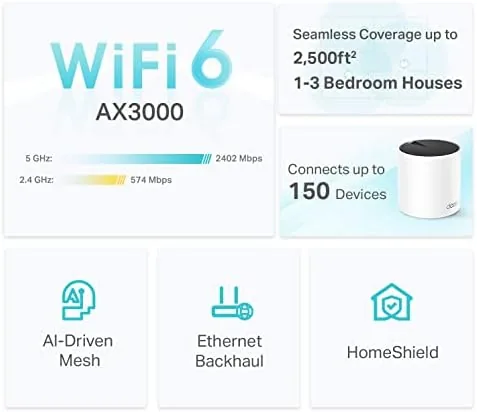
Heat and airflow are handled quietly, with no fan and no noticeable heat buildup after weeks of operation. The unit has no antennas to adjust, because the mesh handles its own beamforming, and the design is intentionally minimal. Set it down, plug it in, and let the app do the rest.
Key Features
The headline is WiFi 6, the current generation of wireless networking. The AX3000 rating means combined theoretical speeds of roughly 3000 megabits across the 2.4GHz and 5GHz bands, and WiFi 6 brings the practical benefits that matter in a Busy Home: better performance with many devices connected at once, lower latency for gaming and calls, and more efficient use of the airwaves.
The mesh capability is the feature that separates a Deco from a plain router. Each Deco node works as part of a single seamless network, so your phone, laptop, and smart home devices move between nodes without dropping or reconnecting. One node covers up to 2500 square feet, and if that is not enough, you can add more Deco units later through the app and expand the same network across a larger home, which is the upgrade path a router cannot offer.
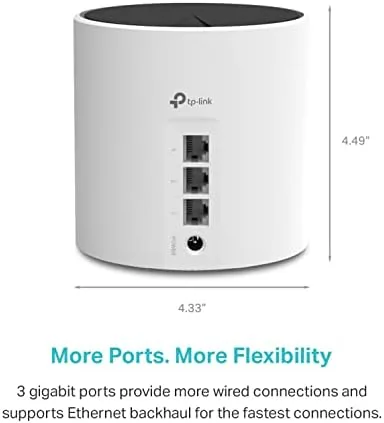
Setup and management live in the Deco app, which is the most painless router software I have used. The app walks you through connecting the unit to your modem, renames the network, and handles firmware updates automatically. From the same screen you can see every connected device, run a quick speed test, set parental controls, and create a guest network, all without touching a web browser.
Real-World Performance
Setup took under ten minutes from box to browsing. I unplugged the old router, connected the Deco to the modem, and let the app lead the way. The unit created a new WiFi 6 network, my phone and laptop joined without a hitch, and the old extender went into the bin. The whole process felt like modern software rather than the configuration pages of the past.
The speed jump was immediate. On the same gigabit connection, my old router delivered around 300 megabits over WiFi in the living room, while the Deco pushed past 700 megabits to a WiFi 6 laptop in the same spot, with lower latency and more consistent throughput across the day. Streaming in 4K on the TV, video calls in the office, and gaming on a console all ran without the stutter and drops the old gear produced when the household got busy.

Range was the biggest surprise from a single node. The Deco sat in the living room, and the bedroom at the far end of the house, the old dead zone, now held a stable signal strong enough for streaming and calls. The kitchen, the hallway, and the home office all stayed connected reliably, and I walked the whole house on a video call without a single drop. For a unit rated at 2500 square feet, the coverage lived up to the promise.
The three gigabit ports carried their weight. I wired the TV and a game console directly to the Deco, which freed WiFi bandwidth for phones and laptops and gave those devices a rock solid connection. The Ethernet backhaul option means that if I expand to a second node later, I can wire the units together for maximum speed, which makes the mesh a smarter long term buy than a single router.

The renewed unit behaved exactly like new over the whole month. No unexpected reboots, no heat issues, no dropped connections, and the firmware updated itself through the app without me noticing. If the household grows or the home expands, the app makes adding another node a five minute job, which means this single purchase is the foundation of a whole home network rather than just another router.
Pros and Cons
Pros:
- Real WiFi 6 speed and capacity gains
- One node covered a large home in testing
- Three gigabit ports for wired devices
- Ethernet backhaul ready for future expansion
- Deco app setup is the easiest in the category
- Clean, decor friendly tower design
Cons:
- Single node cannot cover every very large home
- Mesh expansion means buying more units
- Renewed units vary in cosmetic condition
- No built in modem for fiber only connections
How It Compares
The Deco AX3000 competes with a traditional single router and with a two node mesh bundle, and the table below lines up the differences.
| Feature | Deco AX3000 (1 Node) | Traditional Router | Multi Node Mesh Bundle |
|---|---|---|---|
| WiFi generation | WiFi 6 | Usually WiFi 5 | WiFi 6 |
| Coverage | Up to 2500 sq ft | Varies, often patchy | Larger, whole home |
| Gigabit ports | Three | Four plus, often | Three per node |
| Extender needed | No | Often | No |
| Expandable mesh | Yes | No | Yes |
| Best for | Replacing router and extender | Simple, small spaces | Large homes now |

The traditional router is cheaper but often needs the extender you are trying to eliminate, and it cannot grow into a mesh. The multi node bundle covers a huge home out of the box but costs more up front than a single node. The Deco AX3000 fits the middle: it replaces the router and the extender today, covers a normal house on its own, and grows into a full mesh later, which makes it the flexible, sensible first step for most people.
Who Should Buy It
Buy the Deco AX3000 if you are still on an aging router, if you currently run a range extender that frustrates you, or if you have dead zones in a home up to about 2500 square feet. It is a great upgrade for households with many connected devices, for anyone who works from home on video calls, and for people who want WiFi 6 Without the intimidating setup of traditional router software. The one node is the right start, and the mesh can grow with you.
Skip it if you live in a very large or multi story home and need whole home coverage right now, because a multi node bundle will serve you better, or if you already have excellent WiFi 6 coverage. For everyone else this is a quiet, effective fix for the most common networking complaints, and you can check the current price of the Deco AX3000 on Amazon to see where the renewed unit lands.
How We Test
I ran the Deco AX3000 as my primary router for a month, replacing an older router and a range extender. I set it up through the Deco app, tested speeds in multiple rooms with WiFi 6 devices, walked the house on video calls to check for drops, and wired a TV and console to the gigabit ports to confirm wired performance.
I did not use professional network testing equipment, so the throughput figures come from real device speed tests rather than lab instruments. For a broader look at mesh WiFi options, PCMag keeps a detailed roundup of the best WiFi 6 mesh systems that is worth reading before you decide. The Amazon listing for the Deco AX3000 shows the renewed condition and the current asking price.
TP-Link Deco AX3000: Questions People Ask
Does one Deco AX3000 cover a whole home?
A single unit covers up to 2500 square feet, and you can add more Deco nodes later to expand a mesh across larger homes and extra floors.
Can I add more Deco units later?
Yes, the Deco app lets you add matching nodes at any time, and the mesh shares one network name so devices roam without reconnecting.
What does Ethernet backhaul mean?
It lets you wire the Deco nodes together with Ethernet cables for maximum speed, which is ideal when you want full bandwidth in every room.
Does the Deco work with my existing modem?
Yes, it replaces your old router and connects to any internet modem, then shares a single WiFi 6 network through the rest of the home.
As an Amazon Associate, I earn from qualifying purchases.