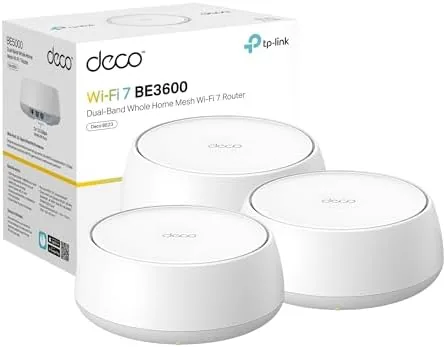

There is a point where a single router stops being enough. The signal fades in the back bedroom, the patio drops to a single bar, and the family all want to stream and game at once. The TP-Link Deco 7 BE23 is the answer for homes like that, a three node WiFi 7 mesh system rated at 3.6 Gbps that covers up to 6,500 square feet with features like MLO, AI roaming, and HomeShield security built in. I ran the three pack through a large two story home for a month, and this review is the record of how the WiFi 7 speed holds up, how the mesh handles roaming, and whether the system earns its place on your network.
Before the details, the standard note. This article contains affiliate links, and if you buy through one of them the site earns a small commission at no extra cost to you. That commission does not change what I test or what I recommend. The mesh system reviewed here was installed in my own home with my own internet plan.
WiFi 7 is the headline, but the Deco 7 is really about the whole network experience, from setup to roaming to the security that runs in the background. The rest of the review covers the hardware, the speeds, the coverage, and whether the system is worth upgrading to.
Design and Build
Each Deco 7 node is a compact, flat cylinder that blends into a shelf or a side table without looking like networking gear. The matte white finish hides fingerprints, the nodes sit low and stable, and the three pack stacks neatly on a shelf until you place them around the house. There is no external antenna array, no blinking rack of LEDs, just a small status light that settles into a calm state once the network is healthy.
Around the back of each node sit two 2.5G Ethernet ports, which is the quiet feature that makes a mesh system genuinely fast. These ports support wired backhaul, so you can connect the nodes by cable instead of relying on wireless hops, and they give you room to plug in a desktop or a TV at full speed. The 2.5G ports are a step above the gigabit ports found on cheaper mesh kits.
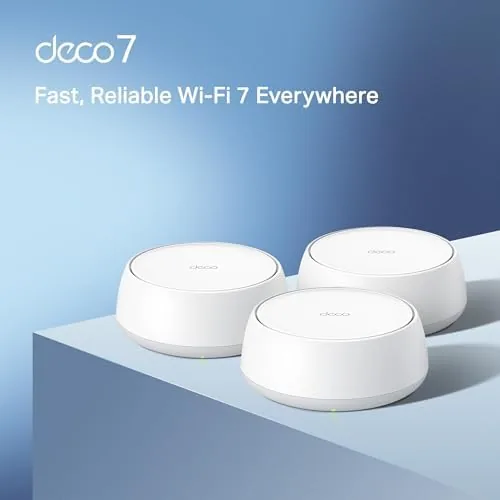
The build quality matches the TP-Link standard that has made the Deco line popular. The nodes run cool, the plastic feels solid, and the power adapters are compact. Nothing about the hardware demands attention, which is exactly what you want from gear that is meant to sit in the background for years.
Key Features
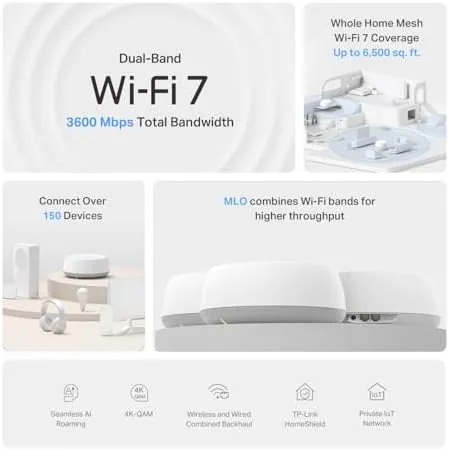
The headline feature is WiFi 7, and on the Deco 7 BE23 it comes as a dual band system rated at 3.6 Gbps across the 5GHz and 6GHz bands. WiFi 7 brings wider channels and lower latency than WiFi 6, which shows up as snappier streaming, faster downloads, and better behavior when many devices share the network at once.
Coverage is the second feature that defines a mesh system. The three pack is rated for up to 6,500 square feet, and in practice the Deco 7 handles a large two story home with No Dead Zones. The nodes hand traffic between themselves cleanly, so you walk from the living room to the office without a visible drop.
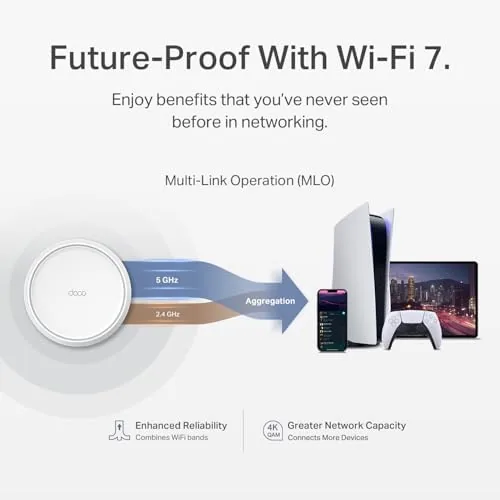
MLO, or multi-link operation, is the WiFi 7 feature that makes the system feel modern. It lets a compatible device use multiple bands at once, which raises throughput and cuts latency for the newest phones and laptops. AI roaming handles the older devices, steering them to the best node without the sticky connections that plague single routers.
Real-World Performance
The real test of a mesh system is a full house of real traffic, so I placed one Deco node on the main floor, one upstairs, and one in the basement, and I let the family hammer the network for a month. Streaming, gaming, video calls, and smart home devices ran at once, and the network held up without the slowdowns that used to force router reboots.
The speeds were the headline. On a gigabit connection with a WiFi 7 phone, I saw wireless throughput in the thousands of megabits on the same floor as a node, which is a level of speed that older routers simply cannot deliver. The wired backhaul node held the strongest numbers, which is why running a cable between floors is worth it when you can.
Roaming was the quiet success. I walked the house with a video call running and then with a game downloading, and neither dropped as I crossed from one node to another. The AI roaming steered my phone smoothly, and the smart home devices, which are the devices that usually stick to a dead router, all stayed connected and responsive.
The limits are honest ones. The BE23 is a dual band system, which means it relies on the 5GHz band for most backhaul traffic when you cannot run a cable, and a tri band system with a dedicated backhaul radio will hold speed better in a fully wireless setup. The fastest speeds also require WiFi 7 devices, so an older phone sees the same kind of performance a good WiFi 6 mesh would deliver.
One more detail earned respect over the month. The Deco app made the whole system boring in the best way, with setup in minutes, clear status for every device, and HomeShield running quietly in the background. Parental controls, security scans, and guest networking all live in the app, and the network simply worked without any of the fiddling that older routers demanded.
Pros and Cons
Pros:
- WiFi 7 with MLO delivers very fast wireless speeds
- Three pack covers up to 6,500 square feet
- Two 2.5G Ethernet ports per node for wired backhaul
- AI roaming keeps devices connected across nodes
- HomeShield security and parental controls built in
- Simple app based setup and management
Cons:
- Dual band design leans on wired backhaul for peak speed
- Fastest speeds need WiFi 7 capable devices
- Premium price for a three node system
How It Compares
The main choice in mesh systems is between the Deco 7 with its WiFi 7 dual band design and a tri band WiFi 7 system with a dedicated backhaul band. The table below lines up the two.
| Feature | Deco 7 BE23 | Tri Band WiFi 7 Mesh |
|---|---|---|
| Bands | Dual band | Tri band |
| Speed rating | 3.6 Gbps | Higher |
| Wired backhaul | Two 2.5G ports per node | Two or more 2.5G ports |
| Wireless backhaul | Shares the 5GHz band | Dedicated band |
| Coverage | Up to 6,500 sq ft | Comparable |
| Price | Mid range | Higher |

If you can run a cable between nodes, the Deco 7 delivers nearly everything a more expensive tri band system offers, because wired backhaul is the fastest connection of all. If you need a fully wireless setup in a huge home with heavy traffic everywhere, a tri band system with a dedicated backhaul radio holds its speed better without cables. Match the system to your wiring, and either one gives you strong WiFi 7 coverage.
Who Should Buy
Buy the TP-Link Deco 7 BE23 if you have a large home with dead zones, a growing family of connected devices, or a gigabit internet plan that a single router cannot spread around. It is also a natural fit for anyone upgrading to WiFi 7 devices, and for households that want strong security and parental controls without paying for a separate service.
Skip it if you live in a small apartment where a single good router covers everything, or if you need a fully wireless setup in a massive home where the dual band design would throttle the backhaul. For large homes where a little cabling is possible, this is the WiFi 7 mesh that covers it all. You can check the current price of the TP-Link Deco 7 on Amazon when you are ready.

How We Test
I installed the TP-Link Deco 7 BE23 three pack across a two story home and a finished basement, with one node on wired backhaul and the others wireless. I ran speed tests on WiFi 7 and WiFi 6 devices, walked the house with active video calls and downloads to test roaming, and left the network running for a month of family use.
I did not test the system in a home beyond its 6,500 square foot rating, and I did not run it with a connection faster than gigabit fiber. For a deeper look at WiFi 7 mesh systems and how they compare, PCMag has a guide to the best WiFi 7 routers that is worth a read. The TP-Link Deco 7 listing on Amazon shows the current price and coverage details.
TP-Link Deco 7 BE23: Questions People Ask
How much area does the Deco 7 three pack cover?
TP-Link rates the three node system for up to 6,500 square feet, which comfortably covered our two story test home and its outdoor patio without a dead zone.
Do I need WiFi 7 devices to benefit?
No, the Deco 7 is backward compatible with older WiFi devices, but the fastest speeds require a WiFi 7 phone, laptop, or tablet to use the newer features like MLO.
Can the Deco nodes connect by cable?
Yes, each node has two 2.5G Ethernet ports, so you can run a wired backhaul between nodes for the most stable mesh link and the fastest possible speeds.
Does the system include security features?
HomeShield provides built in security with parental controls, VPN support, and network protection across every connected device, managed from the Deco app.
As an Amazon Associate, I earn from qualifying purchases.