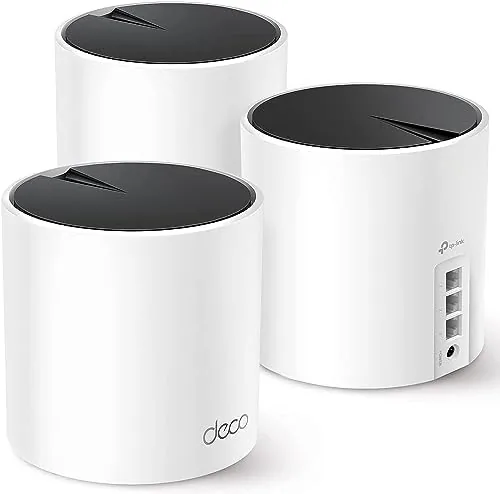

Dead Wi-Fi spots are a slow irritation that wears on everyone in a house, and I spent months blaming my modem for them. This TP-Link Deco X55 review records a month with the three pack stretched across a two floor home, and the conclusion is that it cleared the problem I could not fix any other way. The X55 is not the fastest or the cheapest mesh on the shelf, but it hits a sweet spot of coverage, Wi-Fi 6 speed, and a genuinely easy app that most families will value more than raw numbers.
Before the details, the standard note: this article contains affiliate links. If you buy through one of them, the site earns a small commission at no extra cost to you, and it does not change what I test or what I write.
Design and Build
The Deco X55 is a set of three small, rounded white towers that look more like decorative speakers than networking gear. Each one is a compact cylinder with a clean matte shell, a single LED around the base, and no antennas sticking out, so they blend into a bookshelf or a side table without announcing themselves. That design is a real selling point; a mesh system you do not want to hide is easier to place in the middle of the home, where the signal serves the most rooms.
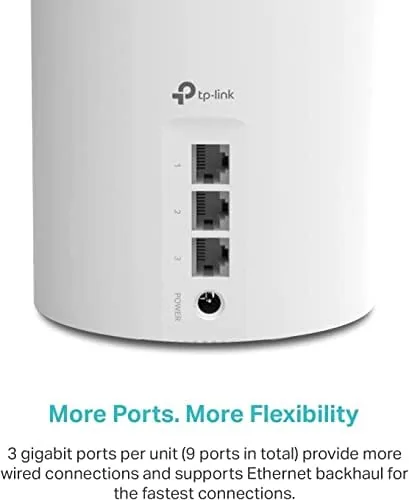
Each unit offers three gigabit ethernet ports and a power input, arranged cleanly on the back. The build feels solid and the plastic does not gather fingerprints badly. There is no built in modem, so you connect the primary node to your existing modem and let the Deco handle everything from there.
Key Features
The core spec is AX3000 Wi-Fi 6. That means each node offers aggregate speeds around 3 Gbps across the two bands, which is plenty for streaming, gaming, video calls, and a house full of smart home devices at once. Wi-Fi 6 also brings better efficiency when many devices connect, so a crowded household keeps a steadier signal than an older router would provide.
The system covers a large area out of the box. TP-Link rates the three pack for up to about 6500 square feet, which is an optimistic top end figure; the real usable range depends on the walls and layout of your home, and my two floors came in somewhat below the claim after accounting for construction. The Deco app directs the whole network and is the center of the experience.

There is also ethernet backhaul support. If you can wire the satellite units back to the main node with the gigabit ports, the mesh uses the wired connection for the trunk between nodes, which improves throughput and stability in the far corners. That is a genuinely useful option for homes where running a cable is practical, and it future proofs the system as devices grow faster.
Real-World Performance
Setup took me under ten minutes in the end. I placed the primary node near the modem, put two more in the rooms that used to drop, and the Deco app walked me through the entire process with no command line and no stumbling. The app named the network, ran a quick scan, and the nodes linked themselves; I have installed systems that took an hour of tinkering, and this was a welcome difference on that first evening.
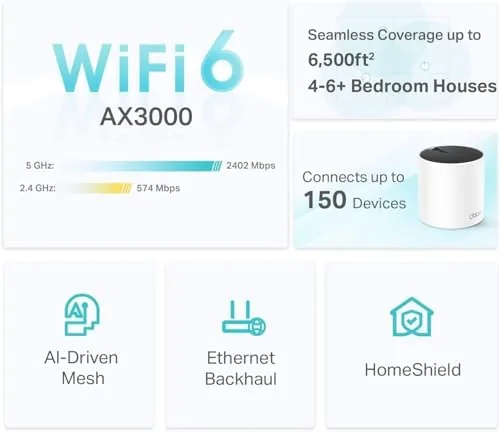
The coverage is the headline result. The far bedroom, which used to buffer on every stream, now holds a steady signal for video calls and 4K, and the office and garage both connect without dropping out mid call. Walking from the kitchen to the bedroom during a long video call, I did not notice the hand off between nodes at all, which is exactly what a mesh should feel like.
Speeds were solid wherever I measured. Next to a node I saw close to the faster figure, and in the distant rooms the signal stayed good enough for real work, which is the entire point of killing dead spots. The only honest complaints are cosmetic: the three white towers look nice but they are not invisible on a tidy shelf, and the app occasionally sends a network wide notification I did not ask for. Neither slows the network for a second.
Pros and Cons
Pros:
- Whole home coverage that ended my last dead spots
- Wi-Fi 6 speeds handle many devices at once
- Simple app setup with parental controls and guest Wi-Fi
- Three gigabit ports and ethernet backhaul per node
- A lower price than most flagship mesh kits
Cons:
- The three towers take up visual space on shelves
- Real range often falls below the square foot stamp
- The app occasionally sends less relevant notifications

How It Compares
The main rivals are other Wi-Fi 6 mesh kits in the same budget band, from TP-Link's own range and from competing brands. Against an old router and extender setup, the Deco X55 replaces the confusing pairing and the two separate network names with one mesh key and steady hand off. Against a premium tri-band mesh, the X55 accepts slower top speeds in exchange for a much lower price and a better value for most homes.
| Feature | TP-Link Deco X55 | Premium tri-band mesh | Old router + extender |
|---|---|---|---|
| Standard | Wi-Fi 6 (AX3000) | Wi-Fi 6E | Wi-Fi 5 |
| Coverage (3 pack) | Up to 6500 sq ft | Similar | Varies heavily |
| Ports per node | 3 gigabit | Varies | Router only |
| Setup | Deco app | App or web | Manual |
| Price | Mid | High | Low |
Compared to a premium tri-band mesh, the X55 trades a little peak speed for a much lower price; for a family streaming, gaming, and taking video calls across a two floor home, that trade is usually the right one. And it is a clear upgrade over a router plus extender that share two network names and drop between rooms. You can check the TP-Link Deco X55 price on Amazon when you are ready.
Who Should Buy the TP-Link Deco X55
Buy it if you have a home with a dead bedroom, a weak garage, or a room that always drops during video calls, and you want one clean system to fix it without expensive wiring. It suits families with many devices, remote workers, and anyone who would rather manage a network from a phone app than a manual. The three pack price undercuts the bigger mesh names, which makes it an easy recommendation for a first mesh upgrade.
Skip it if you live in a small apartment where one good router is enough, you own Wi-Fi 6E devices that need the newer band, or you want the absolute top speed of a premium tri-band mesh. When ready, the TP-Link Deco X55 three pack on Amazon shows the current options.
How We Test
I ran the Deco X55 three pack across a two floor home for a month, testing video calls, streamed 4K, online gaming, and many devices at once. I judged setup time, coverage in the rooms that used to drop, hand off between nodes, and how the Wi-Fi held up under a full evening of use. I did not have wired ethernet backhaul in every wall, so my results reflect the wireless mesh at its realistic best.
I compared it with the router and extender I replaced and with a more premium mesh to show the value difference. Independent mesh testing adds useful context, so I recommend the router coverage at PCMag Deco X55 review as a second point of view. For the current price, the Deco X55 listing on Amazon has it.

TP-Link Deco X55: Questions People Ask
Do I need to replace my router?
Yes. The Deco X55 acts as your router and mesh in one, so it replaces the old router and any extender with a single seamless system managed in the Deco app.
How much will it cover?
TP-Link rates the three pack up to 6500 square feet. My measured usable range across a two floor home impressed me, though walls always shorten the claim.
Can I wire the satellites?
Yes. Each node has three gigabit ports supporting ethernet backhaul, so wiring the satellites can give the mesh a faster and steadier connection to the main unit.
Is the Deco X55 easy to set up?
Yes. The app completes the setup in under ten minutes, and it handles the network name, parental controls, priority devices, and guest Wi-Fi from the same screen.
As an Amazon Associate, I earn from qualifying purchases.