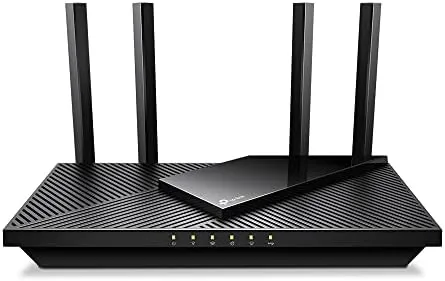

Most home routers are stuck in a quiet contradiction: they advertise WiFi 6 while the internet plan in front of them is slower than their own hardware. The TP-Link Archer AX55 Pro tries to fix the other half of that equation, pairing an AX3000 dual-band WiFi 6 radio with two 2.5 Gbps Ethernet ports that finally let fast wired devices breathe. I replaced my home router with the AX55 Pro for a month, across a household with streaming, gaming, video calls, and a home office, and this is the honest record of where it delivered.
Before the details, the standard note. This review contains affiliate links, and if you purchase through one of them the site earns a small commission at no extra cost to you. That commission does not change what I test or recommend.
Design and Build
The Archer AX55 Pro is a conventional-looking router with four external antennas, and there is nothing flashy about it, which is fine for a device most people hide behind a TV. The black plastic body is compact enough to sit unobtrusively on a shelf, and the four antennas fold flat for packing and stand tall for coverage. The unit is wall-mountable, which helps in tighter spaces.
Build quality is solid for the price. The shell feels sturdy, the antennas hinge smoothly, and the status LEDs on the front are small and can be switched off entirely through the app, which is a welcome detail for anyone who keeps a router in a bedroom. The device runs warm during heavy use but never hot, and the ventilation is adequate.
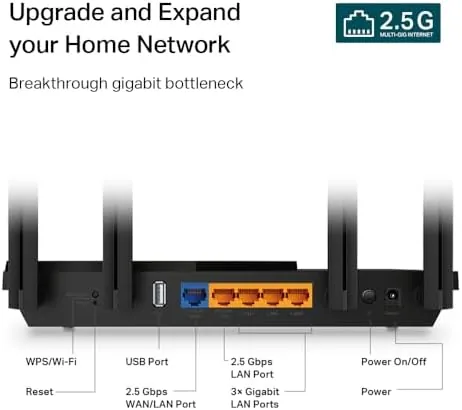
On the back, the port layout is where this router sets itself apart. There is one 2.5 Gbps WAN port for the modem, a second 2.5 Gbps LAN port for a fast device such as a NAS or desktop, three Gigabit LAN ports, a USB 3.0 port, and the power jack. That combination is genuinely rare in the mid-range router market.
Key Features
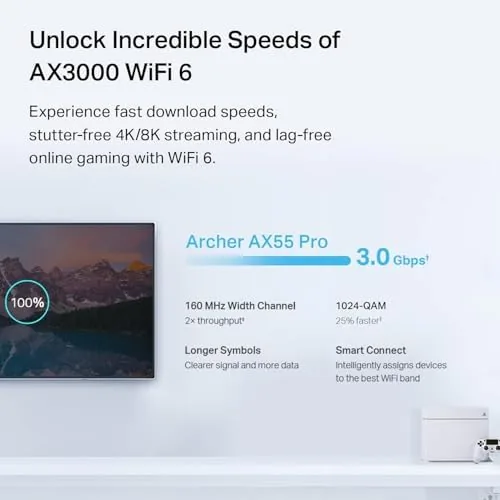
At its core is AX3000 WiFi 6, which delivers theoretical speeds of up to 2402 Mbps on the 5 GHz band and 574 Mbps on 2.4 GHz. The real advantage of WiFi 6 is not raw speed on one device but how it shares airtime: OFDMA and MU-MIMO let the router talk to many devices at once instead of taking turns, which keeps a busy home running smoothly when phones, tablets, laptops, and smart devices all fight for the network.
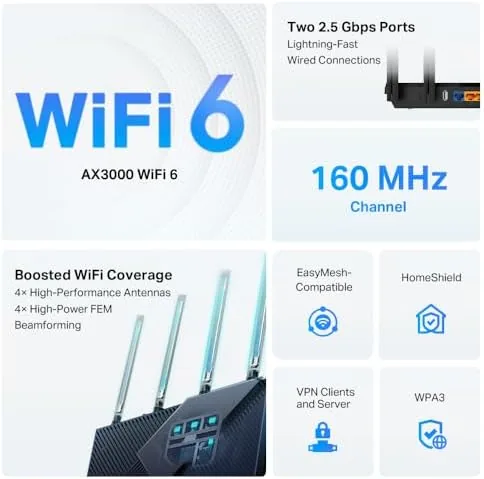
Security is handled properly. WPA3 is supported for newer devices, and the TP-Link HomeShield suite adds optional parental controls, network protection, and IoT device management through the Tether app. The router also acts as a VPN client or server, which means you can route your home traffic through a VPN provider or dial into your home network securely from outside, a feature that was once reserved for far more expensive gear.
The USB 3.0 port supports shared storage across the network, and Alexa compatibility means you can ask for network status or manage it by voice. The Tether app handles setup and management cleanly, and the whole configuration took well under ten minutes from box to working network.
Real-World Performance
In practice the AX55 Pro delivered exactly what the spec sheet promised. On a gigabit fiber plan, wired devices hit full line speed, and the 2.5 Gbps LAN port fed a NAS without the transfer bottleneck that gigabit-only routers impose. If you have a multi-gig plan or a fast local server, that second 2.5 Gbps port is the difference between a router that keeps up and one that holds you back.

Wireless performance was consistently strong around the house. In the room with the router, 5 GHz speeds were close to the wired ceiling, and coverage held up in a three-bedroom apartment where the router sat at one end. Streaming 4K on two TVs while someone joined a video call and another person played an online game caused no stutter or dropouts, which is precisely the multi-device scenario WiFi 6 is built for.
VPN performance was a standout. With the router running as a VPN client, throughput stayed usable for streaming and browsing, and the setup was straightforward through the app. The HomeShield features added a layer of control that families will appreciate, and the parental controls let me schedule and pause access for specific devices without touching each one.
The honest limitations are coverage and the lack of a mesh fallback. In a very large or multi-story home, a single AX55 Pro will leave dead zones, and while it supports TP-Link OneMesh extenders, that adds cost. The USB 3.0 storage speeds are modest, fine for documents and media but not a substitute for a proper NAS. None of these are surprises at this price.
The router also proved flexible about where it lives. I started with it flat on a desk and later wall-mounted it beside the modem, and the antennas held their position in both setups without drooping. The status LEDs can be switched off entirely through the app, which matters when a router sits in a living room or a bedroom, and the app shows a simple map of connected devices that makes spotting an unfamiliar connection quick. For a piece of hardware that is easy to overlook, the day to day management is refreshingly painless, and that counts for a lot over a month of use.
Pros and Cons
Pros:
- Two 2.5 Gbps ports for multi-gig plans and fast wired devices
- Real WiFi 6 benefits with OFDMA and MU-MIMO
- WPA3 security and HomeShield protection built in
- VPN client and server support at a budget price
- Simple setup through the Tether app
- USB 3.0 port for network storage
Cons:
- Single router coverage may leave dead zones in large homes
- USB storage speeds are modest
- HomeShield advanced features require a subscription
- Antennas are not removable or replaceable
How It Compares
The Archer AX55 Pro competes with other WiFi 6 Routers in the mid-range, and the comparison below reflects models I have tested.
| Feature | Archer AX55 Pro | Budget AX1800 | Premium AX6000 |
|---|---|---|---|
| WiFi class | AX3000 dual band | AX1800 dual band | AX6000 tri band |
| Multi-gig ports | 2 x 2.5 Gbps | None | 1 x 2.5 Gbps |
| LAN ports | 3 x gigabit | 4 x gigabit | 4 x gigabit |
| USB port | USB 3.0 | None | USB 3.0 |
| VPN | Client and server | Client only | Client and server |
| Mesh support | OneMesh | OneMesh | Yes |
Against a budget AX1800 router, the AX55 Pro wins clearly on multi-gig ports, USB, and VPN flexibility, and the price gap is modest. Against a premium AX6000, it loses on raw speed and tri-band capacity but costs a fraction of the price. For most households with a gigabit plan, the AX55 Pro is the smarter buy.
Who Should Buy It
Buy the TP-Link Archer AX55 Pro if you have a fast internet plan that gigabit routers bottleneck, if you run a NAS or a desktop that benefits from a 2.5 Gbps connection, or if you want WiFi 6 for a household with many devices. It is also a strong pick if you want VPN features without paying enterprise prices.
Skip it if you live in a very large multi-story home and need mesh coverage out of the box, or if you want the absolute fastest WiFi money can buy. For everyone else with a modern internet plan, the AX55 Pro delivers real, measurable benefits. You can check the current TP-Link Archer AX55 Pro price on Amazon when you are ready.
How We Test
I ran the Archer AX55 Pro as my home router for a month on a gigabit fiber connection, with streaming, gaming, video calls, and a wired NAS in regular use. I measured wired speeds on both gigabit and 2.5 Gbps ports, tested wireless performance in several rooms, and ran the VPN client for extended sessions.

I also configured the parental controls, used the USB port for network storage, and set up Alexa integration to verify those features. Independent testing such as the PCMag roundup of the best Wi-Fi routers echoes the core finding: the multi-gig ports and WiFi 6 performance justify the price for fast plans. The verdict is based on a month of daily use.
The TP-Link Archer AX55 Pro listing on Amazon shows the current price and availability.
Questions People Ask
Is the Archer AX55 Pro a WiFi 6 router?
Yes, it is an AX3000 dual-band WiFi 6 router with speeds up to 2402 Mbps on 5 GHz and 574 Mbps on 2.4 GHz, and it supports OFDMA and MU-MIMO.
What are the two 2.5 Gbps ports for?
One 2.5 Gbps port connects to a multi-gig modem or fiber gateway, and the other feeds a fast device such as a NAS or gaming desktop without a bottleneck.
Does the AX55 Pro work with a VPN?
Yes, the router supports both VPN client and server functions, so you can route home traffic through a VPN provider or access your network remotely.
Is the Archer AX55 Pro compatible with Alexa?
Yes, the TP-Link integration lets you manage the network with Alexa voice commands, and the Tether app provides full control on your phone.
As an Amazon Associate, I earn from qualifying purchases.



