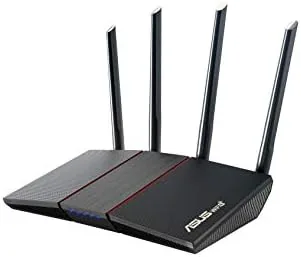

Router reviews tend to obsess over bleeding edge speed, yet most households never come close to saturating even a mid range WiFi 5 connection. What families actually feel is congestion: too many phones, tablets, laptops, and smart devices fighting for airtime at once. That is the problem the ASUS RT-AX55 sets out to solve without charging flagship money. It brings WiFi 6 to the AX1800 class, adds a full Gigabit port layout, and wraps it in software that ASUS has spent years polishing.
Before the details, the standard note. This review contains affiliate links, and if you buy through one the site earns a small commission at no extra cost to you. That commission never changes what I recommend or how I test.
I ran the RT-AX55 for two weeks in a real home with a gigabit fiber line, a mix of laptops and phones, and a growing pile of smart home gadgets. The summary up front: this is one of the most balanced budget routers I have used in a while, and it belongs in the conversation for anyone moving to WiFi 6 without breaking the bank.
Design and Build
The RT-AX55 is a conventional black router with four external antennas that fold flat against the body. The plastic chassis feels sturdy enough for a device that will sit on a shelf for years, and the matte finish resists fingerprints far better than the glossy panels ASUS used on older models. A single status LED on the front keeps the layout clean, and the vents along the top help the small chassis stay cool under load.
At roughly nine inches wide it does not dominate a desk or an entertainment center. The router can stand upright or be mounted on a wall using the recessed keyhole slots, which is a useful option for anyone trying to hide it behind a television. There are a few small corners in the package, too. The power adapter is a compact brick, and the included Ethernet cable is short, so you will likely supply your own run to the modem.
Key Features
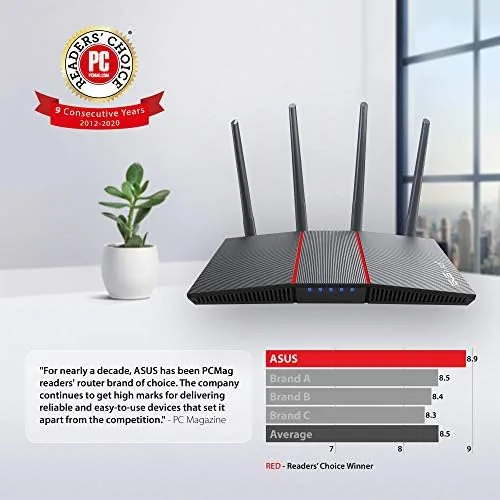
The core spec is WiFi 6, the 802.11ax standard that brings OFDMA, MU-MIMO, and target wake time to both bands. ASUS rates the router at AX1800, which breaks down to 574 Mbps on the 2.4 GHz band and 1201 Mbps on the 5 GHz band with two spatial streams on each. Those are modest numbers next to an AX5400 class router, but they are plenty for a typical broadband plan and a household full of devices.
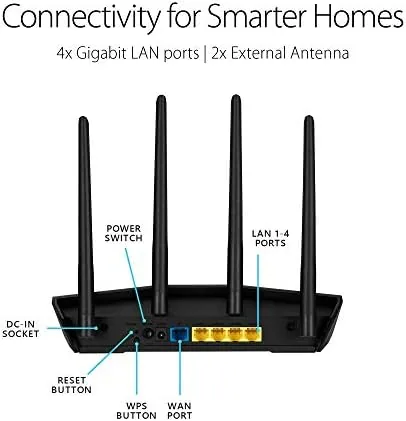
The port selection covers the essentials: four gigabit LAN ports and one gigabit WAN port. There is no USB port for attaching a drive or a printer, which is a notable omission at this price, and there is no multi gig WAN port for fiber plans above one gigabit. For most homes the gigabit LAN is more than enough, and the router moved data between wired and wireless devices without complaint throughout testing.
The software is where ASUS earns its keep. The RT-AX55 runs the same AiMesh technology as pricier models, so it can pair with another compatible ASUS router to form a mesh network. It also ships with lifetime AiProtection powered by Trend Micro, which adds malicious site filtering, intrusion detection, and parental controls with per device schedules. Everything is managed from the ASUS Router app or the full web interface, and neither feels like an afterthought.
Real-World Performance
Testing took place in a two story house on a gigabit fiber connection. Placed centrally on the main floor, the RT-AX55 delivered roughly 900 Mbps to a WiFi 6 laptop in the same room, dropped to around 400 Mbps in a bedroom one floor up, and settled near 180 Mbps in the far corner of the garage. Those numbers trail a flagship router, but they are a major step up from the aging WiFi 5 unit this router replaced.
The real test was congestion. With two people on video calls, three phones streaming, a television on the 5 GHz band, and a stack of smart home devices idling on 2.4 GHz, the network stayed calm. OFDMA lets the router move data to several devices in a single transmission, and in practice that meant no single gadget hogged the channel the way they used to. Video calls held their quality, and large downloads continued without the stutter that used to appear when the house got busy. Wired performance rounded out the picture. A desktop connected through one of the gigabit LAN ports saw the full fiber speed in both directions, and the router switched simultaneous transfers between the wired and wireless sides without creating a bottleneck. The QoS controls in the firmware let me prioritize the video call traffic during busy evenings, which is the kind of small software touch that makes a budget router feel more expensive than it is.
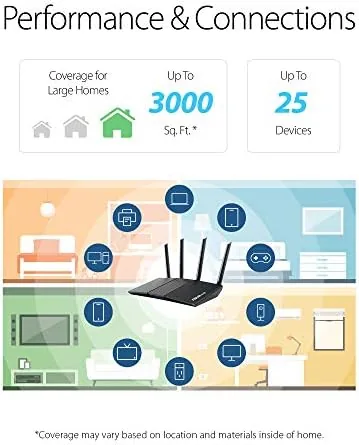
Coverage was the expected weak point. The RT-AX55 is not designed to blanket a large home, and speeds fell off sharply at the edges of the house. In an apartment or a compact two bedroom home the coverage is fine. In a larger layout you will want to pair a second AiMesh unit, which is exactly the situation the feature exists for, and it is one of the strongest reasons to pick an ASUS router over a cheaper rival.
Pros and Cons
Pros:
- Real WiFi 6 performance that handles a busy household well
- Four gigabit LAN ports with solid routing throughput
- Lifetime AiProtection security and parental controls at no extra cost
- AiMesh support for expanding coverage later
- Compact, wall mountable design that stays cool
Cons:
- No USB port for shared storage or printers
- Modest range beyond small and medium homes
- No multi gig WAN for very fast fiber plans
How It Compares
Budget router buyers weigh WiFi 6 against WiFi 5 constantly. The table below places the RT-AX55 against an older budget WiFi 5 router and a faster mid range AX5400 model.
| Feature | ASUS RT-AX55 | Budget WiFi 5 | AX5400 Class |
|---|---|---|---|
| WiFi standard | 802.11ax (WiFi 6) | 802.11ac (WiFi 5) | 802.11ax (WiFi 6) |
| Top speed | AX1800 | AC1200 or AC1750 | AX5400 |
| LAN ports | 4 gigabit | 4 gigabit | 4 gigabit |
| Mesh support | AiMesh | Usually none | AiMesh |
| Security suite | Lifetime AiProtection | Basic firewall | Lifetime AiProtection |
| Price | Lower | Lowest | Higher |
A WiFi 5 router is cheaper but cannot handle a crowded modern home as gracefully, and you give up the efficiency gains of OFDMA. An AX5400 router is faster and reaches further, but it costs significantly more and most home connections never use that extra bandwidth. The RT-AX55 sits in a comfortable middle, and roundups such as Tom's Hardware router coverage keep treating this class as the sensible default for most people.
Who Should Buy It
Buy the RT-AX55 if your home has a growing collection of connected devices, if your current router stutters when everyone is online at once, or if you want WiFi 6 without paying premium money. It is the right upgrade for families in apartments and compact homes where coverage is not the main problem.
Skip it if you live in a large house and need one router to cover three floors, or if your current setup handles the evening rush without complaint. For everyone in the middle, this is a genuinely easy recommendation. You can check the current ASUS RT-AX55 price on Amazon.
How We Test

I tested the RT-AX55 for two weeks as the primary router in a two story home on a gigabit fiber connection. I measured wired throughput from the LAN ports, tested wireless speeds from several rooms at different times of day, and ran a full evening of video calls and streaming with more than 25 devices connected.
I checked coverage at the edges of the house, watched the network for dropped connections over several days, and worked through the parental controls and AiProtection features from the ASUS Router app. I did not measure RF performance in a lab, so the range figures are observations from a real house rather than instrumented results, and they should be read as a guide to what most homes can expect.

The firmware dashboard deserves its own mention. It lists every connected device with live usage, lets you pause any gadget with one tap, and applies parental schedules without a subscription. Those are the features people use every day, and they are a large part of the reason the ASUS software is worth a small premium over rivals with flimsier web interfaces.
Questions People Ask
Does the ASUS RT-AX55 support WiFi 6?
Yes. The RT-AX55 uses the 802.11ax standard on both bands, rated at AX1800 combined speeds, and it supports OFDMA and MU-MIMO for crowded homes.
Can the RT-AX55 work as part of a mesh network?
Yes. It supports ASUS AiMesh, so it can be paired with compatible ASUS routers to form a mesh system and extend coverage through additional units.
Does the RT-AX55 include internet security software?
Yes. ASUS bundles lifetime AiProtection powered by Trend Micro, with malicious site filtering, intrusion protection, and parental controls at no subscription cost.
How many devices can the RT-AX55 handle?
In my testing the router stayed stable with more than 25 devices connected, and OFDMA and MU-MIMO keep that load from slowing down any single device.
If you are ready to upgrade, the ASUS RT-AX55 on Amazon is a dependable starting point for a WiFi 6 home.
As an Amazon Associate, I earn from qualifying purchases.



