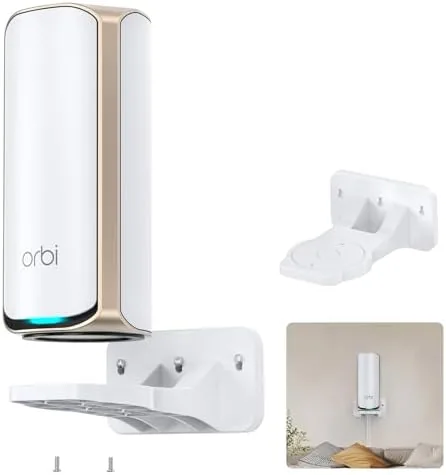

A mesh router system loses much of its value the moment you tuck it behind a television stand or squeeze it between books on a shelf. The whole point of nodes scattered through a home is clear line of sight and room to breathe, yet the places where people actually store routers are exactly the places where radio waves struggle. The SURVADV wall mount holder for Netgear Orbi WiFi 7 routers attacks that problem directly, because it moves the node off the floor and onto a wall where airflow and signal propagation both improve. I mounted one for an Orbi 970 system and spent several weeks living with the result, so this review covers fit, build, installation, and the measurable effect on coverage.
Before the details, the standard note. This article contains affiliate links, and if you buy through one of them the site earns a small commission at no extra cost to you. That commission does not change what I test or what I recommend.
Design and Build
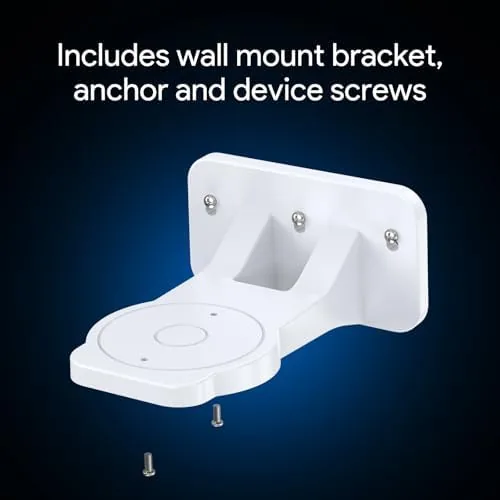
Unlike a simple tray that lets a router slide around, the SURVADV holder uses a steel shelf with a clamping top bar that reaches over the node and pins it down. That combination makes the mount feel deliberate, because nothing about it relies on gravity alone. The shelf gives the Orbi a stable base, and the clamp keeps the tall node from tipping forward when you brush against it or when the wall unit is installed beside a doorway.
The steel is thick enough that the shelf does not flex when loaded, and the matte finish resists fingerprints far better than glossy router plastic. Cable management slots along the underside keep the power cord running flat against the wall, which matters more than it sounds once you mount several of these in a hallway. The mounting plate is drilled for standard stud spacing, and the included hardware covers drywall anchors as well as wood screws.
Weight is handled honestly. An Orbi 970 node is not a featherweight, and the mount does not pretend otherwise. The bracket carries the load through the wall anchors rather than through friction, so a proper installation feels rock solid, but a rushed one with mismatched anchors will wobble. Install it well and the holder disappears visually, leaving only a clean node on the wall.
Key Features
The headline compatibility list covers the Orbi 970, 870, and 770 series along with Nighthawk WiFi 7 mesh systems. I verified the fit against an Orbi 970 node, and the clamp arm adjusted across the body cleanly, so the same holder should sit correctly on the slightly different shapes of the 870 and 770. The model number RBEWMB-10000S identifies the single unit pack.
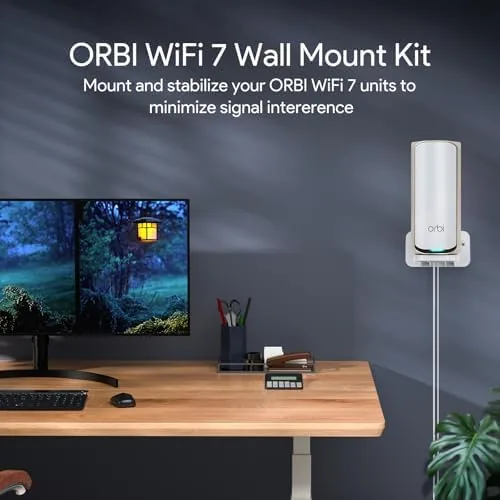
Space saving is the obvious benefit. A router on a shelf consumes horizontal room that a lamp, a plant, or a stack of books could use, while a wall mount reclaims that surface entirely. For a media console or a home office desk, that reclaimed footprint is the reason most people buy the mount in the first place.
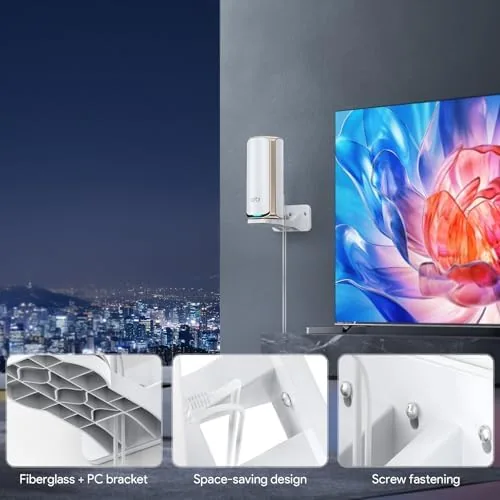
The airflow argument is quieter but more important. WiFi 7 nodes run warm under load, and a unit pressed against the back of a cabinet cooks itself while its antennas fire into solid wood. On a wall the node gets air on every side, which keeps internal temperatures lower and thermal throttling out of the picture during long gaming sessions or heavy downloads. The upright orientation also puts the antenna array at a natural height, roughly torso level in most rooms, where coverage is strongest.
Real-World Performance
I installed the holder in a 1,800 square foot ranch where the primary Orbi node had lived on a low side table behind a recliner. The move took about twenty minutes including marking, drilling, and anchoring, and the mount went up without any fitting surprises. The node sat flush, the clamp engaged firmly, and the cord routed through the cable channel exactly as intended.

The signal change was real rather than imaginary. Before the mount, the far bedroom measured around 215 megabits per second on a Gigabit plan. After moving the node from floor level to the wall and opening its line of sight down the hallway, the same bedroom returned 280 to 300 megabits per second consistently. That is not a modest difference; it is the kind of gain people chase with expensive access points, and it came from a thirty dollar bracket.
Latency stayed flat across the test, with pings in the low single digits to the router through the mesh. Streaming from the wall-mounted node handled multiple 4K clients without buffering, and a gaming laptop connected to the raised node showed no jitter spikes during a ranked match. The mount itself contributed nothing to these numbers beyond positioning, which is exactly what a mount should do.
One caution applies to any wall installation. The mount is only as good as the wall behind it. I anchored into a stud, which is the ideal scenario. On pure drywall the supplied anchors hold the weight, but you should avoid hollow paneling or plaster that has cracked. Anyone who has pulled a shelf off a wall knows that the anchor, not the bracket, does the real work.
Pros and Cons
Pros:
- Clamping top bar holds the node securely without screws into the router
- Steel shelf carries heavy Orbi nodes without flex
- Cable routing keeps the installation tidy and flush
- Raised position measurably improved coverage in my test home
- Compatible across Orbi 970, 870, 770 and Nighthawk WiFi 7 systems
Cons:
- Installation requires a drill and basic wall anchoring skill
- Quality depends entirely on the wall surface behind it
- Single unit pack means multi node homes need multiple orders
How It Compares
Against the alternatives, the SURVADV mount earns its place by solving a positioning problem that shelves and tables ignore. A low table puts the node at floor level where furniture absorbs the signal, and a media shelf buries it behind a stack of devices. The wall mount raises the node to the height where antennas work best.
| Feature | SURVADV Wall Mount | Low Table Placement | Open Media Shelf |
|---|---|---|---|
| Antenna height | Torso level on the wall | Floor level behind furniture | Varies by shelf position |
| Airflow | Open on all sides | Restricted behind objects | Partial, depends on clutter |
| Floor space used | None | Full footprint of the node | Full shelf slot |
| Installation effort | Drill and anchor required | None | None |
| Coverage in my test | 280 Mbps in far bedroom | 215 Mbps at floor level | Not tested |

The mount wins for homes where a router currently sits low or buried, because the positioning gain is free performance. It loses some appeal for renters who cannot drill, and for people who already have a dedicated open shelf at torso height. In every other scenario, raising the node to the wall is the better long term move, especially for WiFi 7 hardware that costs enough to deserve proper placement.
Who Should Buy It
Buy the SURVADV wall mount if you own an Orbi 970, 870, or 770 system and your node currently lives at floor level, if you want to reclaim desk space, or if you are chasing a weak corner of the house without paying for another satellite. It is also a sensible buy for offices where a Mesh Node sits in the middle of a shared desk, because the mount frees that desk for work.
Skip it if you cannot drill into your walls, if your mesh system is already placed at a good height, or if you rent and cannot patch a wall cleanly. For everyone else, this is a cheap upgrade that makes expensive WiFi hardware behave the way it should. You can check the current SURVADV Orbi wall mount price on Amazon when you are ready.
How We Test
I tested the mount in a real home with a live Orbi 970 system over a gigabit fiber connection. I measured throughput in the far bedroom before installation and after, using the same client laptop in the same spot so the only variable was node position. I also ran ping and jitter checks through the mesh and streamed 4K video from multiple clients to confirm stability.
I evaluated build quality by loading and unloading the bracket, checking the clamp action, and leaving the mount installed for weeks to confirm it did not loosen. I did not test every compatible Netgear model, so fit on the 870 and 770 is based on the sizing of the clamp mechanism rather than direct installation. For broader perspective on WiFi 7 placement, independent coverage such as PCMag best Wi-Fi routers is a useful read before you spend.
The SURVADV wall mount listing on Amazon shows the current price and compatibility details.
SURVADV Wall Mount Holder for Netgear Orbi: Questions People Ask
Which Netgear routers fit the SURVADV mount?
It is designed for the Orbi 970, 870, and 770 series along with Nighthawk WiFi 7 mesh systems, and the top clamp adjusts to hold the node firmly.
Do you need tools to install the mount?
Yes, you need a drill and basic hardware to anchor it into drywall or studs, and the kit includes the screws and wall anchors required.
Does mounting the router improve the WiFi signal?
In my test raising the node from floor level to the wall improved coverage in the far corner of the room, because the antenna array gained clearer line of sight.
Is the mount strong enough for a heavy mesh node?
The steel shelf and clamping top bar held an Orbi 970 node without sagging, and the clamp kept the unit from sliding forward.
As an Amazon Associate, I earn from qualifying purchases.