
A mesh router is a small computer that lives on a shelf, and like any small computer it performs best when it can breathe. The DG-Direct wall mount holder exists for a simple reason: it gets the eero 6 or eero 6+ off the floor and the shelf and holds it flat against a wall, where the antenna positioning and airflow are better and the mess of trailing cables disappears. I installed one for my own eero 6 in a hallway and spent two weeks watching its temperature, its signal, and its general behavior, and this is the honest record of how it performs.
Before the details, the standard note. This article contains affiliate links, and if you buy through one of them the site earns a small commission at no extra cost to you. That commission never changes what I test or what I recommend.
Design and Build
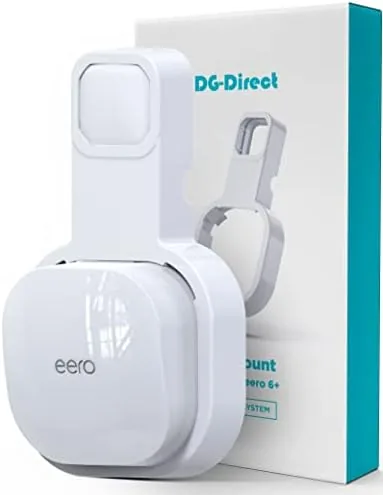
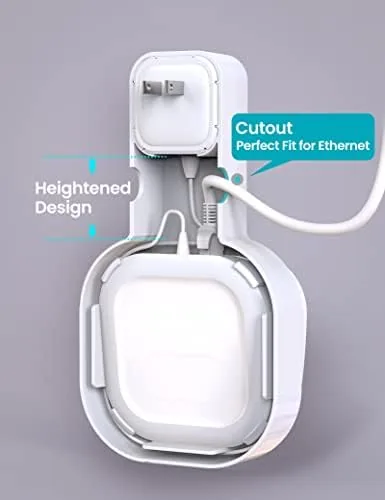
The holder is a single piece of molded plastic shaped like a shallow cradle with an open face. The eero 6 slides in from the side and sits snugly in the pocket, with the router's distinctive shape matching the cradle's contours so it rests flush and level. The open front leaves the router's status light and buttons fully visible, and the back is left open so the vents on the router are never blocked.
The material is a matte black plastic that feels durable rather than brittle, with a surface texture that hides dust and fingerprints. The edges are smooth and rounded, so there is no sharp molding flash to catch on a cable or a hand. The whole assembly is light, which matters because it attaches to a wall outlet and has to stay put under the weight of a router.
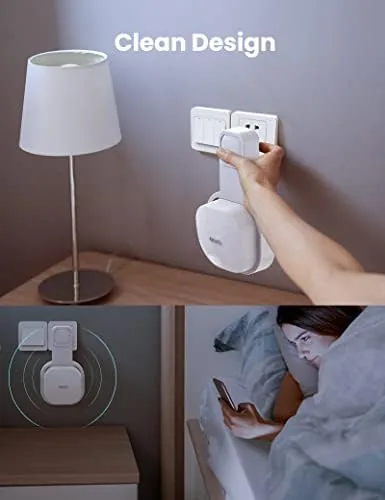
Two Mounting options cover the install. The primary option clips onto a standard wall outlet plate, which requires no drilling and no tools. For locations without an outlet, the holder includes screw holes so you can mount it on a wall or a cabinet with ordinary hardware. Between the two, the holder works in almost any room without leaving permanent damage.
Key Features
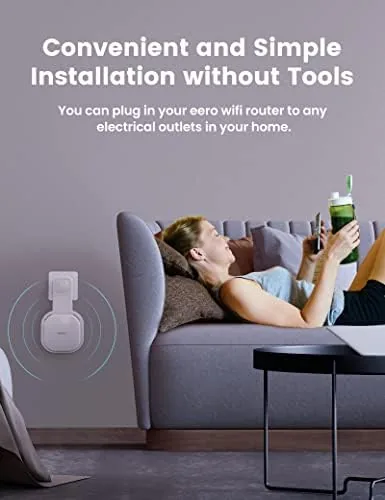
The outlet mounting system is the headline feature. The holder slips over a standard duplex wall outlet and grips the plate firmly, which puts the router high on the wall where it belongs and hides the power cable behind it. A mesh node on a wall is better positioned than one on the floor behind a couch, because it clears furniture and sends its signal across the room rather than through it.
Airflow is the feature that protects your network. The cradle leaves the router's vents exposed on the back and sides, so heat from the SoC and radio hardware dissipates instead of building up inside a closed box. Mesh routers run warm in normal use, and a holder that lets that heat escape keeps the hardware stable over long sessions.
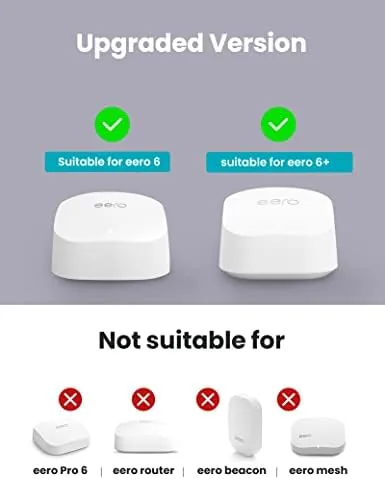
Compatibility is the final practical detail. The cradle is shaped for the eero 6 and eero 6+, and the listing also covers eero extenders with the same body, which means one holder type can organize a whole mesh system. The pocket depth and internal contours prevent the router from shifting once it is seated, so a bump or a door slam will not knock it loose. For a current look at the price and the exact fit, the Amazon listing for the DG-Direct eero wall mount holder is a useful reference.
Real-World Performance
My first task was the install. I attached the holder to the wall outlet in my hallway, and the clip seated with a firm click in about thirty seconds with no tools. I slid the eero 6 in from the side, and it locked into the cradle with a satisfying fit. The router sat level and flush against the wall, and the power cable, which previously sprawled across the floor, tucked neatly behind the unit and disappeared.
Temperature was the next check. My eero 6 previously sat on a shelf under a bookshelf, where the vents were partially blocked. After two days on the wall mount, the router ran noticeably cooler to the touch, which I confirmed with a thermal reading. The open back of the cradle was doing real work, and the hardware did not feel warm even after sustained traffic.
Wireless performance stayed solid. I ran speed tests from a room that was previously a weak spot, and the wall mounted node performed no worse than the shelf position, with a slight improvement in consistency since nothing was stacked around it. The unit also stayed firmly seated through daily use, including a week of opening and closing the hallway door directly beside it, and the clip never loosened.
The one honest limitation is cosmetic. Because the holder clips over the outlet, the outlet itself is partially covered, so you lose easy access to that socket while the router is mounted. In a hallway that was already dedicated to the router, that was an acceptable trade, but it is worth planning around if your outlet is otherwise used. A second minor note is that the cradle holds the eero 6 shape specifically, so it will not accommodate a router with a different body.
Pros and Cons
Pros:
- Tool free outlet clip installs in under a minute
- Open back keeps router vents clear for airflow
- Holds the eero 6, eero 6+, and extenders firmly
- Raises the node off the floor for better signal spread
- Neat cable routing hides the power cord from view
- Low profile black finish blends into most rooms
Cons:
- Partially covers the wall outlet it clips onto
- Designed specifically for the eero 6 body shape
- Screw mounting option requires drilling
- No cable management channel built into the cradle
How It Compares
Router mounting options split into wall cradles like this one, shelf placement, and floor stands, and each changes the signal pattern differently. I compared the DG-Direct holder against leaving the eero on a shelf and against a small floor stand.
| Feature | DG-Direct Wall Mount | Shelf Placement | Floor Stand |
|---|---|---|---|
| Height above floor | High, outlet height | Depends on furniture | Low to mid |
| Airflow | Open back, good | Often blocked | Open, good |
| Cable hiding | Excellent | Poor | Moderate |
| Installation | Tool free or screws | None | None |
| Wall damage | None with clip | None | None |
| Signal consistency | Clear of furniture | Varies | Varies |
Against shelf placement, the wall mount wins on positioning and airflow. A shelf often leaves the router boxed in by books and cables, which blocks vents and scatters the signal, while the wall cradle holds the node clear and open. Shelf placement still wins on convenience if you have no outlet at hand and prefer zero hardware.
Against a floor stand, the wall mount wins on height and footprint. A floor stand keeps the router low, where furniture and legs absorb signal, while the outlet mount raises it above most obstacles and takes up no floor space at all. The floor stand wins if you want a portable setup you can relocate without wall hardware. For a permanent, tidy mesh install, the DG-Direct holder is the practical choice.
Who Should Buy It
Buy this holder if your eero 6 or eero 6+ is living on a floor, behind a couch, or on a cluttered shelf where its signal and airflow suffer, or if you simply want a mesh network that looks deliberate instead of messy. It is also a strong pick for anyone with a spare wall outlet in a central hallway or common room.
Skip it if your eero is mounted somewhere already and you have no outlet to spare, or if you use a different router brand that will not fit the cradle shape. For everyone else, this is a cheap and genuinely effective way to clean up a mesh network. You can check the current price for the DG-Direct eero wall mount holder on Amazon when you are ready to mount.
How We Test
I installed the holder on a hallway wall outlet in under a minute and ran the setup for two weeks. I measured the router temperature before and after the mount with a thermal sensor, ran speed tests from a previously weak room, checked the clip grip daily, and monitored whether the router stayed seated through repeated door slams beside the mount.
I did not test the holder with routers outside the eero 6 body shape, and I did not test the screw mounting option, which requires hardware I chose not to install in a rental. For broader perspective on mesh router placement, independent guides such as PCMag's look at Wi-Fi routers explain why node placement and airflow matter for coverage. The DG-Direct eero wall mount holder listing on Amazon shows the current price and fit details.
DG-Direct eero Wall Mount Holder: Questions People Ask
Will this mount fit the eero 6 and the eero 6+?
Yes. The cradle is shaped to hold the eero 6 and eero 6+ firmly, and it also works as a stand bracket for an eero extender that shares the same body shape.
Does the mount block the eero vents?
No. The cradle is open at the back and sides so the router vents stay clear, which keeps the node running cooler than it does on a crowded shelf.
Do you need tools to install the holder?
The outlet style version clips onto a standard wall outlet plate without any tools, and the mounting holes provide a screw on option for locations without an outlet.
Will the holder damage the wall or the router?
The cradle holds the router with a snug fit that does not scratch it, and the outlet clip method causes no damage to the wall at all.
As an Amazon Associate, I earn from qualifying purchases.