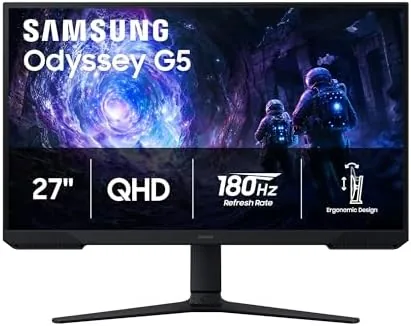

Choosing a gaming monitor used to mean picking between a blurry budget panel and a flagship display that cost as much as the PC beneath it. The gap in the middle, where most gamers actually shop, is where the Samsung Odyssey G5 has made its name, and the G51F generation I have been testing fills that spot with a 27 inch QHD panel, a 180Hz refresh rate, a 1ms response time, and a stack of gaming features. It promises the sharpness of 1440p and the speed of a high refresh panel Without the Price Tag of a top tier model, and I played on it for a month to find out.
This article contains affiliate links. If you buy through one of them, the site earns a small commission at no extra cost to you, and that commission does not change what I recommend. The monitor reviewed here was connected to my main gaming PC and used daily for a month, across competitive shooters and story driven games.
A month in, the Odyssey G5 G51F has earned a permanent spot on my desk. The rest of this review covers the design, the panel quality, the gaming performance, and the features that make it worth the money over a cheaper 1080p screen.
Design and Build
The Odyssey line has a recognizable look, and the G51F carries it well. The monitor has a slim profile with slim bezels that keep the focus on the screen, and the stand is a genuine highlight for this price range: it offers height adjustment, tilt, and a solid base, which is rare on monitors that cost as much as this one. The back carries the angular Odyssey styling, though the RGB is restrained enough that it will not look out of place in a home office.
The build quality is solid throughout. The stand holds the 27 inch panel firmly with no wobble, the cable routing keeps the desk tidy, and the on screen menu is easy to navigate with the joystick on the back. For a monitor in this class, the ergonomic stand alone justifies a large part of the price, because it means you can actually set the screen at the right height instead of stacking books under it.
Key Features
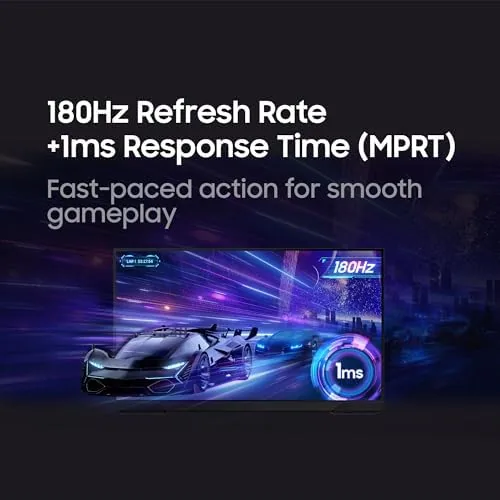
The headline spec is 180Hz, and it is the feature that separates this monitor from the older 144Hz generation. At 180 frames per second, motion looks smoother and input lag drops, which is exactly what a competitive shooter player wants, and the difference from a standard 60Hz screen is night and day. The 1ms response time keeps fast motion from smearing, and together the two specs make this one of the quickest panels in its price bracket.
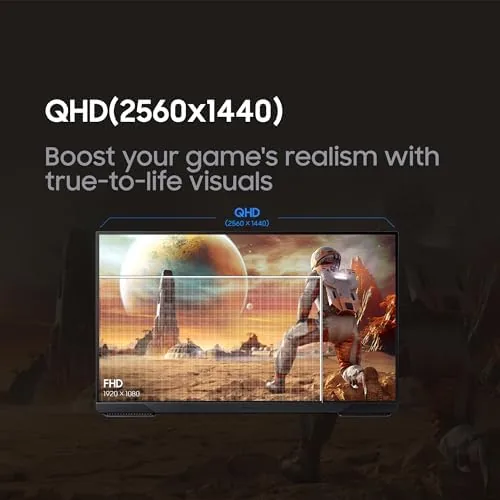
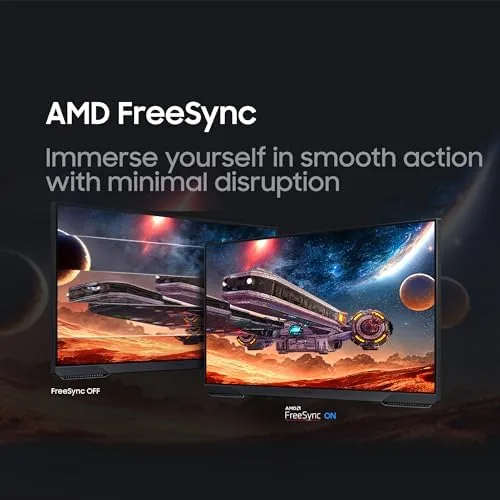
The QHD resolution is the other big draw. At 27 inches, 1440p is the sweet spot: noticeably sharper than 1080p for both games and desktop work, while still being achievable for a mid range graphics card. The panel supports AMD FreeSync for tear free play, and it is VESA Adaptive Sync compliant, so NVIDIA cards run in G-Sync Compatible mode without issue, which means smooth, tear free gameplay on either GPU.
Two gaming tools round out the package. Black Equalizer brightens dark corners so hidden enemies stand out without washing out the whole scene, and Virtual Aim Point puts a crosshair on the screen for games without one. The Auto Source Switch+ feature also means the monitor finds the active input on its own, which is a small convenience you appreciate when your PC and console share the screen.
Real-World Performance
The competitive games came first, and the G51F delivered. In fast shooters, the 180Hz panel made tracking moving targets feel effortless, and the improved frame pacing compared to a 144Hz screen was noticeable in the smoothness of the crosshair. The 1ms response time kept edges clean during flick shots, and with FreeSync enabled there was no tearing to distract from the action. This is a monitor that does not get in the way when the fight gets fast.
Story driven games looked just as good, thanks to the QHD resolution and HDR10 support. The extra sharpness of 1440p showed up in textures and distant detail, and colors looked rich on the panel out of the box. The HDR10 support is entry level rather than transformative, so it will not match a high end HDR display, but for the price the image quality is well above what a 1080p monitor offers.
Desktop work was the quiet bonus. The 27 inch QHD panel gives you a roomy workspace for documents and windows, the height adjustable stand made long sessions comfortable, and the anti glare coating kept reflections down in a bright room. Over a month of daily use, the monitor never flickered, never missed an input switch, and generally behaved like the dependable tool a daily driver should be.
Pros and Cons
Pros:
- Fast 180Hz panel with a crisp 1ms response
- QHD 1440p resolution is sharp at 27 inches
- FreeSync and G-Sync Compatible support
- Height adjustable stand, rare at this price
- Black Equalizer and Virtual Aim Point tools
- Strong value for competitive and casual play
Cons:
- HDR10 support is entry level, not transformative
- Need a capable GPU to reach 180 frames per second
- Panel is not a top tier color grading display
How It Compares
The main decision for a gamer is between a 1080p high refresh monitor and a QHD high refresh monitor, so I compared this Odyssey G5 against a popular 1080p 165Hz option.
| Feature | Odyssey G5 27 Inch QHD | 27 Inch 1080p 165Hz Monitor |
|---|---|---|
| Resolution | QHD 1440p | Full HD 1080p |
| Refresh rate | 180Hz | 165Hz |
| Sharpness | Excellent at 27 inches | Softer, pixels visible |
| GPU demand | Moderate to high | Lower |
| Stand | Height adjustable | Often fixed |
| Best for | Sharper image and speed | Budget GPUs, esports |
The QHD panel wins on sharpness and desktop space, and the 180Hz refresh keeps pace with the speed gamers need. The 1080p monitor only wins if your graphics card cannot push 1440p, or if you want to spend less. For most gamers, the Odyssey G5 is the better long term buy.
Who Should Buy It
Buy the Odyssey G5 G51F if you play a mix of competitive and story driven games and you want a screen that is sharp, fast, and affordable. It suits anyone with a mid range to high end graphics card who is ready to leave 1080p behind, and the height adjustable stand makes it a comfortable monitor for work as well as play. You can check the current price of the Samsung Odyssey G5 on Amazon when you are ready to compare.
Skip it if your GPU cannot handle 1440p, in which case the extra resolution goes to waste, or if you need a professional color accurate display. For gaming, this is one of the best values in its size and price class.
How We Test
I used the Odyssey G5 as my daily monitor for a month, playing competitive shooters, story driven games, and doing regular desktop work. I tested the 180Hz refresh with a capable GPU, checked FreeSync and G-Sync Compatible modes, evaluated the Black Equalizer and Virtual Aim Point features in game, and adjusted the stand for comfort over long sessions. I did not run professional color calibration, because this is a gaming panel rather than a creative display.
For deeper monitor science, RTINGS publishes detailed measurements of Samsung monitors that cover color, motion, and response far more thoroughly than this review can. The Samsung Odyssey G5 listing on Amazon shows the current price and panel details.
Samsung Odyssey G5: Questions People Ask
Is 180Hz worth it over 144Hz?
Yes, the jump from 144Hz to 180Hz makes motion feel a little smoother and reduces input lag, and the difference is noticeable in fast paced shooters.
Does the Odyssey G5 work with NVIDIA graphics cards?
Yes, the panel supports VESA Adaptive Sync, so NVIDIA GPUs run with G-Sync Compatible mode enabled over DisplayPort for tear free play.
Is a QHD 27 inch monitor better than a 1080p 24 inch one?
For most buyers yes, because the extra resolution at 27 inches looks sharper for both games and desktop work, while the pixel density stays comfortable.
What is Black Equalizer on the Odyssey G5?
Black Equalizer brightens dark areas of the image so hidden enemies stand out in shadows, a useful tool in competitive shooters without washing out the whole scene.
As an Amazon Associate, I earn from qualifying purchases.



