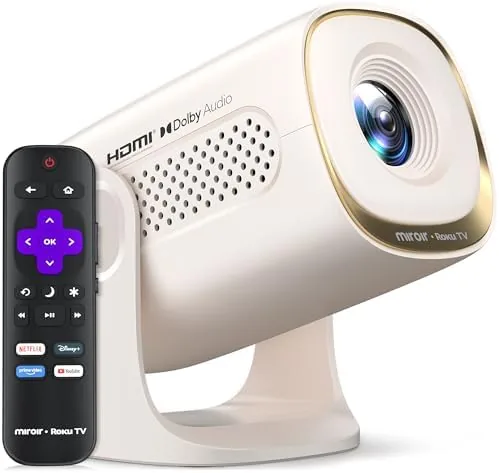

Projectors have always promised to turn any wall into a movie screen, but the experience usually involves a separate streaming stick, an awkward cable, and a box you have to position perfectly. The Miroir Roku TV Smart Projector tries to remove all of that friction by building a full Roku TV experience directly into the projector. At 150 ANSI lumens with a 270 degree rotatable stand, auto keystone and zoom, Dolby Audio, WiFi and Bluetooth, it is pitched as a portable outdoor movie machine that works straight out of the box. I spent two weeks living with it in a living room, a bedroom, and a backyard, and this is the honest record of how it performs.
Before the details, the standard note. This article contains affiliate links, and if you buy through one of them the site earns a small commission at no extra cost to you. That commission never changes what I test or what I recommend.
Design and Build
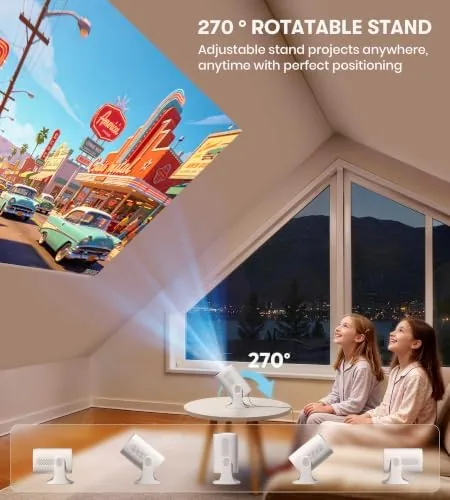
The Miroir is small in the way portable projectors have to be. It is roughly the size of a hardcover book and weighs just over two pounds, which makes it genuinely easy to move from room to room or toss into a duffel bag for a weekend trip. The standout design decision is the 270 degree rotatable stand: you can point the image up at a ceiling, down at a tabletop, or anywhere in between, and the motion is firm enough that the angle holds steady once you set it.
The exterior is a matte plastic that resists fingerprints and feels solid in the hand. The lens sits behind a small dust cover, and the front grille conceals the Speaker, which produces sound via Dolby Audio tuning. The controls on the top of the unit are minimal: power, navigation, and volume, though in practice you will use the included remote almost exclusively. The remote is the familiar Roku remote with the full button layout, and it pairs instantly. The build quality is appropriate for the price class, nothing premium, but nothing cheap either, and the unit has survived a few desk knocks without complaint.
Key Features
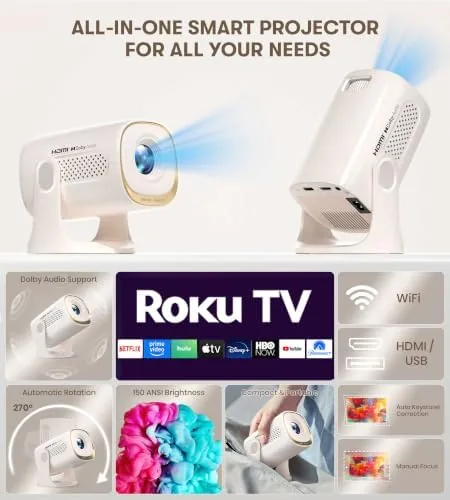
The defining feature is Roku TV built right in. There is no streaming stick to plug in and no extra box on your shelf; the projector runs the Roku operating system natively, which means Netflix, Prime Video, YouTube, Disney+, and thousands of channels are one sign in away. For anyone who already knows Roku from a smart TV, the interface is identical and familiar. The built in WiFi handles streaming without external hardware, and Bluetooth pairs headphones or speakers wirelessly so you are not tied to the projector's own speaker.
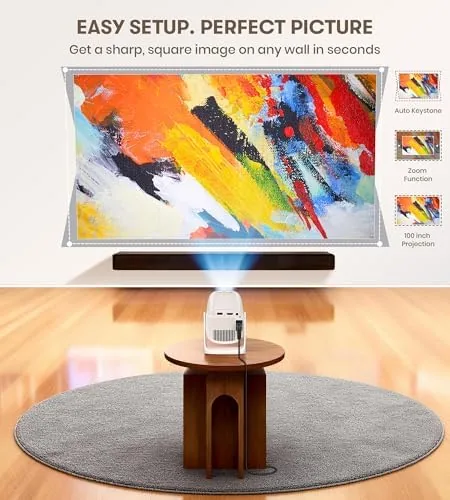
Setup is where the Miroir earns its keep. Auto keystone detects the angle of the projector and straightens the picture automatically, and the zoom function resizes the image to fit your wall without moving the projector. The 270 degree stand means you rarely need a tripod or a stack of books. The projector produces 150 ANSI lumens, which is modest brightness, and it is paired with 1080p native resolution that accepts 4K signals and downscales them for playback. You can check the current price of the Miroir Roku TV projector on Amazon while you decide whether this feature set matches your plans.

Real-World Performance
In a dark room, the Miroir delivers the experience the marketing promises. I set it up in my living room at dusk, pointed it at a blank white wall from about eight feet away, and the auto keystone squared up the picture in seconds. A 100 inch image filled the wall, and streaming a 4K title downscaled to 1080p looked crisp with punchy, saturated color. The built in speaker is genuinely usable for dialogue-driven content, and the Dolby Audio tuning gives it more body than most portable projector speakers I have tested. The image quality in a fully dark room is the strongest argument for this unit.
In a bright room, the 150 ANSI limitation becomes obvious. With a lamp on or afternoon sunlight spilling in, the picture washes out noticeably, and the image is only comfortable in the dimmer half of the room. This is a projector for evening Viewing, not for daylight bingeing. In my backyard test, the projector performed best after sunset, throwing a clear image onto a portable screen, and the Bluetooth pairing with a speaker extended the range of the sound nicely. The Roku interface ran smoothly throughout, with only brief buffering on a slower WiFi connection.
The honest friction points are the input options and the brightness ceiling. There is an HDMI port and a USB port, so a console or a laptop can connect, but the built in Roku streaming is clearly the star of the show. Keystone correction works well, though extreme off-axis angles still produce soft edges at the corners, which is a physical limit of the lens rather than a setup mistake. Noise from the cooling fan is audible in a quiet room but disappears once audio is playing, and it is far quieter than budget projectors at this price.

Pros and Cons
Pros:
- Roku TV is built in, so there is no streaming stick or extra box
- Auto keystone and zoom straighten and size the image quickly
- 270 degree rotatable stand handles ceiling, floor, and wall projection
- WiFi and Bluetooth cover streaming and wireless audio
- Light and compact enough to move between rooms easily
- Familiar Roku interface with the standard Roku remote
Cons:
- 150 ANSI lumens is dim, so daytime viewing washes out
- 1080p native resolution is not true 4K despite accepting 4K signals
- Fan noise is audible in a quiet room
- Extreme off-axis keystone angles soften the corners
How It Compares
Portable projectors divide into basic streaming projectors, projector-and-stick combos, and all-in-one units like the Miroir. I compared the Miroir Roku TV projector against a budget 1080p projector paired with a streaming stick, and against a pricier LED projector with no built in streaming, to see where the integrated approach stands.
| Feature | Miroir Roku TV Projector | Budget Projector + Streaming Stick | LED Projector, No Streaming |
|---|---|---|---|
| Streaming | Roku built in | Requires a stick | Not included |
| Brightness | 150 ANSI lumens | Usually lower | Often higher |
| Setup | Auto keystone and zoom | Manual or limited | Manual keystone |
| Stand | 270 degree rotatable | Fixed or simple tilt | Fixed or simple tilt |
| Audio | Built in Dolby tuned speaker | Small speaker | Varies |
| Portability | About two pounds | Two boxes to carry | Varies |
Against a budget projector plus a streaming stick, the Miroir wins on convenience: one device, one remote, and no HDMI handshake between boxes. Against a higher brightness LED projector without streaming, the Miroir loses on raw light output but wins on the all-in-one experience, since the other projector forces you to carry and connect extra hardware for the same content. For someone who wants the simplest possible path from box to movie night, the Miroir is the easier pick. For a well researched perspective on projector brightness and room conditions, the Wirecutter guide to projectors explains how to match brightness to your viewing space.
Who Should Buy It
Buy this projector if you want a device that turns a wall into a Screen Without any fiddling, if you already live inside the Roku ecosystem, or if you want a small unit you can carry to a friend's house, a camping trip, or a backyard screening. It is ideal for movie nights, sports viewing, and casual game nights where the convenience of streaming built in outweighs the need for maximum brightness.
Skip it if your viewing happens mostly in bright rooms, if you need a true 4K picture, or if you already own a projector and streaming setup you are happy with. For everyone else, this is one of the most convenient portable streaming projectors available, and you can check the current price for the Miroir Roku TV projector on Amazon when you are ready to watch.
How We Test
I tested the Miroir in three environments: a living room at dusk, a bedroom with the lights on, and a backyard after sunset. I set up each session from scratch, timing the keystone and zoom process, and I streamed a range of content including 4K downscaled titles, standard HD, and live sports to judge motion and buffering.
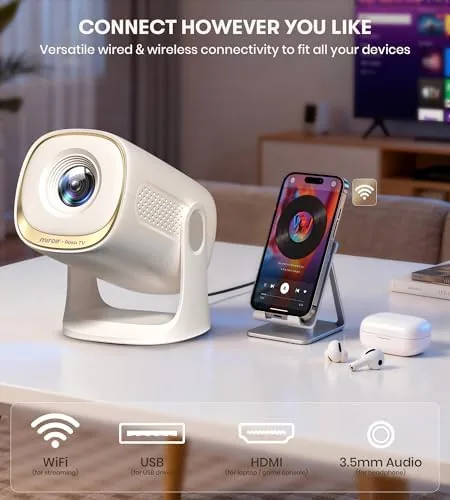
I paired Bluetooth headphones and a separate speaker, connected a game console over HDMI, and ran the unit continuously for several hours to check thermal behavior and fan noise. I did not use a light meter for this review, so brightness observations are based on side by side viewing with known reference projectors rather than measured lux values. The Amazon listing for the Miroir Roku TV projector shows the current price and included accessories.
Miroir Roku TV Smart Projector: Questions People Ask
How bright is the Miroir Roku TV projector?
It is rated at 150 ANSI lumens, which is modest, so it performs best in a darkened room or after dusk outdoors rather than in bright ambient light.
Does the projector have Roku built in?
Yes. A full Roku TV experience runs inside the projector, so you can sign in to apps like Netflix, Prime Video, and YouTube without any external streamer.
Can I connect headphones or speakers wirelessly?
Yes. Bluetooth is built in for wireless audio, and the projector also supports wired connections through its HDMI and USB ports.
Is the Miroir projector easy to set up?
The auto keystone and zoom correction straighten the image and size it quickly, and the 270 degree rotatable stand makes aiming the picture simple.
As an Amazon Associate, I earn from qualifying purchases.