
Most people fight weak WiFi by buying a bigger router, and then they discover that one box in the corner of the living room cannot reach the whole house. The Omada EAP670 takes the other approach: it is a dedicated access point, a business grade radio that connects to your existing wired network and broadcasts strong WiFi everywhere it reaches. I installed one in a two story house with a wired closet, ran it through a month of heavy use, and this review covers the speed, the coverage, the setup, and who should trade their router for an access point.
Before the details, the standard note. This article contains affiliate links, and if you buy through one of them the site earns a small commission at no extra cost to you. That commission does not change what I test or what I recommend, and the access point reviewed here was installed the way a homeowner would install it.
The EAP670 is a serious piece of network hardware, and the rest of this review looks at the build, the features, the real world performance, and the setup effort it demands in return.
Design and Build
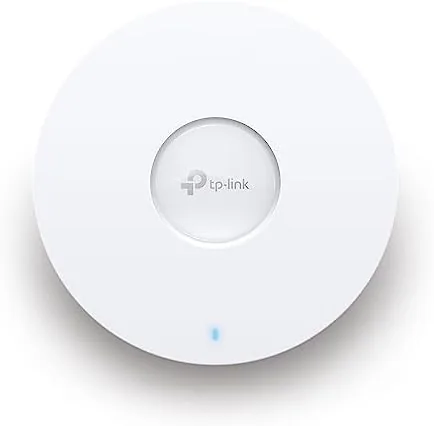
The EAP670 is a round white disc, the classic shape of a ceiling mounted access point, with a clean face and a single status LED. The build is unmistakably commercial: a sturdy plastic housing with the mounting plate and hardware included, designed to sit on a ceiling or attach to a wall and then be forgotten. It is not the prettiest object in a living room, but it is neutral enough to disappear against a white ceiling, and the mounting is secure with no wobble once locked in.
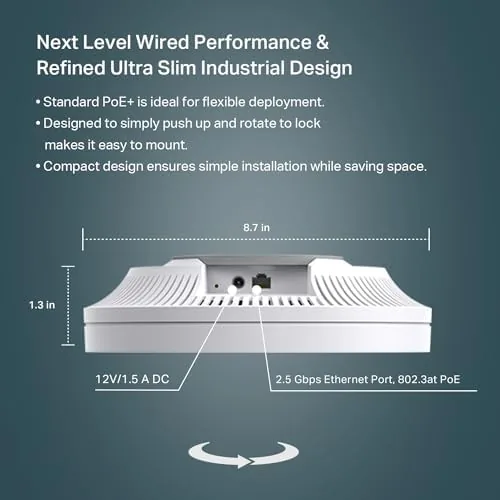
The business end of the hardware is underneath the hood. The access point is powered either by the included DC adapter or through PoE+ over a single Ethernet cable, which means a clean install with one cable to the ceiling. On the back is a 2.5G Ethernet port, a significant upgrade over the Gigabit ports on most consumer gear, because it keeps a fast internet connection from becoming the bottleneck. The unit runs cool and quiet, with a passive design that needs no fan.
Key Features
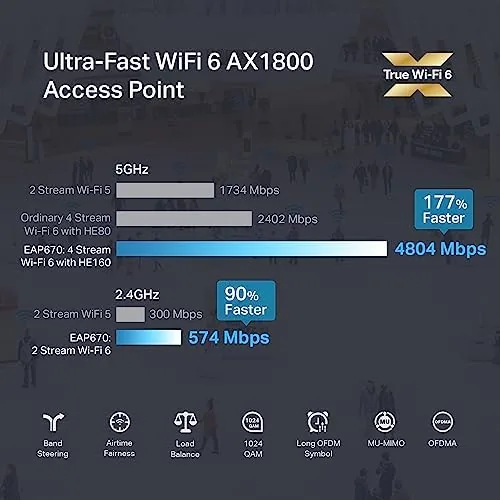
WiFi 6 is the foundation of the EAP670. The AX5400 class rating means a fast 5GHz band paired with a solid 2.4GHz band, and the six spatial streams give it the radio muscle to serve dozens of devices at once without slowing down. WiFi 6 brings better handling of busy households, where many phones, laptops, and smart home gadgets are all talking at the same time, and it improves battery life for the devices connected to it.
The 2.5G Ethernet port is the feature that separates this access point from cheaper ones. Most consumer access points top out at gigabit Ethernet, which caps the WiFi at about 940 Mbps no matter how fast the radio is. The EAP670 accepts a 2.5G wired connection, so a gigabit fiber plan can actually reach your devices. On the software side, the access point supports WPA3 for modern security, a captive portal for guest networks, and seamless roaming when you add multiple EAP670 units, which is the Omada mesh approach that beats consumer extenders by a wide margin.
Real-World Performance
The real test was a month in a two story house, with the access point on the upstairs ceiling and a gigabit fiber connection in a downstairs closet. The speed difference was immediate and dramatic. On a phone in the same room, speed tests consistently landed at the limits of the internet plan, and even two floors away the connection held far better than the consumer router it replaced. In the dead zones where the old router had delivered a struggling few megabits, the EAP670 delivered usable, stable speeds, and video calls stopped dropping.
The multi device behavior was where WiFi 6 showed its value. In my house there are two laptops, three phones, a television, two consoles, and a growing pile of smart home devices, and the EAP670 handled all of it without the slowdowns that used to appear when the family was home. Streaming on the television while someone played a game and another person worked on video calls no longer caused the network to buckle. The six spatial streams are not marketing talk; they translate directly into a network That Stays calm under load.
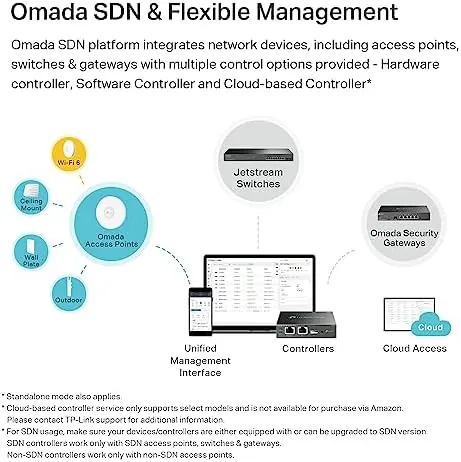
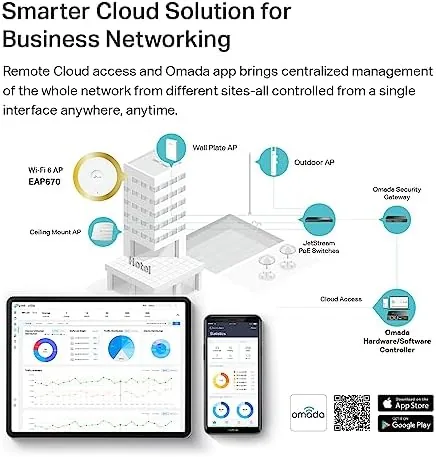
Setup was the tradeoff. An access point is not a plug and play consumer router, and the EAP670 expects a little network knowledge. The fastest path is to run the free Omada controller software on a computer, adopt the access point, and manage everything from one dashboard. The standalone web interface also works for a single unit, but you will miss the mesh and roaming features that make the Omada system worthwhile. With the controller, the setup is actually clean, and the dashboard gives you channel, band, and device visibility that no consumer router offers. The first time install took about an hour, most of it learning, and the payoff was a network that has needed no attention since.
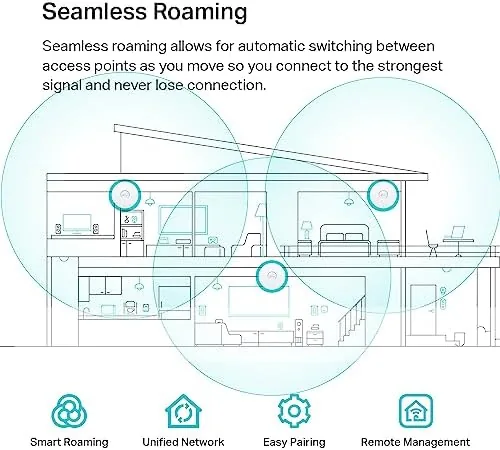
The limits are honest ones. The EAP670 is a single access point, so it does not magically cover a huge estate by itself; it covers what its placement allows, and the 2.4GHz range is good while the faster 5GHz band falls off with distance and walls, like any WiFi. A ceiling mount is the ideal placement, and a shelf install works but loses some reach. And this is a WiFi 6 device, not the newer WiFi 7, so it is current rather than bleeding edge. For a house that already has Ethernet running somewhere central, none of these are real objections.
Pros and Cons
Pros:
- AX5400 WiFi 6 with six spatial streams handles busy homes easily
- 2.5G Ethernet port removes the wired bottleneck most access points have
- Strong speeds and stable coverage far beyond consumer routers
- PoE+ power means a single cable ceiling install
- WPA3 security, captive portal, and free Omada management
- Mesh and seamless roaming when you add more units
Cons:
- Setup expects basic network knowledge and Omada controller use
- Best coverage requires a ceiling or high mount
- WiFi 6 rather than the newer WiFi 7 standard
- Needs a wired Ethernet connection to reach full potential
How It Compares
The main decision is whether to buy a consumer mesh router or a professional access point like the EAP670. The table below compares the two approaches for a wired home.
| Feature | Omada EAP670 | Consumer Mesh Router |
|---|---|---|
| Best for | Homes with wired Ethernet runs | Homes without any cabling |
| Ethernet port | 2.5G for full internet speeds | Usually gigabit |
| Device capacity | High, six spatial streams | Good for typical households |
| Management | Free Omada controller, deep control | Simple phone app |
| Scalability | Add access points with roaming | Add mesh satellites wirelessly |
| Setup effort | Moderate, network knowledge helps | Very easy |
If you already have Ethernet in the walls, the EAP670 is the better network at a better price per performance, because a wired backhaul beats a wireless mesh every time. If you have no cabling and never plan to add any, a consumer mesh router is the pragmatic choice. For anyone who can run one cable, the access point is the upgrade that changes the network.
Who Should Buy
Buy the Omada EAP670 if you have a wired Ethernet point in a central spot and your current router cannot cover the house, or if you have gigabit internet that your router never actually delivers to your devices. It is also a strong fit for small offices, for smart homes with dozens of connected devices, and for anyone who wants a network that stays fast during family prime time.
Skip it if you have no Ethernet anywhere and no desire to run a cable, or if you want the simplest possible plug and play setup, because a mesh router serves that need better. For the wired home that wants real speed and coverage, this access point is hard to beat. You can check the current price of the Omada EAP670 on Amazon when you are ready.
How We Test
I installed the EAP670 on an upstairs ceiling using PoE+ power from the existing wired network, adopted it through the free Omada controller on a laptop, and ran it as the only WiFi source for a month. I ran speed tests in every room, at multiple times of day, and with the whole household online simultaneously, and I compared the results directly against the consumer router it replaced. I also tested the guest network, WPA3, and device capacity under load.
I tested a single access point, and results depend on the home layout and the internet plan, so treat the numbers as a strong reference rather than a guarantee for every house. For a deeper look at modern WiFi standards and access points, PCMag has a well maintained guide to mesh Wi-Fi systems that pairs usefully with access point research. The Omada EAP670 listing on Amazon shows the current price, warranty terms, and the included accessories.
Omada EAP670: Questions People Ask
Is the Omada EAP670 good for a home?
Yes, it is an excellent upgrade for a home with wired Ethernet and high bandwidth needs, delivering strong WiFi 6 coverage and speeds far beyond what a consumer router alone provides.
Can the EAP670 work without a controller?
Yes, it can run standalone from its own web interface for basic setup, though the full feature set like mesh and centralized management works best with the free Omada controller software.
Do I need a PoE+ switch to power it?
No, the access point can be powered by the included DC adapter, or you can use PoE+ from a compatible switch to run it over a single Ethernet cable.
How many devices can the EAP670 handle?
With six spatial streams across dual bands, the access point comfortably handles dozens of connected devices, which is why it suits busy homes and small offices.
As an Amazon Associate, I earn from qualifying purchases.