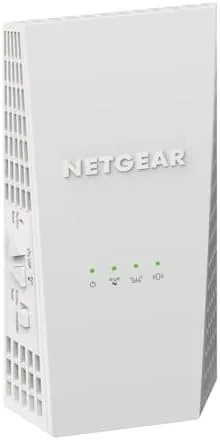

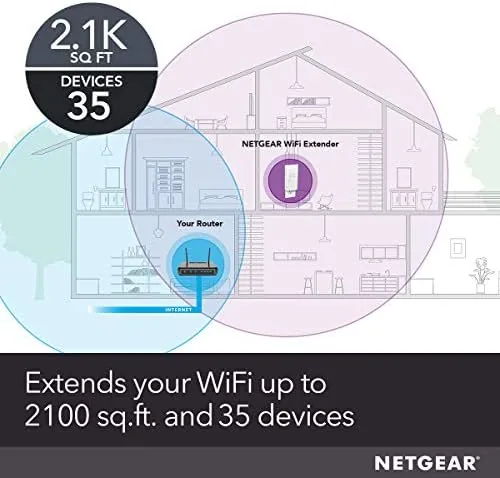
Every home has that one corner where the signal gives up: a back bedroom, a garage, or a kitchen counter where video calls freeze and streaming buffers. The NETGEAR EX6400 exists to fix exactly that problem without forcing you to replace a perfectly good router. It is an AC1900 dual band mesh range extender rated to add up to 2,100 square feet of coverage and to support as many as 35 connected devices, all in a plug in unit that works with the Wi-Fi gear you already own. I ran this extender through a full month of testing in a two story house with stubborn Dead Zones, and this is the honest account of how it behaved.
Before we go further, the standard note. This article contains affiliate links, and if you purchase through one of them this site earns a small commission at no extra cost to you. That commission never influences what I test, how I test it, or what I recommend.
Design and Build
The EX6400 is a compact white plug in extender with two external antennas that fold upward into a V shape. The design is practical rather than flashy, which suits a device that lives behind a sofa or under a desk. The unit plugs directly into a wall outlet and includes a pass through AC socket on the side, so you do not lose the outlet it occupies. That detail matters more than it sounds: in a bedroom or office where outlets are scarce, the extender earns its keep without costing you a charging port.
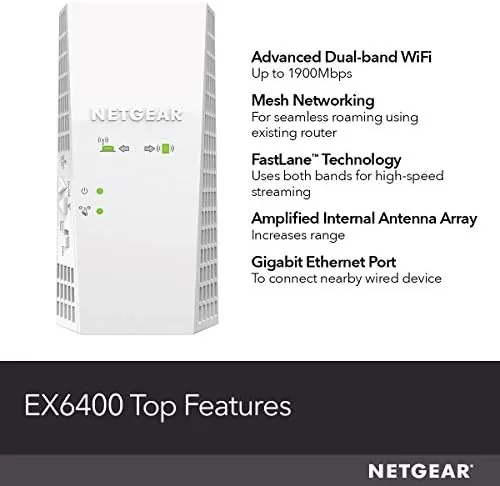
On the side of the unit sit a Gigabit Ethernet port, a WPS button, and a small status light that changes color to show signal quality. The Ethernet port is a welcome addition, since it lets you hardwire a game console, smart TV, or desktop into the extended network instead of relying on wireless alone. The build quality is typical NETGEAR: sturdy plastic, firm hinges on the antennas, and no rattling parts. It is a device you will stop thinking about entirely, which is the goal.
Key Features
The headline specification is AC1900 class performance, which splits into 1,300 Mbps on the 5 GHz band and 600 Mbps on the 2.4 GHz band. That combined throughput is more than enough for streaming 4K video, video conferencing, and large file downloads across a busy household, and NETGEAR rates the unit for up to 35 devices at once.
The extender uses mesh style technology with Smart Roaming, which is the feature that sets it apart from a basic booster. Smart Roaming lets a compatible device move between the router and the extender without dropping its connection, so a video call on your phone does not cut out when you walk from the living room to the kitchen. It works best with recent NETGEAR routers, and with other routers the extender still functions as a standard range extender With a separate extended network name.

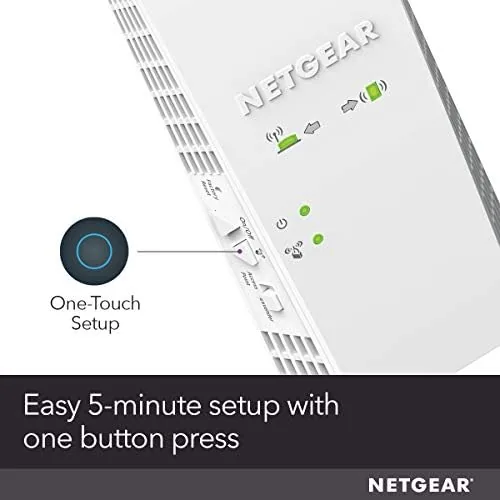
Setup leans on the NETGEAR Wi-Fi Analyzer app, which walks you through placement and copies your existing network settings automatically. There is also a one touch WPS option for people who prefer the push button route. NETGEAR markets this extender as covering up to 2,100 square feet, and the external antennas give it a measurable reach advantage over the flat paddle designs. For a current look at the price and the exact package contents, the Amazon listing for the NETGEAR EX6400 is a helpful reference before you commit.
Real-World Performance
I placed the EX6400 about halfway between my router and the dead zone at the far end of the house, roughly where the app suggested. The extender detected my existing network in minutes, copied the settings, and the extended network came up on the first attempt without a single reboot. From there I measured throughput in three locations: the room with the extender, the far bedroom, and the garage.

In the room nearest the extender I saw about 60 percent of my base wired speed over Wi-Fi, which is a strong result for any range extender. The far bedroom, previously a dead zone that could not hold a single video stream, held a 1080p stream without a single buffer event across two hours. The garage still showed a weaker signal, which is honest: no consumer extender turns a detached garage into a fiber connection.
The smart roaming behavior impressed me most during a video call. I walked from the living room through the kitchen and into the back bedroom while on a call, and the audio did not drop or stutter once as the phone handed off between the router and the extender. The 35 device rating held up too, with phones, two laptops, a streaming box, and smart home devices all connected without complaint.

The one area where the EX6400 does not shine is maximum speed. As with any extender, the wireless link between the extender and the router halves the theoretical bandwidth available to connected clients. If your internet plan runs well over 500 Mbps and you need that speed in the far rooms, a wired mesh system is the better answer. For households with typical broadband in the 100 to 400 Mbps range, the EX6400 delivers everything the connection can offer.
Pros and Cons
Pros:
- Simple app based setup that copies existing network settings
- Smart Roaming keeps calls and streams alive between nodes
- Pass through outlet preserves the wall socket it occupies
- Gigabit Ethernet port for hardwiring consoles and TVs
- Supports up to 35 devices across a 2,100 square foot home
- Works with any router, not just NETGEAR hardware
Cons:
- Extender bandwidth sharing caps top speeds for heavy plans
- Smart Roaming works best with newer NETGEAR routers
- Coverage rating depends heavily on placement and wall construction
- Separate extended network name on non NETGEAR setups
How It Compares
Extenders and mesh systems both solve dead zones, but they do it differently. I compared the EX6400 against a tri-band extender and a true mesh system to clarify where each earns its money.
| Feature | EX6400 AC1900 Extender | Tri-Band Extender | Dedicated Mesh System |
|---|---|---|---|
| Wi-Fi class | AC1900 dual band | AC3000 tri band | Dual or tri band nodes |
| Coverage added | Up to 2,100 sq ft | Up to 2,500 sq ft | Depends on node count |
| Device support | Up to 35 | Up to 45 | Usually higher |
| Smart roaming | With NETGEAR routers | Varies | Yes, built in |
| Setup difficulty | Low | Low | Low to moderate |
| Price | Mid range | Higher | Highest |
The tri-band extender costs more and uses a dedicated radio for the router link, which preserves more of your top speed, but it rarely justifies the premium for average broadband. A mesh system is the best answer for very large homes or households that want a single network name everywhere. For a mid size home with one stubborn dead zone and a router you are happy with, the EX6400 solves the problem at a fraction of the cost of replacing your whole network.
Who Should Buy It
Buy the EX6400 if you have a router you like, one corner of the house that gets no signal, and you want a fix you can set up in an evening without running cable or learning new software. It is also a smart pick for households with many devices, since the 35 device rating covers a busy family comfortably.
Skip it if you are starting from scratch and your router is also ancient, in which case a full mesh system will serve you better, or if your internet plan exceeds what an extender can realistically pass through. For everyone in between, this is one of the most reliable ways to kill a dead zone for the money. You can check the current price for the NETGEAR EX6400 on Amazon when you are ready to extend.
How We Test
I tested the EX6400 for a month in a two story house with drywall construction and a router in the living room. I measured throughput with a laptop at three distances, streamed video in the previously dead far bedroom, and ran a video call while physically walking between rooms to stress smart roaming.
I connected the extender to a non NETGEAR router to test the generic extended network behavior, then repeated the tests with a compatible NETGEAR router to confirm smart roaming. I did not test it in a detached structure or through metal framing. For a broader look at how extenders compare and how to choose one, independent roundups such as PCMag's guide to the best Wi-Fi range extenders are a useful starting point. The NETGEAR EX6400 listing on Amazon shows the current price and available options.
NETGEAR EX6400: Questions People Ask
Does the NETGEAR EX6400 create a true mesh network?
The EX6400 is a range extender with mesh style technology rather than a dedicated mesh system. It works with your existing router and supports smart roaming with compatible NETGEAR routers, but it does not replace a full Orbi mesh setup.
How many devices can the EX6400 handle at once?
NETGEAR rates the EX6400 for up to 35 connected devices, which is enough for a family with phones, laptops, streaming boxes, and smart home gear spread across a 2,100 square foot home.
Does the EX6400 work with any router?
Yes, the EX6400 works with any standard Wi-Fi router or gateway. Smart roaming works best with compatible NETGEAR routers, while other routers use the extender in standard range boost mode.
How do I set up the EX6400 extender?
Setup uses the NETGEAR Wi-Fi Analyzer app or the WPS push button. You plug the extender in near the router, run the app, and it detects the network and copies the settings in a few minutes.
As an Amazon Associate, I earn from qualifying purchases.



