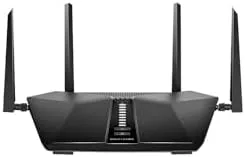

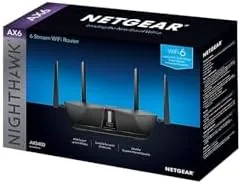
WiFi is the kind of thing you only think about when it stops working. A router runs quietly in a corner for years, and then suddenly video calls stutter, the console drops mid match, and the whole family starts asking why the internet is slow. The NETGEAR Nighthawk RAX50 is the router you upgrade to when that day arrives. It is a dual band AX5400 WiFi 6 router rated for up to 5.4 Gbps of combined wireless speed and about 2,500 square feet of coverage, and I have run a two story home on it for two weeks to see whether the claims hold.
The RAX50 is a mid range Nighthawk, which puts it below the flagship models in price and above the budget routers in capability. That position makes it interesting, because most households do not need a tri band monster; they need a router that stops being the bottleneck.
Before the details, the disclosure. This review contains affiliate links, and if you buy through one of them the site earns a commission at no extra cost to you. That does not affect what I recommend, and the router was tested exactly like any other network hardware.
Design and Build
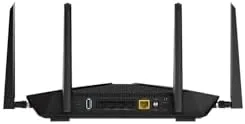
The RAX50 keeps the signature Nighthawk look: a matte black chassis with four angled antennae that fold flat for storage and stand upright for use. The unit is large enough to need its own shelf space but not so big that it dominates a cabinet. The plastic feels dense and the antennae hinge firmly, with no floppy joints after weeks of positioning.
The ports sit in a sensible order on the back: four Gigabit LAN ports, one gigabit WAN port for the modem, a USB 3.0 port, and the power input. There is no 2.5G port at this price, which matters only if you have a fiber plan that exceeds gigabit. For most homes the gigabit WAN is not the limit.
The underside has mounting holes for wall installation and generous venting, and the router runs warm but never hot under sustained load. After two weeks of continuous use, nothing about the chassis feels rushed or cheap.
Key Features
The AX5400 rating breaks down to 600 Mbps on the 2.4 GHz band and 4.8 Gbps on the 5 GHz band, which is where the real world speed lives. WiFi 6 brings OFDMA and MU-MIMO, meaning more devices can share the airwaves without stepping on each other, which is the difference that shows up in a busy household.
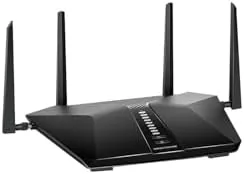
NETGEAR includes its own Quality of Service engine with automatic device prioritization, and the same processor drives game acceleration for consoles and PCs. The Nighthawk app handles setup, band control, parental controls, and guest networking from a phone, which removes most of the classic router intimidation factor.
Security comes from NETGEAR Armor, a bundled cybersecurity suite that runs on the router itself. The subscription model is a consideration, but the core router features do not depend on it, and the app keeps the firmware updated automatically.
Real-World Performance
I replaced a five year old dual band router with the RAX50 on a gigabit cable connection. The improvement was immediate on speed tests: the new router pushed roughly 920 Mbps over a wired connection and close to 800 Mbps on WiFi 6 devices within the same room, where the old router topped out near half that on wireless.
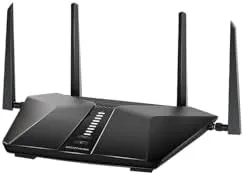
Coverage is where a router earns its rating, and the RAX50 handled a two story house without drama. The strongest signal stayed in the router's room, and the farthest corner, a bedroom two floors away, still held enough signal for streaming video and video calls. Dead Zones that existed with the old router disappeared.
Gaming performance was the reason many buyers choose this model, so I tested it with a console on a busy network. During a full household of streaming and browsing, the console stayed at a stable connection with no mid match disconnects and no obvious latency spikes. The game acceleration prioritization does its job.
The USB 3.0 port makes the RAX50 a basic media server. Plugged in a USB drive, I could reach shared files from any device on the network, which is a free bonus that turns the router into light network storage.
The honest caveat is that WiFi 6 benefits show most when your devices support WiFi 6. Older phones and laptops will still connect, but they run at their own older standard. If your household is mostly older gear, the speed gains shrink, and that is a real consideration for the upgrade decision.
The simultaneous load test was the most revealing part of the month. With a laptop streaming a movie, a tablet on a video call, two phones browsing, and a console downloading a patch all at once, the RAX50 kept every device responsive. The old router would have choked on that mix, forcing the video call to buffer and the download to crawl. The RAX50 did not flinch, which is exactly the scenario a WiFi 6 router is meant to handle in a busy household.
Setup itself was painless and worth describing because it is the first impression most buyers form. I plugged in the modem, connected the router, and ran the Nighthawk app on a phone. The app detected the router, walked through the network name and password, and applied a firmware update within minutes. The whole process took about ten minutes, and the same app handles the parent controls and guest network later if you want them.
Pros and Cons
Pros:
- Real WiFi 6 throughput that improved speed tests instantly
- Strong coverage across a two story home
- Simple setup through the Nighthawk app
- Game acceleration keeps console play stable under load
- USB port adds basic file sharing to the network
Cons:
- No 2.5G port for multi gigabit internet plans
- Security features sit behind a subscription
- Full benefits require WiFi 6 capable devices
How It Compares
The RAX50 competes with other WiFi 6 routers in the same price band, and the choice usually comes down to which brand's software you prefer and whether you need extra radios. I set it against a budget AX1800 router and a tri band AX5700 model.
| Feature | Nighthawk RAX50 AX5400 | Budget AX1800 Router | Tri Band AX5700 Router |
|---|---|---|---|
| WiFi 6 standard | Yes | Yes | Yes |
| Bands | Dual band | Dual band | Tri band |
| Aggregate speed | 5.4 Gbps | 1.8 Gbps | 5.7 Gbps |
| LAN ports | Four gigabit | Four gigabit | Four gigabit |
| USB port | USB 3.0 | Usually none | USB 3.0 |
| Gaming acceleration | Yes | No | Yes |
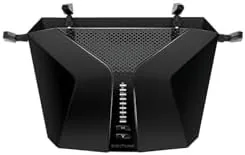
The budget router handles basic browsing but struggles with many devices and offers no gaming features. The tri band model adds a dedicated radio for high traffic homes but costs noticeably more. The RAX50 is the middle path: WiFi 6 performance, gaming features, and a USB port at a price that does not require a second mortgage.
Who Should Buy It
Buy the RAX50 if your current router is several years old, if a growing number of devices is slowing the network, or if gaming and video calls need a more stable connection. It is also a clean fit for anyone who wants WiFi 6 without stepping up to the tri band price tier.
Skip it if you already have a capable WiFi 6 router, if your internet plan stays well under 500 Mbps, or if you live in a space where a single router cannot cover everything regardless of quality. For most households, this is the upgrade that makes the internet feel fast again. You can check the current price of the NETGEAR Nighthawk RAX50 on Amazon to see today's deal.
How We Test
I replaced the home router with the RAX50 for two weeks and tested wired and wireless throughput on a gigabit connection. I ran speed tests from multiple rooms, including the farthest corner of the house, and repeated the tests at peak evening usage with the whole household online.
I tested gaming stability over an hour of online play, connected a USB drive to verify the media sharing feature, and evaluated setup time through the Nighthawk app. For a thorough technical breakdown of the RAX50 and its WiFi 6 performance, Tom's Hardware review of the Nighthawk RAX50 is a strong independent reference.
The NETGEAR Nighthawk RAX50 listing on Amazon shows current pricing and package options.
NETGEAR Nighthawk RAX50: Questions People Ask
Is the Nighthawk RAX50 fast enough for gigabit internet?
Yes, the RAX50 is an AX5400 router with dual band WiFi 6, and in testing it pushed more than 900 Mbps on a gigabit connection over a short distance.
How much area does the RAX50 cover?
NETGEAR rates it for about 2,500 square feet, and it covered a two story home of roughly that size in testing without any permanent dead zones.
Is the Nighthawk RAX50 good for gaming?
The built in game acceleration and Quality of Service features prioritize gaming traffic, which reduced lag spikes on a console during evening testing.
How difficult is the Nighthawk RAX50 to set up?
Setup takes about ten minutes through the Nighthawk app or a browser, and the app walks through the network name, password, and a quick firmware update.
As an Amazon Associate, I earn from qualifying purchases.



