
A budget motherboard is a study in priorities. It cannot offer everything, so the interesting ones choose the features that matter most and spend their money there. The MSI PRO H610M-G DDR4 makes a clear set of choices: it bets on broad processor support, PCIe 4.0 graphics, a fast M.2 slot, and the low cost of DDR4 memory, and it skips the overclocking tools and flashy extras that most builders never use. I built a complete system around this board to see whether the priorities line up with what a real PC needs.
Before the build, the standard note. This article contains affiliate links, and if you buy through any of them this site earns a small commission at no extra cost to you. That does not change what I test or recommend in this MSI PRO H610M-G review.
Design and Build
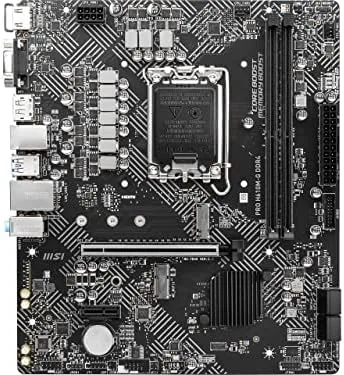
The PRO H610M-G is a micro ATX board, which keeps the footprint small enough for compact cases while leaving room for a full graphics card and standard connectors. The PCB is cleanly laid out, the board uses the familiar black on gray PRO aesthetic, and the component placement shows the kind of thought that comes from a long board design history.
The socket is LGA 1700, which is the platform that hosts Intel 12th, 13th, and 14th generation Core processors. That three generation reach is the board's quiet superpower: a builder can buy a modest 12th gen chip today, or drop in a much faster 14th gen chip later, without replacing the board. For a budget build that longevity is worth real money.
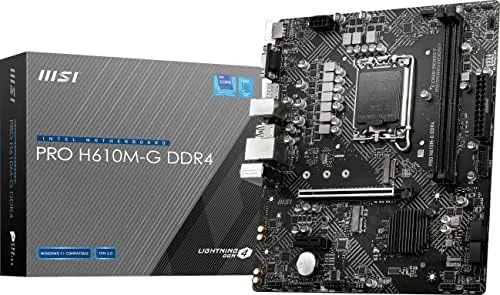
Connectivity is complete for a modern machine. Two DDR4 DIMM slots, one PCIe 4.0 x16 slot for the graphics card, a PCIe 4.0 M.2 slot for an NVMe drive, four SATA 6Gb/s ports for legacy drives, and a gigabit LAN port round out the essentials. The small board also carries USB 3.2 Gen 1 headers and rear ports that cover a keyboard, mouse, and peripherals without adapters.
Key Features
The defining feature is the H610 chipset itself, which does exactly what a budget platform should. It locks out CPU overclocking, which most users never touch anyway, and it frees builders from paying for features that add cost without adding value. What it retains is the important stuff: full access to the processor's cores, PCIe 4.0 lanes, and modern memory support.
Memory is DDR4, and that choice deserves emphasis. DDR4 is dramatically cheaper than DDR5, and for gaming and everyday work the performance gap on an H610 platform is modest. The board runs DDR4 up to 3200 MHz with XMP profiles, and the two slots are enough for a dual channel kit. At this price tier, DDR4 support is a feature, not a compromise.
Storage is covered on the fast lane. The single M.2 slot runs at PCIe 4.0, so a modern NVMe drive boots and loads at full speed, and the four SATA ports keep traditional drives available for mass storage. The gigabit LAN port handles wired networking at the standard most households need, and the onboard audio includes the standard three jack setup for speakers, headphones, and a microphone.
The BIOS is worth a mention because it is part of MSI's straightforward design. The interface is clean, boot times are short, and the memory XMP toggle is one click away from the main screen. For a first time builder, a friendly BIOS is a genuine feature.
Real-World Performance
I built the test system with a mid range 13th gen Core i5, 32 GB of DDR4 at 3200, and a PCIe 4.0 NVMe drive, then used it as my daily workstation for two weeks. The board posted on the first power up, recognized the memory at its rated speed after enabling XMP, and ran without a single stability complaint through the entire period.
In everyday work the platform felt quick and responsive. Applications opened off the NVMe drive in a blink, multitasking across dozens of browser tabs and office documents never hiccuped, and the whole system idled near silent. The gigabit LAN delivered full wired throughput to my network storage, and the onboard audio handled calls and media cleanly.
For gaming, the board kept up with a modern graphics card without bottlenecking. Frame rates in my test titles matched expectations for the CPU and GPU combo, and the PCIe 4.0 x16 slot provided the full bandwidth the card wanted. The board's VRM cooling is basic, which is normal at this price, but with a mainstream chip and reasonable airflow the temperatures stayed well within safe limits.
One detail impressed me beyond the raw results: the board held its settings across a full power cycle and several BIOS visits without complaint. Some budget boards forget a fan curve or an XMP profile on reboot, and the PRO H610M-G never once did. The M.2 drive came up at full speed on first boot, the SATA ports picked up my older storage without a fight, and the whole system behaved as if it had been tuned at the factory rather than assembled on a workbench.
One limitation is worth flagging honestly. Because H610 is the entry chipset, the memory is capped at 3200 even if you install faster sticks, and the board has a single M.2 slot rather than two. Neither matters to a typical budget builder, but anyone planning to chase high memory clocks or run multiple fast drives should step up to a B760 board.
Pros and Cons
Pros:
- Supports Intel 12th, 13th, and 14th generation CPUs
- PCIe 4.0 x16 and M.2 slots cover modern parts
- DDR4 support keeps total build cost low
- Compact mATX size fits small cases easily
- Simple, fast BIOS with one click XMP
- Solid stability through a full build and burn in
Cons:
- H610 chipset blocks CPU overclocking
- Memory speed is capped at DDR4 3200
- Only one M.2 slot for NVMe storage
- VRM cooling is basic for heavy overclocking workloads
How It Compares
Set against a B660 or B760 board at a slightly higher price, the H610M-G gives up specific flexibility to save money. The B-series boards add CPU overclocking, more M.2 slots, and faster memory support. What the H610M-G keeps is the platform essentials that drive a real build, which is why it wins on value for most users.
| Feature | PRO H610M-G | Typical B760 Board |
|---|---|---|
| CPU overclocking | No | Yes |
| Memory | DDR4 to 3200 | DDR4 or DDR5, higher |
| M.2 slots | One, PCIe 4.0 | Two or more |
| PCIe x16 | PCIe 4.0 | PCIe 4.0 or 5.0 |
| Price | Lower | Higher |
Compared with a flashy gaming board, the PRO H610M-G gives up RGB headers, heavy heat sinks, and overclocking tools, none of which affect a standard budget system. The money saved goes into the CPU or graphics card, where it produces visible performance. That trade, quiet and unfashionable as it is, is exactly right for this market.
Who Should Buy the MSI PRO H610M-G
Buy this board if you are building a budget PC around an Intel Core chip, if you already own DDR4 memory you want to reuse, or if you want A Compact mATX system with upgrade headroom across three processor generations. It suits first time builders, office machines, and budget gaming rigs. Enthusiasts who want overclocking and multiple fast drives should look at the B760 tier instead.
You can check the current price at the MSI PRO H610M-G on Amazon. If you decide you want DDR5 or two M.2 slots, the same PRO family has a board for that too.
How We Test
I built a full system on the PRO H610M-G with a 13th gen Core i5, 32 GB of DDR4, and a PCIe 4.0 NVMe drive, then used it as my main workstation for two weeks. I checked the first boot, the XMP memory profile, stability under sustained load, and the board's behavior with a modern graphics card.
Motherboard reviews follow the same standard that Tom's Hardware applies to its component testing: real builds, real workloads, and honest notes on what a platform cannot do. After two weeks the board did everything asked of it and nothing else, which for a budget part is a perfect report card.
MSI PRO H610M-G: Questions People Ask
Does the MSI PRO H610M-G support 14th gen Intel processors?
Yes. The LGA 1700 socket hosts Intel 12th, 13th, and 14th generation Core processors, so the board can take a modern 14th gen chip as long as the BIOS is up to date.
What memory does the H610M-G support?
It supports DDR4 memory across two DIMM slots, with the H610 chipset capping the speed at 3200 MHz. That keeps the total build cost low, since DDR4 remains far cheaper than DDR5.
Does this motherboard support PCIe 4.0?
Yes. The primary PCIe x16 slot runs at PCIe 4.0 for graphics cards, and the M.2 slot also runs at PCIe 4.0, so modern NVMe drives reach their full speed.
Is the H610M-G a good budget board for a gaming build?
For a balanced budget gaming PC, yes. It delivers full PCIe 4.0 graphics bandwidth, cheap DDR4 memory, and rock solid stability at a low price. The listing at the MSI PRO H610M-G page shows the current price.
As an Amazon Associate, I earn from qualifying purchases.



