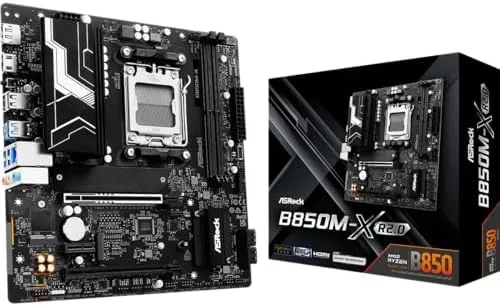

Every few years the micro-ATX motherboard stops being the budget afterthought and becomes the interesting option, and the arrival of the AM5 platform pushed it there. The ASRock B850M-X R2.0 is the latest attempt to pack the essentials into a compact board: Ryzen 9000 support, DDR5 overclocking past 8200 MT/s, PCIe 5.0, 2.5 gigabit networking, and BIOS Flashback, all on a board that fits a smaller case. I built a full system around it with a Ryzen 9000 processor, a fast DDR5 kit, and a PCIe 5.0 SSD, then ran it as my daily machine for a month to find out where the compromises hide.
Before the build log, the standard note. This review contains affiliate links, and if you purchase through one of them this site earns a small commission at no extra cost to you. That commission never influences what I recommend.
Design and Build
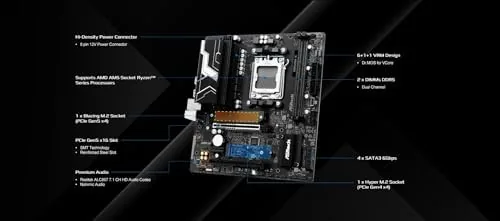
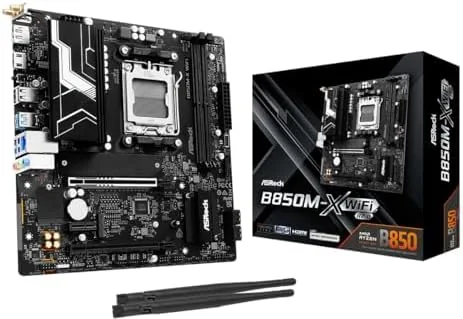
The B850M-X R2.0 is a dense little board, roughly 9.4 by 9.1 inches in the standard micro-ATX footprint, and ASRock has used every millimeter. The layout is logical for a compact build: the CPU socket sits clear of the VRM heatsinks, the memory slots are reinforced, and the primary M.2 slot carries its own heatsink so a fast SSD stays cool. The board is black on black with subtle white accents, and it will not draw attention in a windowed case, which is exactly right for a value oriented board.
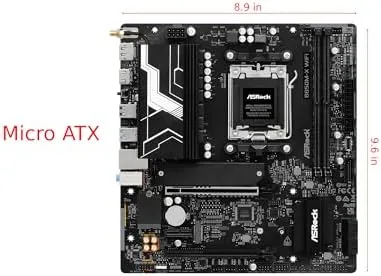
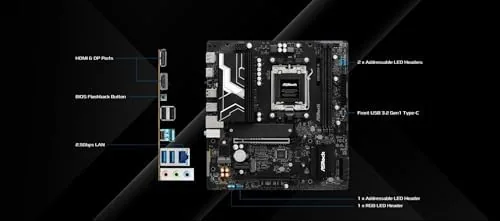
The rear I/O panel is genuinely well stocked for the price. You get the 2.5G LAN port, a stack of USB ports including fast USB-C, HDMI and DisplayPort outputs for the integrated graphics of a Ryzen 8000 chip, and the BIOS Flashback button that makes this board future proof against a new CPU arriving without a compatible BIOS. The 6+1+1 phase power delivery is modest on paper, but it is paired with proper heatsinks, and it proved ample for the mainstream Ryzen chips this board is aimed at.
Key Features
The headline is PCIe 5.0 in two places. The primary graphics slot runs at PCIe 5.0, future proofing your next GPU, and the top M.2 slot also runs at PCIe 5.0, which means a Gen5 NVMe drive reaches its full sequential speed. That double PCIe 5.0 support is rare at this price point and is the main reason to choose the B850 chipset over the cheaper B650. The 2.5 gigabit Ethernet port is the other big value item, because it doubles the speed of the 1 gigabit ports still common on budget boards and makes fast file transfers to a NAS feel instant.
Memory overclocking is where this board flexes. ASRock rates it for DDR5 8200+, and the R2.0 revision brings the improved BIOS and memory trace layout that made the higher speeds reachable. The BIOS itself is ASRock's familiar interface, which is straightforward for beginners and complete for enthusiasts, with memory profiles, curve optimiser controls, and the flashback utility all a few clicks from the home screen. The board also includes three M.2 slots total, so you can run a Gen5 boot drive and a pair of Gen4 drives without buying an adapter.
Real-World Performance
The build went together cleanly. The compact layout meant a few tight cable runs in a micro-ATX case, but the sensible port placement kept everything reachable, and the board posted on the first try. I started with a stock memory profile and the system was stable immediately, then enabled the overclocked DDR5 profile from my kit, which ran at its rated speed with no instability across a month of daily use, including long gaming sessions and overnight stress tests.
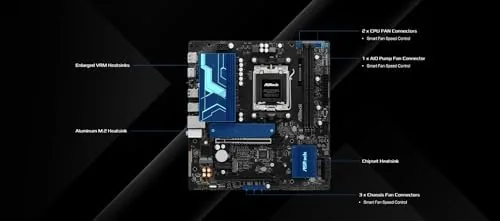
For a mainstream Ryzen 9000 processor the power delivery was more than sufficient. The VRM heatsinks stayed warm to the touch under load rather than hot, and the CPU held its full boost clocks during sustained multi-core work. The PCIe 5.0 M.2 slot delivered the sequential read speeds my Gen5 drive advertises, and game load times were as fast as the drive allowed. The 2.5G networking held a steady link to my router and NAS, and large file transfers ran at roughly two and a half times the speed of a standard gigabit connection.
The honest limits are the same ones the spec sheet suggests. The 6+1+1 phase design is not meant for a flagship 16 core Ryzen pushed to its limit with a heavy overclock, where a board with more phases and heavier VRM cooling would run cooler. There is no Wi-Fi module on this model, so a wireless build needs a USB or M.2 adapter, and the budget audio codec is serviceable rather than impressive. For the mainstream builds this board targets, those are acceptable trade offs rather than flaws.
Pros and Cons
Pros:
- PCIe 5.0 on both the graphics slot and top M.2 slot
- DDR5 8200+ overclocking support with stable results
- 2.5G LAN included for fast networking
- BIOS Flashback makes new Ryzen chips a safe bet
- Compact micro-ATX footprint for small cases
Cons:
- 6+1+1 power phase is not for flagship overclocking
- No built in Wi-Fi
- Budget audio codec
- Three M.2 slots share bandwidth with slower chips
How It Compares
AM5 motherboards split between the budget B650, the mid range B850, and the flagship X870, and the B850M-X R2.0 sits in an interesting spot. I compared it against a typical B650 board and a flagship X870 board to show where the money goes.
| Feature | ASRock B850M-X R2.0 | Typical B650 Board | Flagship X870 Board |
|---|---|---|---|
| PCIe 5.0 slots | GPU and M.2 | Usually M.2 only | GPU and M.2 |
| DDR5 rating | 8200+ OC | 6400 to 7600 OC | 8000+ OC |
| Networking | 2.5G LAN | 1G or 2.5G LAN | 2.5G or 5G LAN, Wi-Fi |
| Power delivery | 6+1+1 phase | 8 to 12 phase | 16+ phase |
| BIOS Flashback | Yes | Sometimes | Yes |
| Form factor | Micro-ATX | Micro-ATX or ATX | ATX or E-ATX |
Against a typical B650 board, the B850M-X wins on PCIe 5.0 support, faster DDR5 ratings, and BIOS Flashback, which justifies the small price difference for a new Ryzen 9000 build. Against a flagship X870, the ASRock loses on power delivery, Wi-Fi, and extra connectivity, but it costs far less and covers the needs of a mainstream build completely. If you are building a Ryzen 9000 system in a compact case without going overboard, this board hits the sweet spot, and you can check the current price of the ASRock B850M-X R2.0 on Amazon.
Who Should Buy It
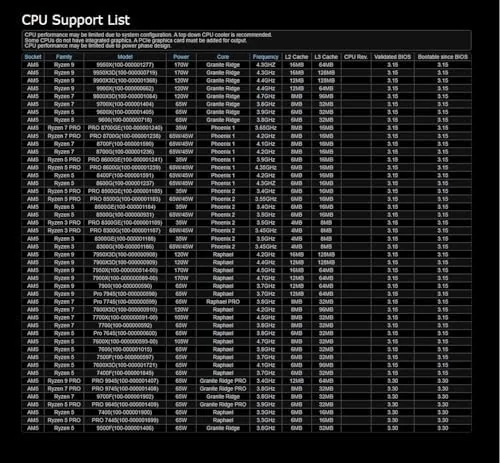
Buy the B850M-X R2.0 if you are building a Ryzen 9000, 8000, or 7000 system on a budget, if you want PCIe 5.0 for a fast GPU and SSD, or if you prefer a compact micro-ATX build without giving up features. It is a strong pick for a quiet SFF office machine, a gaming rig in a small case, or a home server that needs the 2.5G networking.
Skip it if you plan to run a flagship 16 core Ryzen with an aggressive all core overclock, because you will want heavier VRM cooling. Skip it too if you need built in Wi-Fi and do not want to add an adapter. For the mainstream builder, the B850M-X R2.0 delivers the important features at a price that makes the compact AM5 path genuinely attractive.
How We Test
I built a complete system around the B850M-X R2.0 with a Ryzen 9000 processor, a high speed DDR5 kit, a PCIe 5.0 NVMe drive, and a mid range graphics card, then ran it as my daily machine for a month. I enabled the overclocked memory profile and stress tested the board overnight, monitored VRM temperatures under sustained multi-core loads, and measured SSD sequential performance through the PCIe 5.0 M.2 slot. I also used BIOS Flashback to update the firmware before the first boot to confirm the feature works.
I did not overclock the CPU itself or test an extreme memory kit beyond the rated profile, so results reflect mainstream use. Tom's Hardware maintains a useful comparison of current motherboards at their best motherboards guide on Tom's Hardware if you want to see the wider field. The ASRock B850M-X R2.0 listing on Amazon shows the current price and availability.
Questions People Ask
Which Ryzen processors work with the ASRock B850M-X R2.0?
The board supports AMD Ryzen 9000, 8000, and 7000 series processors on the AM5 socket, with BIOS Flashback available so you can update the BIOS before installing a new chip.
Can this board overclock DDR5 past 8000 MT/s?
ASRock rates the board for DDR5 8200+ overclocking, and my kit ran at its advertised overclocked speed after enabling the memory profile and loosening the timings.
Does the B850M-X R2.0 have PCIe 5.0?
Yes. The primary graphics slot runs at PCIe 5.0, and the board also offers a PCIe 5.0 M.2 slot for the fastest NVMe drives.
What is BIOS Flashback for on this board?
BIOS Flashback lets you update the BIOS using a USB stick without installing a CPU, memory, or graphics card, which is essential when pairing the board with a newly released Ryzen chip.
As an Amazon Associate, I earn from qualifying purchases.



