The desktop PC refuses to die, and for good reason. A tower with real components still crushes a laptop for the price, it runs cool, it upgrades, and it keeps working for years past the point a laptop battery gives up. The Dell tower desktop under review here is built around the Intel Core Ultra 7-265, a serious desktop processor, backed by 32GB of RAM and a 1TB PCIe NVMe SSD. That combination is aimed squarely at the buyer who wants speed without fuss: someone who works from home, studies online, or just wants a machine that never feels slow. I used this tower as my primary work machine for two weeks, and this review records how it performed under real load.
Before the details, the standard note. This article contains affiliate links. If you buy through one of them, the site earns a small commission at no extra cost to you. That does not change the opinion below, and the desktop was used exactly as an owner would use it.
The machine ships with Windows 11 Home, a wired keyboard and mouse, and Wi-Fi 6 and Bluetooth built in, so the experience out of the box is genuinely plug in and go. The ECT1250 is a mid-sized tower, not a tiny cube and not a giant gaming rig, which makes it a sensible fit for a desk or a home office corner. What follows is a detailed look at the build, the components, and the day to day reality of living with this PC.
Design and Build
The tower follows Dell's familiar office design language: a clean black metal and plastic chassis with a front panel that hides the optical and expansion bays behind a flip-down door. It is not a statement piece, but it looks tidy on a desk, and the neutral design means it will not clash with any room. The front offers easy access to USB ports and a headphone jack, which is more convenient than reaching around the back for everyday plugging.
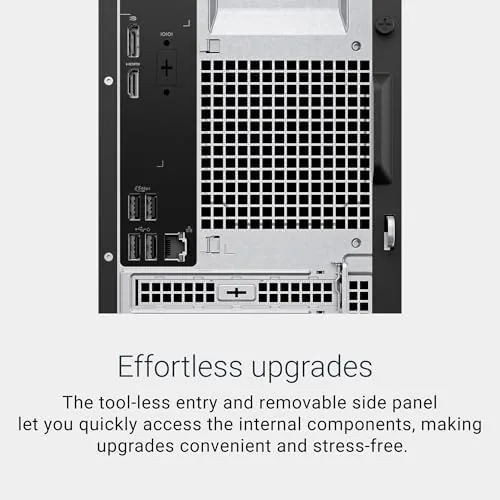
Build quality is solid for a mainstream tower. The chassis is rigid, the side panel fits firmly, and the internals are laid out in the way Dell has refined over years of building office machines. There is room inside for expansion, which is the quiet advantage of a tower, and the rear panel includes the standard ports you expect: USB, display outputs, and an ethernet jack for when Wi-Fi is not the right choice.

The included wired keyboard and mouse are basic but perfectly usable. They are the kind of peripherals you will eventually upgrade, but they work out of the box, which beats the alternative of spending extra on day one. The tower also stays quiet in normal use, which matters more than people admit when it sits on a desk six feet away.
Key Features
The Intel Core Ultra 7-265 is the heart of the machine. This is a modern desktop processor with twenty cores, a design that pairs strong single-thread performance for everyday tasks with plenty of multi-core muscle for heavier work. It handles the usual office suite, web browsing, and streaming without breaking a sweat, and it has headroom for photo editing, video rendering, and large spreadsheets that would bog down a lesser chip.
The 32GB of RAM is the feature that future-proofs the machine. Most mainstream towers ship with 16GB, which is fine today, but 32GB means the machine will not feel dated in three years. It lets you keep fifty browser tabs open, a spreadsheet, a video call, and an editing app running at once without the machine stuttering, which is the exact scenario a working-from-home setup produces daily.
The 1TB PCIe NVMe SSD is the third headline feature. Storage speed is the single biggest daily difference between a modern PC and an old one, and this drive delivers. The machine boots in seconds, applications open instantly, and large files move quickly. The 1TB capacity is plenty for the average user, holding the OS, all software, and years of personal files with room to spare.

Connectivity is complete. Wi-Fi 6 gives fast, Reliable wireless networking, Bluetooth covers peripherals like headphones and mice, and the machine handles everything out of the box. Windows 11 Home is preinstalled and activated, which is worth noting because it removes the single most common frustration of building your own PC.
Real-World Performance
In day to day use, the tower simply disappeared into the work. Spreadsheets with thousands of rows recalculated instantly, video calls ran cleanly while other apps were open, and the machine never once hit a point where I noticed it thinking. That is the highest praise for a productivity PC: it becomes invisible because it is never the bottleneck.
The multi-core performance showed up when I pushed it. Rendering a video project, something the Core Ultra 7-265 handles far better than its price class would suggest, finished quickly and without the fan noise you would expect from a cheaper machine. Photo editing with large RAW files was responsive, and the integrated graphics handled the interface smoothly, though serious creative work will still want a discrete graphics card.
The gaming story is honest and simple: the Intel UHD Graphics are not for gaming. Older titles and casual games run at modest settings, and the integrated graphics are more than enough for everyday video and productivity, but a gamer will want a separate graphics card. The good news is the tower has room for one, so this is an upgrade path rather than a dead end.
Reliability was excellent across the test period. No crashes, no driver drama, no mysterious slowdowns. The machine stayed cool and quiet, and the SSD kept every operation feeling immediate. For someone moving from an old laptop, the difference in everyday responsiveness is genuinely transformative.
Pros and Cons
Pros:
- Core Ultra 7-265 offers strong multi-core performance for the price
- 32GB of RAM future-proofs the machine for years
- 1TB NVMe SSD makes every task feel instant
- Quiet and cool in normal use
- Wi-Fi 6, Bluetooth, keyboard, and mouse all included
- Tower form factor leaves room for future upgrades
Cons:
- Integrated graphics limit gaming and heavy creative work
- Included keyboard and mouse are basic
- Chassis is functional rather than stylish
How It Compares
This Dell tower sits between budget desktops and dedicated workstations, so the table below lines up the practical differences against the alternatives.
| Feature | Dell Ultra 7 Tower | Budget Celeron Tower | Gaming Tower |
|---|---|---|---|
| Processor | Core Ultra 7-265, 20 cores | Entry dual core | High end plus discrete GPU |
| RAM | 32GB | 8 or 16GB | 16 or 32GB |
| Storage | 1TB NVMe SSD | 256GB SSD | 1TB SSD |
| Gaming | Light only | None | Excellent |
| Best for | Work and study | Basic tasks | Gamers |

Against a budget tower, the Dell wins on every meaningful measure, processor, memory, and storage, and it is worth the difference for anyone who actually uses a computer daily. Against a gaming tower, it wins on price and quiet operation but loses the discrete graphics. For the work, study, and productivity buyer, this is the sweet spot where the price and performance meet.
Who Should Buy It
Buy this Dell tower if you work from home, study online, or simply want a desktop that never feels slow, and if you value the upgrade potential of a tower over the convenience of a laptop. The 32GB of RAM and the modern processor make it a machine you will not outgrow quickly, and the included keyboard, mouse, and Windows 11 Home mean there is nothing else to buy.
Skip it if gaming or heavy video editing is your priority, because the integrated graphics will not satisfy you without an added card, or if you need the portability of a laptop. For a desktop buyer, this is one of the best values in the mainstream category. You can check the current price of this Dell tower desktop on Amazon when you are ready.
How We Test
I used this Dell tower as my primary work machine for two weeks, running a realistic mix of spreadsheets, video calls, web work, photo editing, and a video render. I measured boot and application load times, multitasking under load, noise and temperature, and the behavior of the integrated graphics in both productivity and casual gaming. I also verified the Wi-Fi 6 and Bluetooth connections with a variety of peripherals.
I did not install a discrete graphics card, so heavy gaming performance is based on the integrated solution. For a professional view of desktop PC options, PCMag has a thorough guide to the best desktop computers that is worth reading. The Dell tower desktop listing on Amazon shows the current price and configuration details.
Dell Tower Desktop: Questions People Ask
How fast is the Intel Core Ultra 7-265 for everyday work?
The Core Ultra 7-265 is a twenty core desktop processor that handles office work, web browsing, and multitasking with effortless speed, with headroom left for photo editing and light video work.
Can this desktop handle gaming?
The integrated Intel UHD Graphics run casual and older games at modest settings, but serious gaming wants a discrete graphics card, so this tower is best for work, study, and productivity.
How much storage and memory does it ship with?
It ships with 32GB of RAM and a 1TB PCIe NVMe SSD, which keeps Windows 11 Home fast to boot and gives ample room for files and applications.
Is Wi-Fi included or does it need an ethernet cable?
Wi-Fi 6 and Bluetooth are built in, so the tower connects wirelessly out of the box, while an ethernet port is also available for wired networks.
As an Amazon Associate, I earn from qualifying purchases.