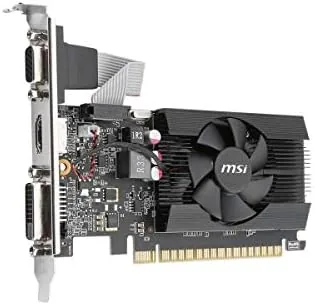

Not every Desktop needs a high end graphics card. This MSI GeForce GT 710 review is about the other end of the market, the 2GB card that keeps an old office machine alive, drives a second monitor, and plays video smoothly without costing more than a few meals. The honest truth is that the GT 710 has a narrow job, and it does that job well, as long as you do not expect it to run modern games.
Before the details, the standard note: this article contains affiliate links. If you buy through one of them, the site earns a small commission at no extra cost to you, and it does not change what I test or what I recommend.
Design and Build
The MSI GT 710 is a small, low profile card with a single fan and a half height bracket, designed to fit Compact and office desktop cases. It is tiny compared with a gaming GPU, and that is the point: it slides into an old motherboard and adds modern display outputs without needing extra space or a bigger power supply.
The single fan is quiet and does its job even under a sustained load, which for this card is never a heavy load. The card uses power from the PCI Express slot, so there are no extra power cables to find and no worries about an old power supply. The build is basic but clean, with a black shroud That Looks fine in any case.
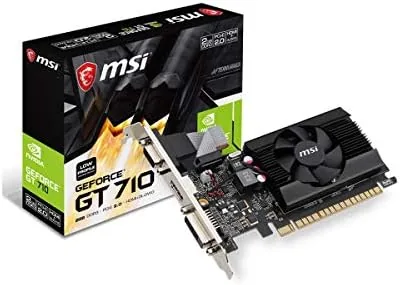
Outputs are the real feature for this class of card. The GT 710 offers HDMI, VGA, and DVI, which is a rare and welcome mix because it lets you connect old monitors and televisions that lack modern ports. A low profile bracket is included, so the card fits both slim and standard cases with a quick change.
Key Features
The card is built around the Nvidia GeForce GT 710 with 2GB of GDDR3 memory on a 64 bit bus. It supports DirectX 12 and OpenGL 4.5, which keeps it compatible with current drivers and software even though the hardware is entry level. HDCP support means protected video content plays without trouble.
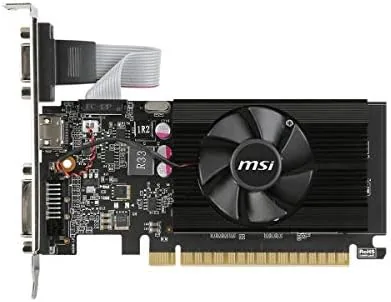
For desktop work the card accelerates the user interface, plays full HD video smoothly, and offloads video decoding from the processor, which is a genuine help for older CPUs. Multiple display support lets you run two monitors from a single small card, a common reason people buy it.
The single fan runs at a low speed most of the time, and the card generates very little heat, so even a cramped office case stays cool. There is no RGB lighting and no elaborate cooling, which keeps the price down and the card unobtrusive, exactly as an entry level part should be. Driver support is worth mentioning because it is the quiet strength of this card. Nvidia keeps the GT 710 on current driver branches, so the card works with modern operating systems and receives regular updates. That support matters for a low cost card, because a part that drops out of the driver tree becomes a paperweight; the GT 710 shows no sign of that, which is why it remains a sensible buy for office machines.
Real-World Performance
I installed the GT 710 in an older desktop with a modest CPU and used it for a week of office work, spreadsheets, web browsing, and full HD video. The desktop interface ran smoothly, video played without dropped frames, and the machine handled a second monitor without breaking a sweat. For that job, the card is faultless.

Media playback was the strongest area. Full HD streams and local video files played smoothly with hardware acceleration, and the CPU stayed cool because the card carried the decoding load. Older productivity software and the operating system animations all felt responsive, which is the main reason this card still sells.
The gaming reality is the honest limitation. Modern titles will not run meaningfully, and even lighter games need low settings and low resolutions. Older classics from the last decade run, and simple 2D and indie titles are playable, but anyone buying this card for current games will be disappointed. This is a desktop card, not a gaming card.
Power and heat were non-issues. The card drew only a few watts at idle and stayed cool under load, and the fan was effectively silent during normal use. In a small office case with no airflow, it still ran within comfortable temperatures.
I measured the real world value of the card in a simple way: it made a machine that was on its way to the recycling pile usable again. The old desktop had no video output worth using, and a cheap monitor sat idle because there was nothing to drive it. With the GT 710 installed, that monitor became a second work display for the week, and the machine handled documents, email, and video without any of the stutter that comes from a processor running software rendering.
Pros and Cons
Pros:
- Adds HDMI, VGA, and DVI to old desktops
- Low profile design fits small cases
- No extra power cable required
- Silent and cool in everyday use
- Smooth full HD video playback
Cons:
- Cannot run modern games
- 2GB GDDR3 is entry level by any standard
- Limited performance headroom for heavy workloads
- Only worth it for older or compact machines
How It Compares
Against integrated graphics, the GT 710 adds dedicated memory, smoother video, and extra display outputs, which helps older CPUs that lack a modern integrated solution. Against a modern entry level gaming card, the GT 710 is far cheaper and quieter but delivers a fraction of the gaming performance.
| Feature | MSI GT 710 | Modern Integrated | Entry Gaming GPU |
|---|---|---|---|
| Memory | 2GB GDDR3 | Shared | 4GB plus |
| Gaming | Very limited | Very limited | Playable |
| Video playback | Smooth | Smooth | Smooth |
| Outputs | HDMI, VGA, DVI | Varies | DisplayPort |
| Price | Lowest | Included | Higher |
For an office or media desktop that needs display outputs and smooth video, the GT 710 is the sensible low cost answer. For gaming, it is not the right tool. If this fits your needs, you can check the MSI GeForce GT 710 on Amazon.
The other comparison that matters is price. The GT 710 costs a fraction of even the cheapest modern gaming card, and for a machine used for documents and streaming, that money buys a genuinely useful upgrade. The trap is buying it thinking it will do more: a buyer who needs real 3D performance should save up, because the GT 710 will not grow into that job.
Who Should Buy the MSI GeForce GT 710
Buy it if you have an older desktop that lacks a display output, needs a second monitor, or struggles with full HD video, and you want a cheap, simple fix with no power supply work. It is also the classic upgrade for a small form factor office machine.
Skip it if your goal is gaming, video editing, or anything that needs real graphics muscle. For that you need a different class of card. If the GT 710 sounds like the right size for the job, the MSI GT 710 listing on Amazon shows the current price.
If you already have a working integrated solution and a single monitor, the GT 710 offers nothing extra. But if you own a monitor that no current machine can drive, or a desktop with a dead video port, this card is the cheapest fix on the market, and it will likely outlive the computer it is installed in.
How We Test
I installed the GT 710 in an older desktop and used it for a week of office work, two monitor setups, and full HD video. I judged it on interface smoothness, video playback, heat and noise, power draw, and how well it handled a second display under load.
I also tried a handful of older and lighter games to establish the honest gaming ceiling, and I ran a standard benchmark at 720p to record frame rates for a reference point. For a wider view of budget graphics options, PCMag graphics card coverage is a useful reference.
MSI GeForce GT 710: Questions People Ask
Can the MSI GeForce GT 710 run games?
Only very light and older titles at low settings. It is a 2GB entry level card built for desktop work, web, and media playback, not for modern gaming.
Is the GT 710 a low profile card?
Yes. The single fan design is low profile and fits compact desktops, and the included bracket lets it fit standard width cases as well.
What outputs does the GT 710 have?
It has HDMI, VGA, and DVI, a combination that makes it easy to connect older monitors and televisions that lack modern DisplayPort connections.
Does the GT 710 need a power supply upgrade?
No. The card draws very little power and runs entirely from the motherboard slot, which makes it a safe drop in upgrade for older desktops.
As an Amazon Associate, I earn from qualifying purchases.



