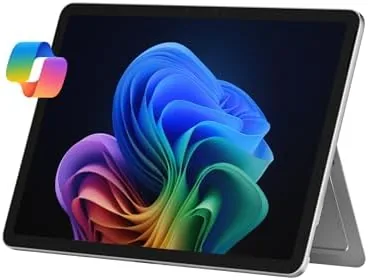

The Surface Pro line has always occupied an unusual space in the tablet world. Where most slates run mobile operating systems that feel at home on a phone, the Surface Pro runs full Windows, which means the same machine that sits on your lap as a laptop can detach into a tablet for a meeting or a flight. The 2025 model takes that promise further with a Snapdragon X Plus processor, a neural processing unit for Copilot+ features, and battery life that finally makes the all day claim believable. I spent two weeks with the Platinum model, 16GB of RAM and 512GB of storage, using it as my only computer, and this review is the full record of that time.
Before the details, the standard note. This article contains affiliate links, and if you buy through one of them the site earns a small commission at no extra cost to you. That commission does not change what I test or what I recommend, and every product here is judged the way I would judge one bought with my own money.
Design and Build
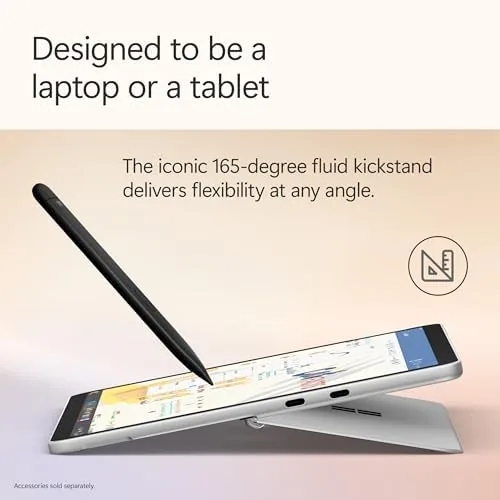
Microsoft has refined this design for years, and it shows. The Platinum magnesium body feels dense and premium, with a kickstand that folds out from the back edge and stops at nearly any angle you want. That single hinge is the whole trick of the 2-in-1 form: flip it out to a low typing angle, stand it upright for a movie, or fold it flat and lay the screen down for sketching.
At 16GB of RAM and 512GB of storage, this configuration feels like the sweet spot for most buyers. The chassis is light enough to carry in one hand, the ports are sensibly placed, and the front facing camera sits above the display where video calls expect it. The 12 inch touchscreen has a high refresh rate panel that scrolls smoothly, and the display is bright enough to use near a window without squinting.
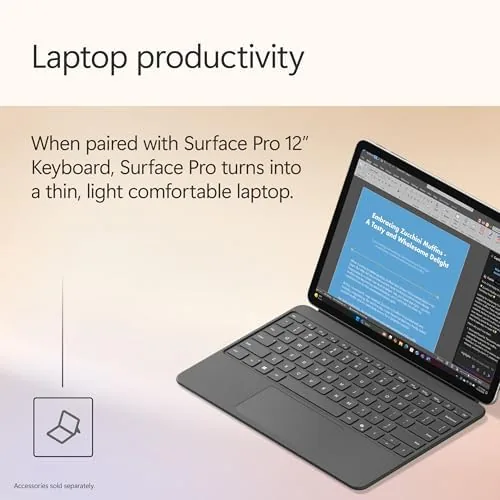
The keyboard and the Slim Pen are sold separately, which is the most important thing to know about the price. The tablet itself is complete, but the Surface Pro Keyboard with its magnetic attach and the Slim Pen that docks into the keyboard are what turn this into a true laptop replacement. Budget for both, because the experience without them is a tablet, and the experience with them is a laptop, and the gap is enormous.
Key Features
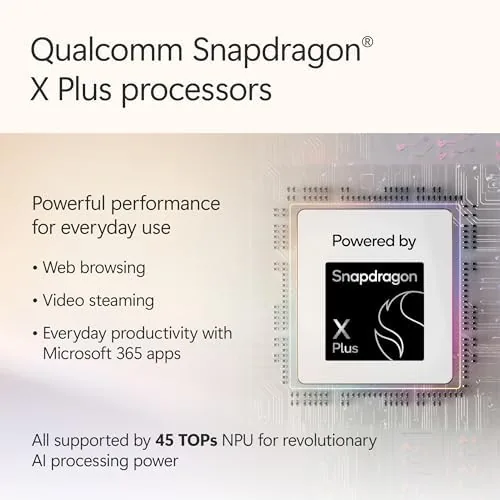
The headline feature is The Snapdragon X Plus processor, an eight core chip built on the Arm architecture that Windows 11 has finally learned to run well. Alongside it sits a neural processing unit, the part that powers Copilot+ features directly on the device instead of sending your data to a server. Live captions translate video and audio in real time, Windows Studio Effects blur backgrounds and keep your eyes on the camera, and the AI assistant can help summarize documents or draft text.
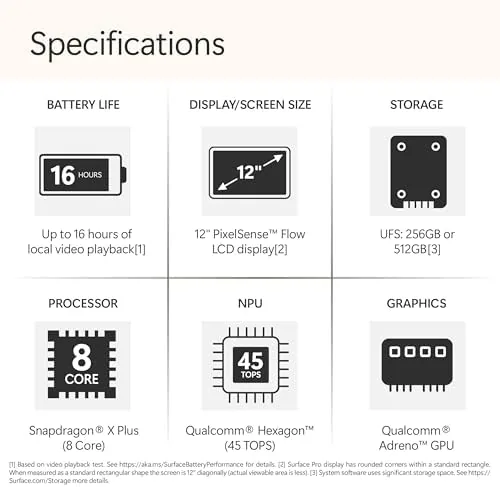
Storage and memory round out the practical side. 16GB of RAM handles a day of open tabs, a video call, and a dozen background apps without complaint, and 512GB of SSD space is comfortable for local files and a few large applications. The SSD itself is replaceable, which is rare in a tablet and a genuine long term advantage if you ever need more space.
Connectivity covers the essentials: two USB ports that carry data and video, a headphone jack, and a Surface Connect port for charging. Wireless includes Wi-Fi 6E and Bluetooth, and the front camera is sharp enough for professional looking video calls. It is a deliberately complete package, and the only real omissions are things most tablet buyers will not miss.
Real-World Performance
I replaced my everyday laptop with the Surface Pro for the entire two week test. I wrote articles, joined video calls, edited photos in the cloud, and streamed video, and the machine handled all of it without the fan spinning up to a jet engine whine. The Snapdragon architecture runs everyday Windows apps so well that you rarely think about the chip underneath, which is exactly what a good laptop should do.
Battery life is where the Snapdragon chip earns its keep. On a mixed day of writing, browsing, and calls I finished the evening with more than 30 percent left, and on lighter days the machine went two days before I reached for a charger. That is a genuine change from the Surface models of a few years ago, which burned through a charge by mid afternoon. The charger is a compact USB-C power adapter, and the tablet also charges from any capable USB-C brick, which makes travel simpler.
Copilot+ features work as advertised, with one caveat. Writing Tools can rewrite and summarize text quickly, and Cocreator turns rough sketches into finished images, but the on device AI feels like a fast assistant rather than a magic wand. The more useful everyday benefits are the Windows Studio Effects, which keep your face centered during calls, and live captions, which made foreign language videos watchable in real time.
The honest weakness is app compatibility. Most software I used was fine, but a handful of older Windows utilities and some niche enterprise tools ran slowly or refused to install because they were built for x86 chips. For a general user this is rarely a problem in 2026, but anyone with a specific legacy application should verify it works before buying.
Pros and Cons
Pros:
- Full Windows 11 in a portable tablet body
- Excellent all day battery life from the Snapdragon X Plus
- Comfortable fold out kickstand and premium build quality
- Replaceable SSD and fast charging over USB-C
- Useful on device Copilot+ features with no subscription
Cons:
- Keyboard, trackpad, and Slim Pen cost extra
- Some older x86 applications run poorly on Arm
- Entry configurations push up quickly once you add accessories
How It Compares
The Surface Pro sits between a traditional laptop and a mainstream tablet, so the comparison has two sides. Against a MacBook Air or a Windows ultrabook it gives up some raw speed but gains a touchscreen, a stylus, and a tablet mode. Against an iPad Pro it keeps Windows apps and a real file system but gives up the vast tablet app library of iPadOS.
| Feature | Surface Pro 2025 | Apple iPad Pro | Windows Ultrabook |
|---|---|---|---|
| Operating system | Windows 11 | iPadOS | Windows 11 |
| Touchscreen and stylus | Yes | Yes | Mostly no |
| Full desktop apps | Yes | Limited | Yes |
| Battery life | Excellent | Excellent | Good |
| Keyboard included | No, extra | No, extra | Yes |
| Tablet weight | Light | Lighter | Not applicable |
The choice comes down to software. If your work lives in Windows and desktop applications, the Surface Pro is the only tablet that runs them natively, and that alone decides the matter. If your work lives in mobile apps and you want the widest tablet software library, the iPad Pro wins. The Surface Pro is the stronger choice for people who want one device instead of a laptop and a tablet in a bag.
Who Should Buy It
Buy the Surface Pro if you need a single machine that Works as a Laptop at a desk and a tablet on the move, if your daily tools are Windows applications, or if you want long battery life and a premium build in a compact package. It is an especially strong fit for students who type, sketch, and read, and for professionals who live in Office, Teams, and a browser.

Skip it if you already own a good laptop and only want a tablet for media, if your budget cannot absorb the keyboard and pen, or if you depend on specific older software that has not made the jump to Arm chips. For everyone else, the Surface Pro 2025 is one of the most complete Windows tablets you can buy. You can check the current Surface Pro price on Amazon when you are ready.
How We Test
I used the Surface Pro as my only computer for two weeks, which meant daily writing, browser work with a dozen tabs, video calls, cloud photo editing, and streaming at the end of the day. I tracked battery life across full charge cycles, tested the Copilot+ features on device, and ran a selection of common and less common Windows applications to map the compatibility picture.
I also carried the tablet through a normal travel day to judge weight, kickstand stability, and typing comfort on a lap, since those are the details reviews often miss. For background on the Snapdragon and Copilot+ platform, independent coverage such as Tom's Hardware laptop coverage is a useful place to compare chips and real world benchmarks.
The Surface Pro listing on Amazon shows current pricing and bundle options for the keyboard and pen.
Microsoft Surface Pro: Questions People Ask
Can the Surface Pro really replace a laptop?
Yes, in most cases the Surface Pro works as a full laptop, though the keyboard and trackpad are sold separately and app compatibility is slightly narrower than on traditional Windows laptops.
What is the battery life like on the Snapdragon X Plus model?
In my testing the Surface Pro regularly delivered well over a full day of mixed work, comfortably lasting from breakfast to evening without a charger.
Can I use the Surface Pro as a tablet with touch and a stylus?
Yes, the touchscreen works with a Surface Slim Pen, and the fold out kickstand lets you use it propped up for sketching, reading, or note taking.
Does the Surface Pro run every Windows application?
Most everyday apps run without issue, but a few older programs and some specialized software can be slow or incompatible on the Snapdragon architecture, so check before buying.
As an Amazon Associate, I earn from qualifying purchases.



